
Dragon curve

You are encouraged to solve this task according to the task description, using any language you may know.


Create and display a dragon curve fractal.
(You may either display the curve directly or write it to an image file.)
- Algorithms
Here are some brief notes the algorithms used and how they might suit various languages.
- Recursively a right curling dragon is a right dragon followed by a left dragon, at 90-degree angle. And a left dragon is a left followed by a right.
*---R----*     expands to     *       *
                               \     /
                                R   L
                                 \ /
                                  *

                                  *
                                 / \
                                L   R
                               /     \
*---L---*      expands to     *       *
- The co-routines
dclanddcrin various examples do this recursively to a desired expansion level.
- The curl direction right or left can be a parameter instead of two separate routines.
- Recursively, a curl direction can be eliminated by noting the dragon consists of two copies of itself drawn towards a central point at 45-degrees.
*------->*   becomes    *       *     Recursive copies drawn
                         \     /      from the ends towards
                          \   /       the centre.
                           v v
                            *
- This can be seen in the SVG example. This is best suited to off-line drawing since the reversal in the second half means the drawing jumps backward and forward (in binary reflected Gray code order) which is not very good for a plotter or for drawing progressively on screen.
- Successive approximation repeatedly re-writes each straight line as two new segments at a right angle,
                       *
*-----*   becomes     / \      bend to left
                     /   \     if N odd
                    *     *

                    *     *
*-----*   becomes    \   /     bend to right
                      \ /      if N even
                       *
- Numbering from the start of the curve built so far, if the segment is at an odd position then the bend introduced is on the right side. If the segment is an even position then on the left. The process is then repeated on the new doubled list of segments. This constructs a full set of line segments before any drawing.
- The effect of the splitting is a kind of bottom-up version of the recursions. See the Asymptote example for code doing this.
- Iteratively the curve always turns 90-degrees left or right at each point. The direction of the turn is given by the bit above the lowest 1-bit of n. Some bit-twiddling can extract that efficiently.
n = 1010110000
        ^
        bit above lowest 1-bit, turn left or right as 0 or 1

LowMask = n BITXOR (n-1)   # eg. giving 0000011111
AboveMask = LowMask + 1    # eg. giving 0000100000
BitAboveLowestOne = n BITAND AboveMask
- The first turn is at n=1, so reckon the curve starting at the origin as n=0 then a straight line segment to position n=1 and turn there.
- If you prefer to reckon the first turn as n=0 then take the bit above the lowest 0-bit instead. This works because "...10000" minus 1 is "...01111" so the lowest 0 in n-1 is where the lowest 1 in n is.
- Going by turns suits turtle graphics such as Logo or a plotter drawing with a pen and current direction.
- If a language doesn't maintain a "current direction" for drawing then you can always keep that separately and apply turns by bit-above-lowest-1.
- Absolute direction to move at point n can be calculated by the number of bit-transitions in n.
n = 11 00 1111 0 1
      ^  ^    ^ ^     4 places where change bit value
                      so direction=4*90degrees=East
- This can be calculated by counting the number of 1 bits in "n XOR (n RIGHTSHIFT 1)" since such a shift and xor leaves a single 1 bit at each position where two adjacent bits differ.
- Absolute X,Y coordinates of a point n can be calculated in complex numbers by some powers (i+1)^k and add/subtract/rotate. This is done in the gnuplot code. This might suit things similar to Gnuplot which want to calculate each point independently.
- Predicate test for whether a given X,Y point or segment is on the curve can be done. This might suit line-by-line output rather than building an entire image before printing. See M4 for an example of this.
- A predicate works by dividing out complex number i+1 until reaching the origin, so it takes roughly a bit at a time from X and Y is thus quite efficient. Why it works is slightly subtle but the calculation is not difficult. (Check segment by applying an offset to move X,Y to an "even" position before dividing i+1. Check vertex by whether the segment either East or West is on the curve.)
- The number of steps in the predicate corresponds to doublings of the curve, so stopping the check at say 8 steps can limit the curve drawn to 2^8=256 points. The offsets arising in the predicate are bits of n the segment number, so can note those bits to calculate n and limit to an arbitrary desired length or sub-section.
- As a Lindenmayer system of expansions. The simplest is two symbols F and S both straight lines, as used by the PGF code.
Axiom F, angle 90 degrees
F -> F+S
S -> F-S
This always has F at even positions and S at odd. Eg. after 3 levels F_S_F_S_F_S_F_S. The +/- turns in between bend to the left or right the same as the "successive approximation" method above. Read more at for instance Joel Castellanos' L-system page.
Variations are possible if you have only a single symbol for line draw, for example the Icon and Unicon and Xfractint code. The angles can also be broken into 45-degree parts to keep the expansion in a single direction rather than the endpoint rotating around.
The string rewrites can be done recursively without building the whole string, just follow its instructions at the target level. See for example C by IFS Drawing code. The effect is the same as "recursive with parameter" above but can draw other curves defined by L-systems.
Ada
This example uses GTKAda and Cairo.

-- FILE: dragon_curve.gpr --
with "gtkada";

project Dragon_Curve is
   Adaflags    := External_As_List ("ADAFLAGS", " ");
   Ldflags     := External_As_List ("LDFLAGS", " ");

   for Languages use ("Ada");
   for Main use ("dragon_curve.adb");
   for Source_Dirs use ("./");
   for Object_Dir use "obj/";
   for Exec_Dir use ".";

   package Compiler is
      for Switches ("Ada") use ("-g", "-O0", "-gnaty-s", "-gnatwJ")
         & Adaflags;
   end Compiler;

   package Linker is
      for Leading_Switches ("Ada") use Ldflags;
   end Linker;

end Dragon_Curve;
-- FILE: dragon_curve.adb --
with Ada.Text_IO; use Ada.Text_IO;
with Events; use Events;
with GLib.Main; use GLib.Main;
with GTK;
with GTK.Drawing_Area; use GTK.Drawing_Area;
with GTK.Main;
with GTK.Window; use GTK.Window;

procedure Dragon_Curve is
   Window : GTK_Window;
begin
   GTK.Main.Init;
   GTK_New (Window);
   GTK_New (Drawing_Area);
   Window.Add (Drawing_Area);
   Drawing_Area.On_Draw (Events.Draw'Access, Drawing_Area);
   Show_All (Window);
   Resize (Window, 800, 800);
   GTK.Main.Main;
end Dragon_Curve;
-- FILE: events.ads --
with Ada.Numerics.Generic_Elementary_Functions;
with Cairo;
with GLib; use Glib;
with GTK.Drawing_Area; use GTK.Drawing_Area;
with GTK.Widget; use GTK.Widget;
with GLib.Object; use GLib.Object;

package Events is
   Drawing_Area : GTK_Drawing_Area;

   package GDouble_Elementary_Functions is new Ada.Numerics.Generic_Elementary_Functions (Float);
   use GDouble_Elementary_Functions;

   function Draw (Self : access GObject_Record'Class;
                  CC   : Cairo.Cairo_Context)
                  return Boolean;
end Events;
-- FILE: events.adb --
with Cairo;
with GTK;

package body Events is
   function Draw (Self : access GObject_Record'Class;
                  CC   : Cairo.Cairo_Context)
                  return Boolean
   is
      type Rotate_Type is (Counterclockwise, Clockwise);

      type Point is record
         X, Y : GDouble;
      end record;

      procedure Heighway_Branch (CC     : Cairo.Cairo_Context;
                                 A, B   : Point;
                                 Rotate : Rotate_Type;
                                 N      : Natural)
      is
         R, RU, C : Point;
      begin
         if N = 0 then
            Cairo.Move_To (CC, A.X, A.Y);
            Cairo.Line_To (CC, B.X, B.Y);
            Cairo.Stroke (CC);
         else
            -- Rotate 45 degrees --
            case Rotate is
               when Clockwise =>
                  R.X := GDouble ((1.0 / Sqrt (2.0)) * Float (B.X - A.X)
                                   - (1.0 / Sqrt (2.0)) * Float (B.Y - A.Y));
                  R.Y := GDouble ((1.0 / Sqrt (2.0)) * Float (B.X - A.X)
                                   + (1.0 / Sqrt (2.0)) * Float (B.Y - A.Y));
               when Counterclockwise =>
                  R.X := GDouble ((1.0 / Sqrt (2.0)) * Float (B.X - A.X)
                                   + (1.0 / Sqrt (2.0)) * Float (B.Y - A.Y));
                  R.Y := GDouble (-(1.0 / Sqrt (2.0)) * Float (B.X - A.X)
                                   + (1.0 / Sqrt (2.0)) * Float (B.Y - A.Y));
            end case;

            -- Make unit vector from rotation --
            RU.X := GDouble (Float (R.X) / Sqrt ( Float (R.X ** 2 + R.Y ** 2)));
            RU.Y := GDouble (Float (R.Y) / Sqrt ( Float (R.X ** 2 + R.Y ** 2)));

            -- Scale --
            R.X := RU.X * GDouble (Sqrt (Float (B.X - A.X) ** 2 + Float (B.Y - A.Y) ** 2) / Sqrt (2.0));
            R.Y := RU.Y * GDouble (Sqrt (Float (B.X - A.X) ** 2 + Float (B.Y - A.Y) ** 2) / Sqrt (2.0));

            C := (R.X + A.X, R.Y + A.Y);

            Heighway_Branch (CC, A, C, Clockwise, N - 1);
            Heighway_Branch (CC, C, B, Counterclockwise, N - 1);
         end if;
      end Heighway_Branch;

      Depth : constant := 14;
      Center, Right, Bottom, Left: Point;
      Width  : GDouble := GDouble (Drawing_Area.Get_Allocated_Width);
      Height : GDouble := GDouble (Drawing_Area.Get_Allocated_Height);

   begin
      Center := (Width / 2.0, Height / 2.0);
      Right  := (Width,       Height / 2.0);
      Left   := (0.0,         Height / 2.0);
      Bottom := (Width / 2.0, Height);

      Cairo.Set_Source_RGB (CC, 0.0, 1.0, 0.0);
      Heighway_Branch (CC, Center, Right, Clockwise, Depth);
      Cairo.Set_Source_RGB (CC, 0.0, 1.0, 1.0);
      Heighway_Branch (CC, Center, Left, Clockwise, Depth);
      Cairo.Set_Source_RGB (CC, 0.0, 1.0, 0.5);
      Heighway_Branch (CC, Center, Bottom, Clockwise, Depth);

      return True;
   end Draw;
end Events;
Action!
Action! language does not support recursion. Therefore an iterative approach with a stack has been proposed.
DEFINE MAXSIZE="20"

INT ARRAY
  xStack(MAXSIZE),yStack(MAXSIZE),
  dxStack(MAXSIZE),dyStack(MAXSIZE)
BYTE ARRAY
  dirStack(MAXSIZE),
  depthStack(MAXSIZE),stageStack(MAXSIZE)
BYTE stacksize=[0]

BYTE FUNC IsEmpty()
  IF stacksize=0 THEN RETURN (1) FI
RETURN (0)

BYTE FUNC IsFull()
  IF stacksize=MAXSIZE THEN RETURN (1) FI
RETURN (0)

PROC Push(INT x,y,dx,dy BYTE dir,depth,stage)
  IF IsFull() THEN Break() FI
  xStack(stacksize)=x yStack(stacksize)=y
  dxStack(stacksize)=dx dyStack(stacksize)=dy
  dirStack(stacksize)=dir
  depthStack(stacksize)=depth
  stageStack(stackSize)=stage
  stacksize==+1
RETURN

PROC Pop(INT POINTER x,y,dx,dy BYTE POINTER dir,depth,stage)
  IF IsEmpty() THEN Break() FI
  stacksize==-1
  x^=xStack(stacksize) y^=yStack(stacksize)
  dx^=dxStack(stacksize) dy^=dyStack(stacksize)
  dir^=dirStack(stacksize)
  depth^=depthStack(stacksize)
  stage^=stageStack(stacksize)
RETURN

PROC DrawDragon(INT x,y,dx,dy BYTE depth)
  BYTE dir,stage
  INT nx,ny,dx2,dy2,tmp

  Push(x,y,dx,dy,1,depth,0)

  WHILE IsEmpty()=0
  DO
    Pop(@x,@y,@dx,@dy,@dir,@depth,@stage)
    IF depth=0 THEN
      Plot(x,y) DrawTo(x+dx,y+dy)
    ELSE
      IF stage<2 THEN
        Push(x,y,dx,dy,dir,depth,stage+1)
      FI
      nx=dx/2 ny=dy/2
      dx2=nx-ny dy2=nx+ny
      IF stage=0 THEN
        IF dir THEN
          Push(x,y,dx2,dy2,1,depth-1,0)
        ELSE
          Push(x,y,dy2,-dx2,1,depth-1,0)
        FI
      ELSEIF stage=1 THEN
        IF dir THEN
          tmp=-dx2 ;to avoid the compiler error
          Push(x+dx2,y+dy2,dy2,tmp,0,depth-1,0)
        ELSE
          Push(x+dy2,y-dx2,dx2,dy2,0,depth-1,0)
        FI
      FI
    FI
  OD
RETURN

PROC Main()
  BYTE CH=$02FC,COLOR1=$02C5,COLOR2=$02C6

  Graphics(8+16)
  Color=1
  COLOR1=$0C
  COLOR2=$02

  DrawDragon(104,72,128,0,12)

  DO UNTIL CH#$FF OD
  CH=$FF
RETURN- Output:
Screenshot from Atari 8-bit computer
ALGOL 68
Animated
File: prelude/turtle_draw.a68
# -*- coding: utf-8 -*- #

STRUCT (REAL x, y, heading, BOOL pen down) turtle;

PROC turtle init = VOID: (
  draw erase (window);
  turtle := (0.5, 0.5, 0, TRUE);
  draw move (window, x OF turtle, y OF turtle);
  draw colour name(window, "white")
);

PROC turtle left = (REAL left turn)VOID:
  heading OF turtle +:= left turn;

PROC turtle right = (REAL right turn)VOID:
  heading OF turtle -:= right turn;

PROC turtle forward = (REAL distance)VOID:(
  x OF turtle +:= distance * cos(heading OF turtle) / width * height;
  y OF turtle +:= distance * sin(heading OF turtle);
  IF pen down OF turtle THEN
    draw line
  ELSE
    draw move
  FI (window, x OF turtle, y OF turtle)
);

SKIP
File: prelude/exception.a68
# -*- coding: utf-8 -*- #

COMMENT
  REQUIRES :
    MODE EXCEPTOBJ = UNION(VOID, MODEA, MODEB, MODEC ...);
    OP FIRMSTR = (EXCEPTOBJ obj)STRING: ~
END COMMENT

MODE EXCEPTOBJS = [0]EXCEPTOBJ;

OP STR = (EXCEPTOBJS obj)STRING: (
  STRING out := "(", fs := "";
  FOR this FROM LWB obj TO UPB obj DO out +:= fs+FIRMSTR obj[this]; fs:=", " OD;
  out +")"
);

MODE EXCEPTMEND = PROC(EXCEPTOBJS #obj#,STRING #msg#)BOOL;

PROC super mend = (EXCEPTOBJS obj,STRING sub exception, msg)BOOL:
  ( put(stand error, ("exception/",sub exception,": ", msg," - ", STR obj, new line)); break; TRUE);

PROC super break mend = (EXCEPTOBJS obj,STRING sub exception, msg)BOOL: ( super mend(obj, sub exception, msg); break; TRUE);
PROC super stop mend = (EXCEPTOBJS obj,STRING sub exception, msg)BOOL: ( super mend(obj, sub exception, msg); stop; FALSE);
PROC super ignore mend = (EXCEPTOBJS obj,STRING sub exception, msg)BOOL: ( #super mend(obj, sub exception, msg);# TRUE);

EXCEPTMEND on undefined mend := super break mend(,"undefined",);
PROC on undefined = (EXCEPTMEND undefined mend)VOID: on undefined mend := undefined mend;
PROC raise undefined = (EXCEPTOBJS obj, STRING msg)VOID: IF NOT on undefined mend(obj, msg) THEN stop FI;

EXCEPTMEND on value error mend := super break mend(,"value error",);
PROC on value error = (EXCEPTMEND value error mend)VOID: on value error mend := value error mend;
PROC raise value error = (EXCEPTOBJS obj, STRING msg)VOID: IF NOT on value error mend(obj, msg) THEN stop FI;

EXCEPTMEND on bounds error mend := super break mend(,"bounds error",);
PROC on bounds error = (EXCEPTMEND bounds error mend)VOID: on bounds error mend := bounds error mend;
PROC raise bounds error = (EXCEPTOBJS obj, STRING msg)VOID: IF NOT on bounds error mend(obj, msg) THEN stop FI;

EXCEPTMEND on tagged union error mend := super break mend(,"tagged union error",);
PROC on tagged union error = (EXCEPTMEND tagged union error mend)VOID: on tagged union error mend := tagged union error mend;
PROC raise tagged union error = (EXCEPTOBJS obj, STRING msg)VOID: IF NOT on tagged union error mend(obj, msg) THEN stop FI;

EXCEPTMEND on untested mend := super break mend(,"untested",);
PROC on untested = (EXCEPTMEND untested mend)VOID: on untested mend := untested mend;
PROC raise untested = (EXCEPTOBJS obj, STRING msg)VOID: IF NOT on untested mend(obj, msg) THEN stop FI;

EXCEPTMEND on unimplemented mend := super break mend(,"unimplemented",);
PROC on unimplemented = (EXCEPTMEND unimplemented mend)VOID: on unimplemented mend := unimplemented mend;
PROC raise unimplemented = (EXCEPTOBJS obj, STRING msg)VOID: IF NOT on unimplemented mend(obj, msg) THEN stop FI;

SKIP
File: test/Dragon_curve.a68
#!/usr/bin/a68g --script #
# -*- coding: utf-8 -*- #

PR read "prelude/turtle_draw.a68" PR;
MODE EXCEPTOBJ = FILE;
OP FIRMSTR = (EXCEPTOBJ obj)STRING: "FILE";

PR read "prelude/exception.a68" PR;

REAL sqrt 2 = sqrt(2), degrees = pi/180;

STRUCT ( INT count, depth, current shade, upb lines, upb colours ) morph;

PROC morph init = (INT depth)VOID: (
  count OF morph := 0;
  depth OF morph := depth;
  current shade OF morph := -1;
  upb lines OF morph := 2**depth;
  upb colours OF morph := 16
);

PROC morph colour = VOID: (
  INT colour sectors = 3; # RGB #
  INT candidate shade = ENTIER ( count OF morph / upb lines OF morph * upb colours OF morph );
  IF candidate shade /= current shade OF morph THEN
    current shade OF morph := candidate shade;
    REAL colour sector = colour sectors * candidate shade / upb colours OF morph - 0.5;
    REAL shade = colour sector - ENTIER colour sector;
    CASE ENTIER colour sector + 1 # of 3 # IN
      draw colour (window, 1 - shade, shade, 0),
      draw colour (window, 0, 1 - shade, shade)
    OUT
      draw colour (window, shade, 0, 1 - shade)
    ESAC
  FI;
  count OF morph +:= 1
);

PROC dragon init = VOID: (
  pen down OF turtle := FALSE;
    turtle forward(23/64); turtle right(90*degrees);
    turtle forward (1/8);  turtle right(90*degrees);
  pen down OF turtle := TRUE
);

PROC dragon = (REAL in step, in length, PROC(REAL)VOID zig, zag)VOID: (
  IF in step <= 0 THEN
    morph colour;
    turtle forward(in length)
  ELSE
    REAL step = in step - 1;
    REAL length = in length / sqrt 2;

    zig(45*degrees);
    dragon(step, length, turtle right, turtle left);
    zag(90*degrees);
    dragon(step, length, turtle left, turtle right);
    zig(45*degrees)
  FI
);

PROC window init = VOID: (
  STRING aspect; FILE f; associate(f, aspect); putf(f, ($g(-4)"x"g(-3)$, width, height));
CO # depricated #
  IF NOT draw device (window, "X", aspect)THEN
    raise undefined(window, "cannot initialise X draw device") FI;
END CO
  IF open (window, "Dragon Curve", stand draw channel) = 0 THEN
    raise undefined(window, "cannot open Dragon Curve window") FI;
  IF NOT make device (window, "X", aspect) THEN
    raise undefined(window, "cannot make device X draw device") FI
);

INT width = 800-15, height = 600-15;

FILE window; window init;
  INT cycle length = 18;
  FOR snap shot TO cycle length DO
    INT depth := (snap shot - 2) MOD cycle length;
    turtle init; dragon init; morph init(depth);
# move to initial turtle location #
    dragon(depth, 7/8, turtle right, turtle left);
    draw show (window);
    VOID(system("sleep 1"))
  OD;
close (window)
Output:
 |
Note: each Dragon curve is composed of many smaller dragon curves (shown in a different colour).
L-System
Alternative (monochrome) version using the L-System library.
Generates an SVG file containing the curve using the L-System. Very similar to the Algol 68 Sierpinski square curve sample. Note the Algol 68 L-System library source code is on a separate page on Rosetta Code - follow the above link and then to the Talk page.
BEGIN # Dragon Curve in SVG                                                  #
      # uses the RC Algol 68 L-System library for the L-System evaluation &  #
      # interpretation                                                       #

    PR read "lsystem.incl.a68" PR               # include L-System utilities #

    PROC dragon curve = ( STRING fname, INT size, length, order, init x, init y )VOID:
         IF FILE svg file;
            BOOL open error := IF open( svg file, fname, stand out channel ) = 0
                               THEN
                                   # opened OK - file already exists and     #
                                   #             will be overwritten         #
                                   FALSE
                               ELSE
                                   # failed to open the file                 #
                                   # - try creating a new file               #
                                   establish( svg file, fname, stand out channel ) /= 0
                               FI;
            open error
         THEN                                      # failed to open the file #
            print( ( "Unable to open ", fname, newline ) );
            stop
         ELSE                                               # file opened OK #

            REAL x     := init x;
            REAL y     := init y;
            INT  angle := 0;
            put( svg file, ( "<svg xmlns='http://www.w3.org/2000/svg' width='"
                           , whole( size, 0 ), "' height='", whole( size, 0 ), "'>"
                           , newline, "<rect width='100%' height='100%' fill='white'/>"
                           , newline, "<path stroke-width='1' stroke='black' fill='none' d='"
                           , newline, "M", whole( x, 0 ), ",", whole( y, 0 ), newline
                           )
               );

            LSYSTEM ssc = ( "F"
                          , ( "F" -> "F+S"
                            , "S" -> "F-S"
                            )
                          );
            STRING curve = ssc EVAL order;
            curve INTERPRET ( ( CHAR c )VOID:
                              IF   c = "F" OR c = "S" THEN
                                  x +:= length * cos( angle * pi / 180 );
                                  y +:= length * sin( angle * pi / 180 );
                                  put( svg file, ( " L", whole( x, 0 ), ",", whole( y, 0 ), newline ) )
                              ELIF c = "+" THEN
                                  angle +:= 90 MODAB 360
                              ELIF c = "-" THEN
                                  angle -:= 90 MODAB 360
                              FI
                            );

            put( svg file, ( "'/>", newline, "</svg>", newline ) );
            close( svg file )
         FI # sierpinski square # ;

    dragon curve( "dragon.svg", 1200, 5, 12, 400, 200 )

END
AmigaE
Example code using mutual recursion can be found in Recursion Example of "A Beginner's Guide to Amiga E".
Asymptote
The Asymptote source code includes an examples/dragon.asy which draws the dragon curve (four interlocking copies actually),
As of its version 2.15 it uses the successive approximation method. Vertices are represented as an array of "pairs" (complex numbers). Between each two vertices a new vertex is is introduced so as to double the segments, repeated to a desired level.
AutoHotkey
BASIC
DIM SHARED angle AS Double

SUB turn (degrees AS Double)
    angle = angle + degrees*3.14159265/180
END SUB

SUB forward (length AS Double)
    LINE - STEP (cos(angle)*length, sin(angle)*length), 7
END SUB

SUB dragon (length AS Double, split AS Integer, d AS Double)
    IF split=0 THEN
        forward length
    ELSE
	turn d*45
	dragon length/1.4142136, split-1, 1
	turn -d*90
	dragon length/1.4142136, split-1, -1
	turn d*45
    END IF
END SUB

' Main program

SCREEN 12
angle = 0
PSET (150,180), 0
dragon 400, 12, 1
SLEEP
See also Sydney Afriat "Dragon Curves" paper for various approaches in BASIC
- http://www.econ-pol.unisi.it/~afriat/Papers.html
- http://www.econ-pol.unisi.it/~afriat/Math_Dragon.pdf
And TRS-80 BASIC code in Dan Rollins, "A Tiger Meets a Dragon: An examination of the mathematical properties of dragon curves and a program to print them on an IDS Paper Tiger", Byte Magazine, December 1983. (Based on generating a string of turns by appending middle turn and reversed copy. Options for the middle turn give the alternate paper folding curve and more too. The turns are then followed for the plot.)
ANSI BASIC
100 PROGRAM DragonCurve
110 DECLARE SUB Dragon
120 SET WINDOW 0, 639, 0, 399
130 SET AREA COLOR 1
140 SET COLOR MIX(1) 0, 0, 0
150 REM SIN, COS in arrays for PI/4 multipl.
160 DIM S(0 TO 7), C(0 TO 7)
170 LET QPI = PI / 4
180 FOR I = 0 TO 7
190    LET S(I) = SIN(I * QPI)
200    LET C(I) = COS(I * QPI)
210 NEXT I
220 REM ** Initialize variables non-local for SUB Dragon.
230 LET SQ = SQR(2)
240 LET X = 224
250 LET Y = 140
260 LET RotQPi = 0
270 CALL Dragon(256, 15, 1) ! Insize = 2^WHOLE_NUM (looks better)
280 REM ** Subprogram
290 SUB Dragon (Insize, Level, RQ)
300    IF Level <= 1 THEN
310       LET XN = C(RotQPi) * Insize + X
320       LET YN = S(RotQPi) * Insize + Y
330       PLOT LINES: X, 399 - Y; XN, 399 - YN
340       LET X = XN
350       LET Y = YN
360    ELSE
370       LET RotQPi = MOD((RotQPi + RQ), 8)
380       CALL Dragon(Insize / SQ, Level - 1, 1)
390       LET RotQPi = MOD((RotQPi - RQ * 2), 8)
400       CALL Dragon(Insize / SQ, Level - 1, -1)
410       LET RotQPi = MOD((RotQPi + RQ), 8)
420    END IF
430 END SUB
440 END
Applesoft BASIC
Apple IIe BASIC code can be found in Thomas Bannon, "Fractals and Transformations", Mathematics Teacher, March 1991, pages 178-185. (At JSTOR.)
BASIC256

# Version without functions (for BASIC-256 ver. 0.9.6.66)

graphsize 390,270

level = 18 : insize = 247		# initial values
x = 92 : y = 94	        		#

iters = 2^level		        	# total number of iterations
qiter = 510/iters			# constant for computing colors
SQ = sqrt(2) : QPI = pi/4		# constants

rotation = 0 : iter = 0 : rq = 1.0	# state variables
dim rqs(level)			        # stack for rq (rotation coefficient)

color white
fastgraphics
rect 0,0,graphwidth,graphheight
refresh
gosub dragon
refresh
imgsave "Dragon_curve_BASIC-256.png", "PNG"
end

dragon:
	if level<=0 then
		yn = sin(rotation)*insize + y
		xn = cos(rotation)*insize + x
		if iter*2<iters then
			color 0,iter*qiter,255-iter*qiter
		else
			color qiter*iter-255,(iters-iter)*qiter,0
		end if
		line x,y,xn,yn
		iter = iter + 1
		x = xn : y = yn
		return
	end if
	insize = insize/SQ
	rotation = rotation + rq*QPI
	level = level - 1
	rqs[level] = rq : rq = 1
	gosub dragon
	rotation = rotation - rqs[level]*QPI*2
	rq = -1
	gosub dragon
	rq = rqs[level]
	rotation = rotation + rq*QPI
	level = level + 1
	insize = insize*SQ
	return
BBC BASIC
      MODE 8
      MOVE 800,400
      GCOL 11
      PROCdragon(512, 12, 1)
      END

      DEF PROCdragon(size, split%, d)
      PRIVATE angle
      IF split% = 0 THEN
        DRAW BY -COS(angle)*size, SIN(angle)*size
      ELSE
        angle += d*PI/4
        PROCdragon(size/SQR(2), split%-1, 1)
        angle -= d*PI/2
        PROCdragon(size/SQR(2), split%-1, -1)
        angle += d*PI/4
      ENDIF
      ENDPROC
Chipmunk Basic
10 rem Dragon curve
20 rem sin, cos in arrays for pi/4 multipl.
30 dim s(7),c(7)
40 for i = 0 to 7
50   s(i) = sin(i*pi/4) : c(i) = cos(i*pi/4)
60 next i
70 level = 15
80 insize = 256 : rem 2^whole_num (looks better)
90 x = 224 : y = 140
100 sq = sqr(2)
110 rotqpi = 0 : rq = 1
120 dim r(level)
130 graphics 0 : graphics cls
140 gosub 160
150 end
160 rem Dragon
170 rotqpi = rotqpi and 7
180 if level <= 1 then
190   yn = s(rotqpi)*insize+y
200   xn = c(rotqpi)*insize+x
210   graphics moveto x,y : graphics lineto xn,yn
220   x = xn : y = yn
230 else
240   insize = insize*sq/2
250   rotqpi = (rotqpi+rq) and 7
260   level = level-1
270   r(level) = rq : rq = 1
280   gosub 160
290   rotqpi = (rotqpi-r(level)*2) and 7
300   rq = -1
310   gosub 160
320   rq = r(level)
330   rotqpi = (rotqpi+rq) and 7
340   level = level+1
350   insize = insize*sq
360 endif
370 return
Commodore BASIC
The values of SIN and COS for multiplies of PI / 4 are remembered in arrays, so that the program may run (a little) faster.
10 REM DRAGON CURVE
20 REM SIN, COS IN ARRAYS FOR PI/4 MULTIPL.
30 DIM S(7),C(7)
40 QPI=ATN(1):SQ=SQR(2)
50 FOR I=0 TO 7
60 S(I)=SIN(I*QPI):C(I)=COS(I*QPI)
70 NEXT I
80 LEVEL=15
90 INSIZE=128:REM 2^WHOLE_NUM (LOOKS BETTER)
100 X=112:Y=70
110 ROTQPI=0:RQ=1
120 DIM R(LEVEL)
130 GRAPHIC 2,1
140 GOSUB 160
150 END
160 REM DRAGON
170 ROTQPI=ROTQPI AND 7
180 IF LEVEL>1 THEN GO TO 240
190 YN=S(ROTQPI)*INSIZE+Y
200 XN=C(ROTQPI)*INSIZE+X
210 DRAW ,X,Y TO XN,YN
220 X=XN:Y=YN
230 RETURN
240 INSIZE=INSIZE*SQ/2
250 ROTQPI=(ROTQPI+RQ)AND 7
260 LEVEL=LEVEL-1
270 R(LEVEL)=RQ:RQ=1
280 GOSUB 160
290 ROTQPI=(ROTQPI-R(LEVEL)*2)AND 7
300 RQ=-1
310 GOSUB 160
320 RQ=R(LEVEL)
330 ROTQPI=(ROTQPI+RQ)AND 7
340 LEVEL=LEVEL+1
350 INSIZE=INSIZE*SQ
360 RETURN
FreeBASIC
Const pi As Double = 4 * Atn(1)
Dim Shared As Double angulo = 0

Sub giro (grados As Double)
    angulo += grados*pi/180
End Sub

Sub dragon (longitud As Double, division As Integer, d As Double)
    If division = 0 Then
        Line - Step (Cos(angulo)*longitud, Sin(angulo)*longitud), Int(Rnd * 7)
    Else
        giro d*45
        dragon longitud/1.4142136, division-1, 1
        giro -d*90
        dragon longitud/1.4142136, division-1, -1
        giro d*45
    End If
End Sub

'--- Programa Principal ---
Screen 12
Pset (150,180), 0
dragon 400, 12, 1
Bsave "Dragon_curve_FreeBASIC.bmp",0
Sleep
GW-BASIC
10 REM Dragon curve
20 REM SIN, COS in arrays for PI/4 multipl.
30 DIM S(7), C(7)
40 QPI = ATN(1): SQ = SQR(2)
50 FOR I = 0 TO 7
60 S(I) = SIN(I * QPI): C(I) = COS(I * QPI)
70 NEXT I
80 LEVEL% = 15
90 INSIZE = 128: REM 2^WHOLE_NUM (looks better)
100 X = 112: Y = 70
110 ROTQPI% = 0: RQ% = 1
120 DIM R%(LEVEL%)
130 SCREEN 2: CLS
140 GOSUB 160
150 END
160 REM ** Dragon
170 ROTQPI% = ROTQPI% AND 7
180 IF LEVEL% > 1 THEN GOTO 240
190 YN = S(ROTQPI%) * INSIZE + Y
200 XN = C(ROTQPI%) * INSIZE + X
210 LINE (2 * X, Y)-(2 * XN, YN): REM For SCREEN 2 doubled x-coords
220 X = XN: Y = YN
230 RETURN
240 INSIZE = INSIZE * SQ / 2
250 ROTQPI% = (ROTQPI% + RQ%) AND 7
260 LEVEL% = LEVEL% - 1
270 R%(LEVEL%) = RQ%: RQ% = 1
280 GOSUB 160
290 ROTQPI% = (ROTQPI% - R%(LEVEL%) * 2) AND 7
300 RQ% = -1
310 GOSUB 160
320 RQ% = R%(LEVEL%)
330 ROTQPI% = (ROTQPI% + RQ%) AND 7
340 LEVEL% = LEVEL% + 1
350 INSIZE = INSIZE * SQ
360 RETURN
IS-BASIC
100 PROGRAM "Dragon.bas"
110 OPTION ANGLE DEGREES
120 LET SQ2=SQR(2)
130 GRAPHICS HIRES 2
140 SET PALETTE 0,33
150 PLOT 250,360,ANGLE 0;
160 CALL DC(580,0,11)
170 DEF DC(D,A,LEV)
180   IF LEV=0 THEN
190     PLOT FORWARD D;
200   ELSE
210     PLOT RIGHT A;
220     CALL DC(D/SQ2,45,LEV-1)
230     PLOT LEFT 2*A;
240     CALL DC(D/SQ2,-45,LEV-1)
250     PLOT RIGHT A;
260   END IF
270 END DEF
Liberty BASIC
nomainwin
    mainwin 50 20

    WindowHeight =620
    WindowWidth  =690

    open "Graphics library" for graphics as #a

    #a, "trapclose [quit]"

    #a "down"

    Turn$ ="R"
    Pace  =100
    s     = 16

[again]
    print Turn$

    #a "cls ; home ; north ; down ; fill black"

    for i =1 to len( Turn$)
        v =255 *i /len( Turn$)
        #a "color "; v; " 120 "; 255 -v
        #a "go "; Pace
        if mid$(  Turn$, i, 1) ="R" then #a "turn 90" else #a "turn -90"
    next i

    #a "color 255 120 0"
    #a "go "; Pace
    #a "flush"

    FlippedTurn$ =""
    for i =len( Turn$) to 1 step -1
        if mid$( Turn$, i, 1) ="R" then FlippedTurn$ =FlippedTurn$ +"L" else FlippedTurn$ =FlippedTurn$ +"R"
    next i

    Turn$ =Turn$ +"R" +FlippedTurn$

    Pace  =Pace /1.35

    scan

    timer 1000, [j]
    wait
[j]
    timer 0

    if len( Turn$) <40000 then goto [again]


wait

[quit]
    close #a
    end
MSX Basic
10 REM Dragon curve
20 REM SIN, COS in arrays for PI/4 multipl.
30 DIM S(7),C(7)
40 QPI=ATN(1):SQ=SQR(2)
50 FOR I=0 TO 7
60 S(I)=SIN(I*QPI):C(I)=COS(I*QPI)
70 NEXT I
80 LEVEL=15
90 INSIZE=128:REM 2^WHOLE_NUM (looks better)
100 X=80:Y=70
110 ROTQPI=0:RQ=1
120 DIM R(LEVEL)
130 SCREEN 2
140 GOSUB 200
150 OPEN "GRP:" FOR OUTPUT AS #1
160 DRAW "BM 0,184":PRINT #1,"Hit any key to exit."
170 IF INKEY$="" THEN 170
180 CLOSE #1
190 END
200 REM Dragon
210 ROTQPI=ROTQPI AND 7
220 IF LEVEL>1 THEN GOTO 280
230 YN=S(ROTQPI)*INSIZE+Y
240 XN=C(ROTQPI)*INSIZE+X
250 LINE (X,Y)-(XN,YN)
260 X=XN:Y=YN
270 RETURN
280 INSIZE=INSIZE*SQ/2
290 ROTQPI=(ROTQPI+RQ)AND 7
300 LEVEL=LEVEL-1
310 R(LEVEL)=RQ:RQ=1
320 GOSUB 200
330 ROTQPI=(ROTQPI-R(LEVEL)*2)AND 7
340 RQ=-1
350 GOSUB 200
360 RQ=R(LEVEL)
370 ROTQPI=(ROTQPI+RQ)AND 7
380 LEVEL=LEVEL+1
390 INSIZE=INSIZE*SQ
400 RETURN
PureBasic
#SqRt2 = 1.4142136
#SizeH = 800: #SizeV = 550
Global angle.d, px, py, imageNum

Procedure turn(degrees.d)
  angle + degrees * #PI / 180
EndProcedure

Procedure forward(length.d)
  Protected w = Cos(angle) * length
  Protected h = Sin(angle) * length
  LineXY(px, py, px + w, py + h, RGB(255,255,255))
  px + w: py + h
EndProcedure

Procedure dragon(length.d, split, d.d)
  If split = 0
    forward(length)
  Else
    turn(d * 45)
    dragon(length / #SqRt2, split - 1, 1)
    turn(-d * 90)
    dragon(length / #SqRt2, split - 1, -1)
    turn(d * 45)
  EndIf
EndProcedure

OpenWindow(0, 0, 0, #SizeH, #SizeV, "DragonCurve", #PB_Window_SystemMenu)
imageNum = CreateImage(#PB_Any, #SizeH, #SizeV, 32)
ImageGadget(0, 0, 0, 0, 0, ImageID(imageNum))

angle = 0: px = 185: py = 190
If StartDrawing(ImageOutput(imageNum))
    dragon(400, 15, 1)
  StopDrawing()
  SetGadgetState(0, ImageID(imageNum))
EndIf

Repeat: Until WaitWindowEvent(10) = #PB_Event_CloseWindow
QuickBASIC
REM Dragon curve
REM SIN, COS in arrays for PI/4 multipl.
DECLARE SUB Dragon (BYVAL Insize!, BYVAL Level%, BYVAL RQ%)
DIM SHARED S(7), C(7), X, Y, RotQPi%
CONST QPI = .785398163397448# ' PI / 4
FOR I = 0 TO 7
  S(I) = SIN(I * QPI)
  C(I) = COS(I * QPI)
NEXT I
X = 112: Y = 70
SCREEN 2: CLS
CALL Dragon(128, 15, 1) ' Insize = 2^WHOLE_NUM (looks better)
END

SUB Dragon (BYVAL Insize, BYVAL Level%, BYVAL RQ%)
  CONST SQ = 1.4142135623731# ' SQR(2)
  IF Level% <= 1 THEN
    XN = C(RotQPi%) * Insize + X
    YN = S(RotQPi%) * Insize + Y
    LINE (2 * X, Y)-(2 * XN, YN) ' For SCREEN 2 doubled x-coords
    X = XN: Y = YN
  ELSE
    RotQPi% = (RotQPi% + RQ%) AND 7
    CALL Dragon(Insize / SQ, Level% - 1, 1)
    RotQPi% = (RotQPi% - RQ% * 2) AND 7
    CALL Dragon(Insize / SQ, Level% - 1, -1)
    RotQPi% = (RotQPi% + RQ%) AND 7
  END IF
END SUB
RapidQ
This implementation displays the Dragon Curve fractal in a GUI window.
DIM angle AS Double
DIM x  AS Double, y AS Double
DECLARE SUB PaintCanvas

CREATE form AS QForm
    Width  = 800
    Height = 600
    CREATE canvas AS QCanvas
        Height = form.ClientHeight
        Width  = form.ClientWidth
        OnPaint = PaintCanvas
    END CREATE
END CREATE

SUB turn (degrees AS Double)
    angle = angle + degrees*3.14159265/180
END SUB

SUB forward (length AS Double)
    x2 = x + cos(angle)*length
    y2 = y + sin(angle)*length
    canvas.Line(x, y, x2, y2, &Haaffff)
    x = x2: y = y2
END SUB

SUB dragon (length AS Double, split AS Integer, d AS Double)
    IF split=0 THEN
        forward length
    ELSE
        turn d*45
        dragon length/1.4142136, split-1, 1
        turn -d*90
        dragon length/1.4142136, split-1, -1
        turn d*45
    END IF
END SUB

SUB PaintCanvas
    canvas.FillRect(0, 0, canvas.Width, canvas.Height, &H102800)
    x = 220: y = 220: angle = 0
    dragon 384, 12, 1
END SUB

form.ShowModal
Run BASIC
graphic #g, 600,600
RL$    = "R"
loc    = 90
pass   = 0

[loop]
#g "cls ; home ; north ; down ; fill black"
for i =1 to len(RL$)
  v = 255 * i /len(RL$)
  #g "color "; v; " 120 "; 255 -v
  #g "go "; loc
  if mid$(RL$,i,1) ="R" then #g "turn 90" else #g "turn -90"
next i

#g "color 255 120 0"
#g "go "; loc
LR$ =""
for i =len( RL$) to 1 step -1
  if mid$( RL$, i, 1) ="R" then LR$ =LR$ +"L" else LR$ =LR$ +"R"
next i

RL$  = RL$ + "R" + LR$
loc  = loc / 1.35
pass = pass + 1
render #g
input xxx
cls

if pass < 16 then goto [loop]
end
TI-89 BASIC
Define dragon = (iter, xform)
Prgm
  Local a,b
  If iter > 0 Then
    dragon(iter-1, xform*[[.5,.5,0][–.5,.5,0][0,0,1]])
    dragon(iter-1, xform*[[–.5,.5,0][–.5,–.5,1][0,0,1]])
  Else
    xform*[0;0;1]→a
    xform*[0;1;1]→b
    PxlLine floor(a[1,1]), floor(a[2,1]), floor(b[1,1]), floor(b[2,1])
  EndIf
EndPrgm

FnOff
PlotsOff
ClrDraw
dragon(7, [[75,0,26] [0,75,47] [0,0,1]])
Valid coordinates on the TI-89's graph screen are x 0..76 and y 0..158. This and the outer size of the dragon curve were used to choose the position and scale determined by the transformation matrix initially passed to dragon such that the curve will fit onscreen no matter the number of recursions chosen. The height of the curve is 1 unit, so the vertical (and horizontal, to preserve proportions) scale is the height of the screen (rather, one less, to avoid rounding/FP error overrunning), or 75. The curve extends 1/3 unit above its origin, so the vertical translation is (one more than) 1/3 of the scale, or 26. The curve extends 1/3 to the left of its origin, or 25 pixels; the width of the curve is 1.5 units, or 1.5·76 = 114 pixels, and the screen is 159 pixels, so to center it we place the origin at 25 + (159-114)/2 = 47 pixels.
uBasic/4tH
uBasic/4tH has neither native support for graphics nor floating point, so everything has to be defined in high level code. All calculations are done in integer arithmetic, scaled by 10K.
Dim @o(5) ' 0 = SVG file, 1 = color, 2 = fillcolor, 3 = pixel, 4 = text

' === Begin Program ===

Proc _SetColor (FUNC(_Color ("Red")))  ' set the line color to red
Proc _SVGopen ("dragon.svg")           ' open the SVG file
Proc _Canvas (525, 625)                ' set the canvas size
Proc _Background (FUNC(_Color ("White")))
                                       ' we have a white background
a = 475 : b = 175 : t = 14142 : r = 0 : p = 7853
                                       ' x,y coordinates, SQRT(2), angle, PI/4
Proc _Dragon (512, 12, 1)              ' size, split and direction
Proc _SVGclose                         ' close SVG file
End

_Dragon
  Param (3)

  If b@ Then                           ' if split > 0 then recurse
    r = r + (c@ * p)
    Proc _Dragon ((a@*10000)/t, b@ - 1, 1)
    r = r - (c@ * (p+p))
    Proc _Dragon ((a@*10000)/t, b@ - 1, -1)
    r = r + (c@ * p)
    Return
  EndIf
                                       ' draw a line
  Proc _Line (a, b, Set (a, a + (((-FUNC(_COS(r)))*a@)/10000)), Set (b, b + ((FUNC(_SIN(r))*a@)/10000)))
Return

' === End Program ===

_SetColor Param (1) : @o(1) = a@ : Return
_SVGclose Write @o(0), "</svg>" : Close @o(0) : Return
_color_ Param (1) : Proc _PrintRGB (a@) : Write @o(0), "\q />" : Return

_PrintRGB                              ' print an RBG color in hex
  Param (1)
  Radix 16

  If a@ < 0 Then
    Write @o(0), "none";
  Else
    Write @o(0), Show(Str ("#!######", a@));
  EndIf

  Radix 10
Return

_Background                            ' set the background color
  Param (1)

  Write @o(0), "<rect width=\q100%\q height=\q100%\q fill=\q";
  Proc _color_ (a@)
Return

_Color                                 ' retrieve color code from its name
  Param (1)
  Local (1)
  Radix 16

  if Comp(a@, "black") = 0 Then
    b@ = 000000
  else if Comp(a@, "blue") = 0 Then
    b@ = 0000ff
  else if Comp(a@, "green") = 0 Then
    b@ = 00ff00
  else if Comp(a@, "cyan") = 0 Then
    b@ = 00ffff
  else if Comp(a@, "red") = 0 Then
    b@ = 0ff0000
  else if Comp(a@, "magenta") = 0 Then
    b@ = 0ff00ff
  else if Comp(a@, "yellow") = 0 Then
    b@ = 0ffff00
  else if Comp(a@, "white") = 0 Then
    b@ = 0ffffff
  else if Comp(a@, "none") = 0 Then
    b@ = Info ("nil")
  else Print "Invalid color" : Raise 1
  fi : fi : fi : fi : fi : fi : fi : fi : fi

  Radix 10
Return (b@)

_Line                                  ' draw an SVG line from x1,y1 to x2,y2
  Param (4)

  Write @o(0), "<line x1=\q";d@;"\q y1=\q";c@;
  Write @o(0), "\q x2=\q";b@;"\q y2=\q";a@;"\q stroke=\q";
  Proc _color_ (@o(1))
Return

_Canvas                                ' set up a canvas x wide and y high
  Param (2)

  Write @o(0), "<svg width=\q";a@;"\q height=\q";b@;"\q viewBox=\q0 0 ";a@;" ";b@;
  Write @o(0), "\q xmlns=\qhttp://www.w3.org/2000/svg\q ";
  Write @o(0), "xmlns:xlink=\qhttp://www.w3.org/1999/xlink\q>"
Return

_SVGopen                               ' open an SVG file by name
  Param (1)

  If Set (@o(0), Open (a@, "w")) < 0 Then
     Print "Cannot open \q";Show (a@);"\q" : Raise 1
  Else
     Write @o(0), "<?xml version=\q1.0\q encoding=\qUTF-8\q standalone=\qno\q?>"
     Write @o(0), "<!DOCTYPE svg PUBLIC \q-//W3C//DTD SVG 1.1//EN\q ";
     Write @o(0), "\qhttp://www.w3.org/Graphics/SVG/1.1/DTD/svg11.dtd\q>"
  EndIf
Return
                                       ' return SIN(x*10K), scaled by 10K
_SIN PARAM(1) : PUSH A@ : LET A@=TOS()<0 : PUSH ABS(POP()%62832)
     IF TOS()>31416 THEN A@=A@=0 : PUSH POP()-31416
     IF TOS()>15708 THEN PUSH 31416-POP()
     PUSH (TOS()*TOS())/10000 : PUSH 10000+((10000*-(TOS()/72))/10000)
     PUSH 10000+((POP()*-(TOS()/42))/10000) : PUSH 10000+((POP()*-(TOS()/20))/10000)
     PUSH 10000+((POP()*-(POP()/6))/10000)  : PUSH (POP()*POP())/10000
     IF A@ THEN PUSH -POP()
     RETURN
                                       ' return COS(x*10K), scaled by 10K
_COS PARAM(1) : PUSH ABS(A@%62832) : IF TOS()>31416 THEN PUSH 62832-POP()
     LET A@=TOS()>15708 : IF A@ THEN PUSH 31416-POP()
     PUSH TOS() : PUSH (POP()*POP())/10000 : PUSH 10000+((10000*-(TOS()/56))/10000)
     PUSH 10000+((POP()*-(TOS()/30))/10000): PUSH 10000+((POP()*-(TOS()/12))/10000)
     PUSH 10000+((POP()*-(POP()/2))/10000) : IF A@ THEN PUSH -POP()
     RETURN
VBScript
VBScript does'nt have direct access to OS graphics, so I write SVG commands to an HTML file then I display it with the default browser. A turtle graphics class makes the definition of the curve very simple.
option explicit
'outputs turtle graphics to svg file and opens it

const pi180= 0.01745329251994329576923690768489 ' pi/180
const pi=3.1415926535897932384626433832795 'pi
class turtle

   dim fso
   dim fn
   dim svg

   dim iang  'radians
   dim ori   'radians
   dim incr
   dim pdown
   dim clr
   dim x
   dim y

   public property let orient(n):ori = n*pi180 :end property
   public property let iangle(n):iang= n*pi180 :end property
   public sub pd() : pdown=true: end sub
   public sub pu()  :pdown=FALSE :end sub

   public sub rt(i)
     ori=ori - i*iang:
     'if ori<0 then ori = ori+pi*2
   end sub
   public sub lt(i):
     ori=(ori + i*iang)
     'if ori>(pi*2) then ori=ori-pi*2
   end sub

   public sub bw(l)
      x= x+ cos(ori+pi)*l*incr
      y= y+ sin(ori+pi)*l*incr
     ' ori=ori+pi '?????
   end sub

   public sub fw(l)
      dim x1,y1
      x1=x + cos(ori)*l*incr
      y1=y + sin(ori)*l*incr
      if pdown then line x,y,x1,y1
      x=x1:y=y1
   end sub

   Private Sub Class_Initialize()
      setlocale "us"
      initsvg
      x=400:y=400:incr=100
      ori=90*pi180
      iang=90*pi180
      clr=0
      pdown=true
   end sub

   Private Sub Class_Terminate()
      disply
   end sub

   private sub line (x,y,x1,y1)
      svg.WriteLine "<line x1=""" & x & """ y1= """& y & """ x2=""" & x1& """ y2=""" & y1 & """/>"
   end sub

   private sub disply()
       dim shell
       svg.WriteLine "</svg></body></html>"
       svg.close
       Set shell = CreateObject("Shell.Application")
       shell.ShellExecute fn,1,False
   end sub

   private sub initsvg()
     dim scriptpath
     Set fso = CreateObject ("Scripting.Filesystemobject")
     ScriptPath= Left(WScript.ScriptFullName, InStrRev(WScript.ScriptFullName, "\"))
     fn=Scriptpath & "SIERP.HTML"
     Set svg = fso.CreateTextFile(fn,True)
     if SVG IS nothing then wscript.echo "Can't create svg file" :vscript.quit
     svg.WriteLine "<!DOCTYPE html>" &vbcrlf & "<html>" &vbcrlf & "<head>"
     svg.writeline "<style>" & vbcrlf & "line {stroke:rgb(255,0,0);stroke-width:.5}" &vbcrlf &"</style>"
     svg.writeline "</head>"&vbcrlf & "<body>"
     svg.WriteLine "<svg xmlns=""http://www.w3.org/2000/svg"" width=""800"" height=""800"" viewBox=""0 0 800 800"">"
   end sub
end class

sub dragon(st,le,dir)
if st=0 then x.fw le: exit sub
  x.rt dir
  dragon st-1, le/1.41421 ,1
  x.rt dir*2
  dragon st-1, le/1.41421 ,-1
  x.rt dir
end sub


dim x
set x=new turtle
x.iangle=45
x.orient=45
x.incr=1
x.x=200:x.y=200
dragon 12,300,1
set x=nothing   'this displays the image
Visual Basic
Option Explicit
Const Pi As Double = 3.14159265358979
Dim angle As Double
Dim nDepth As Integer
Dim nColor As Long

Private Sub Form_Load()
    nColor = vbBlack
    nDepth = 12
    DragonCurve
End Sub

Sub DragonProc(size As Double, ByVal split As Integer, d As Integer)
    If split = 0 Then
     xForm.Line -Step(-Cos(angle) * size, Sin(angle) * size), nColor
    Else
        angle = angle + d * Pi / 4
        Call DragonProc(size / Sqr(2), split - 1, 1)
        angle = angle - d * Pi / 2
        Call DragonProc(size / Sqr(2), split - 1, -1)
        angle = angle + d * Pi / 4
    End If
End Sub

Sub DragonCurve()
    Const xcoefi = 0.74
    Const xcoefl = 0.59
    xForm.PSet (xForm.Width * xcoefi, xForm.Height / 3), nColor
    Call DragonProc(xForm.Width * xcoefl, nDepth, 1)
End Sub
Visual Basic .NET
Option Explicit On
Imports System.Math

Public Class DragonCurve
    Dim nDepth As Integer = 12
    Dim angle As Double
    Dim MouseX, MouseY As Integer
    Dim CurrentX, CurrentY As Integer
    Dim nColor As Color = Color.Black

    Private Sub DragonCurve_Click(sender As Object, e As EventArgs) Handles Me.Click
        SubDragonCurve()
    End Sub

    Sub DrawClear()
        Me.CreateGraphics.Clear(Color.White)
    End Sub

    Sub DrawMove(ByVal X As Double, ByVal Y As Double)
        CurrentX = X
        CurrentY = Y
    End Sub

    Sub DrawLine(ByVal X As Double, ByVal Y As Double)
        Dim MyGraph As Graphics = Me.CreateGraphics
        Dim PenColor As Pen = New Pen(nColor)
        Dim NextX, NextY As Long
        NextX = CurrentX + X
        NextY = CurrentY + Y
        MyGraph.DrawLine(PenColor, CurrentX, CurrentY, NextX, NextY)
        CurrentX = NextX
        CurrentY = NextY
    End Sub

    Sub DragonProc(size As Double, ByVal split As Integer, d As Integer)
        If split = 0 Then
            DrawLine(-Cos(angle) * size, Sin(angle) * size)
        Else
            angle = angle + d * PI / 4
            DragonProc(size / Sqrt(2), split - 1, 1)
            angle = angle - d * PI / 2
            DragonProc(size / Sqrt(2), split - 1, -1)
            angle = angle + d * PI / 4
        End If
    End Sub

    Sub SubDragonCurve()
        Const xcoefi = 0.74, xcoefl = 0.59
        DrawClear()
        DrawMove(Me.Width * xcoefi, Me.Height / 3)
        DragonProc(Me.Width * xcoefl, nDepth, 1)
    End Sub

End Class
Yabasic
w = 390 : h = int(w * 11 / 16)
open window w, h
level = 18 : insize = 247
x = 92 : y = 94

iters = 2^level
qiter = 510/iters
SQ = sqrt(2) : QPI = pi/4

rotation = 0 : iter = 0 : rq = 1.0
dim rqs(level)

color 0,0,0
clear window
dragon()

sub dragon()
	if level<=0 then
		yn = sin(rotation)*insize + y
		xn = cos(rotation)*insize + x
		if iter*2<iters then
			color 0,iter*qiter,255-iter*qiter
		else
			color qiter*iter-255,(iters-iter)*qiter,0
		end if
		line x,y,xn,yn
		iter = iter + 1
		x = xn : y = yn
		return
	end if
	insize = insize/SQ
	rotation = rotation + rq*QPI
	level = level - 1
	rqs(level) = rq : rq = 1
	dragon()
	rotation = rotation - rqs(level)*QPI*2
	rq = -1
	dragon()
	rq = rqs(level)
	rotation = rotation + rq*QPI
	level = level + 1
	insize = insize*SQ
	return
end sub
Other solution
clear screen
width = 512 : height = 512 : crad = 0.01745329
open window width, height
window origin "cc"

x = 75 : y = 120 : level = 18 : iters = 2**level : qiter = 510/iters

sub dragon(size, lev, d)

    if lev then
        dragon(size / sqrt(2), lev - 1, 1)
        angle = angle - d * 90
        dragon(size / sqrt(2), lev - 1, -1)
    else
        x = x - cos(angle * crad) * size
        y = y + sin(angle * crad) * size
        if iter*2<iters then
            color 0,iter*qiter,255-iter*qiter
        else
            color qiter*iter-255,(iters-iter)*qiter,0
        endif
        line to x, y
        iter = iter + 1
     endif
end sub

dot x, y
dragon(300, level, 1)
ZX Spectrum Basic
10 LET level=15: LET insize=120
20 LET x=80: LET y=70
30 LET sq=SQR (2): LET qpi=PI/4
40 LET rotation=0: LET rq=1
50 DIM r(level)
60 GO SUB 70: STOP
70 REM Dragon
80 IF level>1 THEN GO TO 140
90 LET yn=SIN (rotation)*insize+y
100 LET xn=COS (rotation)*insize+x
110 PLOT x,y: DRAW xn-x,yn-y
120 LET x=xn: LET y=yn
130 RETURN
140 LET insize=insize/sq
150 LET rotation=rotation+rq*qpi
160 LET level=level-1
170 LET r(level)=rq: LET rq=1
180 GO SUB 70
190 LET rotation=rotation-r(level)*qpi*2
200 LET rq=-1
210 GO SUB 70
220 LET rq=r(level)
230 LET rotation=rotation+rq*qpi
240 LET level=level+1
250 LET insize=insize*sq
260 RETURN
Befunge
This is loosely based on the M4 predicate algorithm, only it produces a more compact ASCII output (which is also a little easier to implement), and it lets you choose the depth of the expansion rather than having to specify the coordinates of the viewing area.
In Befunge-93 the 8-bit cell size restricts you to a maximum depth of 15, but in Befunge-98 you should be able go quite a bit deeper before other limits of the implementation come into play.
" :htpeD">:#,_&>:00p:2%10p:2/:1+1>\#<1#*-#2:#\_$:1-20p510g2*-*1+610g4vv<v<
| v%2\/3-1$_\#!4#:*#-\#1<\1+1:/4+1g00:\_\#$1<%2/2+1\g02\-1+%-g012\/-*<v"*/
_ >!>0$#0\#$\_-10p20p::00g4/:1+1>\#<1#*-#4:#\_$1-2*3/\2%!>0$#0\#$\_--vv|+2
v:\p06!*-1::p05<g00+1--g01g03\+-g01-p04+1:<0p03:-1_>>$$$1-\1->>:v:+1\<v~::
>:1+*!60g*!#v_!\!*50g0`*!40gg,::30g40g:2-#^_>>$>>:^:+1g02::\,+55_55+,@v":*
v%2/2+*">~":<  ^\-1g05-*">~"/2+*"|~"-%*"|~"\/*"|~":\-*">~"/2+%*"|~"\/*<^<:
>60p\:"~>"*+2/2%60g+2%70p:"kI"*+2/2%60p\:"kI"*+2/2%60g+2%-\70g-"~|"**+"}"^
- Output:
Depth: 9

     _       _
    |_|_    |_|_
 _   _|_|_   _|_|
|_|_| |_| |_|_|_                     _   _
 _|        _|_|_|    _             _| |_|_|
|_        |_| |_    |_|_          |_    |_   _
  |_|          _|_   _|_|                _|_|_|
             _|_|_|_|_|_                |_|_|
           _|_|_|_|_|_|_|    _       _   _|
          |_| |_|_|_|_|_    |_|_    |_|_|_   _
               _|_|_|_|_|_   _|_|_   _|_|_|_|_|
             _|_|_|_| |_| |_|_|_|_|_| |_| |_|
           _|_|_|_|        _|_|_|_|
          |_| |_|_   _    |_| |_|_   _
               _|_|_|_|        _|_|_|_|
              |_| |_|         |_| |_|
BQN
Works in: mlochbaum/BQN
Rot is a helper which rotates 90 degrees given direction in 𝕨.
Turns generates the move sequence of the fractal using the Wolfram MathWorld definition:
The curve can be constructed by representing a left turn by 1 and a right turn by 0. The first-order curve is then denoted 1. For higher order curves, append a 1 to the end, then append the string of preceding digits with its middle digit complemented.
The drawing may be skewed for some iterations since it is drawn to fit the bounding box.
Rot ← ¬⊸{-⌾(𝕨⊸⊑)⌽𝕩}
Turns ← {{𝕩∾1∾¬⌾((⌊2÷˜≠)⊸⊑)𝕩}⍟𝕩 ⥊1}

•Plot´ <˘⍉>+` (<0‿1)(Rot˜)`Turns 3
C
See: Dragon curve/C
C by IFS Drawing

C code that writes PNM of dragon curve. run as a.out [depth] > dragon.pnm. Sample image was with depth 9 (512 pixel length).
#include <stdio.h>
#include <stdlib.h>
#include <string.h>
#include <math.h>

/* x, y: coordinates of current point; dx, dy: direction of movement.
 * Think turtle graphics.  They are divided by scale, so as to keep
 * very small coords/increments without losing precission. clen is
 * the path length travelled, which should equal to scale at the end
 * of the curve.
 */
long long x, y, dx, dy, scale, clen;
typedef struct { double r, g, b; } rgb;
rgb ** pix;

/* for every depth increase, rotate 45 degrees and scale up by sqrt(2)
 * Note how coords can still be represented by integers.
 */
void sc_up()
{
	long long tmp = dx - dy; dy = dx + dy; dx = tmp;
	scale *= 2; x *= 2; y *= 2;
}

/* Hue changes from 0 to 360 degrees over entire length of path; Value
 * oscillates along the path to give some contrast between segments
 * close to each other spatially.  RGB derived from HSV gets *added*
 * to each pixel reached; they'll be dealt with later.
 */
void h_rgb(long long x, long long y)
{
	rgb *p = &pix[y][x];

#	define SAT 1
	double h = 6.0 * clen / scale;
	double VAL = 1 - (cos(3.141592653579 * 64 * clen / scale) - 1) / 4;
	double c = SAT * VAL;
	double X = c * (1 - fabs(fmod(h, 2) - 1));

	switch((int)h) {
	case 0: p->r += c; p->g += X; return;
	case 1:	p->r += X; p->g += c; return;
	case 2: p->g += c; p->b += X; return;
	case 3: p->g += X; p->b += c; return;
	case 4: p->r += X; p->b += c; return;
	default:
		p->r += c; p->b += X;
	}
}

/* string rewriting.  No need to keep the string itself, just execute
 * its instruction recursively.
 */
void iter_string(const char * str, int d)
{
	long tmp;
#	define LEFT  tmp = -dy; dy = dx; dx = tmp
#	define RIGHT tmp = dy; dy = -dx; dx = tmp
	while (*str != '\0') {
		switch(*(str++)) {
		case 'X':	if (d) iter_string("X+YF+", d - 1); continue;
		case 'Y':	if (d) iter_string("-FX-Y", d - 1); continue;
		case '+':	RIGHT; continue;
		case '-':	LEFT;  continue;
		case 'F':
                        /* draw: increment path length; add color; move. Here
                         * is why the code does not allow user to choose arbitrary
                         * image size: if it's not a power of two, aliasing will
                         * occur and grid-like bright or dark lines will result
                         * when normalized later.  It can be gotten rid of, but that
                         * involves computing multiplicative order and would be a huge
                         * bore.
                         */
				clen ++;
				h_rgb(x/scale, y/scale);
				x += dx; y += dy;
				continue;
		}
	}
}

void dragon(long leng, int depth)
{
	long i, d = leng / 3 + 1;
	long h = leng + 3, w = leng + d * 3 / 2 + 2;

	/* allocate pixel buffer */
	rgb *buf = malloc(sizeof(rgb) * w * h);
	pix = malloc(sizeof(rgb *) * h);
	for (i = 0; i < h; i++)
		pix[i] = buf + w * i;
	memset(buf, 0, sizeof(rgb) * w * h);

        /* init coords; scale up to desired; exec string */
	x = y = d; dx = leng; dy = 0; scale = 1; clen = 0;
	for (i = 0; i < depth; i++) sc_up();
	iter_string("FX", depth);

	/* write color PNM file */
	unsigned char *fpix = malloc(w * h * 3);
	double maxv = 0, *dbuf = (double*)buf;

        /* find highest value among pixels; normalize image according
         * to it.  Highest value would be at points most travelled, so
         * this ends up giving curve edge a nice fade -- it's more apparaent
         * if we increase iteration depth by one or two.
         */
	for (i = 3 * w * h - 1; i >= 0; i--)
		if (dbuf[i] > maxv) maxv = dbuf[i];
	for (i = 3 * h * w - 1; i >= 0; i--)
		fpix[i] = 255 * dbuf[i] / maxv;

	printf("P6\n%ld %ld\n255\n", w, h);
	fflush(stdout); /* printf and fwrite may treat buffer differently */
	fwrite(fpix, h * w * 3, 1, stdout);
}

int main(int c, char ** v)
{
	int size, depth;

	depth  = (c > 1) ? atoi(v[1]) : 10;
	size = 1 << depth;

	fprintf(stderr, "size: %d depth: %d\n", size, depth);
	dragon(size, depth * 2);

	return 0;
}
C#
using System;
using System.Collections.Generic;
using System.Drawing;
using System.Drawing.Drawing2D;
using System.Windows.Forms;

public class DragonCurve : Form
{
    private List<int> turns;
    private double startingAngle, side;

    public DragonCurve(int iter)
    {
        Size = new Size(800, 600);
        StartPosition = FormStartPosition.CenterScreen;
        DoubleBuffered = true;
        BackColor = Color.White;

        startingAngle = -iter * (Math.PI / 4);
        side = 400 / Math.Pow(2, iter / 2.0);

        turns = getSequence(iter);
    }

    private List<int> getSequence(int iter)
    {
        var turnSequence = new List<int>();
        for (int i = 0; i < iter; i++)
        {
            var copy = new List<int>(turnSequence);
            copy.Reverse();
            turnSequence.Add(1);
            foreach (int turn in copy)
            {
                turnSequence.Add(-turn);
            }
        }
        return turnSequence;
    }

    protected override void OnPaint(PaintEventArgs e)
    {
        base.OnPaint(e);
        e.Graphics.SmoothingMode = SmoothingMode.AntiAlias;

        double angle = startingAngle;
        int x1 = 230, y1 = 350;
        int x2 = x1 + (int)(Math.Cos(angle) * side);
        int y2 = y1 + (int)(Math.Sin(angle) * side);
        e.Graphics.DrawLine(Pens.Black, x1, y1, x2, y2);
        x1 = x2;
        y1 = y2;
        foreach (int turn in turns)
        {
            angle += turn * (Math.PI / 2);
            x2 = x1 + (int)(Math.Cos(angle) * side);
            y2 = y1 + (int)(Math.Sin(angle) * side);
            e.Graphics.DrawLine(Pens.Black, x1, y1, x2, y2);
            x1 = x2;
            y1 = y2;
        }
    }

    [STAThread]
    static void Main()
    {
        Application.Run(new DragonCurve(14));
    }
}
C++

This program will generate the curve and save it to your hard drive.
#include <windows.h>
#include <iostream>

//-----------------------------------------------------------------------------------------
using namespace std;

//-----------------------------------------------------------------------------------------
const int BMP_SIZE = 800, NORTH = 1, EAST = 2, SOUTH = 4, WEST = 8, LEN = 1;

//-----------------------------------------------------------------------------------------
class myBitmap
{
public:
    myBitmap() : pen( NULL ), brush( NULL ), clr( 0 ), wid( 1 ) {}
    ~myBitmap()
    {
	DeleteObject( pen ); DeleteObject( brush );
	DeleteDC( hdc ); DeleteObject( bmp );
    }

    bool create( int w, int h )
    {
	BITMAPINFO bi;
	ZeroMemory( &bi, sizeof( bi ) );
	bi.bmiHeader.biSize        = sizeof( bi.bmiHeader );
	bi.bmiHeader.biBitCount    = sizeof( DWORD ) * 8;
	bi.bmiHeader.biCompression = BI_RGB;
	bi.bmiHeader.biPlanes      = 1;
	bi.bmiHeader.biWidth       =  w;
	bi.bmiHeader.biHeight      = -h;

	HDC dc = GetDC( GetConsoleWindow() );
	bmp = CreateDIBSection( dc, &bi, DIB_RGB_COLORS, &pBits, NULL, 0 );
	if( !bmp ) return false;

	hdc = CreateCompatibleDC( dc );
	SelectObject( hdc, bmp );
	ReleaseDC( GetConsoleWindow(), dc );

	width = w; height = h;
	return true;
    }

    void clear( BYTE clr = 0 )
    {
	memset( pBits, clr, width * height * sizeof( DWORD ) );
    }

    void setBrushColor( DWORD bClr )
    {
	if( brush ) DeleteObject( brush );
	brush = CreateSolidBrush( bClr );
	SelectObject( hdc, brush );
    }

    void setPenColor( DWORD c )
    {
	clr = c; createPen();
    }

    void setPenWidth( int w )
    {
	wid = w; createPen();
    }

    void saveBitmap( string path )
     {
	BITMAPFILEHEADER fileheader;
	BITMAPINFO       infoheader;
	BITMAP           bitmap;
	DWORD            wb;

	GetObject( bmp, sizeof( bitmap ), &bitmap );
	DWORD* dwpBits = new DWORD[bitmap.bmWidth * bitmap.bmHeight];

	ZeroMemory( dwpBits, bitmap.bmWidth * bitmap.bmHeight * sizeof( DWORD ) );
	ZeroMemory( &infoheader, sizeof( BITMAPINFO ) );
	ZeroMemory( &fileheader, sizeof( BITMAPFILEHEADER ) );

	infoheader.bmiHeader.biBitCount = sizeof( DWORD ) * 8;
	infoheader.bmiHeader.biCompression = BI_RGB;
	infoheader.bmiHeader.biPlanes = 1;
	infoheader.bmiHeader.biSize = sizeof( infoheader.bmiHeader );
	infoheader.bmiHeader.biHeight = bitmap.bmHeight;
	infoheader.bmiHeader.biWidth = bitmap.bmWidth;
	infoheader.bmiHeader.biSizeImage = bitmap.bmWidth * bitmap.bmHeight * sizeof( DWORD );

	fileheader.bfType    = 0x4D42;
	fileheader.bfOffBits = sizeof( infoheader.bmiHeader ) + sizeof( BITMAPFILEHEADER );
	fileheader.bfSize    = fileheader.bfOffBits + infoheader.bmiHeader.biSizeImage;

	GetDIBits( hdc, bmp, 0, height, ( LPVOID )dwpBits, &infoheader, DIB_RGB_COLORS );

	HANDLE file = CreateFile( path.c_str(), GENERIC_WRITE, 0, NULL, CREATE_ALWAYS, FILE_ATTRIBUTE_NORMAL, NULL );
	WriteFile( file, &fileheader, sizeof( BITMAPFILEHEADER ), &wb, NULL );
	WriteFile( file, &infoheader.bmiHeader, sizeof( infoheader.bmiHeader ), &wb, NULL );
	WriteFile( file, dwpBits, bitmap.bmWidth * bitmap.bmHeight * 4, &wb, NULL );
	CloseHandle( file );

	delete [] dwpBits;
    }

    HDC getDC() const     { return hdc; }
    int getWidth() const  { return width; }
    int getHeight() const { return height; }

private:
    void createPen()
    {
	if( pen ) DeleteObject( pen );
	pen = CreatePen( PS_SOLID, wid, clr );
	SelectObject( hdc, pen );
    }

    HBITMAP bmp;
    HDC     hdc;
    HPEN    pen;
    HBRUSH  brush;
    void    *pBits;
    int     width, height, wid;
    DWORD   clr;
};
//-----------------------------------------------------------------------------------------
class dragonC
{
public:
    dragonC() { bmp.create( BMP_SIZE, BMP_SIZE ); dir = WEST; }
    void draw( int iterations ) { generate( iterations ); draw(); }

private:
    void generate( int it )
    {
	generator.push_back( 1 );
	string temp;

	for( int y = 0; y < it - 1; y++ )
	{
	    temp = generator; temp.push_back( 1 );
	    for( string::reverse_iterator x = generator.rbegin(); x != generator.rend(); x++ )
		temp.push_back( !( *x ) );

	    generator = temp;
	}
    }

    void draw()
    {
	HDC dc = bmp.getDC();
	unsigned int clr[] = { 0xff, 0xff00, 0xff0000, 0x00ffff };
	int mov[] = { 0, 0, 1, -1, 1, -1, 1, 0 }; int i = 0;

	for( int t = 0; t < 4; t++ )
	{
	    int a = BMP_SIZE / 2, b = a; a += mov[i++]; b += mov[i++];
	    MoveToEx( dc, a, b, NULL );

	    bmp.setPenColor( clr[t] );
	    for( string::iterator x = generator.begin(); x < generator.end(); x++ )
	    {
		switch( dir )
		{
		    case NORTH:
			if( *x ) { a += LEN; dir = EAST; }
			else { a -= LEN; dir = WEST; }
		    break;
		    case EAST:
			if( *x ) { b += LEN; dir = SOUTH; }
			else { b -= LEN; dir = NORTH; }
		    break;
		    case SOUTH:
			if( *x ) { a -= LEN; dir = WEST; }
			else { a += LEN; dir = EAST; }
		    break;
		    case WEST:
			if( *x ) { b -= LEN; dir = NORTH; }
			else { b += LEN; dir = SOUTH; }
		}
	        LineTo( dc, a, b );
	    }
	}
	// !!! change this path !!!
	bmp.saveBitmap( "f:/rc/dragonCpp.bmp" );
    }

    int dir;
    myBitmap bmp;
    string generator;
};
//-----------------------------------------------------------------------------------------
int main( int argc, char* argv[] )
{
    dragonC d; d.draw( 17 );
    return system( "pause" );
}
//-----------------------------------------------------------------------------------------
Clojure
Calculates the absolute location of each step iteratively by bit-twiddling and then prints terminal output with unicode box-drawing characters:
(defn i->dir
  [n]
  (mod (Long/bitCount (bit-xor n (bit-shift-right n 1))) 4))

(defn safe-bit-or [v bit] (bit-or (or v 0) bit))

(let [steps 511
      {[minx maxx miny maxy] :bbox data :data}
      (loop [i 0
             [x y] [0 0]
             out {}
             [minx maxx miny maxy] [0 0 0 0]]
        (let [dir (i->dir i)
              [nx ny] [(+ x (condp = dir 0 1 2 -1 0))
                       (+ y (condp = dir 1 1 3 -1 0))]
              [ob ib] (nth [[8 4][2 1][4 8][1 2]] dir)
              out (-> (update-in out [y x] safe-bit-or ob)
                      (update-in [ny nx] safe-bit-or ib))
              bbox [(min minx nx) (max maxx nx)
                    (min miny ny) (max maxy ny)]]
          (if (< i steps)
            (recur (inc i) [nx ny] out bbox)
            {:data out :bbox bbox})))]
  (doseq [y (range miny (inc maxy))]
    (->> (for [x (range minx (inc maxx))]
           (nth " ╵╷│╴┘┐┤╶└┌├─┴┬┼" (get-in data [y x] 0)))
         (apply str)
         (println))))
Output:

COBOL
         >>SOURCE FORMAT FREE
*> This code is dedicated to the public domain
identification division.
program-id. dragon.
environment division.
configuration section.
repository. function all intrinsic.
data division.
working-storage section.
01  segment-length pic 9 value 2.
01  mark pic x value '.'.
01  segment-count pic 9999 value 513.

01  segment pic 9999.
01  point pic 9999 value 1.
01  point-max pic 9999.
01  point-lim pic 9999 value 8192.
01  dragon-curve.
    03  filler occurs 8192.
        05  ydragon pic s9999.
        05  xdragon pic s9999.

01  x pic s9999 value 1.
01  y pic S9999 value 1.

01  xdelta pic s9 value 1. *> start pointing east
01  ydelta pic s9 value 0.

01  x-max pic s9999 value -9999.
01  x-min pic s9999 value 9999.
01  y-max pic s9999 value -9999.
01  y-min pic s9999 value 9999.

01  n pic 9999.
01  r pic 9.

01  xupper pic s9999.
01  yupper pic s9999.

01  window-line-number pic 99.
01  window-width pic 99 value 64.
01  window-height pic 99 value 22.
01  window.
    03  window-line occurs 22.
        05  window-point occurs 64 pic x.

01  direction pic x.

procedure division.
start-dragon.

    if segment-count * segment-length > point-lim
        *> too many segments for the point-table
        compute segment-count = point-lim / segment-length
    end-if

    perform varying segment from 1 by 1
    until segment > segment-count

        *>===========================================
        *> segment = n * 2 ** b
        *> if mod(n,4) = 3, turn left else turn right
        *>===========================================

        *> calculate the turn
        divide 2 into segment giving n remainder r
        perform until r <> 0
            divide 2 into n giving n remainder r
        end-perform
        divide 2 into n giving n remainder r

        *> perform the turn
        evaluate r also xdelta also ydelta
        when 0 also 1 also 0  *> turn right from east
        when 1 also -1 also 0 *> turn left from west
            *> turn to south
            move 0 to xdelta
            move 1 to ydelta
        when 1 also 1 also 0  *> turn left from east
        when 0 also -1 also 0 *> turn right from west
            *> turn to north
            move 0 to xdelta
            move -1 to ydelta
        when 0 also 0 also 1  *> turn right from south
        when 1 also 0 also -1 *> turn left from north
            *> turn to west
            move 0 to ydelta
            move -1 to xdelta
        when 1 also 0 also 1  *> turn left from south
        when 0 also 0 also -1 *> turn right from north
            *> turn to east
            move 0 to ydelta
            move 1 to xdelta
        end-evaluate

        *> plot the segment points
        perform segment-length times
            add xdelta to x
            add ydelta to y

            move x to xdragon(point)
            move y to ydragon(point)

            add 1 to point
        end-perform

        *> update the limits for the display
        compute x-max = max(x, x-max)
        compute x-min = min(x, x-min)
        compute y-max = max(y, y-max)
        compute y-min = min(y, y-min)
        move point to point-max

    end-perform

    *>==========================================
    *> display the curve
    *> hjkl corresponds to left, up, down, right
    *> anything else ends the program
    *>==========================================

    move 1 to yupper xupper

    perform with test after
    until direction <> 'h' and 'j' and 'k' and 'l'

        *>==========================================
        *> (yupper,xupper) maps to window-point(1,1)
        *>==========================================

        *> move the window
        evaluate true
        when direction = 'h' *> move window left
        and xupper > x-min + window-width
           subtract 1 from xupper
        when direction = 'j' *> move window up
        and yupper < y-max - window-height
           add 1 to yupper
        when direction = 'k' *> move window down
        and yupper > y-min + window-height
           subtract 1 from yupper
        when direction = 'l' *> move window right
        and xupper < x-max - window-width
            add 1 to xupper
        end-evaluate

        *> plot the dragon points in the window
        move spaces to window
        perform varying point from 1 by 1
        until point > point-max
            if ydragon(point) >= yupper and < yupper + window-height
            and xdragon(point) >= xupper and < xupper + window-width
                *> we're in the window
                compute y = ydragon(point) - yupper + 1
                compute x =  xdragon(point) - xupper + 1
                move mark to window-point(y, x)
            end-if
         end-perform

         *> display the window
         perform varying window-line-number from 1 by 1
         until window-line-number > window-height
             display window-line(window-line-number)
         end-perform

         *> get the next window move or terminate
         display 'hjkl?' with no advancing
         accept direction
    end-perform

    stop run
    .
end program dragon.
- Output:
                  . . .         . . . .
                  ....... ... .........
                    . . . . . . . . .
              ... ...................
              . . . . . . . . . . .
              ....................... ...
                . . . . . . . . . . . . .
          ... ...........................
          . . . . . . . . . . . . . . .
          ..................... ... ...
            . . . . . . . . .
          ..... .............
          . .     . . . . .
          .....   ........... ...
            . .     . . . . . . .
            ...   ...............
                  . . . . . . .
                  ..... ... ...
                    .
              ... ...
              . . .
              ....... ...
hjkl?q
Common Lisp
This implementation uses nested transformations rather than turtle motions. with-scaling, etc. establish transformations for the drawing which occurs within them.
The recursive dragon-part function draws a curve connecting (0,0) to (1,0); if depth is 0 then the curve is a straight line. bend-direction is either 1 or -1 to specify whether the deviation from a straight line should be to the right or left.
(defpackage #:dragon
  (:use #:clim-lisp #:clim)
  (:export #:dragon #:dragon-part))
(in-package #:dragon)

(defun dragon-part (depth bend-direction)
  (if (zerop depth)
      (draw-line* *standard-output* 0 0 1 0)
      (with-scaling (t (/ (sqrt 2)))
        (with-rotation (t (* pi -1/4 bend-direction))
          (dragon-part (1- depth) 1)
          (with-translation (t 1 0)
            (with-rotation (t (* pi 1/2 bend-direction))
              (dragon-part (1- depth) -1)))))))

(defun dragon (&optional (depth 7) (size 100))
  (with-room-for-graphics ()
    (with-scaling (t size)
      (dragon-part depth 1))))
D
Text mode
A textual version of Dragon curve.
The Dragon curve drawn using an L-system.
- variables : X Y F
- constants : + −
- start : FX
- rules : (X → X+YF+),(Y → -FX-Y)
- angle : 90°
import std.stdio, std.string;

struct Board {
    enum char spc = ' ';
    char[][] b = [[' ']]; // Set at least 1x1 board.
    int shiftx, shifty;

    void clear() pure nothrow {
        shiftx = shifty = 0;
        b = [['\0']];
    }

    void check(in int x, in int y) pure nothrow {
        while (y + shifty < 0) {
            auto newr = new char[b[0].length];
            newr[] = spc;
            b = newr ~ b;
            shifty++;
        }

        while (y + shifty >= b.length) {
            auto newr = new char[b[0].length];
            newr[] = spc;
            b ~= newr;
        }

        while (x + shiftx < 0) {
            foreach (ref c; b)
                c = [spc] ~ c;
            shiftx++;
        }

        while (x + shiftx >= b[0].length)
            foreach (ref c; b)
                c ~= [spc];
    }

    char opIndexAssign(in char value, in int x, in int y)
    pure nothrow {
        check(x, y);
        b[y + shifty][x + shiftx] = value;
        return value;
    }

    string toString() const pure {
        return format("%-(%s\n%)", b);
    }
}

struct Turtle {
    static struct TState {
        int[2] xy;
        int heading;
    }

    enum int[2][] dirs = [[1, 0],  [1,   1], [0,  1], [-1,  1],
                          [-1, 0], [-1, -1], [0, -1],  [1, -1]];
    enum string trace = r"-\|/-\|/";
    TState t;

    void reset() pure nothrow {
        t = typeof(t).init;
    }

    void turn(in int dir) pure nothrow {
        t.heading = (t.heading + 8 + dir) % 8;
    }

    void forward(ref Board b) pure nothrow {
        with (t) {
            xy[] += dirs[heading][];
            b[xy[0], xy[1]] = trace[heading];
            xy[] += dirs[heading][];
            b[xy[0], xy[1]] = b.spc;
        }
    }
}

void dragonX(in int n, ref Turtle t, ref Board b) pure nothrow {
    if (n >= 0) { // X -> X+YF+
        dragonX(n - 1, t, b);
        t.turn(2);
        dragonY(n - 1, t, b);
        t.forward(b);
        t.turn(2);
    }
}

void dragonY(in int n, ref Turtle t, ref Board b) pure nothrow {
    if (n >= 0) { // Y -> -FX-Y
        t.turn(-2);
        t.forward(b);
        dragonX(n - 1, t, b);
        t.turn(-2);
        dragonY(n - 1, t, b);
    }
}

void main() {
    Turtle t;
    Board b;
                      // Seed : FX
    t.forward(b);     // <- F
    dragonX(7, t, b); // <- X
    writeln(b);
}
- Output:
           -   -           -   -
          | | | |         | | | |
         - - - -         - - - -
        | | | |         | | | |
         -   - -   -     -   - -   -
              | | | |         | | | |
             - - - -         - - - -
            | | | |         | | | |
   -   -   - - - - -   -   - - - -
  | | | | | | | | | | | | | | | |
 - - - - -   - - -   - - - - - -
| | | | |     | |     | | | | |
 -   - - -     - -     - - - - -   -
      | | |     | |     | | | | | | |
     -   -       -     - - - - - - -
    |                 | | | | | | |
   - -                 - - - - - -
  | | |                 | | | | |
 - - -                 - -   - -           -
| | |                 | |     |           | |
 -   -     -           - -     -   -         -
      |     |           | |     | | |         |
     - -   -             -     - - -         -
    | | | |                   | | |         |
     -   -                     - - -   -   - -
                                | | | | | | | |
                               - -   - - -   -
                              | |     | |
                               - -     - -
                                | |     | |
                                 -       -
PostScript Output Version
import std.stdio, std.string;

string drx(in size_t n) pure nothrow {
    return n ? (drx(n - 1) ~ " +" ~ dry(n - 1) ~ " f +") : "";
}

string dry(in size_t n) pure nothrow {
    return n ? (" - f" ~ drx(n - 1) ~ " -" ~ dry(n - 1)) : "";
}

string dragonCurvePS(in size_t n) pure nothrow {
    return ["0 setlinewidth 300 400 moveto",
            "/f{2 0 rlineto}def/+{90 rotate}def/-{-90 rotate}def\n",
            "f", drx(n), " stroke showpage"].join();
}

void main() {
    writeln(dragonCurvePS(9)); // Increase this for a bigger curve.
}
On a Bitmap
This uses the modules from the bresenhams line algorithm and Grayscale Image tasks.
First a small "turtle.d" module, useful for other tasks:
module turtle;

import bitmap_bresenhams_line_algorithm, grayscale_image, std.math;

// Minimal turtle graphics.
struct Turtle {
    real x = 100, y = 100, angle = -90;

    void left(in real a) pure nothrow { angle -= a; }
    void right(in real a) pure nothrow { angle += a; }

    void forward(Color)(Image!Color img, in real len) pure nothrow {
        immutable r = angle * (PI / 180.0);
        immutable dx = r.cos * len;
        immutable dy = r.sin * len;
        img.drawLine(cast(uint)x, cast(uint)y,
                     cast(uint)(x + dx), cast(uint)(y + dy),
                     Color.white);
        x += dx;
        y += dy;
    }
}
Then the implementation is simple:
import grayscale_image, turtle;

void drawDragon(Color)(Image!Color img, ref Turtle t, in uint depth,
                       in real dir, in uint step) {
    if (depth == 0)
        return t.forward(img, step);
    t.right(dir);
    img.drawDragon(t, depth - 1, 45.0, step);
    t.left(dir * 2);
    img.drawDragon(t, depth - 1, -45.0, step);
    t.right(dir);
}

void main() {
    auto img = new Image!Gray(500, 700);
    auto t = Turtle(180, 510, -90);
    img.drawDragon(t, 14, 45.0, 3);
    img.savePGM("dragon_curve.pgm");
}
With QD
See: Dragon curve/D/QD
With DFL
See: Dragon curve/D/DFL
Delphi
program Dragon_curve;

{$APPTYPE CONSOLE}

uses
  Winapi.Windows,
  System.SysUtils,
  System.Classes,
  Vcl.Graphics;

type
  TDragon = class
  private
    p: TColor;
    _sin: TArray<double>;
    _cos: TArray<double>;
    s: double;
    b: TBitmap;
    FAsBitmap: TBitmap;
    const
      sep = 512;
      depth = 14;
    procedure Dragon(n, a, t: Integer; d, x, y: Double; var b: TBitmap);
  public
    constructor Create;
    destructor Destroy; override;
    property AsBitmap: TBitmap read b;
  end;

{ TDragon }

procedure TDragon.Dragon(n, a, t: Integer; d, x, y: Double; var b: TBitmap);
begin
  if n <= 1 then
  begin
    with b.Canvas do
    begin
      Pen.Color := p;
      MoveTo(Trunc(x + 0.5), Trunc(y + 0.5));
      LineTo(Trunc(x + d * _cos[a] + 0.5), Trunc(y + d * _sin[a] + 0.5));
      exit;
    end;
  end;

  d := d * s;
  var a1 := (a - t) and 7;
  var a2 := (a + t) and 7;

  dragon(n - 1, a1, 1, d, x, y, b);
  dragon(n - 1, a2, -1, d, x + d * _cos[a1], y + d * _sin[a1], b);
end;

constructor TDragon.Create;
begin
  s := sqrt(2) / 2;
  _sin := [0, s, 1, s, 0, -s, -1, -s];
  _cos := [1.0, s, 0.0, -s, -1.0, -s, 0.0, s];
  p := Rgb(64, 192, 96);
  b := TBitmap.create;

  var width := Trunc(sep * 11 / 6);
  var height := Trunc(sep * 4 / 3);
  b.SetSize(width, height);
  with b.Canvas do
  begin
    Brush.Color := clWhite;
    Pen.Width := 3;
    FillRect(Rect(0, 0, width, height));
  end;
  dragon(14, 0, 1, sep, sep / 2, sep * 5 / 6, b);
end;

destructor TDragon.Destroy;
begin
  b.Free;
  inherited;
end;

var
  Dragon: TDragon;

begin
  Dragon := TDragon.Create;
  Dragon.AsBitmap.SaveToFile('dragon.bmp');
  Dragon.Free;
end.
EasyLang
color 050
linewidth 0.5
x = 25
y = 60
move x y
angle = 0
#
proc dragon size lev d . .
   if lev = 0
      x -= cos angle * size
      y += sin angle * size
      line x y
   else
      dragon size / sqrt 2 lev - 1 1
      angle -= d * 90
      dragon size / sqrt 2 lev - 1 -1
   .
.
dragon 60 12 1
Elm
import Color exposing (..)
import Collage exposing (..)
import Element exposing (..)
import Time exposing (..)
import Html exposing (..)
import Html.App exposing (program)


type alias Point = (Float, Float)

type alias Model =
  { points : List Point
  , level : Int
  , frame : Int
  }

maxLevel = 12
frameCount = 100

type Msg = Tick Time

init : (Model,Cmd Msg)
init = ( { points = [(-200.0, -70.0), (200.0, -70.0)]
         , level = 0
         , frame = 0
         }
       , Cmd.none )

-- New point between two existing points.  Offset to left or right
newPoint : Point -> Point -> Float -> Point
newPoint  (x0,y0) (x1,y1) offset =
  let (vx, vy) = ((x1 - x0) / 2.0, (y1 - y0) / 2.0)
      (dx, dy) = (-vy * offset , vx * offset )
  in  (x0 + vx + dx, y0 + vy + dy) --offset from midpoint

-- Insert between existing points. Offset to left or right side.
newPoints : Float -> List Point -> List Point
newPoints offset points =
  case points of
    [] -> []
    [p0] -> [p0]
    p0::p1::rest -> p0 :: newPoint p0 p1 offset :: newPoints -offset (p1::rest)

update : Msg -> Model -> (Model, Cmd Msg)
update _ model =
  let mo = if (model.level == maxLevel)
           then model
           else let nextFrame = model.frame + 1
                in if (nextFrame == frameCount)
                   then { points = newPoints 1.0 model.points
                        , level = model.level+1
                        , frame = 0
                        }
                   else { model | frame = nextFrame
                        }
  in (mo, Cmd.none)

-- break a list up into n equal sized lists.
breakupInto : Int -> List a -> List (List a)
breakupInto n ls =
    let segmentCount = (List.length ls) - 1
        breakup n ls = case ls of
          [] -> []
          _ -> List.take (n+1) ls :: breakup n (List.drop n ls)
    in if n > segmentCount
       then [ls]
       else breakup (segmentCount // n) ls

view : Model -> Html Msg
view model =
  let offset = toFloat (model.frame) / toFloat frameCount
      colors = [red, orange, green, blue]
  in toHtml
       <| layers
            [ collage 700 500
              (model.points
                |> newPoints offset
                |> breakupInto (List.length colors) -- for coloring
                |> List.map path
                |> List.map2 (\color path -> traced (solid color) path ) colors )
              , show model.level
            ]

subscriptions : Model -> Sub Msg
subscriptions _ =
    Time.every (5*millisecond) Tick

main =
  program
      { init = init
      , view = view
      , update = update
      , subscriptions = subscriptions
      }
Link to live demo: http://dc25.github.io/dragonCurveElm
Emacs Lisp
Drawing ascii art characters into a buffer using picture-mode
(defun dragon-ensure-line-above ()
  "If point is in the first line of the buffer then insert a new line above."
  (when (= (line-beginning-position) (point-min))
    (save-excursion
      (goto-char (point-min))
      (insert "\n"))))

(defun dragon-ensure-column-left ()
  "If point is in the first column then insert a new column to the left.
This is designed for use in `picture-mode'."
  (when (zerop (current-column))
    (save-excursion
      (goto-char (point-min))
      (insert " ")
      (while (= 0 (forward-line 1))
        (insert " ")))
    (picture-forward-column 1)))

(defun dragon-insert-char (char len)
  "Insert CHAR repeated LEN many times.
After each CHAR point move in the current `picture-mode'
direction (per `picture-set-motion' etc).

This is the same as `picture-insert' except in column 0 or row 0
a new row or column is inserted to make room, with existing
buffer contents shifted down or right."

  (dotimes (i len)
    (dragon-ensure-line-above)
    (dragon-ensure-column-left)
    (picture-insert char 1)))

(defun dragon-bit-above-lowest-0bit (n)
  "Return the bit above the lowest 0-bit in N.
For example N=43 binary \"101011\" has lowest 0-bit at \"...0..\"
and the bit above that is \"..1...\" so return 8 which is that
bit."
  (logand n (1+ (logxor n (1+ n)))))

(defun dragon-next-turn-right-p (n)
  "Return non-nil if the dragon curve should turn right after segment N.
Segments are numbered from N=0 for the first, so calling with N=0
is whether to turn right after drawing that N=0 segment."
  (zerop (dragon-bit-above-lowest-0bit n)))

(defun dragon-picture (len step)
  "Draw the dragon curve in a *dragon* buffer.
LEN is the number of segments of the curve to draw.
STEP is the length of each segment, in characters.

Any LEN can be given but a power-of-2 such as 256 shows the
self-similar nature of the curve.

If STEP >= 2 then the segments are lines using \"-\" or \"|\"
characters (`picture-rectangle-h' and `picture-rectangle-v').
If STEP=1 then only \"+\" corners.

There's a `sit-for' delay in the drawing loop to draw the curve
progressively on screen."

  (interactive (list (read-number "Length of curve " 256)
                     (read-number "Each step size " 3)))
  (unless (>= step 1)
    (error "Step length must be >= 1"))

  (switch-to-buffer "*dragon*")
  (erase-buffer)
  (ignore-errors ;; if already in picture-mode
    (picture-mode))

  (dotimes (n len)  ;; n=0 to len-1, inclusive
    (dragon-insert-char ?+ 1)  ;; corner char
    (dragon-insert-char (if (zerop picture-vertical-step)
                                    picture-rectangle-h picture-rectangle-v)
                                (1- step))  ;; line chars

    (if (dragon-next-turn-right-p n)
        ;; turn right
        (picture-set-motion (- picture-horizontal-step) picture-vertical-step)
      ;; turn left
      (picture-set-motion picture-horizontal-step (- picture-vertical-step)))

    ;; delay to display the drawing progressively
    (sit-for .01))

  (picture-insert ?+ 1) ;; endpoint
  (picture-mode-exit)
  (goto-char (point-min)))

(dragon-picture 128 2)
- Output:
     +-+ +-+
     | | | |
     +-+-+ +-+
       |     |
 +-+ +-+   +-+
 | | |
 +-+-+-+
   | | |
   +-+-+
     |
     +-+ +-+     +-+     +-+
       | | |     | |     | |
 +-+ +-+-+-+   +-+-+   +-+-+
 | | | | |     | |     | |
 +-+-+-+-+-+ +-+-+-+ +-+-+-+ +-+
   | | | | | | | | | | | | | | |
   +-+ +-+ +-+-+-+-+-+ +-+ +-+-+
             | | | |         |
             +-+-+-+-+       +-+
               | | | |         |
         +-+ +-+-+ +-+     + +-+
         | | | |           | |
         +-+-+-+-+         +-+
           | | | |
           +-+ +-+
ERRE
Graphic solution with PC.LIB library
PROGRAM DRAGON

!
! for rosettacode.org
!

!$DYNAMIC
DIM RQS[0]

!$INCLUDE="PC.LIB"

PROCEDURE DRAGON
        IF LEVEL<=0 THEN
                YN=SIN(ROTATION)*INSIZE+Y
                XN=COS(ROTATION)*INSIZE+X
                LINE(X,Y,XN,YN,12,FALSE)
                ITER=ITER+1
                X=XN Y=YN
                EXIT PROCEDURE
        END IF
        INSIZE=INSIZE/SQ
        ROTATION=ROTATION+RQ*QPI
        LEVEL=LEVEL-1
        RQS[LEVEL]=RQ
        RQ=1 DRAGON
        ROTATION=ROTATION-RQS[LEVEL]*QPI*2
        RQ=-1 DRAGON
        RQ=RQS[LEVEL]
        ROTATION=ROTATION+RQ*QPI
        LEVEL=LEVEL+1
        INSIZE=INSIZE*SQ
END PROCEDURE

BEGIN
        SCREEN(9)

        LEVEL=12 INSIZE=287        ! initial values
        X=200 Y=120                !

        SQ=SQR(2)  QPI=ATN(1)      ! constants
        ROTATION=0 ITER=0 RQ=1     ! state variables
        !$DIM RQS[LEVEL]
                                   ! stack for RQ (ROTATION coefficient)
        LINE(0,0,639,349,14,TRUE)
        DRAGON
        GET(A$)
END PROGRAM
F#
Using
for visualization:
open System.Windows
open System.Windows.Media

let m = Matrix(0.0, 0.5, -0.5, 0.0, 0.0, 0.0)

let step segs =
  seq { for a: Point, b: Point in segs do
          let x = a + 0.5 * (b - a) + (b - a) * m
          yield! [a, x; b, x] }

let rec nest n f x =
  if n=0 then x else nest (n-1) f (f x)

[<System.STAThread>]
do
  let path = Shapes.Path(Stroke=Brushes.Black, StrokeThickness=0.001)
  path.Data <-
    PathGeometry
      [ for a, b in nest 13 step (seq [Point(0.0, 0.0), Point(1.0, 0.0)]) ->
          PathFigure(a, [(LineSegment(b, true) :> PathSegment)], false) ]
  (Application()).Run(Window(Content=Controls.Viewbox(Child=path))) |> ignore
Factor
A translation of the BASIC example, using OpenGL, drawing with HSV coloring similar to the C example.
USING: accessors colors colors.hsv fry kernel locals math
math.constants math.functions opengl.gl typed ui ui.gadgets
ui.gadgets.canvas ui.render ;

IN: dragon

CONSTANT: depth 12

TUPLE: turtle
    { angle fixnum }
    { color float }
    { x float }
    { y float } ;

TYPED: nxt-color ( turtle: turtle -- turtle )
    [ [ 360 2 depth ^ /f + ] keep
      1.0 1.0 1.0 <hsva> >rgba-components glColor4d
    ] change-color ; inline

TYPED: draw-fwd ( x1: float y1: float x2: float y2: float -- )
    GL_LINES glBegin glVertex2d glVertex2d glEnd ; inline

TYPED:: fwd ( turtle: turtle l: float -- )
    turtle x>>
    turtle y>>
    turtle angle>> pi * 180 / :> ( x y angle )
    l angle [ cos * x + ] [ sin * y + ] 2bi :> ( dx dy )
    turtle x y dx dy [ draw-fwd ] 2keep [ >>x ] [ >>y ] bi* drop ; inline

TYPED: trn ( turtle: turtle d: fixnum -- turtle )
    '[ _ + ] change-angle ; inline

TYPED:: dragon' ( turtle: turtle l: float s: fixnum d: fixnum -- )
    s zero? [
        turtle nxt-color l fwd ! don't like this drop
    ] [
        turtle d  45 * trn l 2 sqrt / s 1 -  1 dragon'
        turtle d -90 * trn l 2 sqrt / s 1 - -1 dragon'
        turtle d  45 * trn drop
    ] if ;

: dragon ( -- )
    0 0 150 180 turtle boa 400 depth 1 dragon' ;

TUPLE: dragon-canvas < canvas ;

M: dragon-canvas draw-gadget* [ drop dragon ] draw-canvas ;
M: dragon-canvas pref-dim* drop { 640 480 } ;

MAIN-WINDOW: dragon-window { { title "Dragon Curve" } }
    dragon-canvas new-canvas >>gadgets ;

MAIN: dragon-window
Forth
include turtle.fs

2 value dragon-step

: dragon ( depth dir -- )
  over 0= if dragon-step fd  2drop exit then
  dup rt
  over 1-  45 recurse
  dup 2* lt
  over 1- -45 recurse
  rt drop ;

home clear
10 45 dragon
Basically the same code as the BigForth version.

include lib/graphics.4th
include lib/gturtle.4th

2 constant dragon-step

: dragon ( depth dir -- )
  over 0= if dragon-step forward 2drop exit then
  dup right
  over 1-  45 recurse
  dup 2* left
  over 1- -45 recurse
  right drop ;

150 pic_width !
210 pic_height !
color_image

clear-screen 50 95 turtle!
xpendown 13 45 dragon
s" 4tHdragon.ppm" save_image
Fōrmulæ
Fōrmulæ programs are not textual, visualization/edition of programs is done showing/manipulating structures but not text. Moreover, there can be multiple visual representations of the same program. Even though it is possible to have textual representation —i.e. XML, JSON— they are intended for storage and transfer purposes more than visualization and edition.
Programs in Fōrmulæ are created/edited online in its website.
In this page you can see and run the program(s) related to this task and their results. You can also change either the programs or the parameters they are called with, for experimentation, but remember that these programs were created with the main purpose of showing a clear solution of the task, and they generally lack any kind of validation.
Solution
Recursive

Test case. Creating dragon curves from orders 2 to 13


L-system
There are generic functions written in Fōrmulæ to compute an L-system in the page L-system.
The program that creates a Dragon curve is:


Rounded version:
_01.png)
_02.png)
Gnuplot
Version #1.
Implemented by "parametric" mode running an index t through the desired number of curve segments with X,Y position calculated for each. The "lines" plot joins them up.
# Return the position of the highest 1-bit in n.
# The least significant bit is position 0.
# For example n=13 is binary "1101" and the high bit is pos=3.
# If n==0 then the return is 0.
# Arranging the test as n>=2 avoids infinite recursion if n==NaN (any
# comparison involving NaN is always false).
#
high_bit_pos(n) = (n>=2 ? 1+high_bit_pos(int(n/2)) : 0)

# Return 0 or 1 for the bit at position "pos" in n.
# pos==0 is the least significant bit.
#
bit(n,pos) = int(n / 2**pos) & 1

# dragon(n) returns a complex number which is the position of the
# dragon curve at integer point "n".  n=0 is the first point and is at
# the origin {0,0}.  Then n=1 is at {1,0} which is x=1,y=0, etc.  If n
# is not an integer then the point returned is for int(n).
#
# The calculation goes by bits of n from high to low.  Gnuplot doesn't
# have iteration in functions, but can go recursively from
# pos=high_bit_pos(n) down to pos=0, inclusive.
#
# mul() rotates by +90 degrees (complex "i") at bit transitions 0->1
# or 1->0.  add() is a vector (i+1)**pos for each 1-bit, but turned by
# factor "i" when in a "reversed" section of curve, which is when the
# bit above is also a 1-bit.
#
dragon(n) = dragon_by_bits(n, high_bit_pos(n))
dragon_by_bits(n,pos) \
  = (pos>=0 ? add(n,pos) + mul(n,pos)*dragon_by_bits(n,pos-1)  : 0)

add(n,pos) = (bit(n,pos) ? (bit(n,pos+1) ? {0,1} * {1,1}**pos   \
                                         :         {1,1}**pos)  \
              : 0)
mul(n,pos) = (bit(n,pos) == bit(n,pos+1) ? 1 : {0,1})

# Plot the dragon curve from 0 to "length" with line segments.
# "trange" and "samples" are set so the parameter t runs through
# integers t=0 to t=length inclusive.
#
# Any trange works, it doesn't have to start at 0.  But must have
# enough "samples" that all integers t in the range are visited,
# otherwise vertices in the curve would be missed.
#
length=256
set trange [0:length]
set samples length+1
set parametric
set key off
plot real(dragon(t)),imag(dragon(t)) with lines
Version #2.
- Note
- plotdcf.gp file-functions for the load command is the only possible imitation of the fine functions in the gnuplot.
- plotdcf.gp
## plotdcf.gp 1/11/17 aev
## Plotting a Dragon curve fractal to the png-file.
## Note: assign variables: ord (order), clr (color), filename and ttl (before using load command).
## ord (order)  # a.k.a. level - defines size of fractal (also number of mini-curves).
reset
set style arrow 1 nohead linewidth 1 lc rgb @clr
set term png size 1024,1024
ofn=filename.ord."gp.png"  # Output file name
set output ofn
ttl="Dragon curve fractal: order ".ord
set title ttl font "Arial:Bold,12"
unset border; unset xtics; unset ytics; unset key;
set xrange [0:1.0]; set yrange [0:1.0];
dragon(n, x, y, dx, dy) = n >= ord ?  \
  sprintf("set arrow from %f,%f to %f,%f as 1;", x, y, x + dx, y + dy) : \
  dragon(n + 1, x, y, (dx - dy) / 2, (dy + dx) / 2) . \
  dragon(n + 1, x + dx, y + dy, - (dx + dy) / 2, (dx - dy) / 2);
eval(dragon(0, 0.2, 0.4, 0.7, 0.0))
plot -100
set output
- Plotting 3 Dragon curve fractals
## pDCF.gp 1/11/17 aev
## Plotting 3 Dragon curve fractals.
## Note: assign variables: ord (order), clr (color), filename and ttl (before using load command).
## ord (order)  # a.k.a. level - defines size of fractal (also number of dots).
#cd 'C:\gnupData'

##DCF11
ord=11; clr = '"red"';
filename = "DCF"; ttl = "Dragon curve fractal, order ".ord;
load "plotdcf.gp"

##DCF13
ord=13; clr = '"brown"';
filename = "DCF"; ttl = "Dragon curve fractal, order ".ord;
load "plotdcf.gp"

##DCF15
ord=15; clr = '"navy"';
filename = "DCF"; ttl = "Dragon curve fractal, order ".ord;
load "plotdcf.gp"
- Output:
1. All pDCF.gp file commands.
2. 3 plotted png-files: DCF11gp, DCF13gp and DCF15gp
Go

Version using standard image libriary is an adaptation of the version below using the Bitmap task. The only major change is that line drawing code was needed. See comments in code.
package main

import (
    "fmt"
    "image"
    "image/color"
    "image/draw"
    "image/png"
    "math"
    "os"
)

// separation of the the two endpoints
// make this a power of 2 for prettiest output
const sep = 512
// depth of recursion.  adjust as desired for different visual effects.
const depth = 14

var s = math.Sqrt2 / 2
var sin = []float64{0, s, 1, s, 0, -s, -1, -s}
var cos = []float64{1, s, 0, -s, -1, -s, 0, s}
var p = color.NRGBA{64, 192, 96, 255}
var b *image.NRGBA

func main() {
    width := sep * 11 / 6
    height := sep * 4 / 3
    bounds := image.Rect(0, 0, width, height)
    b = image.NewNRGBA(bounds)
    draw.Draw(b, bounds, image.NewUniform(color.White), image.ZP, draw.Src)
    dragon(14, 0, 1, sep, sep/2, sep*5/6)
    f, err := os.Create("dragon.png")
    if err != nil {
        fmt.Println(err)
        return
    }
    if err = png.Encode(f, b); err != nil {
        fmt.Println(err)
    }
    if err = f.Close(); err != nil {
        fmt.Println(err)
    }
}

func dragon(n, a, t int, d, x, y float64) {
    if n <= 1 {
        // Go packages used here do not have line drawing functions
        // so we implement a very simple line drawing algorithm here.
        // We take advantage of knowledge that we are always drawing
        // 45 degree diagonal lines.
        x1 := int(x + .5)
        y1 := int(y + .5)
        x2 := int(x + d*cos[a] + .5)
        y2 := int(y + d*sin[a] + .5)
        xInc := 1
        if x1 > x2 {
            xInc = -1
        }
        yInc := 1
        if y1 > y2 {
            yInc = -1
        }
        for x, y := x1, y1; ; x, y = x+xInc, y+yInc {
            b.Set(x, y, p)
            if x == x2 {
                break
            }
        }
        return
    }
    d *= s
    a1 := (a - t) & 7
    a2 := (a + t) & 7
    dragon(n-1, a1, 1, d, x, y)
    dragon(n-1, a2, -1, d, x+d*cos[a1], y+d*sin[a1])
}
Original version written to Bitmap task:
package main

// Files required to build supporting package raster are found in:
// * Bitmap
// * Write a PPM file

import (
    "math"
    "raster"
)

// separation of the the two endpoints
// make this a power of 2 for prettiest output
const sep = 512
// depth of recursion.  adjust as desired for different visual effects.
const depth = 14

var s = math.Sqrt2 / 2
var sin = []float64{0, s, 1, s, 0, -s, -1, -s}
var cos = []float64{1, s, 0, -s, -1, -s, 0, s}
var p = raster.Pixel{64, 192, 96}
var b *raster.Bitmap

func main() {
    width := sep * 11 / 6
    height := sep * 4 / 3
    b = raster.NewBitmap(width, height)
    b.Fill(raster.Pixel{255, 255, 255})
    dragon(14, 0, 1, sep, sep/2, sep*5/6)
    b.WritePpmFile("dragon.ppm")
}

func dragon(n, a, t int, d, x, y float64) {
    if n <= 1 {
        b.Line(int(x+.5), int(y+.5), int(x+d*cos[a]+.5), int(y+d*sin[a]+.5), p)
        return
    }
    d *= s
    a1 := (a - t) & 7
    a2 := (a + t) & 7
    dragon(n-1, a1, 1, d, x, y)
    dragon(n-1, a2, -1, d, x+d*cos[a1], y+d*sin[a1])
}
Gri
Recursively by a dragon curve comprising two smaller dragons drawn towards a midpoint.
`Draw Dragon [ from .x1. .y1. to .x2. .y2. [level .level.] ]'
Draw a dragon curve going from .x1. .y1. to .x2. .y2. with recursion
depth .level.

The total number of line segments for the recursion is 2^level.
level=0 is a straight line from x1,y1 to x2,y2.

The default for x1,y1 and x2,y2 is to draw horizontally from 0,0
to 1,0.
{
    new .x1. .y1. .x2. .y2. .level.
    .x1. = \.word3.
    .y1. = \.word4.
    .x2. = \.word6.
    .y2. = \.word7.
    .level. = \.word9.

    if {rpn \.words. 5 >=}
        .x2. = 1
        .y2. = 0
    end if
    if {rpn \.words. 7 >=}
        .level. = 6
    end if

    if {rpn 0 .level. <=}
        draw line from .x1. .y1. to .x2. .y2.
    else
        .level. = {rpn .level. 1 -}

        # xmid,ymid is half way between x1,y1 and x2,y2 and up at
        # right angles away.
        #
        #            xmid,ymid             xmid = (x1+x2 + y2-y1)/2
        #            ^       ^             ymid = (x1-x2 + y1+y2)/2
        #           /    .    \
        #          /     .     \
        #     x1,y1 ........... x2,y2
        #
        new .xmid. .ymid.
        .xmid. = {rpn .x1. .x2. + .y2. .y1. - + 2 /}
        .ymid. = {rpn .x1. .x2. - .y1. .y2. + + 2 /}

        # The recursion is a level-1 dragon from x1,y1 to the midpoint
        # and the same from x2,y2 to the midpoint (the latter
        # effectively being a revered dragon.)
        #
        Draw Dragon from .x1. .y1. to .xmid. .ymid. level .level.
        Draw Dragon from .x2. .y2. to .xmid. .ymid. level .level.

        delete .xmid. .ymid.
    end if

    delete .x1. .y1. .x2. .y2. .level.
}

# Dragon curve from 0,0 to 1,0 extends out by 1/3 at the ends, so
# extents -0.5 to +1.5 for a bit of margin.  The Y extent is the same
# size 2 to make the graph square.
set x axis -0.5 1.5   .25
set y axis -1 1 .25

Draw Dragon
Haskell
import Data.List
import Graphics.Gnuplot.Simple

-- diamonds
-- pl = [[0,1],[1,0]]

pl = [[0,0],[0,1]]
r_90 = [[0,1],[-1,0]]

ip :: [Int] -> [Int] -> Int
ip xs = sum . zipWith (*) xs
matmul xss yss = map (\xs -> map (ip xs ). transpose $ yss) xss

vmoot xs = (xs++).map (zipWith (+) lxs). flip matmul r_90.
          map (flip (zipWith (-)) lxs) .reverse . init $ xs
   where lxs = last xs

dragoncurve = iterate vmoot pl
For plotting I use the gnuplot interface module from hackageDB
Use:
plotPath [] . map (\[x,y] -> (x,y)) $ dragoncurve!!13
String rewrite, and outputs a postscript:
x 0 = ""
x n = (x$n-1)++" +"++(y$n-1)++" f +"
y 0 = ""
y n = " - f"++(x$n-1)++" -"++(y$n-1)

dragon n =
	concat ["0 setlinewidth 300 400 moveto",
		"/f{2 0 rlineto}def/+{90 rotate}def/-{-90 rotate}def\n",
		"f", x n, " stroke showpage"]

main = putStrLn $ dragon 14
HicEst
A straightforward approach, since HicEst does not know recursion (rarely needed in daily work)
    CHARACTER dragon

 1  DLG(NameEdit=orders,DNum,  Button='&OK', TItle=dragon) ! input orders
    WINDOW(WINdowhandle=wh, Height=1, X=1, TItle='Dragon curves up to order '//orders)

    IF( LEN(dragon) < 2^orders) ALLOCATE(dragon, 2^orders)

    AXIS(WINdowhandle=wh, Xaxis=2048, Yaxis=2048) ! 2048: black, linear, noGrid, noScales
    dragon = ' '
    NorthEastSouthWest = 0
    x = 0
    y = 1
    LINE(PenUp, Color=1, x=0, y=0, x=x, y=y)
    last = 1

    DO order = 1, orders
       changeRtoL = LEN_TRIM(dragon) + 1 + (LEN_TRIM(dragon) + 1)/2
       dragon = TRIM(dragon) // 'R' // TRIM(dragon)
       IF(changeRtoL > 2) dragon(changeRtoL) = 'L'

       DO last = last, LEN_TRIM(dragon)
          NorthEastSouthWest = MOD( NorthEastSouthWest-2*(dragon(last)=='L')+5, 4 )
          x = x + (NorthEastSouthWest==1) - (NorthEastSouthWest==3)
          y = y + (NorthEastSouthWest==0) - (NorthEastSouthWest==2)
          LINE(Color=order, X=x, Y=y)
       ENDDO
    ENDDO
    GOTO 1 ! this is to stimulate a discussion

 END
Icon and Unicon
The following implements a Heighway Dragon using the Lindenmayer system. It's based on the linden program in the Icon Programming Library.
J
require 'plot'
start=: 0 0,: 1 0
step=: ],{: +"1 (0 _1,: 1 0) +/ .*~ |.@}: -"1 {:
plot <"1 |: step^:13 start
In English: Start with a line segment. For each step of iteration, retrace that geometry backwards, but oriented 90 degrees about its original end point. To show the curve you need to pick some arbitrary number of iterations.
Any line segment is suitable for start. (For example, -start+123 works just fine though of course the resulting orientation and coordinates for the curve will be different from those obtained using start for the line segment.)

For a more colorful display, with a different color for the geometry introduced at each iteration, replace that last line of code with:
([:pd[:<"1|:)every'reset';|.'show';step&.>^:(i.17)<start
The curve can also be represented as a limiting set of the iterated function system
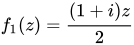
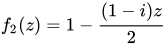


Giving the code
require 'plot'
f1=.*&(-:1j1)
f2=.[: -. *&(-:1j_1)
plot (f1,}.@|.@f2)^:12 ]0 1
Where both functions are applied successively to starting complex values of 0 and 1.
Note the formatting of f2 as }.@|.@f2 . This allows the plotted path to go in the right order and removes redundant points, paralleling similar operations in the previous solution.
Java
import java.awt.Color;
import java.awt.Graphics;
import java.util.*;
import javax.swing.JFrame;

public class DragonCurve extends JFrame {

    private List<Integer> turns;
    private double startingAngle, side;

    public DragonCurve(int iter) {
        super("Dragon Curve");
        setBounds(100, 100, 800, 600);
        setDefaultCloseOperation(EXIT_ON_CLOSE);
        turns = getSequence(iter);
        startingAngle = -iter * (Math.PI / 4);
        side = 400 / Math.pow(2, iter / 2.);
    }

    public List<Integer> getSequence(int iterations) {
        List<Integer> turnSequence = new ArrayList<Integer>();
        for (int i = 0; i < iterations; i++) {
            List<Integer> copy = new ArrayList<Integer>(turnSequence);
            Collections.reverse(copy);
            turnSequence.add(1);
            for (Integer turn : copy) {
                turnSequence.add(-turn);
            }
        }
        return turnSequence;
    }

    @Override
    public void paint(Graphics g) {
        g.setColor(Color.BLACK);
        double angle = startingAngle;
        int x1 = 230, y1 = 350;
        int x2 = x1 + (int) (Math.cos(angle) * side);
        int y2 = y1 + (int) (Math.sin(angle) * side);
        g.drawLine(x1, y1, x2, y2);
        x1 = x2;
        y1 = y2;
        for (Integer turn : turns) {
            angle += turn * (Math.PI / 2);
            x2 = x1 + (int) (Math.cos(angle) * side);
            y2 = y1 + (int) (Math.sin(angle) * side);
            g.drawLine(x1, y1, x2, y2);
            x1 = x2;
            y1 = y2;
        }
    }

    public static void main(String[] args) {
        new DragonCurve(14).setVisible(true);
    }
}
JavaScript
ES5 plus HTML DOM
Version #1.
I'm sure this can be simplified further, but I have this working here!
Though there is an impressive SVG example further below, this uses JavaScript to recurse through the expansion and simply displays each line with SVG. It is invoked as a method DRAGON.fractal(...) as described.
var DRAGON = (function () {
   // MATRIX MATH
   // -----------

   var matrix = {
      mult: function ( m, v ) {
         return [ m[0][0] * v[0] + m[0][1] * v[1],
                  m[1][0] * v[0] + m[1][1] * v[1] ];
      },

      minus: function ( a, b ) {
         return [ a[0]-b[0], a[1]-b[1] ];
      },

      plus: function ( a, b ) {
         return [ a[0]+b[0], a[1]+b[1] ];
      }
   };


   // SVG STUFF
   // ---------

   // Turn a pair of points into an SVG path like "M1 1L2 2".
   var toSVGpath = function (a, b) {  // type system fail
      return "M" + a[0] + " " + a[1] + "L" + b[0] + " " + b[1];
   };


   // DRAGON MAKING
   // -------------

   // Make a dragon with a better fractal algorithm
   var fractalMakeDragon = function (svgid, ptA, ptC, state, lr, interval) {

      // make a new <path>
      var path = document.createElementNS('http://www.w3.org/2000/svg', 'path');
      path.setAttribute( "class",  "dragon");
      path.setAttribute( "d", toSVGpath(ptA, ptC) );

      // append the new path to the existing <svg>
      var svg = document.getElementById(svgid); // call could be eliminated
      svg.appendChild(path);

      // if we have more iterations to go...
      if (state > 1) {

         // make a new point, either to the left or right
         var growNewPoint = function (ptA, ptC, lr) {
            var left  = [[ 1/2,-1/2 ],
                         [ 1/2, 1/2 ]];

            var right = [[ 1/2, 1/2 ],
                         [-1/2, 1/2 ]];

            return matrix.plus(ptA, matrix.mult( lr ? left : right,
                                                 matrix.minus(ptC, ptA) ));
         };

         var ptB = growNewPoint(ptA, ptC, lr, state);

         // then recurse using each new line, one left, one right
         var recurse = function () {
            // when recursing deeper, delete this svg path
            svg.removeChild(path);

            // then invoke again for new pair, decrementing the state
            fractalMakeDragon(svgid, ptB, ptA, state-1, lr, interval);
            fractalMakeDragon(svgid, ptB, ptC, state-1, lr, interval);
         };

         window.setTimeout(recurse, interval);
      }
   };


   // Export these functions
   // ----------------------
   return {
      fractal: fractalMakeDragon

      // ARGUMENTS
      // ---------
      //    svgid    id of <svg> element
      //    ptA      first point [x,y] (from top left)
      //    ptC      second point [x,y]
      //    state    number indicating how many steps to recurse
      //    lr       true/false to make new point on left or right

      // CONFIG
      // ------
      // CSS rules should be made for the following
      //    svg#fractal
      //    svg path.dragon
   };

}());
My current demo page includes the following to invoke this:
...
<script src='./dragon.js'></script>
...
<div>
   <svg xmlns='http://www.w3.org/2000/svg' id='fractal'></svg>
</div>
<script>
   DRAGON.fractal('fractal', [100,300], [500,300], 15, false, 700);
</script>
...
Version #2.


<!-- DragonCurve.html -->
<html>
<head>
<script type='text/javascript'>
function pDragon(cId) {
  // Plotting Dragon curves. 2/25/17 aev
  var n=document.getElementById('ord').value;
  var sc=document.getElementById('sci').value;
  var hsh=document.getElementById('hshi').value;
  var vsh=document.getElementById('vshi').value;
  var clr=document.getElementById('cli').value;
  var c=c1=c2=c2x=c2y=x=y=0, d=1, n=1<<n;
  var cvs=document.getElementById(cId);
  var ctx=cvs.getContext("2d");
  hsh=Number(hsh); vsh=Number(vsh);
  x=y=cvs.width/2;
  // Cleaning canvas, init plotting
  ctx.fillStyle="white"; ctx.fillRect(0,0,cvs.width,cvs.height);
  ctx.beginPath();
  for(i=0; i<=n;) {
    ctx.lineTo((x+hsh)*sc,(y+vsh)*sc);
    c1=c&1; c2=c&2;
    c2x=1*d; if(c2>0) {c2x=(-1)*d}; c2y=(-1)*c2x;
    if(c1>0) {y+=c2y} else {x+=c2x}
    i++; c+=i/(i&-i);
  }
  ctx.strokeStyle = clr;  ctx.stroke();
}
</script>
</head>
<body>
<p><b>Please input order, scale, x-shift, y-shift, color:</></p>
<input id=ord value=11 type="number" min="7" max="25" size="2">
<input id=sci value=7.0 type="number" min="0.001" max="10" size="5">
<input id=hshi value=-265 type="number" min="-50000" max="50000" size="6">
<input id=vshi value=-260 type="number" min="-50000" max="50000" size="6">
<input id=cli value="red" type="text" size="14">
<button onclick="pDragon('canvId')">Plot it!</button>
<h3>Dragon curve</h3>
<canvas id="canvId" width=640 height=640 style="border: 2px inset;"></canvas>
</body>
</html>
Testing cases:
Input parameters:

ord scale x-shift y-shift color   [File name to save]
-------------------------------------------
11  7.    -265   -260   red       DC11.png
15  2.    -205   -230   brown     DC15.png
17  1.    -135    70    green     DC17.png
19  0.6    380    440   navy      DC19.png
21  0.22   1600   800   blue      DC21.png
23  0.15   1100   800   violet    DC23.png
25  0.07   2100   5400  darkgreen DC25.png
===========================================
- Output:
Page with different plotted Dragon curves. Right-clicking on the canvas you can save each of them
as a png-file.
ES6
Declarative definition of an SVG file, in terms of functional primitives. (To test, generate and save SVG as file, and open in a browser or graphics application).
(Pure JS, without HTML or DOM)
(() => {
    'use strict';

    // ------------------ DRAGON CURVE -------------------

    // dragonCurve :: [[Int]] -> [[Int]]
    const dragonCurve = xs => {
        const
            pivot = op => map(
                zipWith(op)(last(xs))
            ),
            r90 = [
                [0, 1],
                [-1, 0]
            ];
        return compose(
            append(xs),
            pivot(add),
            flip(matrixMultiply)(r90),
            pivot(subtract),
            reverse,
            init
        )(xs);
    };


    // ---------------------- TEST -----------------------
    // main :: IO ()
    const main = () =>
        // SVG of 12th iteration.
        console.log(
            svgFromPointLists(512)(512)(
                index(iterate(dragonCurve)([
                    [0, 0],
                    [0, -1]
                ]))(12)
            )
        );


    // ----------------------- SVG -----------------------

    // svgFromPointLists :: Int -> Int ->
    // [[(Int, Int)]] -> String
    const svgFromPointLists = cw => ch =>
        xyss => {
            const
                polyline = xs =>
                `<polyline points="${unwords(concat(xs).map(showJSON))}"/>`,
                [x, y, mx, my] = ap([minimum, maximum])(
                    Array.from(unzip(concat(xyss)))
                ),
                [wd, hd] = map(x => Math.floor(x / 10))([
                    mx - x, my - y
                ]);
            return unlines([
                '<?xml version="1.0" encoding="UTF-8"?>',
                unwords([
                    '<svg',
                    `width="${cw}" height="${ch}"`,
                    `viewBox="${x - wd} ${y - hd} ${12 * wd} ${12 * hd}"`,
                    'xmlns="http://www.w3.org/2000/svg">'
                ]),
                '<g stroke-width="0.2" stroke="red" fill="none">',
                unlines(map(polyline)(xyss)),
                '</g>',
                '</svg>'
            ]);
        };


    // ---------------- GENERIC FUNCTIONS ----------------

    // Just :: a -> Maybe a
    const Just = x => ({
        type: 'Maybe',
        Nothing: false,
        Just: x
    });


    // Nothing :: Maybe a
    const Nothing = () => ({
        type: 'Maybe',
        Nothing: true,
    });


    // Tuple (,) :: a -> b -> (a, b)
    const Tuple = a =>
        b => ({
            type: 'Tuple',
            '0': a,
            '1': b,
            length: 2
        });


    // add (+) :: Num a => a -> a -> a
    const add = a =>
        // Curried addition.
        b => a + b;


    // ap (<*>) :: [(a -> b)] -> [a] -> [b]
    const ap = fs =>
        // The sequential application of each of a list
        // of functions to each of a list of values.
        xs => fs.flatMap(
            f => xs.map(f)
        );

    // append (++) :: [a] -> [a] -> [a]
    // append (++) :: String -> String -> String
    const append = xs =>
        // A list or string composed by
        // the concatenation of two others.
        ys => xs.concat(ys);


    // compose (<<<) :: (b -> c) -> (a -> b) -> a -> c
    const compose = (...fs) =>
        fs.reduce(
            (f, g) => x => f(g(x)),
            x => x
        );


    // concat :: [[a]] -> [a]
    const concat = xs => [].concat(...xs);


    // dotProduct :: Num a => [[a]] -> [[a]] -> [[a]]
    const dotProduct = xs =>
        compose(sum, zipWith(mul)(xs));


    // enumFromTo :: Int -> Int -> [Int]
    const enumFromTo = m =>
        n => Array.from({
            length: 1 + n - m
        }, (_, i) => m + i);


    // flip :: (a -> b -> c) -> b -> a -> c
    const flip = f =>
        x => y => f(y)(x);


    // index (!!) :: [a] -> Int -> Maybe a
    // index (!!) :: Generator (a) -> Int -> Maybe a
    // index (!!) :: String -> Int -> Maybe Char
    const index = xs =>
        i => (
            drop(i)(xs),
            take(1)(xs)
        );


    // drop :: Int -> [a] -> [a]
    // drop :: Int -> Generator [a] -> Generator [a]
    // drop :: Int -> String -> String
    const drop = n =>
        xs => Infinity > length(xs) ? (
            xs.slice(n)
        ) : (take(n)(xs), xs);


    // init :: [a] -> [a]
    const init = xs =>
        // All elements of a list except the last.
        0 < xs.length ? (
            xs.slice(0, -1)
        ) : undefined;


    // iterate :: (a -> a) -> a -> Gen [a]
    const iterate = f =>
        function* (x) {
            let v = x;
            while (true) {
                yield(v);
                v = f(v);
            }
        };


    // last :: [a] -> a
    const last = xs =>
        // The last item of a list.
        0 < xs.length ? xs.slice(-1)[0] : undefined;


    // length :: [a] -> Int
    const length = xs =>
        // Returns Infinity over objects without finite
        // length. This enables zip and zipWith to choose
        // the shorter argument when one is non-finite,
        // like cycle, repeat etc
        (Array.isArray(xs) || 'string' === typeof xs) ? (
            xs.length
        ) : Infinity;


    // map :: (a -> b) -> [a] -> [b]
    const map = f =>
        // The list obtained by applying f
        // to each element of xs.
        // (The image of xs under f).
        xs => xs.map(f);


    // matrixMultiply :: Num a => [[a]] -> [[a]] -> [[a]]
    const matrixMultiply = a =>
        b => {
            const cols = transpose(b);
            return map(
                compose(
                    flip(map)(cols),
                    dotProduct
                )
            )(a);
        };

    // minimum :: Ord a => [a] -> a
    const minimum = xs =>
        0 < xs.length ? (
            xs.slice(1)
            .reduce((a, x) => x < a ? x : a, xs[0])
        ) : undefined;


    // maximum :: Ord a => [a] -> a
    const maximum = xs =>
        // The largest value in a non-empty list.
        0 < xs.length ? (
            xs.slice(1).reduce(
                (a, x) => x > a ? (
                    x
                ) : a, xs[0]
            )
        ) : undefined;


    // mul (*) :: Num a => a -> a -> a
    const mul = a =>
        b => a * b;


    // reverse :: [a] -> [a]
    const reverse = xs =>
        xs.slice(0).reverse();


    // showJSON :: a -> String
    const showJSON = x =>
        // Indented JSON representation of the value x.
        JSON.stringify(x, null, 2);


    // subtract :: Num -> Num -> Num
    const subtract = x =>
        y => y - x;


    // sum :: [Num] -> Num
    const sum = xs =>
        // The numeric sum of all values in xs.
        xs.reduce((a, x) => a + x, 0);


    // take :: Int -> [a] -> [a]
    // take :: Int -> String -> String
    const take = n =>
        // The first n elements of a list,
        // string of characters, or stream.
        xs => 'GeneratorFunction' !== xs
        .constructor.constructor.name ? (
            xs.slice(0, n)
        ) : [].concat.apply([], Array.from({
            length: n
        }, () => {
            const x = xs.next();
            return x.done ? [] : [x.value];
        }));


    // transpose :: [[a]] -> [[a]]
    const transpose = rows =>
        // The columns of the input transposed
        // into new rows.
        // Simpler version of transpose, assuming input
        // rows of even length.
        0 < rows.length ? rows[0].map(
            (x, i) => rows.flatMap(
                x => x[i]
            )
        ) : [];


    // unlines :: [String] -> String
    const unlines = xs =>
        // A single string formed by the intercalation
        // of a list of strings with the newline character.
        xs.join('\n');


    // until :: (a -> Bool) -> (a -> a) -> a -> a
    const until = p => f => x => {
        let v = x;
        while (!p(v)) v = f(v);
        return v;
    };


    // unwords :: [String] -> String
    const unwords = xs =>
        // A space-separated string derived
        // from a list of words.
        xs.join(' ');


    // unzip :: [(a,b)] -> ([a],[b])
    const unzip = xys =>
        xys.reduce(
            (ab, xy) => Tuple(ab[0].concat(xy[0]))(
                ab[1].concat(xy[1])
            ),
            Tuple([])([])
        );


    // zipWith :: (a -> b -> c) -> [a] -> [b] -> [c]
    const zipWith = f =>
        // A list constructed by zipping with a
        // custom function, rather than with the
        // default tuple constructor.
        xs => ys => {
            const
                lng = Math.min(length(xs), length(ys)),
                vs = take(lng)(ys);
            return take(lng)(xs)
                .map((x, i) => f(x)(vs[i]));
        };

    // MAIN ---
    return main();
})();
jq
Works with gojq, the Go implementation of jq
The programs given here generate SVG code that can be viewed directly in a browser, at least if the file suffix is .svg.
The first program uses simple turtle graphics and an L-system; the second is based on the fractalMakeDragon example in Javascript.
L-System
See Simple Turtle Graphics for the simple-turtle.jq module used in this entry. The `include` statement assumes the file is in the pwd.
include "simple-turtle" {search: "."};

def rules:
   { F: "F+S",
     S: "F-S" };

def dragon($count):
  rules as $rules
  | def p($count):
      if $count <= 0 then .
      else gsub("S"; "s") | gsub("F"; $rules["F"]) | gsub("s"; $rules["S"])
      | p($count-1)
      end;
  "F" | p($count) ;

def interpret($x):
  if   $x == "+" then turtleRotate(90)
  elif $x == "-" then turtleRotate(-90)
  elif $x == "F" then turtleForward(4)
  elif $x == "S" then turtleForward(4)
  else .
  end;

def dragon_curve($n):
  dragon($n)
  | split("")
  | reduce .[] as $action (turtle([200,300]) | turtleDown;
      interpret($action) ) ;

dragon_curve(15)
| path("none"; "red"; "0.1") | svg(1700)
fractalMakeDragon
The following is based on the JavaScript example, with some variations, notably:
- the last argument of the main function allows CSS style elements to be specified
- the output is a single SVG element that can, for example, be viewed in a web browser such as Chrome, Firefox, or Safari
- only one "path" element is emitted.
The main function is fractalMakeDragon(svgid; ptA; ptC; steps; left; style) where:
     #    svgid    id of <svg> element
     #    ptA      first point [x,y] (from top left)
     #    ptC      second point [x,y]
     #    steps    number indicating how many steps to recurse
     #    left     if true, make new point on left; if false, then on right
     #    css      a JSON object optionally specifying "stroke" and "stroke-width"
# MATRIX MATH
  def mult(m; v):
    [ m[0][0] * v[0] + m[0][1] * v[1],
      m[1][0] * v[0] + m[1][1] * v[1] ];

  def minus(a; b): [ a[0]-b[0], a[1]-b[1] ];

  def plus(a; b):  [ a[0]+b[0], a[1]+b[1] ];

# SVG STUFF
  # default values of stroke and stroke-width are provided
  def style(obj):
    { "stroke": "rgb(255, 15, 131)", "stroke-width": "2px" } as $default
    | ($default + obj) as $s
    | "<style type='text/css' media='all'>
       .dragon { stroke:\($s.stroke); stroke-width:\($s["stroke-width"]); }
       </style>";

  def svg(id; width; height):
    "<svg width='\(width // "100%")' height='\(height // "100%") '
          id='\(id)'
          xmlns='http://www.w3.org/2000/svg'>";

  # Turn a pair of points into an SVG path like "M1 1L2 2" (M=move to; L=line to).
  def toSVGpath(a; b):
     "M\(a[0]) \(a[1])L\(b[0]) \(b[1])";

# DRAGON MAKING

  def fractalMakeDragon(svgid; ptA; ptC; steps; left; css):

    # Make a new point, either to the left or right
    def growNewPoint(ptA; ptC; left):
        [[ 1/2,-1/2 ], [ 1/2, 1/2 ]]  as $left
      | [[ 1/2, 1/2 ], [-1/2, 1/2 ]]  as $right
      | plus(ptA;
             mult(if left then $left else $right end;
                  minus(ptC; ptA)));

    def grow(ptA; ptC; steps; left):
      # if we have more iterations to go...
      if steps > 1 then
        growNewPoint(ptA; ptC; left) as $ptB
        # ... then recurse using each new line, one left, one right
        | grow($ptB; ptA; steps-1; left),
          grow($ptB; ptC; steps-1; left)
      else
        toSVGpath(ptA; ptC)
      end;

    svg(svgid; "100%"; "100%"),
      style(css),
      "<path class='dragon' d='",
         grow(ptA; ptC; steps; left),
      "'/>",
"</svg>";Example:
# Default values are provided for the last argument
fractalMakeDragon("roar"; [100,300]; [500,300]; 15; false; {})- Output:
The command to generate the SVG and the first few lines of output are as follows:
$ jq -n -r -f dragon.jq
<svg width='100%' height='100% '
          id='roar'
          xmlns='http://www.w3.org/2000/svg'>
<style type='text/css' media='all'>
       .dragon { stroke:rgb(255, 15, 131); stroke-width:2px; }
       </style>
<path class='dragon' d='
M259.375 218.75L259.375 221.875
M259.375 218.75L262.5 218.75
...
Julia
Code uses Luxor library[1].
using Luxor
function dragon(turtle::Turtle, level=4, size=200, direction=45)
    if level != 0
        Turn(turtle, -direction)
        dragon(turtle, level-1, size/sqrt(2), 45)
        Turn(turtle, direction*2)
        dragon(turtle, level-1, size/sqrt(2), -45)
        Turn(turtle, -direction)
    else
        Forward(turtle, size)
    end
end

Drawing(900, 500, "./Dragon.png")
t = Turtle(300, 300, true, 0, (0., 0.0, 0.0));
dragon(t, 10,400)
finish()
preview()

Kotlin
// version 1.0.6

import java.awt.Color
import java.awt.Graphics
import javax.swing.JFrame

class DragonCurve(iter: Int) : JFrame("Dragon Curve") {
    private val turns: MutableList<Int>
    private val startingAngle: Double
    private val side: Double

    init {
        setBounds(100, 100, 800, 600)
        defaultCloseOperation = EXIT_ON_CLOSE
        turns = getSequence(iter)
        startingAngle = -iter * Math.PI / 4
        side = 400.0 / Math.pow(2.0, iter / 2.0)
    }

    fun getSequence(iterations: Int): MutableList<Int> {
        val turnSequence = mutableListOf<Int>()
        for (i in 0 until iterations) {
            val copy = mutableListOf<Int>()
            copy.addAll(turnSequence)
            copy.reverse()
            turnSequence.add(1)
            copy.mapTo(turnSequence) { -it }
        }
        return turnSequence
    }

    override fun paint(g: Graphics) {
        g.color = Color.BLUE
        var angle = startingAngle
        var x1 = 230
        var y1 = 350
        var x2 = x1 + (Math.cos(angle) * side).toInt()
        var y2 = y1 + (Math.sin(angle) * side).toInt()
        g.drawLine(x1, y1, x2, y2)
        x1 = x2
        y1 = y2
        for (turn in turns) {
            angle += turn * Math.PI / 2.0
            x2 = x1 + (Math.cos(angle) * side).toInt()
            y2 = y1 + (Math.sin(angle) * side).toInt()
            g.drawLine(x1, y1, x2, y2)
            x1 = x2
            y1 = y2
        }
    }
}

fun main(args: Array<String>) {
    DragonCurve(14).isVisible = true
}
Lambdatalk
1) two twinned recursive functions
{def dcr
 {lambda {:step :length}
  {let { {:step {- :step 1}}
         {:length {/ :length 1.41421}}
       } {if {> :step 0}
          then T45
               {dcr :step :length}
               T-90
               {dcl :step :length}
               T45
          else T45
               M:length
               T-90
               M:length
               T45}
}}}
-> dcr

{def dcl
 {lambda {:step :length}
  {let { {:step {- :step 1}}
         {:length {/ :length 1.41421}}
       } {if {> :step 0}
          then T-45
               {dcr :step :length}
               T90
               {dcl :step :length}
               T-45
          else T-45
               M:length
               T90
               M:length
               T-45}
}}}
-> dcl
The word Tθ rotates the drawing direction of the pen from θ degrees and the word Md moves it on d pixels. Writing {dcr 10 360} outputs 4093 words begining with T45 T45 T45 T45 T45 T45 T45 T45 T45 T45 M11.250283388970585 T-90 M11.250283388970585 T45 T-90 T-45 M11.250283388970585 T90 M11.250283388970585 ...
2) the SVG context
Lambdatalk comes with a primitive, turtle, translating the previous sequence of words into a sequence of SVG points [x0 y0 x1 y2 ... xn yn] feeding the "d" attribute of a SVG path.
3) drawing three dragon curves [2,6,10] of decreasing width:
{svg
 {@ width="580px" height="580px"
    style="box-shadow:0 0 8px #888;"}
 {path {@ d="M {turtle 130 130 0 {dcr 2 360}}" {stroke 20 #ccc}}}
 {path {@ d="M {turtle 130 130 0 {dcr 6 360}}" {stroke 10 #888}}}
 {path {@ d="M {turtle 130 130 0 {dcr 10 360}}" {stroke 1 #000}}}
}

where
{def stroke
 {lambda {:w :c}
  fill="transparent" stroke=":c" stroke-width=":w"}}
-> stroke
The output can be seen in http://lambdaway.free.fr/lambdawalks/?view=dragon
Logo
Recursive
to dcr :step :length
  make "step :step - 1
  make "length :length / 1.41421
  if :step > 0 [rt 45 dcr :step :length lt 90 dcl :step :length rt 45]
  if :step = 0 [rt 45 fd :length lt 90 fd :length rt 45]
end

to dcl :step :length
  make "step :step - 1
  make "length :length / 1.41421
  if :step > 0 [lt 45 dcr :step :length rt 90 dcl :step :length lt 45]
  if :step = 0 [lt 45 fd :length rt 90 fd :length lt 45]
end
The program can be started using dcr 4 300 or dcl 4 300.
Or removing duplication:
to dc :step :length :dir
  if :step = 0 [fd :length stop]
  rt :dir
  dc :step-1 :length/1.41421  45
  lt :dir lt :dir
  dc :step-1 :length/1.41421 -45
  rt :dir
end
to dragon :step :length
  dc :step :length 45
end
An alternative approach by using sentence-like grammar using four productions o->on, n->wn, w->ws, s->os. O, S, N and W mean cardinal points.
to O :step :length
  if :step=1 [Rt 90 fd :length Lt 90] [O (:step - 1) (:length / 1.41421) N (:step - 1) (:length / 1.41421)]
end

to N :step :length
  if :step=1 [fd :length] [W (:step - 1) (:length / 1.41421) N (:step - 1) (:length / 1.41421)]
end

to W :step :length
  if :step=1 [Lt 90 fd :length Rt 90] [W (:step - 1) (:length / 1.41421) S (:step - 1) (:length / 1.41421)]
end

to S :step :length
  if :step=1 [Rt 180 fd :length Lt 180] [O (:step - 1) (:length / 1.41421) S (:step - 1) (:length / 1.41421)]
end
Iterative
Or drawing iteratively by making a turn left or right at each point calculated by bit-twiddling. This allows any length to be drawn, not just powers-of-2.
; Return the bit above the lowest 1-bit in :n.
; If :n = binary "...z100..00" then the return is "z000..00".
; Eg. n=22 is binary 10110 the lowest 1-bit is the "...1." and the return is
; bit above that "..1.," which is 4.
to bit.above.lowest.1bit :n
  output bitand :n (1 + (bitxor :n (:n - 1)))
end

; Return angle +90 or -90 for dragon curve turn at point :n.
; The curve is reckoned as starting from n=0 so the first turn is at n=1.
to dragon.turn.angle :n
  output ifelse (bit.above.lowest.1bit :n) = 0  [90] [-90]
end

; Draw :steps many segments of the dragon curve.
to dragon :steps
  localmake "step.len 12  ; length of each step
  repeat :steps [
    forward :step.len
    left    dragon.turn.angle repcount  ; repcount = 1 to :steps inclusive
  ]
end

dragon 256
; Draw :steps many segments of the dragon curve, with corners chamfered
; off with little 45-degree diagonals.
; Done this way the vertices don't touch.
to dragon.chamfer :steps
localmake "step.len 12 ; length of each step
localmake "straight.frac 0.5 ; fraction of the step to go straight
localmake "straight.len :step.len * :straight.frac
localmake "diagonal.len (:step.len - :straight.len) * sqrt(1/2)
repeat :steps [
localmake "turn (dragon.turn.angle repcount)/2 ; +45 or -45
forward :straight.len
left :turn
forward :diagonal.len
left :turn
]
end
dragon.chamfer 256Lua
Could be made much more compact, but this was written for speed. It has two rendering modes, one which renders the curve in text mode (default,) and one which just dumps all the coordinates for use by an external rendering application.
function dragon()
    local l = "l"
    local r = "r"
    local inverse = {l = r, r = l}
    local field = {r}
    local num = 1
    local loop_limit = 6 --increase this number to render a bigger curve
    for discard=1,loop_limit do
        field[num+1] = r
        for i=1,num do
            field[i+num+1] = inverse[field[num-i+1]]
        end
        num = num*2+1
    end
    return field
end

function render(field, w, h, l)
    local x = 0
    local y = 0
    local points = {}
    local highest_x = 0
    local highest_y = 0
    local lowest_x = 0
    local lowest_y = 0
    local l = "l"
    local r = "r"
    local u = "u"
    local d = "d"
    local heading = u
    local turn = {r = {r = d, d = l, l = u, u = r}, l = {r = u, u = l, l = d, d = r}}
    for k, v in ipairs(field) do
        heading = turn[v][heading]
        for i=1,3 do
            points[#points+1] = {x, y}
            if heading == l then
                x = x-w
            elseif heading == r then
                x = x+w
            elseif heading == u then
                y = y-h
            elseif heading == d then
                y = y+h
            end
            if x > highest_x then
                highest_x = x
            elseif x < lowest_x then
                lowest_x = x
            end
            if y > highest_y then
                highest_y = y
            elseif y < lowest_y then
                lowest_y = y
            end
        end
    end
    points[#points+1] = {x, y}
    highest_x = highest_x - lowest_x + 1
    highest_y = highest_y - lowest_y + 1
    for k, v in ipairs(points) do
        v[1] = v[1] - lowest_x + 1
        v[2] = v[2] - lowest_y + 1
    end
    return highest_x, highest_y, points
end

function render_text_mode()
    local width, height, points = render(dragon(), 1, 1, 1)
    local rows = {}
    for i=1,height do
        rows[i] = {}
        for j=1,width do
            rows[i][j] = ' '
        end
    end
    for k, v in ipairs(points) do
        rows[v[2]][v[1]] = "*"
    end

    for i=1,height do
        print(table.concat(rows[i], ""))
    end
end

function dump_points()
    local width, height, points = render(dragon(), 4, 4, 1)
    for k, v in ipairs(points) do
        print(unpack(v))
    end
end

--replace this line with dump_points() to output a list of coordinates:
render_text_mode()
Output:
      ****  ****
      *  *  *  *
      *  *  *  *
   ****  *******
   *        *
   *        *
   ****     ****  ****
               *  *  *
               *  *  *
            **********
            *  *  *
            *  *  *
            *******
               *
               *
      ****  ****
      *  *  *
      *  *  *
      **********  ****
         *  *  *  *  *
         *  *  *  *  *
****  ****************
*  *  *  *  *  *  *
*  *  *  *  *  *  *
*******************
   *  *  *  *  *
   *  *  *  *  *
*******  *******              ****
*  *        *                    *
*  *        *                    *
*******     ****  ****           ****
   *  *        *  *  *              *
   *  *        *  *  *              *
   ****     **********           ****
            *  *  *              *
            *  *  *              *
            **********  ****  *******
               *  *  *  *  *  *  *  *
               *  *  *  *  *  *  *  *
            *******  **********  ****
            *  *        *  *
            *  *        *  *
            *******     *******
               *  *        *  *
               *  *        *  *
               ****        ****
M2000 Interpreter
Module Checkit {
      def  double angle, d45, d90, change=5000
      const sr2 as double= .70710676237
      Cls 0
      Pen 14
      \\ move console full screen to second monitor
      Window 12, 1
      \\ reduce size (tv as second monitor cut pixels from edges)
      Window 12, scale.x*.9, scale.y*.9;
      \\ opacity 100%, but for 0 (black is 100%, and we can hit anything under console window)
      Desktop 255, 0
      \\ M2000 console can divide screen to characters/lines with automatic line space
      Form 60, 30
      \\ cut the border from window
      Form
      \\ scale.x and scale.y in twips
      \\ all graphic/console commands works for printer also (except for Input)
      Move scale.x/2,scale.y/10
      \\ outline graphics, here outline text
      \\ legend text$, font, size, angle, justify(2 for center), quality (non zero for antialiasing, works for angle 0), letter spacing.
      Color  {
                  Legend "DRAGON CURVE", "Courier",SCALE.Y/200,0,2, 1, SCALE.X/50
      }
      angle=0
      d45=pi/4
      d90=pi/2
      Move scale.x/3, scale.y*2/3
      bck=point
      \\ twipsx is width in twips of pixel. twipsy are height in twips of a pixel
      \\ so we use length:twips.x*scale.x/40  or scale.x/40 pixels.
      \\ use % for integer - we can omit these, and we get integer by automatic conversion (overflow raise error)
      dragon(twipsx*scale.x/40,14%, 1)
      Pen 14
      a$=key$
      Cls 5
      \\ set opacity to 100%
      Desktop 255
      End
      \\ Subs are private to this module
      \\ Subs have same scope as module
      Sub turn(rand as double)
            angle+=rand
      End Sub
      \\ angle is absolute, length is relative
      Sub forward(length as double)
            Draw Angle angle, length
      End Sub
      Sub dragon(length as double, split as integer, d as double)
            If split=0 then {
                  forward(length)
            } else {
                  Gosub turn(d*d45)
                  \\ we can omit Gosub
                  dragon(length*sr2,split-1,1)
                  turn(-d*d90)
                  dragon(length*sr2,split-1,-1)
                  turn(d*d45)
                  change--
                  If change else {
                        push 0: do {drop: push random(11,15) : over } until number<>pen: pen number
                        change=5000
                  }
            }
      End Sub
}
Checkit
M4
This code uses the "predicate" approach. A given x,y position is tested by a predicate as to whether it's on the curve or not and printed as a character or a space accordingly. The output goes row by row and column by column with no image storage or buffering.
# The macros which return a pair of values x,y expand to an unquoted 123,456
# which is suitable as arguments to a further macro.  The quoting is slack
# because the values are always integers and so won't suffer unwanted macro
# expansion.

#                0,1                 Vertex and segment x,y numbering.
#                 |
#                 |                  Segments are numbered as if a
#                 |s=0,1             square grid turned anti-clockwise
#                 |                  by 45 degrees.
#                 |
#  -1,0 -------- 0,0 -------- 1,0    vertex_to_seg_east(x,y) returns
#        s=-1,1   |   s=0,0          the segment x,y to the East,
#                 |                  so vertex_to_seg_east(0,0) is 0,0
#                 |
#                 |s=-1,0            vertex_to_seg_west(x,y) returns
#                 |                  the segment x,y to the West,
#                0,-1                so vertex_to_seg_west(0,0) is -1,1
#
define(`vertex_to_seg_east',  `eval($1 + $2),     eval($2 - $1)')
define(`vertex_to_seg_west',  `eval($1 + $2 - 1), eval($2 - $1 + 1)')
define(`vertex_to_seg_south', `eval($1 + $2 - 1), eval($2 - $1)')

# Some past BSD m4 didn't have "&" operator, so mod2(n) using % instead.
# mod2() returns 0,1 even if "%" gives -1 for negative odds.
#
define(`mod2', `ifelse(eval($1 % 2),0,0,1)')

# seg_to_even(x,y) returns x,y moved to an "even" position by subtracting an
# offset in a way which suits the segment predicate test.
#
# seg_offset_y(x,y) is a repeating pattern
#
#    | 1,1,0,0
#    | 1,1,0,0
#    | 0,0,1,1
#    | 0,0,1,1
#    +---------
#
# seg_offset_x(x,y) is the same but offset by 1 in x,y
#
#    | 0,1,1,0
#    | 1,0,0,1
#    | 1,0,0,1
#    | 0,1,1,0
#    +---------
#
# Incidentally these offset values also give n which is the segment number
# along the curve.  "x_offset XOR y_offset" is 0,1 and is a bit of n from
# low to high.
#
define(`seg_offset_y', `mod2(eval(($1 >> 1) + ($2 >> 1)))')
define(`seg_offset_x', `seg_offset_y(eval($1+1), eval($2+1))')
define(`seg_to_even', `eval($1 - seg_offset_x($1,$2)),
                       eval($2 - seg_offset_y($1,$2))');

# xy_div_iplus1(x,y) returns x,y divided by complex number i+1.
# So (x+i*y)/(i+1) which means newx = (x+y)/2, newy = (y-x)/2.
# Must have x,y "even", meaning x+y even, so newx and newy are integers.
#
define(`xy_div_iplus1', `eval(($1 + $2)/2), eval(($2 - $1)/2)')

# seg_is_final(x,y) returns 1 if x,y is one of the final four points.
# On these four points xy_div_iplus1(seg_to_even(x,y)) returns x,y
# unchanged, so the seg_pred() recursion does not reduce any further.
#
#       ..   |  ..
#      final | final      y=+1
#      final | final      y=0
#     -------+--------
#       ..   |  ..
#       x=-1    x=0
#
define(`seg_is_final', `eval(($1==-1 || $1==0) && ($2==1 || $2==0))')

# seg_pred(x,y) returns 1 if segment x,y is on the dragon curve.
# If the final point reached is 0,0 then the original x,y was on the curve.
# (If a different final point then x,y was one of four rotated copies of the
# curve.)
#
define(`seg_pred', `ifelse(seg_is_final($1,$2), 1,
                           `eval($1==0 && $2==0)',
                           `seg_pred(xy_div_iplus1(seg_to_even($1,$2)))')')

# vertex_pred(x,y) returns 1 if point x,y is on the dragon curve.
# The curve always turns left or right at a vertex, it never crosses itself,
# so if a vertex is visited then either the segment to the east or to the
# west must have been traversed.  Prefer ifelse() for the two checks since
# eval() || operator is not a short-circuit.
#
define(`vertex_pred', `ifelse(seg_pred(vertex_to_seg_east($1,$2)),1,1,
                             `seg_pred(vertex_to_seg_west($1,$2))')')

# forloop(varname, start,end, body)
# Expand body with varname successively define()ed to integers "start" to
# "end" inclusive.  "start" to "end" can go either increasing or decreasing.
#
define(`forloop', `define(`$1',$2)$4`'dnl
ifelse($2,$3,,`forloop(`$1',eval($2 + 2*($2 < $3) - 1), $3, `$4')')')

#----------------------------------------------------------------------------

# dragon01(xmin,xmax, ymin,ymax) prints an array of 0s and 1s which are the
# vertex_pred() values.  `y' runs from ymax down to ymin so that y
# coordinate increases up the screen.
#
define(`dragon01',
`forloop(`y',$4,$3, `forloop(`x',$1,$2, `vertex_pred(x,y)')
')')

# dragon_ascii(xmin,xmax, ymin,ymax) prints an ascii art dragon curve.
# Each y value results in two output lines.  The first has "+" vertices and
# "--" horizontals.  The second has "|" verticals.
#
define(`dragon_ascii',
`forloop(`y',$4,$3,
`forloop(`x',$1,$2,
`ifelse(vertex_pred(x,y),1, `+', ` ')dnl
ifelse(seg_pred(vertex_to_seg_east(x,y)), 1, `--', `  ')')
forloop(`x',$1,$2,
`ifelse(seg_pred(vertex_to_seg_south(x,y)), 1, `|  ', `   ')')
')')

#--------------------------------------------------------------------------
divert`'dnl

# 0s and 1s directly from vertex_pred().
#
dragon01(-7,23,      dnl X range
         -11,10)     dnl Y range

# ASCII art lines.
#
dragon_ascii(-6,5,      dnl X range
             -10,2)     dnl Y range
- Output
# 0s and 1s directly from vertex_pred().
#
0000000000000000011111110000000
0000000000000011011111111000000
0000000000000111011111111000000
0000000000000111111111100000000
0000000000000111111111111111000
0000000000000111111111111111100
0000000000000001111111111111100
0000000000000001111111111110000
0000111100000000011111111111000
0000111110000011011110001111100
0011110110000111011110111111100
0011110000000111111000111110000
0001110000000111111100011110000
0000111100110111111110000000000
0011111101110111111110000000000
0011111111111111111000000000000
0001111111111111111100000000000
0000000011111000111110000000000
0000001111111011111110000000000
0000001111100011111000000000000
0000000111100001111000000000000
0000000000000000000000000000000

# ASCII art lines.
#
         +--+  +--+
         |  |  |  |
         +--+--+  +--+
            |        |
   +--+  +--+     +--+
   |  |  |
   +--+--+--+
      |  |  |
      +--+--+
         |
         +--+  +--+        +--+
            |  |  |        |  |
   +--+  +--+--+--+     +--+--+
   |  |  |  |  |        |  |
   +--+--+--+--+--+  +--+--+--+  +--
      |  |  |  |  |  |  |  |  |  |
      +--+  +--+  +--+--+--+--+--+
                     |  |  |  |
                     +--+--+--+--+
                        |  |  |  |
               +--+  +--+--+  +--+
               |  |  |  |
               +--+--+--+--+
                  |  |  |  |
                  +--+  +--+
Mathematica / Wolfram Language
Two functions: one that makes 2 lines from 1 line. And another that applies this function to all existing lines:
FoldOutLine[{a_,b_}]:={{a,#},{b,#}}&[a+0.5(b-a)+{{0.,0.5},{-0.5,0.}}.(b-a)]
NextStep[in_]:=Flatten[FoldOutLine/@in,1]
lines={{{0.,0.},{1.,0.}}};
Graphics[Line/@Nest[NextStep,lines,11]]
Metafont
Metafont is a language to create fonts; since fonts normally are not too big, Metafont has hard encoded limits which makes it difficult to produce large images. This is one of the reasons why Metapost came into being.
The following code produces a single character font, 25 points wide and tall (0 points in depth), and store it in the position where one could expect to find the character D.
mode_setup;
dragoniter := 8;
beginchar("D", 25pt#, 25pt#, 0pt#);
  pickup pencircle scaled .5pt;
  x1 = 0; x2 = w; y1 = y2 = .5h;
  mstep := .5; sg := -1;
  for i = 1 upto dragoniter:
    for v = 1 step mstep until (2-mstep):
      if unknown z[v+mstep]:
	pair t;
	t := .7071[ z[v], z[v+2mstep] ];
	z[v+mstep] = t rotatedaround(z[v], 45sg);
	sg := -1*sg;
      fi
    endfor
    mstep := mstep/2;
  endfor
  draw for v:=1 step 2mstep until (2-2mstep): z[v] -- endfor z[2];
endchar;
end
The resulting character, magnified by 2, looks like:

Nim
The program is an adaptation of the second version of Go solution with some changes.
Rather than producing a big PPM file, we output a PNG file.
import math
import imageman

const
  ## Separation of the two endpoints.
  ## Make this a power of 2 for prettier output.
  Sep = 512
  ## Depth of recursion. Adjust as desired for different visual effects.
  Depth = 18

  S = sqrt(2.0) / 2
  Sin = [float 0, S, 1, S, 0, -S, -1, -S]
  Cos = [float 1, S, 0, -S, -1, -S, 0, S]

  LineColor = ColorRGBU [byte 64, 192, 96]
  Width = Sep * 11 div 6
  Height = Sep * 4 div 3

  Output = "dragon.png"

#---------------------------------------------------------------------------------------------------

func dragon(img: var Image; n, a, t: int; d, x, y: float) =
  if n <= 1:
    img.drawLine((x.toInt, y.toInt), ((x + d * Cos[a]).toInt, (y + d * Sin[a]).toInt), LineColor)
    return
  let d = d * S
  let a1 = (a - t) and 7
  let a2 = (a + t) and 7
  img.dragon(n - 1, a1, 1, d, x, y)
  img.dragon(n - 1, a2, -1, d, x + d * Cos[a1], y + d * Sin[a1])

#---------------------------------------------------------------------------------------------------

var image = initImage[ColorRGBU](Width, Height)
image.fill(ColorRGBU [byte 0, 0, 0])
image.dragon(Depth, 0, 1, Sep, Sep / 2, Sep * 5 / 6)

# Save into a PNG file.
image.savePNG(Output, compression = 9)
OCaml
Example solution, using an OCaml class and displaying the result in a Tk canvas, mostly inspired by the Tcl solution.
(* This constant does not seem to be defined anywhere in the standard modules *)
let pi = acos (-1.0);

(*
** CLASS dragon_curve_computer:
** ----------------------------
** Computes the coordinates for the line drawing the curve.
** - initial_x initial_y: coordinates for starting point for curve
** - total_length: total length for the curve
** - total_splits: total number of splits to perform
*)
class dragon_curve_computer initial_x initial_y total_length total_splits =
  object(self)
    val mutable current_x = (float_of_int initial_x)  (* current x coordinate in curve *)
    val mutable current_y = (float_of_int initial_y)  (* current y coordinate in curve *)
    val mutable current_angle = 0.0                   (* current angle *)

    (*
    ** METHOD compute_coords:
    ** ----------------------
    ** Actually computes the coordinates in the line for the curve
    ** - length: length for current iteration
    ** - nb_splits: number of splits to perform for current iteration
    ** - direction: direction for current line (-1.0 or 1.0)
    ** Returns: the list of coordinates for the line in this iteration
    *)
    method compute_coords length nb_splits direction =
      (* If all splits have been done *)
      if nb_splits = 0
      then
        begin
          (* Draw line segment, updating current coordinates *)
          current_x <- current_x +. length *. cos current_angle;
          current_y <- current_y +. length *. sin current_angle;
          [(int_of_float current_x, int_of_float current_y)]
        end
      (* If there are still splits to perform *)
      else
        begin
          (* Compute length for next iteration *)
          let sub_length = length /. sqrt 2.0 in
          (* Turn 45 degrees to left or right depending on current direction and draw part
             of curve in this direction *)
          current_angle <- current_angle +. direction *. pi /. 4.0;
          let coords1 = self#compute_coords sub_length (nb_splits - 1) 1.0 in
          (* Turn 90 degrees in the other direction and draw part of curve in that direction *)
          current_angle <- current_angle -. direction *. pi /. 2.0;
          let coords2 = self#compute_coords sub_length (nb_splits - 1) (-1.0) in
          (* Turn back 45 degrees to set head in the initial direction again *)
          current_angle <- current_angle +. direction *. pi /. 4.0;
          (* Concatenate both sub-curves to get the full curve for this iteration *)
          coords1 @ coords2
        end

    (*
    ** METHOD get_coords:
    ** ------------------
    ** Returns the coordinates for the curve with the parameters set in the object initializer
    *)
    method get_coords = self#compute_coords total_length total_splits 1.0
  end;;


(*
** MAIN PROGRAM:
** =============
*)
let () =
  (* Curve is displayed in a Tk canvas *)
  let top=Tk.openTk() in
  let c = Canvas.create ~width:400 ~height:400 top in
  Tk.pack [c];
  (* Create instance computing the curve coordinates *)
  let dcc = new dragon_curve_computer 100 200 200.0 16 in
  (* Create line with these coordinates in canvas *)
  ignore (Canvas.create_line ~xys: dcc#get_coords c);
  Tk.mainLoop ();
;;
A functional version
Here is another OCaml solution, in a functional rather than OO style:
let zig (x1,y1) (x2,y2) = (x1+x2+y1-y2)/2, (x2-x1+y1+y2)/2
let zag (x1,y1) (x2,y2) = (x1+x2-y1+y2)/2, (x1-x2+y1+y2)/2

let rec dragon p1 p2 p3 n =
   if n = 0 then [p1;p2] else
   (dragon p1 (zig p1 p2) p2 (n-1)) @ (dragon p2 (zag p2 p3) p3 (n-1))

let _ =
   let top = Tk.openTk() in
   let c = Canvas.create ~width:430 ~height:300 top in
   Tk.pack [c];
   let p1, p2 = (100, 100), (356,100) in
   let points = dragon p1 (zig p1 p2) p2 15 in
   ignore (Canvas.create_line ~xys: points c);
   Tk.mainLoop ()
producing:

Run an example with:
ocaml -I +labltk labltk.cma dragon.ml
Openscad
Using the two sub-curves inward approach. The sub-curves are rotated and shifted explicitly. That could be combined into a multmatrix() each if desired. Lines segments are drawn as elongated cuboids.
level = 8;
linewidth = .1;  // fraction of segment length
sqrt2 = pow(2, .5);

// Draw a dragon curve "level" going from [0,0] to [1,0]
module dragon(level) {
    if (level <= 0) {
        translate([.5,0]) cube([1+linewidth,linewidth,linewidth],center=true);
    } else {
        rotate(-45) scale(1/sqrt2) dragon(level-1);
        translate([1,0]) rotate(-135) scale(1/sqrt2) dragon(level-1);
    }
}

scale(40) {  // scale to nicely visible in the default GUI
    sphere(1.5*linewidth / pow(2,level/2));  // mark the start of the curve
    dragon(level);
}
PARI/GP
Version #1.
Using the "high level" plothraw with real and imaginary parts of vertex points as X and Y coordinates. Change plothraw() to psplothraw() to write a PostScript file "pari.ps" instead of drawing on-screen.
level = 13
p = [0, 1];  \\ complex number points, initially 0 to 1

\\ "unfold" at the current endpoint p[#p].
\\ p[^-1] so as not to duplicate that endpoint.
\\
\\           *  end
\\      -->  |
\\     /     |
\\           v
\\  *------->*
\\ 0,0       p[#p]
\\
for(i=1,level, my(end = (1+I)*p[#p]); \
               p = concat(p, apply(z->(end - I*z), Vecrev(p[^-1]))))

plothraw(apply(real,p),apply(imag,p), 1); \\ flag=1 join points
Version #2.
Using the "low level" plotting functions to draw to a GUI window (X etc).
len=256;

bit_above_low_1(n) = bittest(n, valuation(n,2)+1);

plotinit(0);
plotscale(0, -32,32, 32,-32); \\ Y increasing up the screen
plotmove(0, 0,0);
plotstring(0, "start", 8+32); \\ flags 8=top + 32=gap

dx=1;
dy=0;
turn_right()= [dx,dy]=[-dy,dx];
turn_left() = [dx,dy]=[dy,-dx];

for(i=1,len, plotrline(0,dx,dy); \
             if(bit_above_low_1(i), turn_right(), turn_left()));
plotdraw([0,100,100]);
Version #3.


This is actualy Version #1 upgraded to the reusable function.
\\ Dragon curve
\\ 4/8/16 aev
Dragon(level)={my(p=[0,1],end);
print(" *** Dragon curve, level ",level);
for(i=1,level, end=(1+I)*p[#p];
    p=concat(p,apply(z->(end-I*z),Vecrev(p[^-1]))) );
plothraw(apply(real,p),apply(imag,p), 1);
}

{\\ Executing/Testing:

Dragon(13); \\ Dragon13.png

Dragon(17); \\ Dragon17.png

Dragon(21); \\ Dragon21.png

Dragon(23); \\ No result
}- Output:
 *** Dragon curve, level 13
 ***   last result computed in 282 ms.

 *** Dragon curve, level 17
 ***   last result computed in 453 ms.

 *** Dragon curve, level 21
 ***   last result computed in 7,266 ms.

 *** Dragon curve, level 23
 *** concat: the PARI stack overflows !
 ***   last result computed in 0 ms.
Pascal
using Compas (Pascal with Logo-expansion):
procedure dcr(step,dir:integer;length:real);
 begin;
  step:=step -1;
  length:= length/sqrt(2);
  if dir > 0 then
   begin
     if step > 0 then
     begin
       turnright(45);
       dcr(step,1,length);
       turnleft(90);
       dcr(step,0,length);
       turnright(45);
     end
     else
     begin
       turnright(45);
       forward(length);
       turnleft(90);
       forward(length);
       turnright(45);
     end;
   end
  else
   begin
     if step > 0 then
     begin
       turnleft(45);
       dcr(step,1,length);
       turnright(90);
       dcr(step,0,length);
       turnleft(45);
     end
     else
     begin
       turnleft(45);
       forward(length);
       turnright(90);
       forward(length);
       turnleft(45);
     end;
   end;
end;
main program:
begin
 init;
 penup;
 back(100);
 pendown;
 dcr(step,direction,length);
 close;
end.
Perl
As in the Raku solution, we'll use a Lindenmayer system and draw the dragon in SVG.
use SVG;
use List::Util qw(max min);

use constant pi => 2 * atan2(1, 0);

# Compute the curve with a Lindemayer-system
my %rules = (
    X => 'X+YF+',
    Y => '-FX-Y'
);
my $dragon = 'FX';
$dragon =~ s/([XY])/$rules{$1}/eg for 1..10;

# Draw the curve in SVG
($x, $y) = (0, 0);
$theta   = 0;
$r       = 6;

for (split //, $dragon) {
    if (/F/) {
        push @X, sprintf "%.0f", $x;
        push @Y, sprintf "%.0f", $y;
        $x += $r * cos($theta);
        $y += $r * sin($theta);
    }
    elsif (/\+/) { $theta += pi/2; }
    elsif (/\-/) { $theta -= pi/2; }
}

$xrng =  max(@X) - min(@X);
$yrng =  max(@Y) - min(@Y);
$xt   = -min(@X)+10;
$yt   = -min(@Y)+10;
$svg = SVG->new(width=>$xrng+20, height=>$yrng+20);
$points = $svg->get_path(x=>\@X, y=>\@Y, -type=>'polyline');
$svg->rect(width=>"100%", height=>"100%", style=>{'fill'=>'black'});
$svg->polyline(%$points, style=>{'stroke'=>'orange', 'stroke-width'=>1}, transform=>"translate($xt,$yt)");

open  $fh, '>', 'dragon_curve.svg';
print $fh  $svg->xmlify(-namespace=>'svg');
close $fh;
Dragon curve (offsite image)

Phix
You can run this online here. Changing the colour and depth give some mildly interesting results.
--
-- demo\rosetta\DragonCurve.exw
-- ============================
--
with javascript_semantics
include pGUI.e

Ihandle dlg, canvas
cdCanvas cddbuffer, cdcanvas

integer colour = 0

procedure Dragon(integer depth, atom x1, y1, x2, y2)
    depth -= 1
    if depth<=0 then
        cdCanvasSetForeground(cddbuffer, colour)
        cdCanvasLine(cddbuffer, x1, y1, x2, y2)
        -- (some interesting colour patterns emerge)
        colour += 2
--      colour += 2000
--      colour += #100
    else
        atom dx = x2-x1, dy = y2-y1,
             nx = x1+(dx-dy)/2,
             ny = y1+(dx+dy)/2
        Dragon(depth,x1,y1,nx,ny)
        Dragon(depth,x2,y2,nx,ny)
    end if
end procedure

function redraw_cb(Ihandle /*ih*/, integer /*posx*/, /*posy*/)
    cdCanvasActivate(cddbuffer)
    cdCanvasClear(cddbuffer)
    -- (note: depths over 21 take a long time to draw,
    --        depths <= 16 look a little washed out)
    Dragon(17,100,100,100+256,100)
    cdCanvasFlush(cddbuffer)
    return IUP_DEFAULT
end function

function map_cb(Ihandle ih)
    cdcanvas = cdCreateCanvas(CD_IUP, ih)
    cddbuffer = cdCreateCanvas(CD_DBUFFER, cdcanvas)
    cdCanvasSetBackground(cddbuffer, CD_PARCHMENT)
    return IUP_DEFAULT
end function

procedure main()
    IupOpen()

    canvas = IupCanvas(NULL)
    IupSetAttribute(canvas, "RASTERSIZE", "420x290")
    IupSetCallback(canvas, "MAP_CB", Icallback("map_cb"))
    IupSetCallback(canvas, "ACTION", Icallback("redraw_cb"))

    dlg = IupDialog(canvas,"RESIZE=NO")
    IupSetAttribute(dlg, "TITLE", "Dragon Curve")

    IupShow(dlg)
    if platform()!=JS then
        IupMainLoop()
        IupClose()
    end if
end procedure

main()
PicoLisp
This uses the 'brez' line drawing function from Bitmap/Bresenham's line algorithm#PicoLisp.
# Need some turtle graphics
(load "@lib/math.l")

(setq
   *TurtleX 100      # X position
   *TurtleY  75      # Y position
   *TurtleA 0.0 )    # Angle

(de fd (Img Len)  # Forward
   (let (R (*/ *TurtleA pi 180.0)  DX (*/ (cos R) Len 1.0)  DY (*/ (sin R) Len 1.0))
      (brez Img *TurtleX *TurtleY DX DY)
      (inc '*TurtleX DX)
      (inc '*TurtleY DY) ) )

(de rt (A)  # Right turn
   (inc '*TurtleA A) )

(de lt (A)  # Left turn
   (dec '*TurtleA A) )


# Dragon curve stuff
(de *DragonStep . 4)

(de dragon (Img Depth Dir)
   (if (=0 Depth)
      (fd Img *DragonStep)
      (rt Dir)
      (dragon Img (dec Depth) 45.0)
      (lt (* 2 Dir))
      (dragon Img (dec Depth) -45.0)
      (rt Dir) ) )

# Run it
(let Img (make (do 200 (link (need 300 0))))       # Create image 300 x 200
   (dragon Img 10 45.0)                            # Build dragon curve
   (out "img.pbm"                                  # Write to bitmap file
      (prinl "P1")
      (prinl 300 " " 200)
      (mapc prinl Img) ) )
PL/I
This was written for the Ministry of Works IBM390 system running MVS/XA. Odd results when linking from a library of previously-compiled procedures led to the preference for employing libraries via including source files. That way, all of the prog. would be compiled with the same settings: optimisation, bound checking, etc. and the odd behaviour vanished. As complexity grew, these libraries tended to take advantage of each other, so small ad-hoc progs. still ended up needing many inclusions. GOODIES for example defined INTEGER to be FIXED BINARY(16,0), BOOLEAN as FIXED BIT(1) ALIGNED, etc. and so was nearly always wanted. RUNFILE offered an interface to the special assembler routines (written by the MOW) that enabled run-time file allocation and also helped with error messages. CARDINAL and ORDINAL are for presenting numbers as texts. And PSTUFF supplied my notions of an interface to the local plotting routines that allowed output to an IBM3268 screen or a CalComp pen plotter and a few others. These routines are alas no longer available, but I do have an order 19 Dragoncurve that was plotted on a sheet of 32" by 56" by the Calcomp shortly before it was retired, still in excellent order: the + plotted at the start and the x at the end were perfectly aligned. To the 119 secs of cpu time to generate the plot file (the Calcomp format was used, in units of a thousandth of an inch), a further 350 seconds was needed to present the results to the plotter. The charge rate was a dollar a second...
The source file was used to test plotting opportunities, and I have removed the code to draw the likes of a snowflake, pursuit curves, Lissajou curves, and a few others. If the dragon curve order was less than twelve, then all up to that order would be drawn, otherwise only the specified order for the larger jobs. The odd layout (especially of the documentation for DRAGONCURVE) was grist to the "prettyprint" process of PLIST that would list pl/i source files with whole-line comments textflowed into a lineprinter width of 132 columns and end-of-line comments were aligned to the right, away from the source on the left. Each printer line began with the line sequence number, normally in columns 73-80, though they have been removed here. Display screens only had a width of 72 for the source and six for the line sequence: with the ISPF editor, each field control code occupied one space on the display.
The method uses a bit string to represent the turn direction, and each "fold" to construct the next dragon curve involved appending an inverted and reversed copy of the current bit string to the end of the current string after a "1" bit representing the fold. That is, source 1 ecruos where "ecruos" is inverted via not - this scheme was described to me by an acquaintance at Auckland University in 1970. The dragon curve was not drawn by straight lines, because that meant that the dragon curve would intersect with itself at many corners. So, instead of showing each bend as two lines at right angles, a quarter-turn of a circle was used with the same orientation. No collisions, and no bewildering areas of simple squares huddled together. There cannot be any intersections, because the original involves a sheet of paper and no matter how folded it never passes through itself.
A restriction of the pl/i compiler in the 1980s was that array indices could not exceed 32767, thus the escalation to a two-dimensional array, as in DECLARE FOLD(0:31,0:32767) BOOLEAN; /*Oh for (0:1000000) or so..*/ This made the array indexing rather messy.
* PROCESS GONUMBER, MARGINS(1,72), NOINTERRUPT, MACRO;
TEST:PROCEDURE OPTIONS(MAIN);
 DECLARE
  SYSIN FILE STREAM INPUT,
  DRAGON FILE STREAM OUTPUT PRINT,
  SYSPRINT FILE STREAM OUTPUT PRINT;
 DECLARE (MIN,MAX,MOD,INDEX,LENGTH,SUBSTR,VERIFY,TRANSLATE) BUILTIN;
 DECLARE (COMPLEX,SQRT,REAL,IMAG,ATAN,SIN,EXP,COS,ABS) BUILTIN;
 %INCLUDE PLILIB(GOODIES);
 %INCLUDE PLILIB(SCAN);
 %INCLUDE PLILIB(GRAMMAR);
 %INCLUDE PLILIB(CARDINAL);
 %INCLUDE PLILIB(ORDINAL);
 %INCLUDE PLILIB(ANSWAROD);
 %INCLUDE PLILIB(RUNFILE);
 %INCLUDE PLILIB(PSTUFF);

 DECLARE (TWOPI,TORAD) REAL;
 DECLARE RANGE(4) REAL;
 DECLARE TRACERANGE BOOLEAN INITIAL(FALSE);
 DECLARE FRESHRANGE BOOLEAN INITIAL(TRUE);

 BOUND:PROCEDURE(Z);
  DECLARE Z COMPLEX;
  DECLARE (ZX,ZY) REAL;
   ZX = REAL(Z); ZY = IMAG(Z);
   IF FRESHRANGE THEN
    DO;
     RANGE(1),RANGE(2) = ZX;
     RANGE(3),RANGE(4) = ZY;
    END;
    ELSE
     DO;
      RANGE(1) = MIN(RANGE(1),ZX);
      RANGE(2) = MAX(RANGE(2),ZX);
      RANGE(3) = MIN(RANGE(3),ZY);
      RANGE(4) = MAX(RANGE(4),ZY);
     END;
   FRESHRANGE = FALSE;
 END BOUND;

 PLOTZ:PROCEDURE(Z,PEN);
  DECLARE Z COMPLEX;
  DECLARE PEN INTEGER;
   IF TRACERANGE THEN CALL BOUND(Z);
   CALL PLOT(REAL(Z),IMAG(Z),PEN);
 END PLOTZ;

 %PAGE;
 DRAGONCURVE:PROCEDURE(ORDER,HOP); /*Folding paper in two...*/
/*Some statistics on runs with x = 56.25", y = 32.6"
&(the calcomp plotter).*/
/*The actual size of the picture determines the number of steps
&to each quarter-turn.*/
/*   n      turns       x         y     secs     dx    dy
&*/
/*  20  1,048,575  -2389:681  -682:1364  180+  3070  2046
&*/
/*  19    524,287  -1365:681  -340:1364  119   2046  1704
&*/
/*  18    262,143   -341:681  -340:1194   71   1022  1554
&*/
/*  17    131,071   -171:681  -340:682    35    852  1022
&*/
  DECLARE ORDER BIGINT; /*So how many folds.*/
  DECLARE HOP BOOLEAN;
  DECLARE FOLD(0:31,0:32767) BOOLEAN; /*Oh for (0:1000000) or so..*/
  DECLARE (TURN,N,IT,I,I1,I2,J1,J2,L,LL) BIGINT;
  DECLARE (XMIN,XMAX,YMIN,YMAX,XMID,YMID) REAL;
  DECLARE (IXMIN,IXMAX,IYMIN,IYMAX) BIGINT;
  DECLARE (S,H,TORAD) REAL;
  DECLARE (ZMID,Z,Z2,DZ,ZL) COMPLEX;
  DECLARE (FULLTURN,ABOUTTURN,QUARTERTURN) INTEGER;
  DECLARE (WAY,DIRECTION,ND,LD,LD1,LD2) INTEGER;
  DECLARE LEAF(0:3,0:360) COMPLEX; /*Corner turning.*/
  DECLARE SWAPXY BOOLEAN; /*Try to align rectangles.*/
  DECLARE (T1,T2) CHARACTER(200) VARYING;
   IF ¬PLOTCHOICE('') THEN RETURN; /*Ascertain the plot device.*/
   N = 0;
   FOR TURN = 1 TO ORDER;
    IT = N + 1;
    I1 = IT/32768; I2 = MOD(IT,32768);
    FOLD(I1,I2) = TRUE;
    FOR I = 1 TO N;
     I1 = (IT + I)/32768; I2 = MOD(IT + I,32768);
     J1 = (IT - I)/32768; J2 = MOD(IT - I,32768);
     FOLD(I1,I2) = ¬FOLD(J1,J2);
    END;
    N = N*2 + 1;
    IF HOP & TURN < ORDER THEN GO TO XX;
    XMIN,XMAX,YMIN,YMAX = 0;
    Z = 0; /*Start at the origin.*/
    DZ = 1; /*Step out unilaterally.*/
    FOR I = 1 TO N;
     Z = Z + DZ; /*Take the step before the kink.*/
     I1 = I/32768; I2 = MOD(I,32768);
     IF FOLD(I1,I2) THEN DZ = DZ*(0 + 1I); ELSE DZ = DZ*(0 - 1I);
     Z = Z + DZ; /*The step after the kink.*/
     XMIN = MIN(XMIN,REAL(Z)); XMAX = MAX(XMAX,REAL(Z));
     YMIN = MIN(YMIN,IMAG(Z)); YMAX = MAX(YMAX,IMAG(Z));
    END;
    SWAPXY = ((XMAX - XMIN) >= (YMAX - YMIN)) /*Contemplate */
     ¬= (PLOTSTUFF.XSIZE >= PLOTSTUFF.YSIZE); /* rectangularities.*/
    IF SWAPXY THEN
     DO;
      H = XMIN;
      XMIN = YMIN;
      YMIN = -XMAX;
      XMAX = YMAX;
      YMAX = -H;
     END;
    IXMAX = XMAX; IYMAX = YMAX; IXMIN = XMIN; IYMIN = YMIN;
    XMID = (XMAX + XMIN)/2; YMID = (YMAX + YMIN)/2;
    ZMID = COMPLEX(XMID,YMID);
    XMAX = XMAX - XMID; YMAX = YMAX - YMID;
    XMIN = XMIN - XMID; YMIN = YMIN - YMID;
    T1 = 'Order ' || IFMT(TURN) || ' Dragoncurve, '
     || SAYNUM(0,N,'turn') || '.';
    IF SWAPXY THEN T2 = 'y range ' || IFMT(IYMIN) || ':' || IFMT(IYMAX)
     || ', x range ' || IFMT(IXMIN) || ':' || IFMT(IXMAX);
     ELSE T2 = 'x range ' || IFMT(IXMIN) || ':' || IFMT(IXMAX)
     || ', y range ' || IFMT(IYMIN) || ':' || IFMT(IYMAX);
    S = MIN(PLOTSTUFF.XSIZE/(XMAX - XMIN), /*Rectangularity */
     (PLOTSTUFF.YSIZE - 4*H)/(YMAX - YMIN)); /* matching?*/
    H = MIN(PLOTSTUFF.XSIZE,S*(XMAX - XMIN)); /*X-width for text.*/
    H = MIN(PLOTCHAR,H/(MAX(LENGTH(T1),LENGTH(T2)) + 6));
    IF ¬NEWRANGE(XMIN*S,XMAX*S,YMIN*S-2*H,YMAX*S+2*H) THEN STOP('Urp!');
    CALL PLOTTEXT(-LENGTH(T1)*H/2,YMAX*S + 2*PLOTTICK,H,T1,0);
    CALL PLOTTEXT(-LENGTH(T2)*H/2,YMIN*S - 2*H + 2*PLOTTICK,H,T2,0);
    QUARTERTURN = MIN(MAX(3,12*SQRT(S)),90); /*Angle refinement.*/
    ABOUTTURN = QUARTERTURN*2;
    FULLTURN = QUARTERTURN*4; /*Ensures divisibility.*/
    TORAD = TWOPI/FULLTURN; /*Imagine if FULLTURN was 360.*/
    ZL = 1; /*Start with 0 degrees.*/
    FOR L = 0 TO 3; /*The four directions.*/
     FOR I = 0 TO FULLTURN; /*Fill out the petals in the corner.*/
      LEAF(L,I) = ZL + EXP((0 + 1I)*I*TORAD); /*Poke!*/
     END; /*Fill out the full circle for each for simplicity.*/
     ZL = ZL*(0 + 1I); /*Rotate to the next axis.*/
    END; /*Four circles, centred one unit along each axial direction.*/
    Z = -ZMID; /*The start point. Was 0, before shift by ZMID.*/
    CALL PLOTZ(S*Z,3); /*Position the pen.*/
    DIRECTION = 0; /*The way ahead is along the x-axis.*/
    DZ = 1; /*The step before the kink.*/
    IF SWAPXY THEN DIRECTION = -QUARTERTURN; /*Or maybe y.*/
    IF SWAPXY THEN DZ = (0 - 1I); /*An x-y swap.*/
    FRESHRANGE = TRUE; /*A sniffing.*/
    FOR I = 1 TO N; /*The deviationism begins.*/
     I1 = I/32768; I2 = MOD(I,32768);
     IF FOLD(I1,I2) THEN WAY = +1; ELSE WAY = -1;
     ND = DIRECTION + QUARTERTURN*WAY;
     IF ND >= FULLTURN THEN ND = ND - FULLTURN;
     IF ND < 0 THEN ND = ND + FULLTURN;
     LD = ND/QUARTERTURN; /*Select a leaf.*/
     LD1 = MOD(ND + ABOUTTURN,FULLTURN);
     LD2 = LD1 + WAY*QUARTERTURN; /*No mod, see the FOR loop below.*/
     FOR L = LD1 TO LD2 BY WAY; /*Round the kink.*/
      LL = L; /*A copy to wrap into range.*/
      IF LL < 0 THEN LL = LL + FULLTURN;
      IF LL >= FULLTURN THEN LL = LL - FULLTURN;
      ZL = Z + LEAF(LD,LL); /*Work along the curve.*/
      CALL PLOTZ(S*ZL,2); /*Move a bit.*/
     END; /*On to the next step.*/
     DIRECTION = ND; /*The new direction.*/
     Z = Z + DZ; /*The first half of the step that has been rounded.*/
     DZ = DZ*(0 + 1I)*WAY; /*A right-angle, one way or the other.*/
     Z = Z + DZ; /*Avoid the roundoff of hordes of fractional moves.*/
    END; /*On to the next fold.*/
    CALL PLOT(0,0,998);
    IF TRACERANGE THEN PUT SKIP(3) FILE(DRAGON) LIST('Dragoncurve: ');
    IF TRACERANGE THEN PUT FILE(DRAGON) DATA(RANGE,ORDER,S,ZMID);
XX:END;
 END DRAGONCURVE;
 %PAGE;
 %PAGE;
 %PAGE;
 RANDOM:PROCEDURE(SEED) RETURNS(REAL);
  DECLARE SEED INTEGER;
   SEED = SEED*497 + 4032;
   IF SEED <= 0 THEN SEED = SEED + 32767;
   IF SEED > 32767 THEN SEED = MOD(SEED,32767);
   RETURN(SEED/32767.0);
 END RANDOM;

 %PAGE;
 TRACE:PROCEDURE(O,R,A,N,G);
  DECLARE (I,N,G) INTEGER;
  DECLARE (O,R,A(*),X0,X1,X2) COMPLEX;
   X1 = O + R*A(1);
   X0 = X1;
   CALL PLOT(REAL(X1),IMAG(X1),3);
   FOR I = 2 TO N;
    X2 = O + R*A(I);
    CALL PLOT(REAL(X2),IMAG(X2),2);
    X1 = X2;
   END;
   CALL PLOT(REAL(X0),IMAG(X0),2);
 END TRACE;

 CENTREZ:PROCEDURE(A,N);
  DECLARE (A(*),T) COMPLEX;
  DECLARE (I,N) INTEGER;
   T = 0;
   FOR I = 1 TO N;
    T = T + A(I);
   END;
   T = T/N;
   FOR I = 1 TO N;
    A(I) = A(I) - T;
   END;
 END CENTREZ;
 %PAGE;
 %PAGE;
 DECLARE (BELCH,ORDER,CHASE,TWIRL) INTEGER;
 DECLARE HOP BOOLEAN;

  TWOPI = 8*ATAN(1);
  TORAD = TWOPI/360;
  BELCH = REPLYN('How many dragoncurves (max 20)');
  IF BELCH < 12 THEN HOP = FALSE;
   ELSE HOP = YEA('Go directly to order ' || IFMT(BELCH));
/*ORDER = REPLYN('The depth of recursion (eg 4)');
  CHASE = REPLYN('How many pursuits');
  TWIRL = REPLYN('How many twirls');
  TRACERANGE = YEA('Trace the ranges');*/
  CALL DRAGONCURVE(BELCH,HOP);
/*CALL TRIANGLEPLEX(ORDER);
  CALL SQUAREBASH(ORDER,+1);
  CALL SQUAREBASH(ORDER,-1);
  CALL SNOWFLAKE(ORDER);
  CALL SNOWFLAKE3(ORDER);
  CALL PURSUE(CHASE);
  CALL LISSAJOU(TWIRL);
  CALL CARDIOD;
  CALL HEART;*/
  CALL PLOT(0,0,-3); CALL PLOT(0,0,999);
END TEST;
PostScript
%!PS
%%BoundingBox: 0 0 550 400
/ifpendown false def
/rotation 0 def
/srootii 2 sqrt def
/turn {
         rotation add /rotation exch def
      } def
/forward {
            dup rotation cos mul
           exch rotation sin mul
           ifpendown
                { rlineto }
                { rmoveto }
           ifelse
         } def
/penup {
          /ifpendown false def
       } def
/pendown {
             /ifpendown true def
         } def

/dragon { % [ length, split, d ]
          dup
          dup 1 get 0 eq
              { 0 get forward }
              { dup 2 get 45 mul turn
                  dup aload pop pop
                  1 sub exch srootii div exch
                  1 3 array astore dragon pop
                dup 2 get 90 mul neg turn
                  dup aload pop pop
                  1 sub exch srootii div exch
                  -1 3 array astore dragon
                dup 2 get 45 mul turn
              }
          ifelse
          pop
        } def
150 150 moveto pendown [ 300 12 1 ] dragon stroke
% 0 0 moveto 550 0 rlineto 0 400 rlineto -550 0 rlineto closepath stroke
showpage
%%END
Or (almost) verbatim string rewrite: (this is a 20 page document, and don't try to print it, or you might have a very angry printer).
%!PS-Adobe-3.0
%%BoundingBox 0 0 300 300

/+ { 90 rotate } def
/- {-90 rotate } def
/!1 { dup 1 sub dup 0 eq not } def

/F { 180 0 rlineto } def
/X { !1 { X + Y F + } if pop } def
/Y { !1 { - F X - Y } if pop } def

/dragon {
        gsave
        70 180 moveto
        dup 1 sub { 1 2 div sqrt dup scale -45 rotate } repeat
        F X stroke
        grestore
} def

1 1 20 { dragon showpage } for

%%EOF
- See also
POV-Ray
Example code recursive and iterative can be found at Courbe du Dragon.
PowerShell
WinForms
# handy constants with script-wide scope
[Single]$script:QUARTER_PI=0.7853982
[Single]$script:HALF_PI=1.570796

# leverage GDI (Forms and Drawing)
Add-Type -AssemblyName System.Drawing
Add-Type -AssemblyName System.Windows.Forms
$script:TurtlePen = New-Object Drawing.Pen darkGreen
$script:Form = New-Object Windows.Forms.Form
$script:Canvas = $Form.CreateGraphics()

# implement a turtle graphics model
Class Turtle { # relies on the script-scoped $TurtlePen and $Canvas
  # member properties for turtle's position and orientation
  [Single]$TurtleX
  [Single]$TurtleY
  [Single]$TurtleAngle

  # constructors
  Turtle() {
    $this.TurtleX, $this.TurtleY = 44.0, 88.0
    $this.TurtleAngle = 0.0
  }
  Turtle([Single]$InitX, [Single]$InitY, [Single]$InitAngle) {
    $this.TurtleX, $this.TurtleY = $InitX, $InitY
    $this.TurtleAngle = $InitAngle
  }

  # methods for turning and drawing
  [Void]Turn([Single]$Angle) {  # $Angle measured in radians
    $this.TurtleAngle += $Angle  # use positive $Angle for right turn, negative for left turn
  }
  [Void]Forward([Single]$Distance) {
    # draw line segment
    $TargetX = $this.TurtleX + $Distance * [Math]::Cos($this.TurtleAngle)
    $TargetY = $this.TurtleY + $Distance * [Math]::Sin($this.TurtleAngle)
    $script:Canvas.DrawLine($script:TurtlePen, $this.TurtleX, $this.TurtleY, $TargetX, $TargetY)
    # relocate turtle to other end of segment
    $this.TurtleX = $TargetX
    $this.TurtleY = $TargetY
  }
} # end of Turtle class definition

# Implement dragon curve drawing methods in a subclass that inherits Turtle
Class DragonTurtle : Turtle {

  # DCL: recursive dragon curve, starting with left turns
  [Void]DCL([Byte]$Step, [Single]$Length) {
    $AdjustedStep = $Step - 1
    $AdjustedLength = $Length / [Math]::Sqrt(2.0)

    $this.Turn(-$script:QUARTER_PI)
    if ($AdjustedStep -gt 0) {
      $this.DCR($AdjustedStep, $AdjustedLength)
    } else {
      $this.Forward($AdjustedLength)
    }
    $this.Turn($script:HALF_PI)
    if ($AdjustedStep -gt 0) {
      $this.DCL($AdjustedStep, $AdjustedLength)
    } else {
      $this.Forward($AdjustedLength)
    }
    $this.Turn(-$script:QUARTER_PI)
  }

  # DCR: recursive dragon curve, starting with right turns
  [Void]DCR([Byte]$Step, [Single]$Length) {
    $AdjustedStep = $Step - 1
    $AdjustedLength = $Length / [Math]::Sqrt(2.0)

    $this.Turn($script:QUARTER_PI)
    if ($AdjustedStep -gt 0) {
      $this.DCR($AdjustedStep, $AdjustedLength)
    } else {
      $this.Forward($AdjustedLength)
    }
    $this.Turn(-$script:HALF_PI)
    if ($AdjustedStep -gt 0) {
      $this.DCL($AdjustedStep, $AdjustedLength)
    } else {
      $this.Forward($AdjustedLength)
    }
    $this.Turn($script:QUARTER_PI)
  }
} # end of DragonTurtle subclass definition

# prepare anonymous dragon-curve painting function for WinForms dialog
$Form.add_paint({
  [DragonTurtle]$Dragon = [DragonTurtle]::new()
  $Dragon.DCR(14,128)
})

# display the GDI Form window, which triggers its prepared anonymous drawing function
$Form.ShowDialog()
Processing
float l = 3;
int ints = 13;

void setup() {
  size(700, 600);
  background(0, 0, 255);
  translate(150, 100);
  stroke(255);
  turn_left(l, ints);
  turn_right(l, ints);
}

void turn_right(float l, int ints) {
  if (ints == 0) {
    line(0, 0, 0, -l);
    translate(0, -l);
  } else {
    turn_left(l, ints-1);
    rotate(radians(90));
    turn_right(l, ints-1);
  }
}

void turn_left(float l, int ints) {
  if (ints == 0) {
    line(0, 0, 0, -l);
    translate(0, -l);
  } else {
    turn_left(l, ints-1);
    rotate(radians(-90));
    turn_right(l, ints-1);
  }
}
The sketch can be run online :
here.
Processing Python mode
l = 3
ints = 13

def setup():
  size(700, 600)
  background(0, 0, 255)
  translate(150, 100)
  stroke(255)
  turn_left(l, ints)
  turn_right(l, ints)

def turn_right(l, ints):
    if ints == 0:
        line(0, 0, 0, -l)
        translate(0, -l)
    else:
        turn_left(l, ints - 1)
        rotate(radians(90))
        turn_right(l, ints - 1)

def turn_left(l, ints):
    if ints == 0:
        line(0, 0, 0, -l)
        translate(0, -l)
    else:
        turn_left(l, ints - 1)
        rotate(radians(-90))
        turn_right(l, ints - 1)
Prolog
Works with SWI-Prolog which has a Graphic interface XPCE.
DCG are used to compute the list of "turns" of the Dragon Curve and the list of points.
dragonCurve(N) :-
	dcg_dg(N, [left], DCL, []),
	Side = 4,
	Angle is -N * (pi/4),
	dcg_computePath(Side, Angle, DCL, point(180,400), P, []),
	new(D, window('Dragon Curve')),
	send(D, size, size(800,600)),
	new(Path, path(poly)),
	send_list(Path, append, P),
	send(D, display, Path),
	send(D, open).


% compute the list of points of the Dragon Curve
dcg_computePath(Side, Angle, [left | DCT], point(X1, Y1)) -->
	   [point(X1, Y1)],
	   {	X2 is X1 + Side * cos(Angle),
		Y2 is Y1 + Side * sin(Angle),
		Angle1 is Angle + pi / 2
	   },
	   dcg_computePath(Side, Angle1, DCT, point(X2, Y2)).

dcg_computePath(Side, Angle, [right | DCT], point(X1, Y1)) -->
	   [point(X1, Y1)],
	   {	X2 is X1 + Side * cos(Angle),
		Y2 is Y1 + Side * sin(Angle),
		Angle1 is Angle - pi / 2
	   },
	   dcg_computePath(Side, Angle1, DCT, point(X2, Y2)).


dcg_computePath(_Side, _Angle, [], point(X1, Y1)) -->
	[ point(X1, Y1)].


% compute the list of the "turns" of the Dragon Curve
dcg_dg(1, L) --> L.

dcg_dg(N, L) -->
	{dcg_dg(L, L1, []),
	  N1 is N - 1},
	  dcg_dg(N1, L1).

% one interation of the process
dcg_dg(L) -->
	L,
	[left],
	inverse(L).

inverse([H | T]) -->
	inverse(T),
	inverse(H).

inverse([]) --> [].

inverse(left) -->
	[right].

inverse(right) -->
	[left].
Output :
1 ?- dragonCurve(13).
true

Python
from turtle import *

def dragon(step, length):
    dcr(step, length)

def dcr(step, length):
    step -= 1
    length /= 1.41421
    if step > 0:
        right(45)
        dcr(step, length)
        left(90)
        dcl(step, length)
        right(45)
    else:
        right(45)
        forward(length)
        left(90)
        forward(length)
        right(45)

def dcl(step, length):
    step -= 1
    length /= 1.41421

    if step > 0:
        left(45)
        dcr(step, length)
        right(90)
        dcl(step, length)
        left(45)
    else:
        left(45)
        forward(length)
        right(90)
        forward(length)
        left(45)
A more pythonic version:
from turtle import right, left, forward, speed, exitonclick, hideturtle

def dragon(level=4, size=200, zig=right, zag=left):
    if level <= 0:
        forward(size)
        return

    size /= 1.41421
    zig(45)
    dragon(level-1, size, right, left)
    zag(90)
    dragon(level-1, size, left, right)
    zig(45)

speed(0)
hideturtle()
dragon(6)
exitonclick() # click to exit
Other version:
from turtle import right, left, forward, speed, exitonclick, hideturtle

def dragon(level=4, size=200, direction=45):
    if level:
        right(direction)
        dragon(level-1, size/1.41421356237, 45)
        left(direction * 2)
        dragon(level-1, size/1.41421356237, -45)
        right(direction)
    else:
        forward(size)

speed(0)
hideturtle()
dragon(6)
exitonclick() # click to exit
Quackery
 [ $ "turtleduck.qky" loadfile ] now!

 [ 2 *
   2dup turn
   4 1 walk
   turn ]                        is corner ( n/d --> )

                         forward is right  (   n --> )

                         forward is left   (   n --> )

 [ dup 0 = iff
     [ drop 8 1 walk ] done
   1 - dup
   left
   1 4 corner
   right ]                 resolves right  (   n --> )

 [ dup 0 = iff
     [ drop 8 1 walk ] done
   1 - dup
   left
   -1 4 corner
   right ]                 resolves left   (   n --> )

turtle
20 frames
-260 1 fly
3 4 turn
100 1 fly
5 8 turn
11 left
1 frames- Output:

R
Version #1.
Dragon<-function(Iters){
  Rotation<-matrix(c(0,-1,1,0),ncol=2,byrow=T) ########Rotation multiplication matrix
  Iteration<-list() ###################################Set up list for segment matrices for 1st
  Iteration[[1]] <- matrix(rep(0,16), ncol = 4)
  Iteration[[1]][1,]<-c(0,0,1,0)
  Iteration[[1]][2,]<-c(1,0,1,-1)
  Moveposition<-rep(0,Iters) ##########################Which point should be shifted to origin
  Moveposition[1]<-4
  if(Iters > 1){#########################################where to move to get to origin
    for(l in 2:Iters){#####################################only if >1, because 1 set before for loop
      Moveposition[l]<-(Moveposition[l-1]*2)-2#############sets vector of all positions in matrix where last point is
    }}
  Move<-list() ########################################vector to add to all points to shift start at origin
for (i in 1:Iters){
half<-dim(Iteration[[i]])[1]/2
half<-1:half
for(j in half){########################################Rotate all points 90 degrees clockwise
  Iteration[[i]][j+length(half),]<-c(Iteration[[i]][j,1:2]%*%Rotation,Iteration[[i]][j,3:4]%*%Rotation)
}
Move[[i]]<-matrix(rep(0,4),ncol=4)
Move[[i]][1,1:2]<-Move[[i]][1,3:4]<-(Iteration[[i]][Moveposition[i],c(3,4)]*-1)
Iteration[[i+1]]<-matrix(rep(0,2*dim(Iteration[[i]])[1]*4),ncol=4)##########move the dragon, set next Iteration's matrix
for(k in 1:dim(Iteration[[i]])[1]){#########################################move dragon by shifting all previous iterations point
  Iteration[[i+1]][k,]<-Iteration[[i]][k,]+Move[[i]]###so the start is at the origin
}
xlimits<-c(min(Iteration[[i]][,3])-2,max(Iteration[[i]][,3]+2))#Plot
ylimits<-c(min(Iteration[[i]][,4])-2,max(Iteration[[i]][,4]+2))
plot(0,0,type='n',axes=FALSE,xlab="",ylab="",xlim=xlimits,ylim=ylimits)
s<-dim(Iteration[[i]])[1]
s<-1:s
segments(Iteration[[i]][s,1], Iteration[[i]][s,2], Iteration[[i]][s,3], Iteration[[i]][s,4], col= 'red')
}}#########################################################################
![[2]](https://commons.wikimedia.org/wiki/File:Dragon_Curve_16_Iterations_R_programming_language.png#mediaviewer/File:Dragon_Curve_16_Iterations_R_programming_language.png)
Version #2.
Note: This algorithm in R works only for orders <= 16. For bigger values it returns error
in bitwAnd() [bit-wise AND].
It means: 32-bit integer is not long enough. This is true even on 64-bit computer.
See samples using the same algorithm in JavaScript version #2 (order is up to 25, may be even greater).


# Generate and plot Dragon curve.
# translation of JavaScript v.#2: http://rosettacode.org/wiki/Dragon_curve#JavaScript
# 2/27/16 aev
# gpDragonCurve(ord, clr, fn, d, as, xsh, ysh)
# Where: ord - order (defines the number of line segments);
#   clr - color, fn - file name (.ext will be added), d - segment length,
#   as - axis scale, xsh - x-shift, ysh - y-shift
gpDragonCurve <- function(ord, clr, fn, d, as, xsh, ysh) {
  cat(" *** START:", date(), "order=",ord, "color=",clr, "\n");
  d=10; m=640; ms=as*m; n=bitwShiftL(1, ord);
  c=c1=c2=c2x=c2y=i1=0; x=y=x1=y1=0;
  if(fn=="") {fn="DCR"}
  pf=paste0(fn, ord, ".png");
  ttl=paste0("Dragon curve, ord=",ord);
  cat(" *** Plot file -", pf, "title:", ttl, "n=",n, "\n");
  plot(NA, xlim=c(-ms,ms), ylim=c(-ms,ms), xlab="", ylab="", main=ttl);
  for (i in 0:n) {
    segments(x1+xsh, y1+ysh, x+xsh, y+ysh, col=clr); x1=x; y1=y;
    c1=bitwAnd(c, 1); c2=bitwAnd(c, 2);
    c2x=d; if(c2>0) {c2x=(-1)*d}; c2y=(-1)*c2x;
    if(c1>0) {y=y+c2y} else {x=x+c2x}
    i1=i+1; ii=bitwAnd(i1, -i1); c=c+i1/ii;
  }
  dev.copy(png, filename=pf, width=m, height=m); # plot to png-file
  dev.off(); graphics.off();  # Cleaning
  cat(" *** END:",date(),"\n");
}
## Testing samples:
gpDragonCurve(7, "red", "", 20, 0.2, -30, -30)
##gpDragonCurve(11, "red", "", 10, 0.6, 100, 200)
gpDragonCurve(13, "navy", "", 10, 1, 300, -200)
##gpDragonCurve(15, "darkgreen", "", 10, 2, -450, -500)
gpDragonCurve(16, "darkgreen", "", 10, 3, -1050, -500)
- Output:
> gpDragonCurve(7, "red", "", 20, 0.2, -30, -30)
 *** START: Mon Feb 27 12:53:57 2017 order= 7 color= red
 *** Plot file - DCR7.png title: Dragon curve, ord=7 n= 128
 *** END: Mon Feb 27 12:53:57 2017

> gpDragonCurve(13, "navy", "", 10, 1, 300, -200)
 *** START: Mon Feb 27 12:44:04 2017 order= 13 color= navy
 *** Plot file - DCR13.png title: Dragon curve, ord=13 n= 8192
 *** END: Mon Feb 27 12:44:06 2017

> gpDragonCurve(16, "darkgreen", "", 10, 3, -1050, -500)
 *** START: Mon Feb 27 12:18:56 2017 order= 16 color= darkgreen
 *** Plot file - DCR16.png title: Dragon curve, ord=16  n= 65536
 *** END: Mon Feb 27 12:19:03 2017
Racket
#lang racket

(require plot)

(define (dragon-turn n)
  (if (> (bitwise-and (arithmetic-shift (bitwise-and n (- n)) 1) n) 0)
      'L
      'R))

(define (rotate heading dir)
  (cond
    [(eq? dir 'R) (cond [(eq? heading 'N) 'E]
                        [(eq? heading 'E) 'S]
                        [(eq? heading 'S) 'W]
                        [(eq? heading 'W) 'N])]
    [(eq? dir 'L) (cond [(eq? heading 'N) 'W]
                        [(eq? heading 'E) 'N]
                        [(eq? heading 'S) 'E]
                        [(eq? heading 'W) 'S])]))
(define (step pos heading)
  (cond
    [(eq? heading 'N) (list (car pos) (add1 (cadr pos)))]
    [(eq? heading 'E) (list (add1 (car pos)) (cadr pos))]
    [(eq? heading 'S) (list (car pos) (sub1 (cadr pos)))]
    [(eq? heading 'W) (list (sub1 (car pos)) (cadr pos))]
    ))

(let-values ([(dir pos trail)
              (for/fold ([dir 'N]
                         [pos (list 0 0)]
                         [trail '((0 0))])
                ([n (in-range 0 50000)])
                (let* ([new-dir (rotate dir (dragon-turn n))]
                       [new-pos (step pos new-dir)])
                  (values new-dir
                          new-pos
                          (cons new-pos trail))))])
  (plot-file (lines trail) "dragon.png" 'png))

Raku
(formerly Perl 6) We'll use a L-System role, and draw the dragon in SVG.
use SVG;

role Lindenmayer {
    has %.rules;
    method succ {
	    self.comb.map( { %!rules{$^c} // $c } ).join but Lindenmayer(%!rules)
    }
}

my $dragon = "FX" but Lindenmayer( { X => 'X+YF+', Y => '-FX-Y' } );

$dragon++ xx ^15;

my @points = 215, 350;

for $dragon.comb {
    state ($x, $y) = @points[0,1];
    state $d = 2 + 0i;
    if /'F'/ { @points.append: ($x += $d.re).round(.1), ($y += $d.im).round(.1) }
    elsif /< + - >/ { $d *= "{$_}1i" }
}

say SVG.serialize(
    svg => [
        :600width, :450height, :style<stroke:rgb(0,0,255)>,
        :rect[:width<100%>, :height<100%>, :fill<white>],
        :polyline[ :points(@points.join: ','), :fill<white> ],
    ],
);
REXX
This REXX version uses a unique plot character to indicate which part of the dragon curve is being shown; the
number of "parts" of the dragon curve can be specified (the 1st argument).
The initial (facing) direction may be specified (North, East, South, or West) (the 2nd argument).
A specific plot character can be specified instead for all curve parts (the 3rd argument).
This, in effect, allows the dragon curve to be plotted/displayed with a different (starting) orientation.
/*REXX program creates & draws an ASCII  Dragon Curve (or Harter-Heighway dragon curve).*/
d.= 1;   d.L= -d.;    @.= ' ';    x= 0;    x2= x;   y= 0;   y2= y;    z= d.;    @.x.y= "∙"
plot_pts = '123456789abcdefghijklmnopqrstuvwxyzABCDEFGHIJKLMNOPQRSTUVWXYZΘ' /*plot chars*/
loX= 0;     hiX= 0;     loY= 0;   hiY= 0         /*assign various constants & variables.*/
parse arg # p c .                                /*#:  number of iterations; P=init dir.*/
if #=='' | #==","  then #= 11                    /*Not specified?  Then use the default.*/
if p=='' | p==","  then p= 'north';     upper p  /* "      "         "   "   "     "    */
if c==''           then c= plot_pts              /* "      "         "   "   "     "    */
if length(c)==2    then c= x2c(c)                /*was a  hexadecimal  code specified?  */
if length(c)==3    then c= d2c(c)                /* "  "    decimal      "      "       */
p= translate( left(p, 1), 0123, 'NESW')          /*get the orientation for dragon curve.*/
$=                                               /*initialize the dragon curve to a null*/
    do #                                         /*create the start of a dragon curve.  */
    $= $'R'reverse( translate($, "RL", 'LR') )   /*append the rest of dragon curve.     */
    end   /*#*/                                  /* [↑]  append char, flip, and reverse.*/

  do j=1  for length($);     _= substr($, j, 1)  /*get next cardinal direction for curve*/
  p= (p + d._) // 4                              /*move dragon curve in a new direction.*/
  if p< 0  then p= p + 4                         /*Negative?  Then use a new direction. */
  if p==0  then do;  y= y + 1;  y2= y + 1;  end  /*curve is going  east  cartologically.*/
  if p==1  then do;  x= x + 1;  x2= x + 1;  end  /*  "    "       south         "       */
  if p==2  then do;  y= y - 1;  y2= y - 1;  end  /*  "    "        west         "       */
  if p==3  then do;  x= x - 1;  x2= x - 1;  end  /*  "    "       north         "       */
  if j>2**z  then z= z + 1                       /*identify a part of curve being built.*/
  != substr(c, z, 1)                             /*choose plot point character (glyph). */
  if !==' '  then != right(c, 1)                 /*Plot point a blank?  Then use a glyph*/
  @.x.y= !;            @.x2.y2= !                /*draw part of the  dragon curve.      */
  loX= min(loX,x,x2);  hiX= max(hiX,x,x2); x= x2 /*define the min & max  X  graph limits*/
  loY= min(loY,y,y2);  hiY= max(hiY,y,y2); y= y2 /*   "    "   "  "  "   Y    "     "   */
  end   /*j*/                                    /* [↑]  process all of  $  char string.*/
              do r=loX  to hiX;     a=           /*nullify the line that will be drawn. */
                do c=loY  to hiY;  a= a || @.r.c /*create a line (row) of curve points. */
                end   /*c*/                      /* [↑] append a single column of a row.*/
              if a\==''  then say strip(a, "T")  /*display a line (row) of curve points.*/
              end      /*r*/                     /*stick a fork in it,  we're all done. */
Choosing a high visibility glyph can really help make the dragon much more viewable; the
solid fill ASCII character (█ or hexadecimal db in code page 437) is quite good for this.
output when using the following input: 12 south db
(Shown at 1/6 size)
███ ███ ███ ███ ███ ███ ███ ███
█ █ █ █ █ █ █ █ █ █ █ █ █ █ █ █
█████████ █████████ █████████ █████████
█ █ █ █ █ █ █ █ █ █ █ █ █ █ █ █
███ █████ ███ ███ █████ ███ ███ █████ ███ ███ █████ ███
█ █ █ █ █ █ █ █ █ █ █ █ █ █ █ █
█████████ █████████ █████████ █████████
█ █ █ █ █ █ █ █ █ █ █ █ █ █ █ █
███ ███ ███████████ ███ █████████ ███ ███ ███████████ ███ █████████
█ █ █ █ █ █ █ █ █ █ █ █ █ █ █ █ █ █ █ █ █ █ █ █ █ █ █ █ █ █ █ █
█████████████████████████████████ █████████████████████████████████
█ █ █ █ █ █ █ █ █ █ █ █ █ █ █ █ █ █ █ █ █ █ █ █ █ █ █ █ █ █ █ █
███ █████████████████████████████ ███ ███ █████████████████████████████ ███
█ █ █ █ █ █ █ █ █ █ █ █ █ █ █ █ █ █ █ █ █ █ █ █ █ █ █ █ █ █ █ █
█████████████████████████████████ █████████████████████████████████
█ █ █ █ █ █ █ █ █ █ █ █ █ █ █ █ █ █ █ █ █ █ █ █ █ █ █ █ █ █ █ █
█████████ ███ ███████████████████ ███ ███ █████████ ███ ███████████████████ ███ ███
█ █ █ █ █ █ █ █ █ █ █ █ █ █ █ █ █ █ █ █ █ █ █ █ █ █ █ █ █ █ █ █
█████████ █████████████████ █████████ █████████ █████████████████ █████████
█ █ █ █ █ █ █ █ █ █ █ █ █ █ █ █ █ █ █ █ █ █ █ █ █ █ █ █ █ █ █ █
███ █████ ███ ███ █████████████ ███ ███ █████ ███ ███ █████ ███ ███ █████████████ ███ ███ █████ ███
█ █ █ █ █ █ █ █ █ █ █ █ █ █ █ █ █ █ █ █ █ █ █ █ █ █ █ █ █ █ █ █
█████████ █████████████████ █████████ █████████ █████████████████ █████████
█ █ █ █ █ █ █ █ █ █ █ █ █ █ █ █ █ █ █ █ █ █ █ █ █ █ █ █ █ █ █ █
███ ███ ███████████████████ ███ █████████ ███ ███ ███████████████████ ███ █████████
█ █ █ █ █ █ █ █ █ █ █ █ █ █ █ █ █ █ █ █ █ █ █ █ █ █ █ █ █ █ █ █
█████████████████████████████████ █████████████████████████████████
█ █ █ █ █ █ █ █ █ █ █ █ █ █ █ █ █ █ █ █ █ █ █ █ █ █ █ █ █ █ █ █
███ █████████████████████████████ ███ ███ █████████████████████████████ ███
█ █ █ █ █ █ █ █ █ █ █ █ █ █ █ █ █ █ █ █ █ █ █ █ █ █ █ █ █ █ █ █
█████████████████████████████████ █████████████████████████████████
█ █ █ █ █ █ █ █ █ █ █ █ █ █ █ █ █ █ █ █ █ █ █ █ █ █ █ █ █ █ █ █
███ ███ ███ ███ ███ ███ █████████████████████████████████ ███ ███ ███ ███ █████████████████████████ ███ ███
█ █ █ █ █ █ █ █ █ █ █ █ █ █ █ █ █ █ █ █ █ █ █ █ █ █ █ █ █ █ █ █ █ █ █ █ █ █ █ █ █ █ █ █ █ █ █ █
█████████ █████████ █████████████████████████████████████████ █████████ █████████████████████████████████
█ █ █ █ █ █ █ █ █ █ █ █ █ █ █ █ █ █ █ █ █ █ █ █ █ █ █ █ █ █ █ █ █ █ █ █ █ █ █ █ █ █ █ █ █ █ █ █
███ █████ ███ ███ █████ ███ ███ █████████████████████████████████████ ███ ███ █████ ███ ███ █████████████████████████████ ███
█ █ █ █ █ █ █ █ █ █ █ █ █ █ █ █ █ █ █ █ █ █ █ █ █ █ █ █ █ █ █ █ █ █ █ █ █ █ █ █ █ █ █ █ █ █ █ █
█████████ █████████ █████████████████████████████████████████ █████████ █████████████████████████████████
█ █ █ █ █ █ █ █ █ █ █ █ █ █ █ █ █ █ █ █ █ █ █ █ █ █ █ █ █ █ █ █ █ █ █ █ █ █ █ █ █ █ █ █ █ █ █ █
███ ███ ███████████ ███ ███████████ ███ ███████████████████████████████████████████ ███ ███████████ ███ █████████████████████████ ███ ███
█ █ █ █ █ █ █ █ █ █ █ █ █ █ █ █ █ █ █ █ █ █ █ █ █ █ █ █ █ █ █ █ █ █ █ █ █ █ █ █ █ █ █ █ █ █ █ █ █ █ █ █ █ █ █ █ █ █ █ █ █ █ █ █
███████████████████████████████████████████ ███████ ███████████████████████ ███████ █████████████████████████████████████████████
█ █ █ █ █ █ █ █ █ █ █ █ █ █ █ █ █ █ █ █ █ █ █ █ █ █ █ █ █ █ █ █ █ █ █ █ █ █ █ █ █ █ █ █ █ █ █ █ █ █ █ █ █ █ █ █
███ ███████████████████████████████████████ █████ █████████████████████ █████ ███████████████████████████████████████████ ███
█ █ █ █ █ █ █ █ █ █ █ █ █ █ █ █ █ █ █ █ █ █ █ █ █ █ █ █ █ █ █ █ █ █ █ █ █ █ █ █ █ █ █ █ █ █ █ █ █ █ █ █ █ █ █ █
███████████████████████████████████ ███ ███ █████████████████ ███ ███ ███████████████████████████████████████████████
█ █ █ █ █ █ █ █ █ █ █ █ █ █ █ █ █ █ █ █ █ █ █ █ █ █ █ █ █ █ █ █ █ █ █ █ █ █ █ █ █ █ █ █ █ █ █ █
█████████ ███ ███████████████████████ █████████████████ █████████████████████████████████████████████ ███ ███
█ █ █ █ █ █ █ █ █ █ █ █ █ █ █ █ █ █ █ █ █ █ █ █ █ █ █ █ █ █ █ █ █ █ █ █ █ █ █ █ █ █ █ █ █ █ █ █
█████████ ███████████████████████ ███ █████ ███████████ ███ █████ █████████████████████████████████████ █████████
█ █ █ █ █ █ █ █ █ █ █ █ █ █ █ █ █ █ █ █ █ █ █ █ █ █ █ █ █ █ █ █ █ █ █ █ █ █ █ █ █ █ █ █ █ █ █ █
███ █████ ███ ███ ███████████████████ █████ █████ █████████ █████ █████ ███████████████████████████████████ ███ ███ █████ ███
█ █ █ █ █ █ █ █ █ █ █ █ █ █ █ █ █ █ █ █ █ █ █ █ █ █ █ █ █ █ █ █ █ █ █ █ █ █ █ █ █ █ █ █ █ █ █ █
█████████ █████████████████████ █████ ███ ███████████ █████ ███ ███████████████████████████████████████ █████████
█ █ █ █ █ █ █ █ █ █ █ █ █ █ █ █ █ █ █ █ █ █ █ █ █ █ █ █ █ █ █ █ █ █ █ █ █ █ █ █ █ █ █ █ █ █ █ █
███ ███ █████████████████████████████ █████████████████ ███████████████████████████████████████ ███ █████████
█ █ █ █ █ █ █ █ █ █ █ █ █ █ █ █ █ █ █ █ █ █ █ █ █ █ █ █ █ █ █ █ █ █ █ █ █ █ █ █ █ █ █ █ █ █ █ █
███████████ ███████ ███████ ███ █████ ███████ ███ ███ ███████████████████████████████████████████████████
█ █ █ █ █ █ █ █ █ █ █ █ █ █ █ █ █ █ █ █ █ █ █ █ █ █ █ █ █ █ █ █ █ █ █ █ █ █ █ █
███ ███████ █████ █████ █████ █████ ███████████████████████████████████████████████████████ ███
█ █ █ █ █ █ █ █ █ █ █ █ █ █ █ █ █ █ █ █ █ █ █ █ █ █ █ █ █ █ █ █ █ █ █ █ █ █ █ █
███ ███ ███ ███ ███ ███ ███ ███████████████████████████████████████████████████████████
█ █ █ █ █ █ █ █ █ █ █ █ █ █ █ █ █ █ █ █ █ █ █ █ █ █ █ █ █ █ █ █
███ ███ █████ █████████████████████████████████████████████████████ ███ ███
█ █ █ █ █ █ █ █ █ █ █ █ █ █ █ █ █ █ █ █ █ █ █ █ █ █ █ █ █ █ █ █
███████████████ ███ █████ █████████████████████████████████████████████
█ █ █ █ █ █ █ █ █ █ █ █ █ █ █ █ █ █ █ █ █ █ █ █ █ █ █ █ █ █ █ █
███ ███████████ █████ █████ ███████████████████████████████████████████ ███
█ █ █ █ █ █ █ █ █ █ █ █ █ █ █ █ █ █ █ █ █ █ █ █ █ █ █ █ █ █ █ █
█████████████ █████ ███ ███████████████████████████████████████████████
█ █ █ █ █ █ █ █ █ █ █ █ █ █ █ █ █ █ █ █ █ █ █ █ █ █ █ █ █ █ █ █
███ ███ █████████████████████ █████████████████████████████████████ ███ ███
█ █ █ █ █ █ █ █ █ █ █ █ █ █ █ █ █ █ █ █ █ █ █ █ █ █ █ █ █ █ █ █
███████████████████████████ ███ ███ █████████████ ███████ █████████████ ███ ███
█ █ █ █ █ █ █ █ █ █ █ █ █ █ █ █ █ █ █ █ █ █ █ █ █ █ █ █ █ █ █ █
███ ███████████████████████ █████████████████ █████ ███████████ ███ █████ █████
█ █ █ █ █ █ █ █ █ █ █ █ █ █ █ █ █ █ █ █ █ █ █ █ █ █ █ █ █ █ █ █
███████████████████ ███ ███ █████████████ ███ ███ ███████████████ ███ ███████ █████
█ █ █ █ █ █ █ █ █ █ █ █ █ █ █ █ █ █ █ █ █ █ █ █ █ █ █ █ █ █ █ █
█████████ ███ ███████ ███ ███ █████████████████ █████████████ ███ ███ █████ ███ ███████
█ █ █ █ █ █ █ █ █ █ █ █ █ █ █ █ █ █ █ █ █ █ █ █ █ █ █ █ █ █ █ █
█████████ ███████ ███ ███ █████ █████ ███████████ ███ █████ █████ █████████ ███ ███████ ███
█ █ █ █ █ █ █ █ █ █ █ █ █ █ █ █ █ █ █ █ █ █ █ █ █ █ █ █ █ █ █ █
███ █████ ███ ███ ███ █████ ∙ ███ ███ █████ █████████ █████ █████ ███ ███ ███ █████ ███ ███ █ ███ ███ █████
█ █ █ █ █ █ █ █ █ █ █ █ █ █ █ █ █ █ █ █ █ █ █ █ █ █ █ █ █ █ █ █
█████████ █████ █████ ███████ ███ ███████████ █████ ███ ███████ █████████ ███ █████ █████
█ █ █ █ █ █ █ █ █ █ █ █ █ █ █ █ █ █ █ █ █ █ █ █ █ █ █ █ █ █ █ █
███ ███ █████████████ █████ █████████████████ ███████ ███ █████████ █████████████
█ █ █ █ █ █ █ █ █ █ █ █ █ █ █ █ █ █ █ █ █ █ █ █ █ █ █ █ █ █ █ █
███████████████ ███ ███ ███ █████ ███████ ███ ███ ███████████████████ ███████████ ███
█ █ █ █ █ █ █ █ █ █ █ █ █ █ █ █ █ █ █ █ █ █ █ █ █ █ █ █ █ █ █ █
███ ███████████ █████ ███████ ███ █████ █████ ███████████████████████ ███ ███ ███████
█ █ █ █ █ █ █ █ █ █ █ █ █ █ █ █ █ █ █ █ █ █ █ █ █ █ █ █ █ █ █ █
█████████████ ███████ ███████████ ███ ███ ███ ███████████████████████████ ███ ███
█ █ █ █ █ █ █ █ █ █ █ █ █ █ █ █ █ █ █ █ █ █ █ █ █ █ █ █ █ █ █ █
█████████ ███ ███████████ ███ ███ █████████████████████████████ ███ ███ ███ ███ █████
█ █ █ █ █ █ █ █ █ █ █ █ █ █ █ █ █ █ █ █ █ █ █ █ █ █ █ █ █ █ █ █
█████████ █████████ █████ █████████████████████ █████████ ███████████████ ███
█ █ █ █ █ █ █ █ █ █ █ █ █ █ █ █ █ █ █ █ █ █ █ █ █ █ █ █ █ █ █ █
███ █████ ███ ███ █████ ███ █████ ███████████████████ ███ ███ █████ ███ ███ ███████████ █████
█ █ █ █ █ █ █ █ █ █ █ █ █ █ █ █ █ █ █ █ █ █ █ █ █ █ █ █ █ █ █ █
█████████ █████████ ███ ███████████████████████ █████████ █████████████ █████
█ █ █ █ █ █ █ █ █ █ █ █ █ █ █ █ █ █ █ █ █ █ █ █ █ █ █ █ █ █ █ █
███ ███ ███ ███ ███████████████████████ ███ ███████████ ███ █████████████████████
█ █ █ █ █ █ █ █ █ █ █ █ █ █ █ █ █ █ █ █ █ █ █ █ █ █ █ █ █ █ █ █
███ █████████████ ███████ ███████████████████████ ███████ ███████ ███
█ █ █ █ █ █ █ █ █ █ █ █ █ █ █ █ █ █ █ █ █ █ █ █
█████████████████ █████ █████████████████████ █████ █████
█ █ █ █ █ █ █ █ █ █ █ █ █ █ █ █ █ █ █ █ █ █ █ █
███ █████████████ ███ ███ █████████████████ ███ ███ ███
█ █ █ █ █ █ █ █ █ █ █ █ █ █ █ █
█████████████████ █████████████████
█ █ █ █ █ █ █ █ █ █ █ █ █ █ █ █
█████ ███████████ ███ █████ ███████████ ███
█ █ █ █ █ █ █ █ █ █ █ █ █ █ █ █
█████ █████████ █████ █████ █████████ █████
█ █ █ █ █ █ █ █ █ █ █ █ █ █ █ █
███ ███████████ █████ ███ ███████████ █████
█ █ █ █ █ █ █ █ █ █ █ █ █ █ █ █
█████████████████ █████████████████
█ █ █ █ █ █ █ █ █ █ █ █ █ █ █ █
█████ ███████ ███ █████ ███████ ███
█ █ █ █ █ █ █ █
█████ █████ █████ █████
█ █ █ █ █ █ █ █
███ ███ ███ ███
Ruby
Point = Struct.new(:x, :y)
Line = Struct.new(:start, :stop)

Shoes.app(:width => 800, :height => 600, :resizable => false) do

  def split_segments(n)
    dir = 1
    @segments = @segments.inject([]) do |new, l|
      a, b, c, d = l.start.x, l.start.y, l.stop.x, l.stop.y

      mid_x = a + (c-a)/2.0 - (d-b)/2.0*dir
      mid_y = b + (d-b)/2.0 + (c-a)/2.0*dir
      mid_p = Point.new(mid_x, mid_y)

      dir *= -1
      new << Line.new(l.start, mid_p)
      new << Line.new(mid_p, l.stop)
    end
  end

  @segments = [Line.new(Point.new(200,200), Point.new(600,200))]
  15.times do |n|
    info "calculating frame #{n}"
    split_segments(n)
  end

  stack do
    @segments.each do |l|
      line l.start.x, l.start.y, l.stop.x, l.stop.y
    end
  end
end
LEN = 3
GEN = 14
attr_reader :angle

def setup
  sketch_title 'Heighway Dragon'
  background(0, 0, 255)
  translate(170, 170)
  stroke(255)
  @angle = 90.radians
  turn_left(GEN)
end

def draw_line
  line(0, 0, 0, -LEN)
  translate(0, -LEN)
end

def turn_right(gen)
  return draw_line if gen.zero?

  turn_left(gen - 1)
  rotate(angle)
  turn_right(gen - 1)
end

def turn_left(gen)
  return draw_line if gen.zero?

  turn_left(gen - 1)
  rotate(-angle)
  turn_right(gen - 1)
end

def settings
  size(700, 600)
end
Context Free Art version
require 'cf3'

INV_SQRT = 1 / Math.sqrt(2)

def setup_the_dragon
  @dragon = ContextFree.define do
    shape :start do
      dragon alpha: 1
    end

    shape :dragon do
      square hue: 0, brightness: 0, saturation: 1, alpha: 0.02
      split do
        dragon size: INV_SQRT, rotation: -45, x: 0.25, y: 0.25
        rewind
        dragon size: INV_SQRT, rotation: 135, x: 0.25, y: 0.25
        rewind
      end
    end
  end
end

def settings
  size 800, 500
end

def setup
  sketch_title 'Heighway Dragon'
  setup_the_dragon
  draw_it
end

def draw_it
  background 255
  @dragon.render :start, size: width * 0.8, stop_size: 2,
                         start_x: width / 3, start_y: height / 3.5
end
Rust
use ggez::{
    conf::{WindowMode, WindowSetup},
    error::GameResult,
    event,
    graphics::{clear, draw, present, Color, MeshBuilder},
    nalgebra::Point2,
    Context,
};
use std::time::Duration;

// L-System to create the sequence needed for a Dragon Curve.
// This function creates the next generation given the current one
// L-System from https://www.cs.unm.edu/~joel/PaperFoldingFractal/L-system-rules.html
//
fn l_system_next_generation(current_generation: &str) -> String {
    let f_rule = "f-h";
    let h_rule = "f+h";
    let mut next_gen = String::new();
    for char in current_generation.chars() {
        match char {
            'f' => next_gen.push_str(f_rule),
            'h' => next_gen.push_str(h_rule),
            '-' | '+' => next_gen.push(char),
            _ => panic!("Unknown char {}", char),
        }
    }
    next_gen
}

// The rest of the code is for drawing the output and is specific to using the
// ggez 2d game library: https://ggez.rs/

const WINDOW_WIDTH: f32 = 700.0;
const WINDOW_HEIGHT: f32 = 700.0;
const START_X: f32 = WINDOW_WIDTH / 6.0;
const START_Y: f32 = WINDOW_HEIGHT / 6.0;
const MAX_DEPTH: i32 = 15;
const LINE_LENGTH: f32 = 20.0;

struct MainState {
    start_gen: String,
    next_gen: String,
    line_length: f32,
    max_depth: i32,
    current_depth: i32,
}

impl MainState {
    fn new() -> GameResult<MainState> {
        let start_gen = "f";
        let next_gen = String::new();
        let line_length = LINE_LENGTH;
        let max_depth = MAX_DEPTH;
        let current_depth = 0;
        Ok(MainState {
            start_gen: start_gen.to_string(),
            next_gen,
            line_length,
            max_depth,
            current_depth,
        })
    }
}

impl event::EventHandler for MainState {
    // In each repetition of the event loop a new generation of the L-System
    // is generated and drawn, until the maximum depth is reached.
    // Each time the line length is reduced so that the overall dragon curve
    // can be seen in the window as it spirals and gets bigger.
    // The update sleeps for 0.5 seconds just so that its pogression can be watched.
    //
    fn update(&mut self, _ctx: &mut Context) -> GameResult {
        if self.current_depth < self.max_depth {
            self.next_gen = l_system_next_generation(&self.start_gen);
            self.start_gen = self.next_gen.clone();
            self.line_length -= (self.line_length / self.max_depth as f32) * 1.9;
            self.current_depth += 1;
        }
        ggez::timer::sleep(Duration::from_millis(500));
        Ok(())
    }

    fn draw(&mut self, ctx: &mut Context) -> GameResult {
        let grey = Color::from_rgb(77, 77, 77);
        let blue = Color::from_rgb(51, 153, 255);
        let initial_point_blue = Point2::new(START_X, START_Y);
        clear(ctx, grey);
        draw_lines(
            &self.next_gen,
            ctx,
            self.line_length,
            blue,
            initial_point_blue,
        )?;
        present(ctx)?;
        Ok(())
    }
}

fn next_point(current_point: Point2<f32>, heading: f32, line_length: f32) -> Point2<f32> {
    let next_point = (
        (current_point.x + (line_length * heading.to_radians().cos().trunc() as f32)),
        (current_point.y + (line_length * heading.to_radians().sin().trunc() as f32)),
    );
    Point2::new(next_point.0, next_point.1)
}

fn draw_lines(
    instructions: &str,
    ctx: &mut Context,
    line_length: f32,
    colour: Color,
    initial_point: Point2<f32>,
) -> GameResult {
    let line_width = 2.0;
    let mut heading = 0.0;
    let turn_angle = 90.0;
    let mut start_point = initial_point;
    let mut line_builder = MeshBuilder::new();
    for char in instructions.chars() {
        let end_point = next_point(start_point, heading, line_length);
        match char {
            'f' | 'h' => {
                line_builder.line(&[start_point, end_point], line_width, colour)?;
                start_point = end_point;
            }
            '+' => heading += turn_angle,
            '-' => heading -= turn_angle,
            _ => panic!("Unknown char {}", char),
        }
    }
    let lines = line_builder.build(ctx)?;
    draw(ctx, &lines, (initial_point,))?;
    Ok(())
}

fn main() -> GameResult {
    let cb = ggez::ContextBuilder::new("dragon curve", "huw")
        .window_setup(WindowSetup::default().title("Dragon curve"))
        .window_mode(WindowMode::default().dimensions(WINDOW_WIDTH, WINDOW_HEIGHT));
    let (ctx, event_loop) = &mut cb.build()?;
    let state = &mut MainState::new()?;
    event::run(ctx, event_loop, state)
}

Scala
import javax.swing.JFrame
import java.awt.Graphics

class DragonCurve(depth: Int) extends JFrame(s"Dragon Curve (depth $depth)") {

  setBounds(100, 100, 800, 600);
  setDefaultCloseOperation(JFrame.EXIT_ON_CLOSE);

  val len = 400 / Math.pow(2, depth / 2.0);
  val startingAngle = -depth * (Math.PI / 4);
  val steps = getSteps(depth).filterNot(c => c == 'X' || c == 'Y')

  def getSteps(depth: Int): Stream[Char] = {
    if (depth == 0) {
      "FX".toStream
    } else {
      getSteps(depth - 1).flatMap{
        case 'X' => "XRYFR"
        case 'Y' => "LFXLY"
        case c => c.toString
      }
    }
  }

  override def paint(g: Graphics): Unit = {
    var (x, y) = (230, 350)
    var (dx, dy) = ((Math.cos(startingAngle) * len).toInt, (Math.sin(startingAngle) * len).toInt)
    for (c <- steps) c match {
      case 'F' => {
        g.drawLine(x, y, x + dx, y + dy)
        x = x + dx
        y = y + dy
      }
      case 'L' => {
        val temp = dx
        dx = dy
        dy = -temp
      }
      case 'R' => {
        val temp = dx
        dx = -dy
        dy = temp
      }
    }
  }

}

object DragonCurve extends App {
  new DragonCurve(14).setVisible(true);
}
Scilab
It uses complex numbers and treats them as vectors to perform rotations of the edges of the curve around one of its ends. The output is a shown in a graphic window.
n_folds=10

folds=[];
folds=[0 1];

old_folds=[];
vectors=[];

i=[];

for i=2:n_folds+1

    curve_length=length(folds);

    vectors=folds(1:curve_length-1)-folds(curve_length);

    vectors=vectors.*exp(90/180*%i*%pi);

    new_folds=folds(curve_length)+vectors;

    j=curve_length;

    while j>1
        folds=[folds new_folds(j-1)]
        j=j-1;
    end

end

scf(0); clf();
xname("Dragon curve: "+string(n_folds)+" folds")

plot2d(real(folds),imag(folds),5);

set(gca(),"isoview","on");
set(gca(),"axes_visible",["off","off","off"]);
Seed7
$ include "seed7_05.s7i";
  include "float.s7i";
  include "math.s7i";
  include "draw.s7i";
  include "keybd.s7i";

var float: angle is 0.0;
var integer: x is 220;
var integer: y is 220;

const proc: turn (in integer: degrees) is func
  begin
    angle +:= flt(degrees) * PI / 180.0
  end func;

const proc: forward (in float: length) is func
  local
    var integer: x2 is 0;
    var integer: y2 is 0;
  begin
    x2 := x + trunc(cos(angle) * length);
    y2 := y + trunc(sin(angle) * length);
    lineTo(x, y, x2, y2, black);
    x := x2;
    y := y2;
  end func;

const proc: dragon (in float: length, in integer: split, in integer: direct) is func
  begin
    if split = 0 then
      forward(length);
    else
      turn(direct * 45);
      dragon(length/1.4142136, pred(split), 1);
      turn(-direct * 90);
      dragon(length/1.4142136, pred(split), -1);
      turn(direct * 45);
    end if;
  end func;

const proc: main is func
  begin
    screen(976, 654);
    clear(curr_win, white);
    KEYBOARD := GRAPH_KEYBOARD;
    dragon(768.0, 14, 1);
    ignore(getc(KEYBOARD));
  end func;
Original source: [3]
SequenceL
Tail-Recursive SequenceL Code:
import <Utilities/Math.sl>;
import <Utilities/Conversion.sl>;

initPoints := [[0,0],[1,0]];

f1(point(1)) :=
	let
		matrix := [[cos(45 * (pi/180)), -sin(45 * (pi/180))],
				   [sin(45 * (pi/180)), cos(45 * (pi/180))]];
	in
		head(transpose((1/sqrt(2)) * matmul(matrix, transpose([point]))));

f2(point(1)) :=
	let
		matrix := [[cos(135 * (pi/180)), -sin(135 * (pi/180))],
				   [sin(135 * (pi/180)), cos(135 * (pi/180))]];
	in
		head(transpose((1/sqrt(2)) * matmul(matrix, transpose([point])))) + initPoints[2];

matmul(X(2),Y(2))[i,j] := sum(X[i,all]*Y[all,j]);

entry(steps(0), maxX(0), maxY(0)) :=
	let
		scaleX := maxX / 1.5;
		scaleY := maxY;

		shiftX := maxX / 3.0 / 1.5;
		shiftY := maxY / 3.0;
	in
		round(run(steps, initPoints) * [scaleX, scaleY] + [shiftX, shiftY]);

run(steps(0), result(2)) :=
	let
		next := f1(result) ++ f2(result);
	in
		result when steps <= 0
	else
		run(steps - 1, next);
C++ Driver Code:
#include <iostream>
#include <vector>
#include "SL_Generated.h"

#include "Cimg.h"

using namespace cimg_library;
using namespace std;

int main(int argc, char** argv)
{
	int threads = 0;
	if(argc > 1) threads = atoi(argv[1]);
	Sequence< Sequence<int> > result;

	sl_init(threads);

	int width = 500;
	if(argc > 2) width = atoi(argv[2]);
	int height = width;
	if(argc > 3) height = atoi(argv[3]);

	CImg<unsigned char> visu(width, height, 1, 3, 0);
	CImgDisplay draw_disp(visu);

	SLTimer compTimer;
	SLTimer drawTimer;

	int steps = 0;
	int maxSteps = 18;
	if(argc > 4) maxSteps = atoi(argv[4]);
	int waitTime = 200;
	if(argc > 5) waitTime = atoi(argv[5]);
	bool adding = true;
	while(!draw_disp.is_closed())
	{
		compTimer.start();
		sl_entry(steps, width, height, threads, result);
		compTimer.stop();

		drawTimer.start();
		visu.fill(0);

		double thirdSize = ((result.size() / 2.0) / 3.0);
		thirdSize = (int)thirdSize == 0 ? 1 : thirdSize;

		for(int i = 1; i <= result.size(); i+=2)
		{
			unsigned char shade = (unsigned char)(255 * ((((i / 2) % (int)thirdSize) / thirdSize)) + 0.5);

			unsigned char r = i / 2 <= thirdSize ? shade : 255/2;
			unsigned char g = thirdSize < i / 2 && i / 2 <= thirdSize * 2 ? shade : 255/2;
			unsigned char b = thirdSize * 2 < i / 2 && i / 2 <= thirdSize * 3 ? shade : 255/2;
			const unsigned char color[] = {r,g,b};

			visu.draw_line(result[i][1], result[i][2], 0, result[i + 1][1], result[i + 1][2], 0, color);
		}
		visu.display(draw_disp);
		drawTimer.stop();

		draw_disp.set_title("Dragon Curve in SequenceL: %d Threads | Steps: %d | CompTime: %f Seconds | Draw Time: %f Seconds", threads, steps, drawTimer.getTime(), compTimer.getTime());

		if(adding) steps++;
		else steps--;

		if(steps <= 0) adding = true;
		else if(steps >= maxSteps) adding = false;

		draw_disp.wait(waitTime);
	}

	sl_done();
	return 0;
}
- Output:
Sidef
Uses the LSystem() class from Hilbert curve.
var rules = Hash(
    x => 'x+yF+',
    y => '-Fx-y',
)

var lsys = LSystem(
    width:  600,
    height: 600,

    xoff: -430,
    yoff: -380,

    len:   8,
    angle: 90,
    color: 'dark green',
)

lsys.execute('Fx', 11, "dragon_curve.png", rules)
Output image: Dragon curve

Smalltalk
The classic book "Smalltalk-80 The Language and its Implementation" chapter 19 pages 372-3 includes a few lines for drawing the dragon curve (and the Hilbert curve too).
SPL
Animation of dragon curve.
levels = 16
level = 0
step = 1
>
  draw(level)
  level += step
  ? level>levels
    step = -1
    level += step*2
  .
  ? level=0, step = 1
  #.delay(1)
<

draw(level)=
  mx,my = #.scrsize()
  fs = #.min(mx,my)/2
  r = fs/2^((level-1)/2)
  x = mx/2+fs*#.sqrt(2)/2
  y = my/2+fs/4
  a = #.pi/4*(level-2)
  #.scroff()
  #.scrclear()
  #.drawline(x,y,x,y)
  ss = 2^level-1
  > i, 0..ss
    ? #.and(#.and(i,-i)*2,i)
      a += #.pi/2
    !
      a -= #.pi/2
    .
    x += r*#.cos(a)
    y += r*#.sin(a)
    #.drawcolor(#.hsv2rgb(i/(ss+1)*360,1,1):3)
    #.drawline(x,y)
  <
  #.scr()
.
SVG

SVG does not support recursion, but it does support transformations and multiple uses of the same graphic, so the fractal can be expressed linearly in the iteration count of the fractal.
This version also places circles at the endpoints of each subdivision, size varying with the scale of the fractal, so you can see the shape of each step somewhat.
Note: Some SVG implementations, particularly rsvg (as of v2.26.0), do not correctly interpret XML namespaces; in this case, replace the “l” namespace prefix with “xlink”.
<?xml version="1.0" standalone="yes"?>
<!DOCTYPE svg PUBLIC "-//W3C//DTD SVG 20010904//EN"
 "http://www.w3.org/TR/2001/REC-SVG-20010904/DTD/svg10.dtd">
<svg xmlns="http://www.w3.org/2000/svg"
     xmlns:l="http://www.w3.org/1999/xlink"
     width="400" height="400">
  <style type="text/css"><![CDATA[
    line { stroke: black; stroke-width: .05; }
    circle { fill: black; }
  ]]></style>

<defs>

  <g id="marks">
    <circle cx="0" cy="0" r=".03"/>
    <circle cx="1" cy="0" r=".03"/>
  </g>

  <g id="l0">
    <line x1="0" y1="0" x2="1" y2="0"/>
    <!-- useful for studying the transformation stages:
         <line x1="0.1" y1="0" x2="0.9" y2="0.1"/> -->
  </g>

  <!-- These are identical except for the id and href. -->
  <g id="l1"> <use l:href="#l0" transform="matrix( .5 .5  -.5  .5  0 0)"/>
              <use l:href="#l0" transform="matrix(-.5 .5  -.5 -.5  1 0)"/>
              <use l:href="#marks"/></g>
  <g id="l2"> <use l:href="#l1" transform="matrix( .5 .5  -.5  .5  0 0)"/>
              <use l:href="#l1" transform="matrix(-.5 .5  -.5 -.5  1 0)"/>
              <use l:href="#marks"/></g>
  <g id="l3"> <use l:href="#l2" transform="matrix( .5 .5  -.5  .5  0 0)"/>
              <use l:href="#l2" transform="matrix(-.5 .5  -.5 -.5  1 0)"/>
              <use l:href="#marks"/></g>
  <g id="l4"> <use l:href="#l3" transform="matrix( .5 .5  -.5  .5  0 0)"/>
              <use l:href="#l3" transform="matrix(-.5 .5  -.5 -.5  1 0)"/>
              <use l:href="#marks"/></g>
  <g id="l5"> <use l:href="#l4" transform="matrix( .5 .5  -.5  .5  0 0)"/>
              <use l:href="#l4" transform="matrix(-.5 .5  -.5 -.5  1 0)"/>
              <use l:href="#marks"/></g>
  <g id="l6"> <use l:href="#l5" transform="matrix( .5 .5  -.5  .5  0 0)"/>
              <use l:href="#l5" transform="matrix(-.5 .5  -.5 -.5  1 0)"/>
              <use l:href="#marks"/></g>
  <g id="l7"> <use l:href="#l6" transform="matrix( .5 .5  -.5  .5  0 0)"/>
              <use l:href="#l6" transform="matrix(-.5 .5  -.5 -.5  1 0)"/>
              <use l:href="#marks"/></g>
  <g id="l8"> <use l:href="#l7" transform="matrix( .5 .5  -.5  .5  0 0)"/>
              <use l:href="#l7" transform="matrix(-.5 .5  -.5 -.5  1 0)"/>
              <use l:href="#marks"/></g>
  <g id="l9"> <use l:href="#l8" transform="matrix( .5 .5  -.5  .5  0 0)"/>
              <use l:href="#l8" transform="matrix(-.5 .5  -.5 -.5  1 0)"/>
              <use l:href="#marks"/></g>
</defs>

<g transform="translate(100, 200) scale(200)">
  <use l:href="#marks"/>
  <use l:href="#l9"/>
</g>

</svg>
Tcl
package require Tk

set pi [expr acos(-1)]
set r2 [expr sqrt(2)]

proc turn {degrees} {
    global a pi
    set a [expr {$a + $degrees*$pi/180}]
}
proc forward {len} {
    global a coords
    lassign [lrange $coords end-1 end] x y
    lappend coords [expr {$x + cos($a)*$len}] [expr {$y + sin($a)*$len}]
}
proc dragon {len split {d 1}} {
    global r2 coords
    if {$split == 0} {
	forward $len
	return
    }

    # This next part is only necessary to allow the illustration of progress
    if {$split == 10 && [llength $::coords]>2} {
	.c coords dragon $::coords
	update
    }

    incr split -1
    set sublen [expr {$len/$r2}]
    turn [expr {$d*45}]
    dragon $sublen $split 1
    turn [expr {$d*-90}]
    dragon $sublen $split -1
    turn [expr {$d*45}]
}

set coords {150 180}
set a 0.0
pack [canvas .c -width 700 -height 500]
.c create line {0 0 0 0} -tag dragon
dragon 400 17
.c coords dragon $coords
See also the Tcl/Tk wiki Dragon Curves and Recursive curves pages.
Plain TeX
PGF
The PGF package includes a "lindenmayersystems" library.
A dragon can be made with the "F-S" rule by defining S as a second drawing symbol.
So, for plainTeX,
\input tikz.tex
\usetikzlibrary{lindenmayersystems}

\pgfdeclarelindenmayersystem{Dragon curve}{
    \symbol{S}{\pgflsystemdrawforward}
    \rule{F -> F+S}
    \rule{S -> F-S}
}
\tikzpicture
\draw
    [lindenmayer system={Dragon curve, step=10pt, axiom=F, order=8}]
    lindenmayer system;
\endtikzpicture
\bye
LaTeX
Or fixed-direction variant to stay horizontal, this time for LaTeX,
\documentclass{minimal}
\usepackage{tikz}
\usetikzlibrary{lindenmayersystems}
\pgfdeclarelindenmayersystem{Dragon curve}{
    \symbol{S}{\pgflsystemdrawforward}
    \rule{F -> -F++S-}
    \rule{S -> +F--S+}
}
\foreach \i in {1,...,8} {
    \hbox{
        order=\i
        \hspace{.5em}
        \begin{tikzpicture}[baseline=0pt]
            \draw
            [lindenmayer system={Dragon curve, step=10pt,angle=45, axiom=F, order=\i}]
            lindenmayer system;
        \end{tikzpicture}
      \hspace{1em}
    }
    \vspace{.5ex}
}
\begin{document}
\end{document}
Vedit macro language
Vedit is a text editor, so obviously there is no graphics support in the macro language. However, since Vedit can edit any file, including graphics files, it is possible to do some graphics.
This implementation first creates a blank BMP file in an edit buffer, then plots the fractal in that file, and finally calls the application associated to BMP files to display the results.
The DRAGON routine combines two steps of the algorithm used in other implementations. As a result, each turn is 90 degrees and thus all lines are vertical or horizontal (or alternatively diagonal). In addition, the length is divided by 2 instead of square root of 2 on each step. This way we can avoid using any floating point calculations, trigonometric functions etc.
File_Open("|(USER_MACRO)\dragon.bmp", OVERWRITE+NOEVENT)
BOF Del_Char(ALL)

#11 = 640		// width of the image
#12 = 480		// height of the image
Call("CREATE_BMP")

#1 = 384		// dx
#2 = 0			// dy
#3 = 6			// depth of recursion
#4 = 1			// flip
#5 = 150		// x
#6 = 300		// y
Call("DRAGON")
Buf_Close(NOMSG)

Sys(`start "" "|(USER_MACRO)\dragon.bmp"`, DOS+SUPPRESS+SIMPLE+NOWAIT)
return

/////////////////////////////////////////////////////////////////////
//
//  Dragon fractal, recursive
//
:DRAGON:
if (#3 == 0) {
    Call("DRAW_LINE")
} else {
    #1 /= 2
    #2 /= 2
    #3--
    if (#4) {
	Num_Push(1,4) #4=1; #7=#1; #1=#2; #2=-#7; Call("DRAGON") Num_Pop(1,4)
	Num_Push(1,4) #4=0; Call("DRAGON") Num_Pop(1,4)
	Num_Push(1,4) #4=1; #7=#1; #1=-#2; #2=#7; Call("DRAGON") Num_Pop(1,4)
	Num_Push(1,4) #4=0; Call("DRAGON") Num_Pop(1,4)
    } else {
	Num_Push(1,4) #4=1; Call("DRAGON") Num_Pop(1,4)
	Num_Push(1,4) #4=0; #7=#1; #1=-#2; #2=#7; Call("DRAGON") Num_Pop(1,4)
	Num_Push(1,4) #4=1; Call("DRAGON") Num_Pop(1,4)
	Num_Push(1,4) #4=0; #7=#1; #1=#2; #2=-#7; Call("DRAGON") Num_Pop(1,4)
    }
}
return

/////////////////////////////////////////////////////////////////////
//
//  Daw a horizontal, vertical or diagonal line. #1 = dx, #2 = dy
//
:DRAW_LINE:
while (#1 || #2 ) {
    #21 = (#1>0) - (#1<0)
    #22 = (#2>0) - (#2<0)
    #5 += #21; #1 -= #21
    #6 += #22; #2 -= #22
    Goto_Pos(1078 + #5 + #6*#11)
    IC(255, OVERWRITE)		// plot a pixel
}
return

/////////////////////////////////////////////////////////////////////
//
//  Create a bitmap file
//
:CREATE_BMP:

// BITMAPFILEHEADER:
IT("BM")			// bfType
#10 = 1078+#11*#12		// file size
Call("INS_4BYTES")
IC(0, COUNT, 4)			// reserved
#10 = 1078; Call("INS_4BYTES")	// offset to bitmap data

// BITMAPINFOHEADER:
#10 = 40;  Call("INS_4BYTES")	// size of BITMAPINFOHEADER
#10 = #11; Call("INS_4BYTES")	// width of image
#10 = #12; Call("INS_4BYTES")	// height of image
IC(1) IC(0)			// number of bitplanes = 1
IC(8) IC(0)			// bits/pixel = 8
IC(0, COUNT, 24)		// compression, number of colors etc.

// Color table - create greyscale palette
for (#1 = 0; #1 < 256; #1++) {
  IC(#1) IC(#1) IC(#1) IC(0)
}

// Pixel data - init to black
for (#1 = 0; #1 < #12; #1++) {
  IC(0, COUNT, #11)
}
return

//
//  Write 32 bit binary value from #10 in the file
//
:INS_4BYTES:
for (#1 = 0; #1 < 4; #1++) {
  Ins_Char(#10 & 0xff)
  #10 = #10 >> 8
}
return
Wren
import "graphics" for Canvas, Color
import "dome" for Window

class Game {
   static init() {
        Window.title = "Dragon curve"
        Window.resize(800, 600)
        Canvas.resize(800, 600)
        var iter = 14
        var turns = getSequence(iter)
        var startingAngle = -iter * Num.pi / 4
        var side = 400 / 2.pow(iter/2)
        dragon(turns, startingAngle, side)
    }

    static getSequence(iterations) {
        var turnSequence = []
        for (i in 0...iterations) {
            var copy = []
            copy.addAll(turnSequence)
            if (copy.count > 1) copy = copy[-1..0]
            turnSequence.add(1)
            copy.each { |i| turnSequence.add(-i) }
        }
        return turnSequence
    }

    static dragon(turns, startingAngle, side) {
        var col = Color.blue
        var angle = startingAngle
        var x1 = 230
        var y1 = 350
        var x2 = x1 + (angle.cos * side).truncate
        var y2 = y1 + (angle.sin * side).truncate
        Canvas.line(x1, y1, x2, y2, col)
        x1 = x2
        y1 = y2
        for (turn in turns) {
            angle = angle + turn*Num.pi/2
            x2 = x1 + (angle.cos * side).truncate
            y2 = y1 + (angle.sin * side).truncate
            Canvas.line(x1, y1, x2, y2, col)
            x1 = x2
            y1 = y2
        }
    }

    static update() {}

    static draw(alpha) {}
}
X86 Assembly

Translation of XPL0. Assemble with tasm, tlink /t
        .model  tiny
        .code
        .486
        org     100h            ;assume ax=0, bx=0, sp=-2
start:  mov     al, 13h         ;(ah=0) set 320x200 video graphics mode
        int     10h
        push    0A000h
        pop     es
        mov     si, 8000h       ;color

        mov     cx, 75*256+100  ;coordinates of initial horizontal line segment
        mov     dx, 75*256+164  ;use power of 2 for length

        call    dragon
        mov     ah, 0           ;wait for keystroke
        int     16h
        mov     ax, 0003h       ;restore normal text mode
        int     10h
        ret

dragon: cmp     sp, -100        ;at maximum recursion depth?
        jne     drag30          ;skip if not
        mov     bl, dh          ;draw at max depth to get solid image
        imul    di, bx, 320     ;(bh=0) plot point at X=dl, Y=dh
        mov     bl, dl
        add     di, bx
        mov     ax, si          ;color
        shr     ax, 13
        or      al, 8           ;use bright colors 8..F
        stosb                   ;es:[di++]:= al
        inc     si
        ret
drag30:
        push    cx              ;preserve points P and Q
        push    dx

        xchg    ax, dx          ;DX:= Q(0)-P(0);
        sub     al, cl
        sub     ah, ch          ;DY:= Q(1)-P(1);

        mov     dx, ax          ;new point
        sub     dl, ah          ;R(0):= P(0) + (DX-DY)/2
        jns     drag40
         inc    dl
drag40: sar     dl, 1           ;dl:= (al-ah)/2 + cl
        add     dl, cl

        add     dh, al          ;R(1):= P(1) + (DX+DY)/2;
        jns     drag45
         inc    dh
drag45: sar     dh, 1           ;dh:= (al+ah)/2 + ch
        add     dh, ch

        call    dragon          ;Dragon(P, R);
        pop     cx              ;get Q
        push    cx
        call    dragon          ;Dragon(Q, R);

        pop     dx              ;restore points
        pop     cx
        ret
        end     start
Xfractint
The xfractint program includes two dragon curves in its lsystem/fractint.l. Here is another version. Xfractint has only a single "F" drawing symbol, so empty symbols X and Y are used for even and odd positions to control the expansion. Each X and each Y is always followed by a single F each.
Dragon3 {
  Angle 4
  Axiom XF
  X=XF+Y
  Y=XF-Y
  }
Put this in a file dragon3.l and run as follows. params=8 means an 8-order curve.
xfractint type=lsystem lfile=dragon3.l lname=Dragon3 params=8
XPL0

include c:\cxpl\codes;          \intrinsic 'code' declarations

proc Dragon(D, P, Q);           \Draw a colorful dragon curve
int  D, P, Q;                   \recursive depth, coordinates of line segment
int  R(2),                      \coordinates of generated new point
     DX, DY, C;                 \deltas, color
[C:= [0];                       \color is a local, static-like variable
D:= D+1;                        \depth of recursion increases
if D >= 13 then                 \draw lines at maximum depth to get solid image
    [Move(P(0), P(1));  Line(Q(0), Q(1), C(0)>>9+4!8);  C(0):= C(0)+1;  return];
DX:= Q(0)-P(0);  DY:= Q(1)-P(1);
R(0):= P(0) + (DX-DY)/2;        \new point
R(1):= P(1) + (DX+DY)/2;
Dragon(D, P, R);                \draw two segments that include the new point
Dragon(D, Q, R);
];

int X, Y, P(2), Q(2);
[SetVid($101);                  \set 640x480 video graphics mode
X:= 32;  Y:= 32;                \coordinates of initial horizontal line segment
P(0):= X;  P(1):= Y;
Q(0):= X+64;  Q(1):= Y;         \(power of two length works best for integers)
Dragon(0, P, Q);                \draw its dragon curve
X:= ChIn(1);                    \wait for keystroke
SetVid(3);                      \restore normal text mode
]
zkl
Draw the curve in SVG to stdout.
println(0'|<?xml version='1.0' encoding='utf-8' standalone='no'?>|"\n"
   0'|<!DOCTYPE svg PUBLIC '-//W3C//DTD SVG 1.1//EN'|"\n"
   0'|'http://www.w3.org/Graphics/SVG/1.1/DTD/svg11.dtd'>|"\n"
   0'|<svg width='100%' height='100%' version='1.1'|"\n"
   0'|xmlns='http://www.w3.org/2000/svg'>|);

order:=13.0; # akin to number of recursion steps
d_size:=1000.0; # size in pixels
pi:=(1.0).pi;
turn_angle:=pi/2; # turn angle of each segment, 90 degrees for the canonical dragon

angle:=pi - (order * (pi/4)); # starting angle
len:=(d_size/1.5) / (2.0).sqrt().pow(order); # size of each segment
x:=d_size*5/6; y:=d_size*1/3; # starting point

foreach i in ([0 .. (2.0).pow(order-1)]){
   # find which side to turn based on the iteration
   angle += i.bitAnd(-i).shiftLeft(1).bitAnd(i) and -turn_angle or turn_angle;

   dx:=x + len * angle.sin(); dy:=y - len * angle.cos();
   println("<line x1='",x,"' y1='",y,"' x2='",dx,"' y2='",dy,
           "' style='stroke:rgb(0,0,0);stroke-width:1'/>");
   x=dx; y=dy;
}
println("</svg>");- Output:
$zkl bbb > dragon.svg
$ls -l dragon.svg
... 408780 May 18 00:29 dragon.svg
$less dragon.svg
<?xml version='1.0' encoding='utf-8' standalone='no'?>
<!DOCTYPE svg PUBLIC '-//W3C//DTD SVG 1.1//EN'
'http://www.w3.org/Graphics/SVG/1.1/DTD/svg11.dtd'>
<svg width='100%' height='100%' version='1.1'
xmlns='http://www.w3.org/2000/svg'>
<line x1='833.333' y1='333.333' x2='838.542' y2='328.125' style='stroke:rgb(0,0,0);stroke-width:1'/>
....
Visiting file:///home/craigd/Projects/ZKL/Tmp/dragon.svg shows a nice dragon curve

- Programming Tasks
- Fractals
- Recursion
- Ada
- Action!
- ALGOL 68
- ALGOL 68-l-system
- AmigaE
- Asymptote
- AutoHotkey
- BASIC
- ANSI BASIC
- Applesoft BASIC
- BASIC256
- BBC BASIC
- Chipmunk Basic
- Commodore BASIC
- FreeBASIC
- GW-BASIC
- IS-BASIC
- Liberty BASIC
- MSX Basic
- PureBasic
- QuickBASIC
- RapidQ
- Run BASIC
- TI-89 BASIC
- UBasic/4tH
- VBScript
- Visual Basic
- Visual Basic .NET
- Yabasic
- ZX Spectrum Basic
- Befunge
- BQN
- C
- C sharp
- C++
- Clojure
- COBOL
- Common Lisp
- CLIM
- D
- Delphi
- Winapi.Windows
- System.SysUtils
- System.Classes
- Vcl.Graphics
- EasyLang
- Elm
- Emacs Lisp
- ERRE
- F Sharp
- Windows Presentation Foundation
- Factor
- Forth
- Fōrmulæ
- Gnuplot
- Pages with broken file links
- Go
- Gri
- Haskell
- HicEst
- Icon
- Unicon
- Icon Programming Library
- J
- Java
- JavaScript
- Jq
- Julia
- Kotlin
- Lambdatalk
- Logo
- Lua
- M2000 Interpreter
- M4
- Mathematica
- Wolfram Language
- Metafont
- Nim
- Imageman
- OCaml
- Tk
- Openscad
- PARI/GP
- Pascal
- Perl
- Phix
- Phix/pGUI
- Phix/online
- PicoLisp
- PL/I
- PostScript
- POV-Ray
- PowerShell
- WinForms
- Turtle
- Processing
- Processing Python mode
- Prolog
- Python
- Quackery
- R
- Racket
- Raku
- REXX
- Ruby
- Shoes
- RubyGems
- JRubyArt
- Cf3ruby
- Rust
- Scala
- Scilab
- Seed7
- SequenceL
- CImg
- Sidef
- Smalltalk
- SPL
- SVG
- SVG examples needing attention
- Examples needing attention
- Tcl
- PlainTeX
- PGF
- LaTeX
- Vedit macro language
- Wren
- DOME
- X86 Assembly
- Xfractint
- XPL0
- Zkl
- AWK/Omit
- Minimal BASIC/Omit
- Geometry