
Greyscale bars/Display

You are encouraged to solve this task according to the task description, using any language you may know.
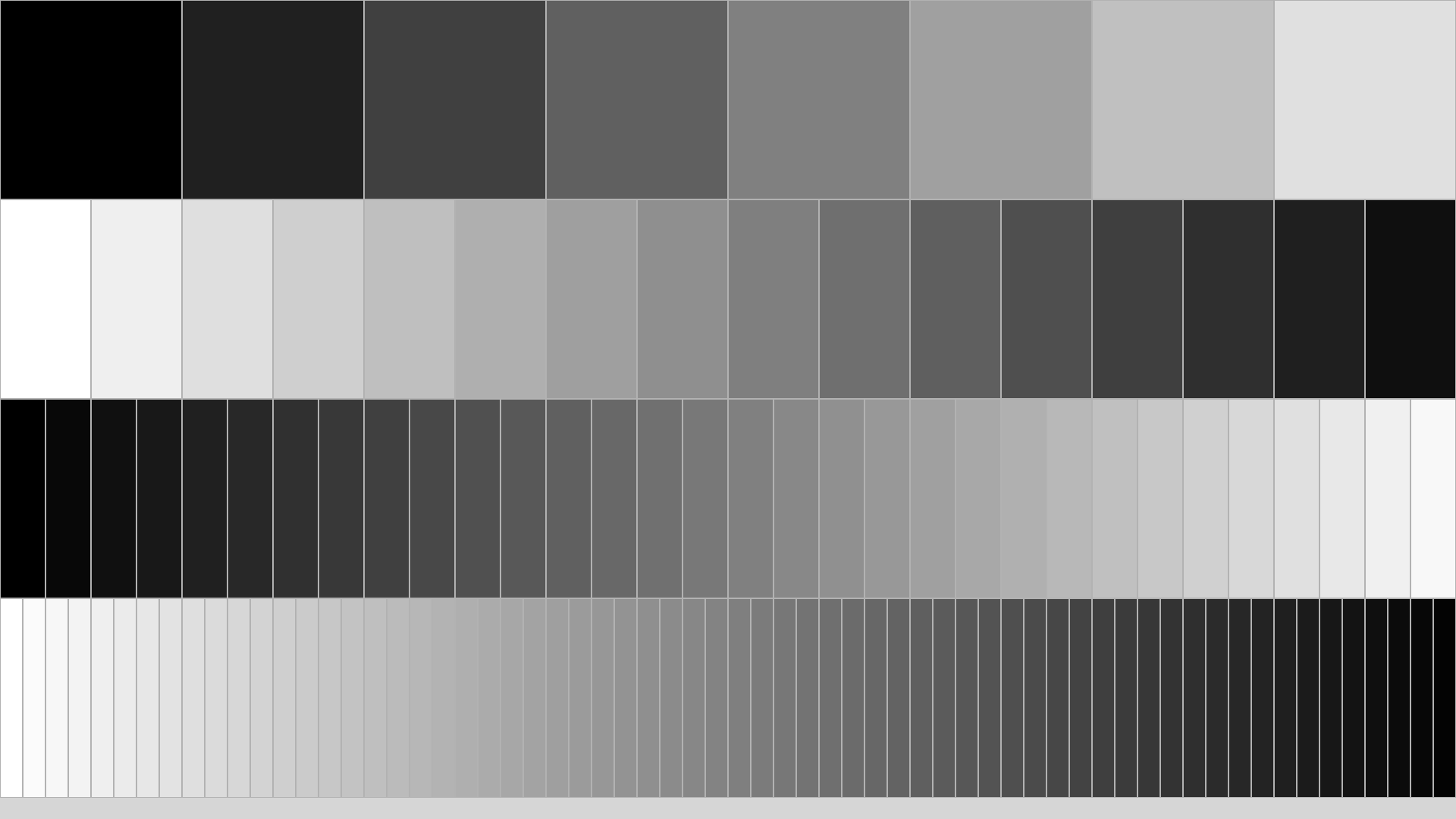
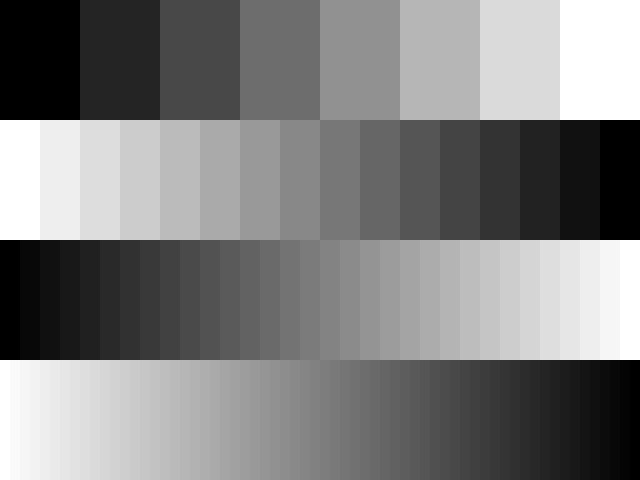
The task is to display a series of vertical greyscale bars (contrast bars) with a sufficient number of bars to span the entire width of the display.
For the top quarter of the display, the left hand bar should be black, and we then incrementally step through six shades of grey until we have a white bar on the right hand side of the display. (This gives a total of 8 bars)
For the second quarter down, we start with white and step down through 14 shades of gray, getting darker until we have black on the right hand side of the display. (This gives a total of 16 bars).
Halfway down the display, we start with black, and produce 32 bars, ending in white, and for the last quarter, we start with white and step through 62 shades of grey, before finally arriving at black in the bottom right hand corner, producing a total of 64 bars for the bottom quarter.
ActionScript
package
{
	import flash.display.Sprite;

	[SWF(width="640", height="480")]
	public class GreyscaleBars extends Sprite
	{

		public function GreyscaleBars()
		{
			_drawRow(8, 0);
			_drawRow(16, stage.stageHeight/4, true);
			_drawRow(32, stage.stageHeight/2);
			_drawRow(64, stage.stageHeight/4 * 3, true);
		}

		private function _drawRow(nbSteps : uint, startingY : uint, reverse : Boolean = false) : void {

			for (var i : int = 0; i < nbSteps; i++) {
				graphics.beginFill(0x00, reverse ? 1 - (i/nbSteps) : (i/nbSteps));
				graphics.drawRect(i * stage.stageWidth / nbSteps, startingY, stage.stageWidth/nbSteps, stage.stageHeight/4);
				graphics.endFill();
			}
		}
	}
}
Ada
with Gtk.Window;   use Gtk.Window;
with Gtk.Enums;
with Gtk.Handlers;
with Gtk.Main;
with Gdk;
with Gdk.Event;
with Glib;         use Glib;
with Cairo;        use Cairo;
with Gdk.Cairo;
pragma Elaborate_All (Gtk.Handlers);

procedure Greyscale is

   Win    : Gtk_Window;
   Width  : constant := 640;
   Height : constant := 512;

   package Handlers is new Gtk.Handlers.Callback (Gtk_Window_Record);
   package Event_Cb is new Gtk.Handlers.Return_Callback (
      Widget_Type => Gtk_Window_Record,
      Return_Type => Boolean);

   procedure Quit (Win : access Gtk_Window_Record'Class) is
      pragma Warnings (Off, Win);
   begin
      Gtk.Main.Main_Quit;
   end Quit;

   function Expose
     (Drawing : access Gtk_Window_Record'Class;
      Event   : Gdk.Event.Gdk_Event)
      return    Boolean
   is
      subtype Dub is Glib.Gdouble;
      Cr       : Cairo_Context;
      Revert   : Boolean;
      Grey     : Dub;
      DH       : constant Dub := Dub (Height) / 4.0;
      X, Y, DW : Dub;
      N        : Natural;

   begin
      Cr := Gdk.Cairo.Create (Get_Window (Drawing));
      for Row in 1 .. 4 loop

         N      := 2 ** (Row + 2);
         Revert := (Row mod 2) = 0;
         DW     := Dub (Width) / Dub (N);
         X      := 0.0;
         Y      := DH * Dub (Row - 1);
         for B in 0 .. (N - 1) loop
            Grey := Dub (B) / Dub (N - 1);
            if Revert then
               Grey := 1.0 - Grey;
            end if;
            Cairo.Set_Source_Rgb (Cr, Grey, Grey, Grey);
            Cairo.Rectangle (Cr, X, Y, DW, DH);
            Cairo.Fill (Cr);
            X := X + DW;
         end loop;
      end loop;
      Cairo.Destroy (Cr);
      return False;
   end Expose;

begin
   Gtk.Main.Set_Locale;
   Gtk.Main.Init;

   Gtk_New (Win);
   Gtk.Window.Initialize (Win, Gtk.Enums.Window_Toplevel);
   Set_Title (Win, "Greyscale with GTKAda");
   Set_Default_Size (Win, Width, Height);
   Set_App_Paintable (Win, True);
   --  Attach handlers
   Handlers.Connect (Win, "destroy", Handlers.To_Marshaller (Quit'Access));
   Event_Cb.Connect
     (Win,
      "expose_event",
      Event_Cb.To_Marshaller (Expose'Access));

   Show_All (Win);

   Gtk.Main.Main;
end Greyscale;
Amazing Hopper
Version: hopper-FLOW!
#include <flow.h>
#include <flow-term.h>

#define  SPACE(_T_,_N_)   REPLICATE( " ", {_T_}DIV-INTO(_N_) )

DEF-MAIN(argv,argc)
   CLR-SCR
   GOSUB( Print Grey Scale )
END

RUTINES

DEF-FUN( Print Grey Scale )
  SET( nrcolors, 8 )
  SET( direction, 1 )
  MSET( quarter, color )
  LOCATE( 0, 0 )
  FOR( LT?( quarter, 4 ), ++quarter )
      SET( height, 0 )
      FOR( LT?( height, 5 ), ++height )
          SET( width, 0 )
          FOR( LT?( width, nrcolors ), ++width )
              LET( color := CEIL( MUL( width, DIV( 255, SUB(nrcolors,1) ) ) ) )
              WHEN( NOT( MOD( direction, 2 ) ) ){
                  LET( color := SUB( 255, color ) )
              }
               PRN( COLOR-RGBB( color, color, color) SPACE( 128, nrcolors ) )
          NEXT
          PRNL("\OFF")
      NEXT
      nrcolors*=2
      ++direction
  NEXT
RET
AutoHotkey
Requires the GDI+ Standard Library by tic: http://www.autohotkey.com/forum/viewtopic.php?t=32238
h	:= A_ScreenHeight
w	:= A_ScreenWidth
pToken	:= gdip_Startup()
hdc	:= CreateCompatibleDC()
hbm	:= CreateDIBSection(w, h)
obm	:= SelectObject(hdc, hbm)
G	:= Gdip_GraphicsFromHDC(hdc)

OnExit, Exit

Gui +E0x80000 +LastFound +OwnDialogs +Owner +AlwaysOnTop
hwnd	:= WinExist()
Gui Show, NA

columnHeight := h/4

Loop 4
{
	columnY		:= (A_Index-1) * columnHeight
	columnCount	:= 2**(A_Index+2)
	colorgap	:= 255 / (columnCount-1)
	columnWidth	:= w/ColumnCount
	If (A_Index & 1)
		colorComp := 0
	else
		colorComp := 255
		,colorgap *= -1
	MsgBox % colorGap * columnCount
	Loop % columnCount
	{
		columnX := (A_Index-1) * columnWidth
		pBrush := Gdip_BrushCreateSolid(QColor(colorComp, colorComp, colorComp))
		Gdip_FillRectangle(G, pBrush, columnX, columnY, columnWidth, columnHeight)
		Gdip_DeleteBrush(pBrush)
		colorComp += colorgap
	}
	SetFormat, IntegerFast, hex
	SetFormat, IntegerFast, D
}

UpdateLayeredWindow(hwnd, hdc, 0, 0, W, H)

SelectObject(hdc, obm)
DeleteObject(hbm)
DeleteDC(hdc)
Gdip_DeleteGraphics(G)
Return

Esc::
Exit:
Gdip_Shutdown(pToken)
ExitApp

QColor(r, g, b){
	return 0xFF000000 | (r << 16) | (g << 8) | (b)
}
AWK
BEGIN {
  nrcolors = 8
  direction = 1

  for (quarter=0; quarter<4; quarter++) {
    for (height=0; height<5; height++) {
      for (width=0; width<nrcolors; width++) {
        # gradient goes white-to-black or black-to-white depending on direction
        if (direction % 2)
          color = width * (255 / (nrcolors-1))
        else
          color = 255 - width * (255 / (nrcolors-1))

        # print (ANSI) RGB greysacle color and amount of spaces
        printf("\033[48;2;%d;%d;%dm%*s", color, color, color, 64 / nrcolors, " ")
      }
      # reset color and print newline
      printf("\033[0m\n")
    }

    # 8, 16, 32, 64 colors and alternating direction of gradient
    nrcolors *= 2
    direction++
  }
}
BASIC
ANSI BASIC
100 SET WINDOW 0,1279,0,1023
110 REM (0,0) is the bottom left of the display
120 SET AREA COLOR 1 ! Select color one for drawing
130 FOR row=1 TO 4
140    LET n=IP(2^(row+2))
150    LET w=IP(1280/n)
160    LET py=IP(256*(4-row))
170    FOR b=0 TO n-1
180       LET g=b/(n-1)
190       IF n=16 OR n=64 THEN LET g=1-g
200       SET COLOR MIX(1) g,g,g    !  Reprogram color 1 to the gray we want
210       PLOT AREA: w*b,py; w*b+w,py; w*b+w,py+256; w*b,py+256
220    NEXT b
230 NEXT row
240 END
BASIC256
h=ceil(graphheight/4)
for row=1 to 4
  w=ceil(graphwidth/(8*row))
  c=255/(8*row-1)
  for n = 0 to (8*row-1)
     color 255-c*n,255-c*n,255-c*n
     if row/2 = int(row/2) then color c*n,c*n,c*n
     rect n*w,h*(row-1),w,h
  next n
next row
BBC BASIC
MODE 8:REM 640 x 512 pixel display mode: BBC BASIC gives 2 graphics points per pixel
REM (0,0) is the bottom left of the display
GCOL 1  :REM Select colour one for drawing
FOR row%=1 TO 4
  n%=2^(row%+2)
  w%=1280/n%
  py%=256*(4-row%)
  FOR b%=0 TO n%-1
    g%=255*b%/(n%-1)
    IF n%=16 OR n%=64 THEN g%=255-g%
    COLOUR 1,g%,g%,g%  : REM Reprogram colour 1 to the grey we want
    RECTANGLE FILL w%*b%,py%,w%,256
  NEXT b%
NEXT row%
C
#include <gtk/gtk.h>
/* do some greyscale plotting */
void gsplot (cairo_t *cr,int x,int y,double s) {
    cairo_set_source_rgb (cr,s,s,s);
    cairo_move_to (cr,x+0.5,y);
    cairo_rel_line_to (cr,0,1);
    cairo_stroke (cr);
}
/* make a shaded widget */
gboolean expose_event (GtkWidget *widget,GdkEventExpose *event,gpointer data) {
    int r,c,x=0;
    cairo_t *cr;
    cr = gdk_cairo_create (widget->window);
    cairo_scale (cr,5,50);
    cairo_set_line_width (cr,1);
    for (r=0;r<4;r++) {
        c = (r&1)*64-(r%2);
        do gsplot (cr,x++%64,r,c/(1<<(3-r))/(8*(1<<r)-1.0));
        while ((c+=2*!(r%2)-1)!=(!(r%2))*64-(r%2));
    } cairo_destroy (cr);
    return FALSE;
}
/* main */
int main (int argc, char *argv[]) {
    GtkWidget *window;
    gtk_init (&argc, &argv);
    window = gtk_window_new (GTK_WINDOW_TOPLEVEL);
    g_signal_connect (window, "expose-event",G_CALLBACK (expose_event), NULL);
    g_signal_connect (window, "delete-event", G_CALLBACK(gtk_main_quit), NULL);
    gtk_window_set_default_size (GTK_WINDOW(window), 320, 200);
    gtk_widget_set_app_paintable (window, TRUE);
    gtk_widget_show_all (window);
    gtk_main ();
    return 0;
}
C#
using System;
using System.Drawing;
using System.Windows.Forms;
static class Program { static void Main() { Application.Run(new FullScreen()); } }
public sealed class FullScreen : Form
{
    const int ColorCount = 256;
    public FullScreen()
    {
        FormBorderStyle = FormBorderStyle.None;
        WindowState = FormWindowState.Maximized;
        KeyPress += (s, e) => Application.Exit();
        BackgroundImage = ColorBars(Screen.FromControl(this).Bounds);
    }
    private static Bitmap ColorBars(Rectangle size)
    {
        var colorBars = new Bitmap(size.Width, size.Height);
        Func<int, int, int> forwardColor = (x, divs) => (int)(x * ((float)divs / size.Width)) * ColorCount / divs;
        Func<int, int, int> reverseColor = (x, divs) => ColorCount - 1 - forwardColor(x, divs);
        Action<int, int, int> setGray = (x, y, gray) => colorBars.SetPixel(x, y, Color.FromArgb(gray, gray, gray));
        Action<int, int, int> setForward = (x, y, divs) => setGray(x, y, forwardColor(x, divs));
        Action<int, int, int> setReverse = (x, y, divs) => setGray(x, y, reverseColor(x, divs));
        int verticalStripe = size.Height / 4;
        for (int x = 0; x < size.Width; x++)
        {
            for (int y = 0; y < verticalStripe; y++) setForward(x, y, 8);
            for (int y = verticalStripe; y < verticalStripe * 2; y++) setReverse(x, y, 16);
            for (int y = verticalStripe * 2; y < verticalStripe * 3; y++) setForward(x, y, 32);
            for (int y = verticalStripe * 3; y < verticalStripe * 4; y++) setReverse(x, y, 64);
        }
        return colorBars;
    }
}
C++
using Qt 4.6
file greytones.h
#ifndef MYWIDGET_H
#define MYWIDGET_H
#include <QWidget>

class QPaintEvent ;

class MyWidget : public QWidget {
public :
   MyWidget( ) ;

protected :
   void paintEvent( QPaintEvent * ) ;
} ;
#endif
file greytones.cpp
#include <QtGui>
#include "greytones.h"

MyWidget::MyWidget( ) {
   setGeometry( 0, 0 , 640 , 480 ) ;
}

void MyWidget::paintEvent ( QPaintEvent * ) {
   QBrush myBrush( Qt::SolidPattern ) ;
   QPainter myPaint( this ) ;
   int run = 0 ; //how often have we run through the loop ?
   int colorcomp = 0 ;
   for ( int columncount = 8 ; columncount < 128 ; columncount *= 2 ) {
      int colorgap = 255 / columncount ;
      int columnwidth = 640 / columncount ; // 640 being the window width
      int columnheight = 480 / 4 ; //we're looking at quarters
      if ( run % 2 == 0 ) { //we start with black columns
	 colorcomp = 0 ;
      }
      else { //we start with white columns
	 colorcomp = 255 ;
	 colorgap *= -1 ; //we keep subtracting color values
      }
      int ystart = 0 + columnheight * run ; //determines the y coordinate of the first column per row
      int xstart = 0 ;
      for ( int i = 0 ; i < columncount ; i++ ) {
	 myBrush.setColor( QColor( colorcomp, colorcomp , colorcomp ) ) ;
	 myPaint.fillRect( xstart , ystart , columnwidth , columnheight , myBrush ) ;
	 xstart += columnwidth ;
	 colorcomp += colorgap ; //we choose the next color
      }
      run++ ;
   }
}
file main.cpp
#include <QApplication>
#include "greytones.h"

int main( int argc, char * argv[ ] ) {
   QApplication app( argc , argv ) ;
   MyWidget window ;
   window.setWindowTitle( QApplication::translate( "greyScales" , "grey scales demonstration" ) ) ;
   window.show( ) ;
   return app.exec( ) ;
}
Component Pascal

MODULE RosettaGreys;
IMPORT Views, Ports, Properties, Controllers, StdLog;

CONST
	(* orient values *)
	left = 1;
	right = 0;

TYPE
	View = POINTER TO RECORD
		(Views.View)
	END;

	PROCEDURE LoadGreyPalette(VAR colors: ARRAY OF Ports.Color);
	VAR
		i, step, hue: INTEGER;
	BEGIN
		step := 255 DIV LEN(colors);
		FOR i := 1 TO LEN(colors) DO
			hue := i * step;
			colors[i - 1] := Ports.RGBColor(hue,hue,hue)
		END
	END LoadGreyPalette;

	PROCEDURE (v: View) Restore(f: Views.Frame; l, t, r, b: INTEGER);
	VAR
		i, w, h: INTEGER;
		colors: POINTER TO ARRAY OF Ports.Color;

		PROCEDURE Draw(row, cols: INTEGER; orient: INTEGER);
		VAR
			w: INTEGER;
			c: Ports.Color;
		BEGIN
			NEW(colors,cols);LoadGreyPalette(colors^);
			w := (r - l) DIV cols;
			FOR i := 1 TO cols DO
				IF orient = left THEN c := colors[cols - i] ELSE c := colors[i - 1] END;
				f.DrawRect((l + w) * (i - 1), t + (row - 1) * h, (l + w) * i, t + row * h,Ports.fill,c);
			END
		END Draw;
	BEGIN
		h := (b - t) DIV 4;
		Draw(1,8,right);
		Draw(2,16,left);
		Draw(3,32,right);
		Draw(4,64,left);
	END Restore;

	PROCEDURE (v: View) HandlePropMsg(VAR msg: Properties.Message);
	CONST
		min = 5 * Ports.mm;
		max = 50 * Ports.mm;
	VAR
		stdProp: Properties.StdProp;
		prop: Properties.Property;
	BEGIN
		WITH msg: Properties.SizePref DO
			IF (msg.w = Views.undefined) OR (msg.h = Views.undefined) THEN
				msg.w := 100 * Ports.mm;
				msg.h := 35 * Ports.mm
			END
		ELSE (* ignore other messages *)
		END
	END HandlePropMsg;

	PROCEDURE Deposit*;
	VAR
		v: View;
	BEGIN
		NEW(v);
		Views.Deposit(v)
	END Deposit;
END RosettaGreys.

 "RosettaGreys.Deposit; StdCmds.Open"
Delphi
Uses Delphi graphic objects to create a subroutine which draws rows of bars according to specificification for number of bars and rows, the row number and the direction of the color graident.
procedure DrawBar(Image: TImage; Bars,Rows,Row: integer; WhiteToBlack: boolean);
{Draw horizontal bar according the following parameters:}
{Bars = number of color bars to fit into the horizontal space}
{Rows = number of rows to fit into the vertical space}
{Row = the row to place the current bar - numbered 0..n, top to bottom}
{WhiteToBlack - if true, bars in the row go from white to back}
var X: integer;
var Color: integer;
var ColorStep: double;
var BarHeight: integer;
var R,R2: TRect;
begin
{Calculate bar dimensions}
BarHeight:=Image.Height div Rows;
R:=Rect(0,0,(Image.Width div Bars)+1, BarHeight);
OffsetRect(R,0,BarHeight * Row);
R2:=R;
{Calculate color parameters}
ColorStep:=255/(Bars-1);
if WhiteToBlack then
	begin
	Color:=255;
	ColorStep:=-ColorStep
	end
else Color:=0;
{Draw bars}
for X:=1 to Bars do
	begin
	{Set color}
	Image.Canvas.Brush.Color:=RGB(Color,Color,Color);
	Image.Canvas.Pen.Color:=RGB(Color,Color,Color);
	{Draw rectangular bar}
	Image.Canvas.Rectangle(R2);
	{Move rectangle and calculate color}
	OffsetRect(R2,R.Right,0);
	Color:=Round(X * ColorStep);
	end;
end;


procedure ShowGrayBars(Image: TImage);
{Draw four bar, with alternating color scheme}
begin
DrawBar(Image,8,4,0,False);
DrawBar(Image,16,4,1,True);
DrawBar(Image,32,4,2,False);
DrawBar(Image,64,4,3,True);
end;
- Output:

EasyLang
n = 8
for row = 0 to 3
   sz = 100 / n
   for i = 0 to n - 1
      c = i / (n - 1)
      if row mod 2 = 1
         c = 1 - c
      .
      color3 c c c
      move sz * i 75 - row * 25
      rect sz + 1 25
      sleep 0.02
   .
   n *= 2
.
Eiffel

feature -- Test routines

	rc_greyscale_bars_test
			-- Greyscale bars/Display
		note
			testing:
				"execution/isolated",
				"execution/serial"
		local
			y: INTEGER
		do
			y := 0
			paint_row (black, y, r1_div_count, r1_width)

			y := y + row_height
			paint_row (white, y, r2_div_count, r2_width)

			y := y + row_height
			paint_row (black, y, r3_div_count, r3_width)

			y := y + row_height
			paint_row (white, y, r4_div_count, r4_width)

			pic.save_to_named_file (create {EV_PNG_FORMAT}, ".\testing\rc_greyscale_bars\eifgreyscale.png")
		end

feature {NONE} -- Test Support

	paint_row (a_init_color: REAL; a_y, r_div, r_width: INTEGER)
			-- `paint_row' with rectangles from `black' to `white' or reverse.
		require
			valid_color: a_init_color = white or else a_init_color = black
			valid_y: (<<0,row_height * 1, row_height * 2, row_height * 3>>).has (a_y)
			valid_div: (<<r1_div_count, r2_div_count, r3_div_count, r4_div_count>>).has (r_div)
			valid_width: (<<r1_width, r2_width, r3_width, r4_width>>).has (r_width)
		local
			color: REAL
			x, dir: INTEGER
		do
			color := a_init_color
			if color = white then dir := down else dir := up end
			⟳ i:1 |..| r_div ¦
				pic.set_foreground_color (create {EV_COLOR}.make_with_rgb (color, color, color))
				pic.fill_rectangle (x, a_y, r_width, row_height)
				color := color + ((1/r_div).truncated_to_real * dir)
				x := x + r_width
			⟲
		end

feature -- Constants

	pic: EV_PIXMAP
		once
			create Result.make_with_size (width, height)
		end

	width: INTEGER = 1024
	height: INTEGER = 768

	row_height: INTEGER once Result := (height / 4).truncated_to_integer end

	r1_width: INTEGER = 128; r1_div_count: INTEGER = 8	--| width of each rectangle; number of rectangles on this row
	r2_width: INTEGER = 64; r2_div_count: INTEGER = 16
	r3_width: INTEGER = 32; r3_div_count: INTEGER = 32
	r4_width: INTEGER = 16; r4_div_count: INTEGER = 64

	black: REAL = 0.0
	white: REAL = 1.0

	down: INTEGER = -1	--| From `white' to `black' or ...
	up: INTEGER = 1		--| From `black' to `white'
Euler Math Toolbox
>function grayscale(y1,y2,n,direction=1) ...
$  loop 0 to n-1;
$  s=#/(n-1); barcolor(rgb(s,s,s));
$  if direction==1 then plotbar(#/n,y1,1/n,y2-y1);
$  else plotbar(1-(#+1)/n,y1,1/n,y2-y1);
$  endif;
$  end;
$endfunction
>function grayscales () ...
$  aspect(2); barstyle("#");
$  window(0,0,1023,1023); margin(0); setplot(0,1,0,1);
$  clg;
$  hold on;
$  grayscale(3/4,1,8,1);
$  grayscale(1/2,3/4,14,-1);
$  grayscale(1/4,1/2,32,1);
$  grayscale(0,1/4,64,-1);
$  hold off;
$endfunction
>grayscales:
FreeBASIC
' version 01-09-2017
'    compile with: fbc -s console
' or compile with: fbc -s gui
' hit any key to stop

Dim As UInteger d, blocks, blocksize, ps, col, h, w, x, y1, y2

ScreenInfo w, h
' create display size window, 8bit color (palette), no frame
ScreenRes w, h, 8,, 8

For x = 0 To 255        ' create grayscale palette for
    Palette x, x, x, x  ' the window we just opened
Next

h = h \ 4 : y2 = h -1

If w Mod 64 <> 0 Then w -= (w Mod 64)
blocks = 8 : blocksize = w \ 8

For ps = 1 To 4
    For x = 0 To blocks -1
        col = 255 * x \ (blocks -1)              ' from black to white
        If (ps And 1) = 0 Then col = 255 - col   ' from white to black
        Line (x * blocksize, y1) - (((x +1) * blocksize) -1, y2), col, bf
    Next
    y1 += h : y2 += h
    blocks *= 2 : blocksize \= 2
Next

' empty keyboard buffer
While Inkey <> "" : Wend

Sleep
End
Frink
fakewidth =!= dummy

g = new graphics
g.antialiased[false]
drawBars[g, 0, 1, 0, 1/4, 8]
drawBars[g, 1, 0, 1/4, 1/2, 16]
drawBars[g, 0, 1, 1/2, 3/4, 32]
drawBars[g, 1, 0, 3/4, 1, 64]
g.show[640,480,1]  // No portable fullscreen mode; user must maximize window.

drawBars[g is graphics, leftColor, rightColor, top, bottom, steps] :=
{
   colorStep = (rightColor - leftColor) / steps
   color = leftColor
   for i=0 to steps-1
   {
      g.color[color, color, color]
      g.fillRectSides[i/dummy/steps, top, (i+1)/dummy/steps, bottom]
      color = color + colorStep
   }
}
FutureBasic

_window = 1

void local fn BuildGrayBarWindow
  NSInteger i
  float     gray

  CGRect r = fn CGRectMake( 0, 0, 640, 400 )
  window _window, @"Gray Scale Window", r
  WindowSetBackgroundColor( _window, fn ColorBlack )

  gray = 0.0
  r = fn CGrectMake( 0, 300, 80, 100 )
  for i = 1 to 8
    textfield i, YES,,r,_window
    TextFieldSetEditable( i, NO )
    TextFieldSetBackgroundColor( i, fn ColorWithRGB( gray, gray, gray, 1.0 )  )
    r = fn CGRectOffset( r, 80, 0 )
    gray += 0.142857142857143 // 1/7
  next

  gray = 1.0
  r = fn CGrectMake( 0, 200, 40, 100 )
  for i = 11 to 26
    textfield i, YES,,r,_window
    TextFieldSetEditable( i, NO )
    TextFieldSetBackgroundColor( i, fn ColorWithRGB( gray, gray, gray, 1.0 ) )
    r = fn CGRectOffset( r, 40, 0 )
    gray -= 0.066666666666667  // 1/5
  next

  gray = 0.0
  r = fn CGrectMake( 0, 100, 20, 100 )
  for i = 31 to 62
    textfield i, YES,,r,_window
    TextFieldSetEditable( i, NO )
    TextFieldSetBackgroundColor( i, fn ColorWithRGB( gray, gray, gray, 1.0 ) )
    r = fn CGRectOffset( r, 20, 0 )
    gray += 0.032258064516129  // 1/31
  next

  gray = 1.0
  r = fn CGrectMake( 0, 0, 10, 100 )
  for i = 101 to 164
    textfield i, YES,,r,_window
    TextFieldSetEditable( i, NO )
    TextFieldSetBackgroundColor( i, fn ColorWithRGB( gray, gray, gray, 1.0 ) )
    r = fn CGRectOffset( r, 10, 0 )
    gray -= 0.015873015873016  // 1/63
  next
end fn

fn BuildGrayBarWindow

HandleEvents- Output:
[See accompanying screenshot.]
And here's another clever and shorter solution:
void local fn BuildWindow
  CGRect  r = {0,0,640,400}
  long    i, j, bars = 8
  CGFloat gray, delta, y = 0.0, w = 80

  window 1, @"Grayscale Bars", r

  pen -1
  for j = 1 to 4
    delta = 1.0/(bars-1)
    if ( j mod 2 ) then gray = 0.0 else gray = 1.0 : delta = -delta
    r = fn CGRectMake( 0, y, w, 100 )
    for i = 1 to bars
      rect fill r, fn ColorWithWhite( gray, 1.0 )
      r.origin.x += w
      gray += delta
    next
    bars = bars << 1
    y += 100 : w = w/2
  next
end fn

fn BuildWindow

HandleEvents
Gambas
Public Sub Form_Open()
Dim iRow, iCol, iClr As Integer                                     'For Row, Column and Colour
Dim iInc As Integer = 4                                             'To calculate RGB colour
Dim h1Panel As Panel                                                'Panels to display colours

With Me                                                             'Setup the Form
  .Arrangement = Arrange.Row                                        'Arrange children in rows
  .Border = False                                                   'No Border
  .Height = Desktop.Height                                          'Fill the screen
  .Width = Desktop.Width                                            'Fill the screen
  .Fullscreen = True                                                'Set the Form to Fullscreen
End With

For iRow = 1 To 4                                                   'For each row..
  iInc += iInc                                                      'Increase iInc by itself
  For iCol = 0 To iInc - 1                                          'For each column..
    iClr = iCol * (256 / iInc)                                      'Set the RGB colour
    If iRow = 2 Or iRow = 4 Then iClr = 255 - (iCol * (256 / iInc)) 'If row 2 or 4 then reverse the colours
    h1Panel = New Panel(Me)                                         'Create a new Panel
    With h1Panel                                                    'With the Panel..
      .Width = Desktop.Width / iInc                                 'Set the width
      .Height = Desktop.Height / 4                                  'Set the height
      .Background = Color.RGB(iClr, iClr, iClr)                     'Set the Background colour
      .Border = Border.Plain                                        'Set a Border (It's easier to see the colour changes)
    End With
  Next
Next

End
Click here for image of the output
Go
package main

import (
    "github.com/fogleman/gg"
    "math"
)

func greyBars(dc *gg.Context) {
    run := 0
    colorComp := 0.0 // component of the color
    for colCount := 8; colCount < 128; colCount *= 2 {
        // by this gap we change the background color
        colorGap := 255.0 / float64(colCount-1)
        colWidth := float64(dc.Width() / colCount)
        colHeight := float64(dc.Height() / 4)
        // switches color directions with each iteration of for loop
        if run%2 == 0 {
            colorComp = 0.0
        } else {
            colorComp = 255.0
            colorGap = -colorGap
        }
        xstart, ystart := 0.0, colHeight*float64(run)
        for i := 0; i < colCount; i++ {
            icolor := int(math.Round(colorComp)) // round to nearer integer
            dc.SetRGB255(icolor, icolor, icolor)
            dc.DrawRectangle(xstart, ystart, colWidth, colHeight)
            dc.Fill()
            xstart += colWidth
            colorComp += colorGap
        }
        run++
    }
}

func main() {
    dc := gg.NewContext(640, 320)
    greyBars(dc)
    dc.SavePNG("greybars.png")
}
- Output:
Image similar to R entry (first image)
Haskell
This program uses an inlined XPM file which is scaled to fill an entire GTK fullscreen window
import Graphics.UI.Gtk
import Graphics.UI.Gtk.Gdk.GC
import Control.Monad.Trans (liftIO)

-- click on the window to exit.

main = do
    initGUI

    window <- windowNew

    buf <- pixbufNewFromXPMData bars

    widgetAddEvents window [ButtonPressMask]
    on window objectDestroy mainQuit
    on window exposeEvent (paint buf)
    on window buttonPressEvent $
        liftIO $ do { widgetDestroy window; return True }

    windowFullscreen window
    widgetShowAll window

    mainGUI

paint :: Pixbuf -> EventM EExpose Bool
paint buf = do
    pix <- eventWindow
    liftIO $ do
        (sx, sy) <- drawableGetSize pix
        newBuf <- pixbufScaleSimple buf sx sy InterpNearest
        gc <- gcNewWithValues pix newGCValues
        drawPixbuf pix gc newBuf 0 0 0 0 (-1) (-1) RgbDitherNone 0 0
        return True

bars :: [String]
bars = [
    "64 4 65 1 1 1","  c None","A c #000000",
    "C c #080808","D c #0C0C0C","E c #101010","F c #141414",
    "G c #181818","H c #1C1C1C","I c #202020","J c #242424",
    "K c #282828","L c #2C2C2C","M c #303030","N c #343434",
    "O c #383838","P c #3C3C3C","Q c #404040","R c #444444",
    "S c #484848","T c #4C4C4C","U c #505050","V c #545454",
    "W c #585858","X c #5C5C5C","Y c #606060","Z c #646464",
    "a c #686868","b c #6C6C6C","c c #707070","d c #747474",
    "e c #787878","f c #7C7C7C","g c #808080","h c #848484",
    "i c #888888","j c #8C8C8C","k c #909090","l c #949494",
    "m c #989898","n c #9C9C9C","o c #A0A0A0","p c #A4A4A4",
    "q c #A8A8A8","r c #ACACAC","s c #B0B0B0","t c #B4B4B4",
    "u c #B8B8B8","v c #BCBCBC","w c #C0C0C0","x c #C4C4C4",
    "y c #C8C8C8","z c #CCCCCC","0 c #D0D0D0","1 c #D4D4D4",
    "2 c #D8D8D8","3 c #DCDCDC","4 c #E0E0E0","5 c #E4E4E4",
    "6 c #E8E8E8","7 c #ECECEC","8 c #F0F0F0","9 c #F4F4F4",
    ". c #F8F8F8","+ c #FCFCFC","* c #FFFFFF",
    "AAAAAAAAJJJJJJJJRRRRRRRRZZZZZZZZhhhhhhhhppppppppxxxxxxxx********",
    "****88881111xxxxttttppppllllhhhhddddZZZZVVVVRRRRNNNNJJJJFFFFAAAA",
    "AADDFFHHJJLLNNPPRRTTVVXXZZbbddffhhjjllnnpprrttvvxxzz11336688..**",
    "*+.9876543210zyxwvutsrqponmlkjihgfedcbaZYXWVUTSRQPONMLKJIHGFEDCA"
     ]
Icon and Unicon
This procedure uses code from the Colour bars/Display task, specifically the: DrawTestCard procedure and testcard, band, and bar records which are used to build structures that can be easily transcribed into independent bands and bars.

graphics.icn supports graphics printf.icn provides sprintf, etc. numbers.icn provides round
J
Solution:
   load 'viewmat'
   NB. size=. 2{.".wd'qm' NB. J6
   NB. size=. getscreenwh_jgtk_ '' NB. J7
   size=. 2 3{_".wd'qscreen' NB. J9
   rows=. (2^3+i.4),._1^i.4
   bars=. ((64%{.)#[:(<:@|%~i.)*/)"1 rows
   togreyscale=. (256#. [:<.255 255 255&*)"0
   'rgb' viewmat (4<.@%~{:size)# (64<.@%~{.size)#"1 togreyscale bars
   wd 'pmove 0 _30 ',":size [ wd 'psel ',1{::,hforms_jviewmat_'' NB. J9
Note that hardware changes over the years have left their mark on interface protocols, which shows up here as language changes.
Java
using basically the same code as in the C++ example
import javax.swing.* ;
import java.awt.* ;

public class Greybars extends JFrame {
   private int width ;
   private int height ;

   public Greybars( )  {
      super( "grey bars example!" ) ;
      width = 640 ;
      height = 320 ;
      setSize( width , height ) ;
      setDefaultCloseOperation( JFrame.EXIT_ON_CLOSE ) ;
      setVisible( true ) ;
    }

    public void paint ( Graphics g ) {
      int run = 0 ;
      double colorcomp = 0.0 ; //component of the color
      for ( int columncount = 8 ; columncount < 128 ; columncount *= 2 ) {
	 double colorgap = 255.0 / (columncount - 1) ; //by this gap we change the background color
	 int columnwidth = width / columncount ;
	 int columnheight = height / 4 ;
	 if ( run % 2 == 0 ) //switches color directions with every for loop
	    colorcomp = 0.0 ;
	 else {
	    colorcomp = 255.0 ;
	    colorgap *= -1.0 ;
	 }
	 int ystart = 0 + columnheight * run ;
	 int xstart = 0 ;
	 for ( int i = 0 ; i < columncount ; i++ ) {
            int icolor = (int)Math.round(colorcomp) ; //round to nearer integer
	    Color nextColor = new Color( icolor , icolor, icolor ) ;
	    g.setColor( nextColor ) ;
	    g.fillRect( xstart , ystart , columnwidth , columnheight ) ;
	    xstart += columnwidth ;
	    colorcomp += colorgap ;
	 }
	 run++ ;
      }
    }

    public static void main( String[ ] args ) {
       Greybars gb = new Greybars( ) ;
    }
}
JavaScript
Live Demo: http://jsfiddle.net/gcN9g/embedded/result/
<html><body>
<script type="text/javascript">
var width = 640; var height = 400;
var c = document.createElement("canvas");
c.setAttribute('id',    'myCanvas');
c.setAttribute('style', 'border:1px solid black;');
c.setAttribute('width',  width);
c.setAttribute('height', height);
document.body.appendChild(c);
var ctx = document.getElementById('myCanvas').getContext("2d");

var columnCount = 8;    // number of columns
var rowCount    = 4;    // number of rows
var direction   = 1;    // 1 = from left to right, 0 = from right to left
var blackLeft   = 1;    // black is left: 1 = true, 0 = false
for(var j = 0; j < rowCount; j++){
    for(var i = 0; i < columnCount; i++){
        ctx.fillStyle = 'rgba(0,0,0,'+ (blackLeft-(1/(columnCount-1)*i))*direction +')';
        ctx.fillRect(
            (width/columnCount)*i,(height/rowCount)*j,
            (width/columnCount),(height/rowCount)
            );
        }
    columnCount *= 2;
    direction *= -1;
    blackLeft = blackLeft ? 0 : 1;
    }
</script>
</body></html>
Julia
using Gtk, Cairo, ColorTypes

function generategrays(n, screenwidth)
    verts = Vector{RGB}()
    hwidth = Int(ceil(screenwidth/n))
    for x in 00:Int(floor(0xff/(n-1))):0xff
        rgbgray = RGB(x/255, x/255, x/255)
        for i in 1:hwidth
            push!(verts, rgbgray)
        end
    end
    verts
end

function drawline(ctx, p1, p2, color, width)
    move_to(ctx, p1.x, p1.y)
    set_source(ctx, color)
    line_to(ctx, p2.x, p2.y)
    set_line_width(ctx, width)
    stroke(ctx)
end

const can = @GtkCanvas()
const win = GtkWindow(can, "Grayscale bars/Display", 400, 400)
fullscreen(win)  # start full screen, then reduce to regular window in 5 seconds.

draw(can) do widget
    ctx = getgc(can)
    h = height(can)
    w = width(can)
    gpoints = generategrays(8, w)
    for (i, x) in enumerate(0:w-1)
        drawline(ctx, Point(x, 0.25*h), Point(x, 0), gpoints[i], 1)
    end
    gpoints = reverse(generategrays(16, w))
    for (i, x) in enumerate(0:w-1)
        drawline(ctx, Point(x, 0.5*h), Point(x, 0.25*h), gpoints[i], 1)
    end
    gpoints = generategrays(32, w)
    for (i, x) in enumerate(0:w-1)
        drawline(ctx, Point(x, 0.75*h), Point(x, 0.5*h), gpoints[i], 1)
    end
    gpoints = reverse(generategrays(64, w))
    for (i, x) in enumerate(0:w-1)
        drawline(ctx, Point(x, h), Point(x, 0.75*h), gpoints[i], 1)
    end
end

show(can)
sleep(5)
unfullscreen(win)
const cond = Condition()
endit(w) = notify(cond)
signal_connect(endit, win, :destroy)
wait(cond)
Kotlin
// version 1.1

import java.awt.Color
import java.awt.Graphics
import javax.swing.JFrame

class GreyBars : JFrame("grey bars example!") {
    private val w: Int
    private val h: Int

    init {
        w = 640
        h = 320
        setSize(w, h)
        defaultCloseOperation = JFrame.EXIT_ON_CLOSE
        isVisible = true
    }

    override fun paint(g: Graphics) {
        var run = 0
        var colorComp: Double  // component of the color
        var columnCount = 8
        while (columnCount < 128) {
            var colorGap = 255.0 / (columnCount - 1) // by this gap we change the background color
            val columnWidth = w / columnCount
            val columnHeight = h / 4
            if (run % 2 == 0)  // switches color directions with each iteration of while loop
                colorComp = 0.0
            else {
                colorComp = 255.0
                colorGap *= -1.0
            }
            val ystart = columnHeight * run
            var xstart = 0
            for (i in 0 until columnCount) {
                val iColor = Math.round(colorComp).toInt()
                val nextColor = Color(iColor, iColor, iColor)
                g.color = nextColor
                g.fillRect(xstart, ystart, columnWidth, columnHeight)
                xstart += columnWidth
	        colorComp += colorGap
	    }
            run++
            columnCount *= 2
        }
    }
}

fun main(args: Array<String>) {
    GreyBars()
}
Liberty BASIC
Black boxes were added around each color for ease of counting the boxes.
nomainwin

WindowWidth  =DisplayWidth
WindowHeight =DisplayHeight

open "Grey bars" for graphics_fs_nsb as #w

#w "trapclose [quit]"
#w "down"

bars             =4 '   alter for more, finer bars.

for group =0 to bars -1
    for i = 0 to 2^( 3 +group) -1
        #w "place "; WindowWidth *i /( 2^( 3 +group)); " "; WindowHeight *group /bars
        if ( group =0) or ( group =2) then
            g$ =str$( int( 255 *i /(2^( 3 +group)-1)))
        else
            g$ =str$( 255 -int( 255 *i /(2^( 3 +group)-1)))
        end if
        grey$ =g$ +" " +g$ +" " +g$
        #w "backcolor "; grey$
        '#w "color ";     grey$ 'rem out for outlined areas..
        #w "boxfilled "; WindowWidth *( i +1) /8 ; " "; WindowHeight *( group +1) /bars
    next i
next group

wait
[quit]
close #w
end
Resulting GreyScale image without the outlines.

Lua
local nw = require("nw")
local app = nw:app()
local cw, ch = 320, 240
local win = app:window(cw, ch, "Grayscale Bars", false)
function win:repaint()
  local cr = win:bitmap():cairo()
  local ystride = ch/4
  for y = 0, 3 do
    local i, n = 1, 2^(y+3)
    local xstride = cw/n
    for x = 0, n-1 do
      cr:rectangle(x*xstride, y*ystride, xstride, ystride)
      local gray = x / (n-1)
      if y%2>0 then gray=1-gray end
      cr:rgb(gray, gray, gray)
      cr:fill()
    end
  end
end
win:show()
app:run()
Mathematica / Wolfram Language
CreateDocument[ Graphics[ Flatten@Table[
{ If[EvenQ[#3], GrayLevel[ 1. - j/#1 ], GrayLevel[ j/#1 ]],
   Rectangle[{j #2, 7*#3}, {#2 (j + 1), (#3 + 1) 7}]}, {j, 0, #1}] & @@@
   {{7, 8, 3}, {15, 4, 2}, {31, 2, 1}, {63, 1, 0} }
,ImageSize -> Full], WindowFrame -> "Frameless", WindowSize -> Full]

MAXScript
3ds max provides customizable maps like gradient to the user, but you can also write it:
fn drawBarRow _bmp _row _width _number _inverse=
(
	local dir = if _inverse then 1 else -1
		if not _inverse then
		(
			setpixels _bmp [0,_row] (for i in 1 to (_width/_number) collect (black))
			for i = (_width/_number) to _width by (_width/_number) do
			(
				local loopPosition = i/(_width-(_width/_number)) as float
				local colorsArr = for c in 1 to (_width/_number) collect (white*loopPosition)
				setpixels _bmp [i,_row] colorsArr
			)
			return _bmp
		)
		else
		(
			setpixels _bmp [0,_row] (for i in 1 to (_width/_number) collect (white))
			for i = _width to (_width/_number) by ((_width/_number)*-1) do
			(
				local loopPosition = 1.0-(i/(_width-(_width/_number))) as float
				local colorsArr = for c in 1 to (_width/_number) collect (white*loopPosition)
				setpixels _bmp [i,_row] colorsArr
			)
			return _bmp
		)

)

fn bitmap_verticalBars =
(
	local width = (sysinfo.desktopsize).x
	local height = (sysinfo.desktopsize).y
	local theBitmap = bitmap width height color:white

	local row = 0
	while row <= (height-1) do
	(
		local barNumber = 0
		case of
		(
			(row < (height/4)): (barNumber = 1)
			(row >= (height/4) and row < (height/2)): (barNumber = 2)
			(row >= (height/2) and row < (height-(height/4))): (barNumber = 3)
			(row >= (height-(height/4))): (barNumber = 4)
			default: return theBitmap
		)
		case barNumber of
		(
			1: (
					theBitmap = drawBarRow theBitmap row width 8 false
				)
			2: (
					theBitmap = drawBarRow theBitmap row width 16 true
				)
			3: (
					theBitmap = drawBarRow theBitmap row width 32 false
				)
			4: (
					theBitmap = drawBarRow theBitmap row width 64 true
				)
		)
		row += 1
		--
	)
	return theBitmap
)

b = bitmap_verticalBars()
display b
Nim
import gintro/[glib, gobject, gtk, gio, cairo]

const
  Width = 640
  Height = 480

#---------------------------------------------------------------------------------------------------

proc draw(area: DrawingArea; context: Context) =
  ## Draw the greyscale bars.

  const
    Black = 0.0
    White = 1.0

  var y = 0.0
  var nrect = 8
  let rectHeight = Height / 4

  # Draw quarters.
  for quarter in 0..3:
    let rectWidth = Width / nrect
    var x = 0.0
    var (grey, incr) = if (quarter and 1) == 0: (Black, 1 / nrect) else: (White, -1 / nrect)

    # Draw rectangles.
    for _ in 1..nrect:
      context.rectangle(x, y, rectWidth, rectHeight)
      context.setSource([grey, grey, grey])
      context.fill()
      x += rectWidth
      grey += incr

    y += rectHeight
    nrect *= 2

#---------------------------------------------------------------------------------------------------

proc onDraw(area: DrawingArea; context: Context; data: pointer): bool =
  ## Callback to draw/redraw the drawing area contents.

  area.draw(context)
  result = true

#---------------------------------------------------------------------------------------------------

proc activate(app: Application) =
  ## Activate the application.

  let window = app.newApplicationWindow()
  window.setSizeRequest(Width, Height)
  window.setTitle("Greyscale bars")

  # Create the drawing area.
  let area = newDrawingArea()
  window.add(area)

  # Connect the "draw" event to the callback to draw the spiral.
  discard area.connect("draw", ondraw, pointer(nil))

  window.showAll()

#———————————————————————————————————————————————————————————————————————————————————————————————————

let app = newApplication(Application, "Rosetta.GreyscaleBars")
discard app.connect("activate", activate)
discard app.run()
OCaml
open Graphics

let round x = truncate (floor (x +. 0.5))

let () =
  open_graph "";
  let width = size_x ()
  and height = size_y () in
  let bars = [| 8; 16; 32; 64 |] in
  let n = Array.length bars in
  Array.iteri (fun i bar ->
    let part = float width /. float bar in
    let y = (height / n) * (n - i - 1) in
    for j = 0 to pred bar do
      let x = round (float j *. part) in
      let v = round (float j *. 255. /. float (bar - 1)) in
      let v = if (i mod 2) = 0 then v else 255 - v in
      set_color (rgb v v v);
      fill_rect x y (round part) (height / n)
    done
  ) bars;
  ignore(read_key())
Run with:
$ ocaml graphics.cma greyscale_bars.ml
Perl
sub partition {
    my($all, $div) = @_;
    my @marks = 0;
    push @marks, $_/$div * $all for 1..$div;
    my @copy = @marks;
    $marks[$_] -= $copy[$_-1] for 1..$#marks;
    @marks[1..$#marks];
}

sub bars {
    my($h,$w,$p,$rev) = @_;
    my (@nums,@vals,$line,$d);

    $d  = 2**$p;
    push @nums, int $_/($d-1) * (2**16-1) for $rev ? reverse 0..$d-1 : 0..$d-1;
    push @vals, ($nums[$_]) x (partition($w, $d))[$_] for 0..$#nums;
    $line = join(' ', @vals) . "\n";
    $line x $h;
}

my($w,$h) = (1280,768);
open my $pgm, '>', 'Greyscale-bars-perl5.pgm' or die "Can't create Greyscale-bars-perl5.pgm: $!";

print $pgm <<"EOH";
P2
# Greyscale-bars-perl5.pgm
$w $h
65535
EOH

my ($h1,$h2,$h3,$h4) = partition($h,4);

print $pgm
    bars($h1,$w,3,0),
    bars($h2,$w,4,1),
    bars($h3,$w,5,0),
    bars($h4,$w,6,1);
See Greyscale-bars-perl5 (offsite image)

Phix
Resizeable. Use of nx avoids rounding/misalignment errors
You can run this online here.
--
-- demo\rosetta\Greyscale_bars.exw
-- ===============================
--
with javascript_semantics
include pGUI.e

Ihandle dlg, canvas
cdCanvas cddbuffer, cdcanvas

integer quit = 1
bool refire = false

function redraw_cb(Ihandle /*ih*/, integer /*posx*/, /*posy*/)
    cdCanvasActivate(cddbuffer)
    integer {width, height} = IupGetIntInt(canvas, "DRAWSIZE")
    integer h = floor(height/4)
    height -= 1
    for row=1 to 4 do
        integer x = 0, p2 = power(2,row+2), c = floor(255/(p2-1))
        for n=0 to p2-1 do
            integer colour = c*n*#010101
            if and_bits(row,1)=0 then colour = xor_bits(colour,#FFFFFF) end if
            cdCanvasSetForeground(cddbuffer, colour)
            integer nx = ceil(width*(n+1)/p2)
            cdCanvasBox(cddbuffer, x, nx-1, (4-row)*h, height)
            x = nx
        end for
        height = (4-row)*h-1
    end for
    cdCanvasFlush(cddbuffer)
    return IUP_DEFAULT
end function

function map_cb(Ihandle ih)
    cdcanvas = cdCreateCanvas(CD_IUP, ih)
    cddbuffer = cdCreateCanvas(CD_DBUFFER, cdcanvas)
    return IUP_DEFAULT
end function

function unmap_cb(Ihandle /*ih*/)
    cdKillCanvas(cddbuffer)
    cdKillCanvas(cdcanvas)
    return IUP_DEFAULT
end function

procedure main()
    IupOpen()
    canvas = IupCanvas("RASTERSIZE=600x400")
    IupSetCallbacks(canvas, {"MAP_CB", Icallback("map_cb"),
                             "UNMAP_CB", Icallback("unmap_cb"),
                             "ACTION", Icallback("redraw_cb")})
    dlg = IupDialog(canvas, `TITLE="Greyscale bars"`)
    IupShow(dlg)
    IupSetAttribute(canvas, "RASTERSIZE", NULL)
    if platform()!=JS then
        IupMainLoop()
        IupClose()
    end if
end procedure

main()
PicoLisp
(let Pgm  # Create PGM of 384 x 288 pixels
   (make
      (for N 4
         (let L
            (make
               (for I (* N 8)
                  (let C (*/ (dec I) 255 (dec (* N 8)))
                     (unless (bit? 1 N)
                        (setq C (- 255 C)) )
                     (do (/ 48 N) (link C)) ) ) )
            (do 72 (link L)) ) ) )
   (out '(display)  # Pipe to ImageMagick
      (prinl "P5")  # NetPBM format
      (prinl (length (car Pgm)) " " (length Pgm))
      (prinl 255)
      (for Y Pgm (apply wr Y)) ) )
Plain English
To run:
Start up.
Clear the screen.
Imagine a box with the screen's left and the screen's top and the screen's right and the screen's bottom divided by 4.
Make a gradient with the box and 8 and "left-to-right".
Draw the gradient.
Draw the next gradient given the gradient.
Draw the next gradient given the gradient.
Draw the next gradient given the gradient.
Refresh the screen.
Wait for the escape key.
Shut down.

A gradient is a record with
A box,
A partitions number,
And a direction string. \"left-to-right" or "right-to-left"

To make a gradient with a box and a number and a string:
Put the box into the gradient's box.
Put the number into the gradient's partitions.
Put the string into the gradient's direction.

To draw a gradient:
Put the white color into a color.
Put 1000 [the maximum lightness] divided by the gradient's partitions into an amount.
If the gradient's direction is "left-to-right", put the black color into the color.
Put the gradient's box into a box.
Put the gradient's box's width divided by the gradient's partitions into a width number.
Put the width plus the box's left into the box's right.
Loop.
If a counter is past the gradient's partitions, exit.
Draw and fill the box with the color.
Move the box right the width.
If the gradient's direction is "left-to-right", lighten the color by the amount; repeat.
Darken the color by the amount.
Repeat.

To draw the next gradient given a gradient:
Move the gradient's box down the gradient's box's height.
Double the gradient's partitions.
If the gradient's direction is "left-to-right", set a flag.
If the flag is set, put "right-to-left" into the gradient's direction.
If the flag is not set, put "left-to-right" into the gradient's direction.
Draw the gradient.
Processing
//Aamrun, 3rd July 2022

void drawPanel(int startColour,int endColour,int bars,int startY){
  int rectWidth = width / bars,rectHeight = height / 4, startX = 0,increment;

  increment = (endColour - startColour)/(bars-1);

  for(int i = 0;i < bars;i++){
    fill(startColour + i*increment);
    rect(startX + i*rectWidth,startY,rectWidth,rectHeight);
  }
}

void setup(){
  size(1280,960);

  drawPanel(0,255,8,0);
  drawPanel(255,0,16,height/4);
  drawPanel(0,255,32,height/2);
  drawPanel(255,0,64,3*height/4);
}
PureBasic
EnableExplicit

Macro Check(Function)
  If Not Function : End : EndIf
EndMacro

Check(InitKeyboard())    ; Cannot initialize keyboard
Check(InitSprite())      ; Cannot initialize sprite/screen library
Check(ExamineDesktops()) ; Cannot retrieve informations about desktops

Define.i iHeight, iWidth, iDepth
iHeight = DesktopHeight(0)
iWidth  = DesktopWidth(0)
iDepth  = DesktopDepth(0)

If OpenScreen(iWidth, iHeight, iDepth, "Press ENTER to exit")
  Define.i bMode.b, iLines, fLine.f, iRow, iSpans, fSpan.f,
           fColor.f, iTop, iWide, iHigh, iCol, iShade
  If StartDrawing(ScreenOutput())

    bMode  = #True ; Pow = #True; Add = #False
    iLines = 4     ; Number of Lines

    If   iLines < 1  : iLines = 1  : EndIf ; Pow/Add-Min
    If bMode
      If iLines > 6  : iLines = 6  : EndIf ; Pow-Max
    Else
      If iLines > 32 : iLines = 32 : EndIf ; Add-Max
    EndIf
    fLine  = iHeight / iLines
    iLines - 1

    For iRow = 0 To iLines
      If bMode
        iSpans = Pow(2, iRow + 3) - 1 ; Pow: 8, 16, 32, 64, 128, 256
      Else
        iSpans = (iRow + 1) * 8 - 1   ; Add: 8, 16, 24, 32, 40, 48, ...
      EndIf
      fSpan  = iWidth / (iSpans + 1)
      fColor = 255 / iSpans
      iTop   = Round(iRow * fLine, #PB_Round_Up)
      iWide  = Round(fSpan, #PB_Round_Up)
      iHigh  = Round(fLine, #PB_Round_Up)
      For iCol = 0 To iSpans
        iShade = Round(fColor * iCol, #PB_Round_Nearest)
        If iRow % 2 <> 0 : iShade = 255 - iShade : EndIf ; Alternation
        Box(Round(iCol * fSpan, #PB_Round_Up), iTop, iWide, iHigh,
            RGB(iShade, iShade, iShade))
      Next
    Next

    StopDrawing()
    FlipBuffers()

    Repeat
      Delay(30)
      ExamineKeyboard()
    Until KeyboardPushed(#PB_Key_Escape) Or
          KeyboardPushed(#PB_Key_Return)
  EndIf
  CloseScreen()
EndIf
End
Press Enter or Escape to exit the programs's display.
Python
#!/usr/bin/env python
#four gray scaled stripes 8:16:32:64 in Python 2.7.1

from livewires import *

horiz=640; vert=480; pruh=vert/4; dpp=255.0
begin_graphics(width=horiz,height=vert,title="Gray stripes",background=Colour.black)

def ty_pruhy(each):
	hiy=each[0]*pruh; loy=hiy-pruh
	krok=horiz/each[1]; piecol=255.0/(each[1]-1)
	for x in xrange(0,each[1]):
		barva=Colour(piecol*x/dpp,piecol*x/dpp,piecol*x/dpp ); set_colour(barva)
		if each[2]:
			box(x*krok,hiy,x*krok+krok,loy,filled=1)
		else:
			box(horiz-x*krok,hiy,horiz-((x+1)*krok),loy,filled=1)

# main
source=[[4,8,True],[3,16,False],[2,32,True],[1,64,False]]
for each in source:
	ty_pruhy(each)

while keys_pressed() != [' ']: # press spacebar to close window
	pass
Quackery
  [ $ "turtleduck.qky" loadfile ] now!

  [ 1280 1 ]                  is width          (     --> s )
  [ 720 1 ]                   is height         (     --> s )

  [ dip [ 1 - dup ]
    255 * swap /
    1 swap
    3 of dup colour fill
      [ 2 times
        [ width 2over v/ walk
          -1 4 turn
          height 4 1 v/ walk
          -1 4 turn ]
        2drop ] ]             is bar            ( n n -->   )

  [ 1 over times
      [ over i bar
        width 2over v/ fly ]
    2drop ]                   is line           (   n -->   )

  [ turtle
    10 frames
    width 2 1 v/ fly
    1 4 turn
    height 2 1 v/ fly
    1 2 turn
    height fly
    -1 4 turn
    ' [ 8 16 32 64 ]
    2 times
      [ behead line
        1 4 turn
        height -2 1 v/ fly
        1 4 turn
        behead line
        1 2 turn ]
    drop
    1 frames ]                is greyscale-bars (     -->   )

greyscale-bars- Output:

R
Create a 4x64 matrix representing the described pattern, set margins to 0 so the image will fill the display, and plot the matrix in grayscale using the "image" function:
mat <- matrix(c(rep(1:8, each = 8) / 8,
                rep(16:1, each = 4) / 16,
                rep(1:32, each = 2) / 32,
                rep(64:1, each = 1) / 64),
              nrow = 4, byrow = TRUE)
par(mar = rep(0, 4))
image(t(mat[4:1, ]), col = gray(1:64/64), axes = FALSE)
Or, this can be generalized with the function below, which produces the pattern for an arbitrary number of rows (though rows become visibly indistinguishable after about row 5):

grayscalesImage <- function(nrow = 4) {
  X <- matrix(NA, nrow = nrow, ncol = 2^(nrow + 2))
  for (i in 1:nrow) {
    X[i, ] <- rep(1:2^(i + 2), each = 2^(nrow - i)) / 2^(i + 2)
    if (i %% 2 == 0) X[i, ] <- rev(X[i, ])
  }
  par(mar = rep(0, 4))
  image(t(X[nrow:1, ]), col = gray(1:ncol(X) / ncol(X)), axes = FALSE)
}
## Example ##
grayscalesImage(6)  # produces image shown in screenshot to the right
Racket
This solution uses the built-in pict library for graphics.

#lang racket/gui
(require slideshow/pict)

(define-values (*width* *height*) (values 400 40))

(define (shades inc)
  (for/list ([scale (in-range 0 (+ 1 inc) inc)])
    (round (* 255 scale))))

(define (grays increment direction)
  (define colors (shades increment))
  (apply hc-append
         ((if (eq? direction 'right) identity reverse)
          (for/list ([c colors])
            (colorize (filled-rectangle
                       (/ *width* (length colors)) *height*)
                      (make-color c c c))))))

(vc-append (grays 1/8 'right)  (grays 1/16 'left)
           (grays 1/32 'right) (grays 1/64 'left))
Raku
(formerly Perl 6)
my ($width,$height) = 1280,768;

my $PGM = open "Greyscale-bars-perl6.pgm", :w orelse die "Can't create Greyscale-bars-perl6.pgm: $_";

$PGM.print: qq:to/EOH/;
    P2
    # Greyscale-bars-perl6.pgm
    $width $height
    65535
    EOH

my ($h1,$h2,$h3,$h4) = divvy($height,4);

my @nums = ((0/7,1/7...7/7) X* 65535)».floor;
my $line = ~(@nums Zxx divvy($width,8));
$PGM.say: $line for ^$h1;

@nums = ((15/15,14/15...0/15) X* 65535)».floor;
$line = ~(@nums Zxx divvy($width,16));
$PGM.say: $line for ^$h2;

@nums = ((0/31,1/31...31/31) X* 65535)».floor;
$line = ~(@nums Zxx divvy($width,32));
$PGM.say: $line for ^$h3;

@nums = ((63/63,62/63...0/63) X* 65535)».floor;
$line = ~(@nums Zxx divvy($width,64));
$PGM.say: $line for ^$h4;

$PGM.close;

sub divvy($all, $div) {
    my @marks = ((1/$div,2/$div ... 1) X* $all)».round;
    @marks Z- 0,|@marks;
}
See Greyscale-bars-perl6 (offsite image)

RapidQ
Declare Sub PaintCanvas

Create Form as Qform
    Caption = "Rosetta Greyscale"
    Center
    create Canv as QCanvas
        align = 5
        onPaint = PaintCanvas
    end create
end create

Sub PaintCanvas
    NumRows = 4 'Change for number of rows
    for curbar = 0 to NumRows-1
        Bars = 2^(curbar+3)
        for x = 0 to (Bars -1)
            x1=Canv.Width/Bars*x
            y1=Canv.Height/NumRows*CurBar
            x2=Canv.Width/Bars*(x+1)
            y2=Canv.Height/NumRows*(CurBar+1)
            c=(255/(Bars-1))*x
            c=iif(curbar mod 2, 255-c, c)
            Canv.FillRect(x1, y1, x2, y2, rgb(c, c, c))
        next x
    next curbar
end sub

Form.showmodal
Ring
# Project : Greyscale bars/Display

load "guilib.ring"

paint = null

new qapp
        {
        win1 = new qwidget() {
                  setwindowtitle("Greyscale bars/Display")
                  setgeometry(100,100,500,600)
                  label1 = new qlabel(win1) {
                              setgeometry(10,10,400,400)
                              settext("")
                  }
                  new qpushbutton(win1) {
                          setgeometry(150,500,100,30)
                          settext("draw")
                          setclickevent("draw()")
                  }
                  show()
        }
        exec()
        }

func draw
        p1 = new qpicture()
               color = new qcolor() {
               setrgb(0,0,255,255)
        }
        pen = new qpen() {
                 setcolor(color)
                 setwidth(1)
        }
        paint = new qpainter() {
                  begin(p1)
                  setpen(pen)

        for row=1 to 4
              n=pow(2,(row+2))
              w=1280/n
              py=256*(4-row)
              for b=0 to n-1
                   g=floor(255*b/(n-1))
                   if n=16 or n=64
                      g=255-g
                   ok
                   color2 = new qcolor()
                   color2.setrgb(g,g,g,255)
                   mybrush = new qbrush() {setstyle(1) setcolor(color2)}
                   paint.setbrush(mybrush)
                   paint.drawrect(w*b,py,w,256)
              next
        next

        endpaint()
        }
        label1 { setpicture(p1) show() }
Output: https://www.dropbox.com/s/01iywg04iwubf55/GreyscaleBars.jpg?dl=0

Run BASIC
for i = 1 to 4
	incr	= int(256 / (i * 8))
	c	= 256
        html "<table style='width: 200px; height: 11px;' border=0 cellpadding=0 cellspacing=0><tr>"
	for j = 1 to i * 8
		html "<td style='background-color: rgb(";c;",";c;",";c;");'></td>"
		c = c - incr
	next j
        html "</tr>"
next i
html "</table>"
end
Run in a browser
Scala
import scala.swing._

class GreyscaleBars extends Component {
  override def paintComponent(g:Graphics2D)={
    val barHeight=size.height>>2
    for(run <- 0 to 3; colCount=8<<run){
      val deltaX=size.width.toDouble/colCount
      val colBase=if (run%2==0) -255 else 0
      for(x <- 0 until colCount){
        val col=(colBase+(255.0/(colCount-1)*x).toInt).abs
        g.setColor(new Color(col,col,col))

        val startX=(deltaX*x).toInt
        val endX=(deltaX*(x+1)).toInt
        g.fillRect(startX, barHeight*run, endX-startX, barHeight)
      }
    }
  }
}
Open window:

new MainFrame(){
  title="Greyscale bars"
  visible=true
  preferredSize=new Dimension(640, 320)
  contents=new GreyscaleBars()
}
Seed7
$ include "seed7_05.s7i";
  include "draw.s7i";
  include "keybd.s7i";

const proc: main is func
  local
    var integer: barHeight is 0;
    var integer: barNumber is 0;
    var integer: colCount is 0;
    var integer: deltaX is 0;
    var integer: x is 0;
    var integer: col is 0;
  begin
    screen(640, 480);
    KEYBOARD := GRAPH_KEYBOARD;
    barHeight := height(curr_win) div 4;
    for barNumber range 0 to 3 do
      colCount := 8 << barNumber;
      deltaX := width(curr_win) div colCount;
      for x range 0 to pred(colCount) do
        if barNumber rem 2 = 0 then
          col := 65535 - 65535 div pred(colCount) * x;
        else
          col := 65535 div pred(colCount) * x;
        end if;
        rect(deltaX * x, barHeight * barNumber, deltaX, barHeight,
            color(col, col, col));
      end for;
    end for;
    ignore(getc(KEYBOARD));
  end func;
Tcl
package require Tcl 8.5
package require Tk 8.5

wm attributes . -fullscreen 1
pack [canvas .c -highlightthick 0] -fill both -expand 1

# Add more values into this to do more greyscale bar variations
set splits {8 16 32 64}
set dy [expr {[winfo screenheight .c] / [llength $splits]}]
set y 0
foreach s $splits {
    set dx [expr {double([winfo screenwidth .c]) / $s}]
    set dc [expr {double(0xFF) / ($s-1)}]
    for {set i 0} {$i < $s} {incr i} {
	set c [expr {int($i * $dc)}]
	set x [expr {int($i * $dx)}]
	.c create rectangle $x $y [expr {$x+$dx+1}] [expr {$y+$dy+1}] \
            -fill [format "#%02x%02x%02x" $c $c $c] -outline {}
    }
    incr y $dy
}
Wren
import "graphics" for Canvas, Color
import "dome" for Window
import "math" for Math

class GreyBars {
    construct new(width, height) {
        Window.title = "Grey bars example"
        Window.resize(width, height)
        Canvas.resize(width, height)
        _w = width
        _h = height
    }

    init() {
        drawBars()
    }

    drawBars() {
        var run = 0
        var colorComp = 0 // component of the color
        var columnCount = 8
        while (columnCount < 128) {
            var colorGap = 255 / (columnCount - 1) // by this gap we change the background color
            var columnWidth = (_w / columnCount).floor
            var columnHeight = (_h / 4).floor
            if (run % 2 == 0) { // switches color directions with each iteration of while loop
                colorComp = 0
            } else {
                colorComp = 255
                colorGap = -colorGap
            }
            var ystart = columnHeight * run
            var xstart = 0
            for (i in 0...columnCount) {
                var iColor = Math.round(colorComp)
                var nextColor = Color.rgb(iColor, iColor, iColor)
                Canvas.rectfill(xstart, ystart, xstart + columnWidth, ystart + columnHeight, nextColor)
                xstart = xstart + columnWidth
	            colorComp = colorComp + colorGap
	        }
            run = run + 1
            columnCount = columnCount * 2
        }
    }

    update() {}

    draw(alpha) {}
}

var Game = GreyBars.new(640, 320)
XPL0
Floating point is used to get the full range of black to white.
include c:\cxpl\codes;          \intrinsic 'code' declarations
int Q, N, W, B, C, Y;
[SetVid($112);                  \640x480x24 graphics
for Q:= 0 to 4-1 do             \quarter of screen
    [N:= 8<<Q;                  \number of bars
    W:= 640/N;                  \width of bar (pixels)
    for B:= 0 to N-1 do         \for each bar...
        [C:= fix(255.0/float(N-1) * float(if Q&1 then N-1-B else B));
        C:= C<<16 + C<<8 + C;   \RGB color = gray
        for Y:= Q*120 to (Q+1)*120-1 do
                [Move(W*B, Y);  Line(W*(B+1)-1, Y, C)];
        ];
    ];
Q:= ChIn(1);                    \wait for keystroke
SetVid(3);                      \restore normal text mode
]
Yabasic
open window 1024, 600
w = peek("winwidth")
h = peek("winheight")
rows = 4
hd = int(h / rows)
mitad = 0


for row = 1 to rows
  if not mitad then
     wd = int(w / (8 * row))
     mitad = wd
  else
     mitad = mitad / 2
  end if
  c = 255 / (w / mitad)
  for n = 0 to (w / mitad)
     color 255 - c * n, 255 - c * n, 255 - c * n
     if mod(row, 2) = 0 color c * n, c * n, c * n
     fill rectangle mitad * n, hd * (row - 1), mitad * (n+1), hd * row
     pause .1
  next n
next row
zkl
Draws to a PPM file, not the screen, assumes a 640/480 display.
Uses the PPM class from http://rosettacode.org/wiki/Bitmap/Bresenham%27s_line_algorithm#zkl
img:=PPM(640,480);
foreach q in ([0..3]){		//quarter of screen
   n:=(8).shiftLeft(q);         //number of bars
   w:=640/n;			//width of bar (pixels)
   foreach b in ([0..n-1]){	//for each bar...
      c:=(255.0/(n-1).toFloat() * (if(q.isOdd) n-1-b else b)).toInt();
      c:=c.shiftLeft(16) + c.shiftLeft(8) + c;   //RGB color = gray
      foreach y in ([(3-q)*120 .. (3-q+1)*120-1]){  // flip image vertically
         img.line(w*b,y, w*(b+1)-1,y, c);
      }
   }
}
img.write(File("foo.ppm","wb"));- Output:
Same as the R image (but smaller): http://www.zenkinetic.com/Images/RosettaCode/grayscaleBars.jpg
ZX Spectrum Basic
ZX Spectrum Basic cannot natively produce greyscale. However, the colours have been cleverly arranged, so that the native colours give monochrome signals in sequential order of brightness. Wind the colour down, or use a black and white television and we have a set of 8 bars:
10 REM wind the colour down or use a black and white television to see greyscale bars
20 REM The ZX Spectrum display is 32 columns wide, so we have 8 columns of 4 spaces
25 BORDER 0: CLS
30 FOR r=0 TO 21: REM There are 22 rows
40 FOR c=0 TO 7: REM We use the native colour sequence here
50 PRINT PAPER c;"    ";: REM four spaces, the semicolon prevents newline
60 NEXT c
70 REM at this point the cursor has wrapped, so we don't need a newline
80 NEXT r- Programming Tasks
- Solutions by Programming Task
- Test card
- ActionScript
- Ada
- GTK
- GtkAda
- Amazing Hopper
- AutoHotkey
- AWK
- BASIC
- ANSI BASIC
- BASIC256
- BBC BASIC
- C
- C sharp
- System.Windows.Forms
- C++
- Component Pascal
- Pages with broken file links
- Delphi
- Windows,Types,StdCtrls,ExtCtrls,SysUtils,Graphics
- EasyLang
- Eiffel
- Euler Math Toolbox
- FreeBASIC
- Frink
- FutureBasic
- Gambas
- Go
- Go Graphics
- Haskell
- Icon
- Unicon
- Icon Programming Library
- J
- Java
- JavaScript
- Julia
- Kotlin
- Liberty BASIC
- Lua
- Nw
- Cairo
- Mathematica
- Wolfram Language
- MAXScript
- Nim
- Gintro
- OCaml
- Perl
- Phix
- Phix/pGUI
- Phix/online
- PicoLisp
- Plain English
- Processing
- PureBasic
- Python
- Livewires
- Quackery
- R
- Racket
- Raku
- RapidQ
- Ring
- Run BASIC
- Scala
- Seed7
- Tcl
- Tk
- Wren
- DOME
- XPL0
- Yabasic
- Zkl
- ZX Spectrum Basic
- GUISS/Omit
- Lilypond/Omit
- TI-83 BASIC/Omit