
Animate a pendulum

You are encouraged to solve this task according to the task description, using any language you may know.

One good way of making an animation is by simulating a physical system and illustrating the variables in that system using a dynamically changing graphical display.
The classic such physical system is a simple gravity pendulum.
- Task
Create a simple physical model of a pendulum and animate it.
Ada
This does not use a GUI, it simply animates the pendulum and prints out the positions. If you want, you can replace the output method with graphical update methods.
X and Y are relative positions of the pendulum to the anchor.
pendulums.ads:
generic
   type Float_Type is digits <>;
   Gravitation : Float_Type;
package Pendulums is
   type Pendulum is private;
   function New_Pendulum (Length : Float_Type;
                          Theta0 : Float_Type) return Pendulum;
   function Get_X (From : Pendulum) return Float_Type;
   function Get_Y (From : Pendulum) return Float_Type;
   procedure Update_Pendulum (Item : in out Pendulum; Time : in Duration);
private
   type Pendulum is record
      Length   : Float_Type;
      Theta    : Float_Type;
      X        : Float_Type;
      Y        : Float_Type;
      Velocity : Float_Type;
   end record;
end Pendulums;
pendulums.adb:
with Ada.Numerics.Generic_Elementary_Functions;
package body Pendulums is
   package Math is new Ada.Numerics.Generic_Elementary_Functions (Float_Type);

   function New_Pendulum (Length : Float_Type;
                          Theta0 : Float_Type) return Pendulum is
      Result : Pendulum;
   begin
      Result.Length   := Length;
      Result.Theta    := Theta0 / 180.0 * Ada.Numerics.Pi;
      Result.X        := Math.Sin (Theta0) * Length;
      Result.Y        := Math.Cos (Theta0) * Length;
      Result.Velocity := 0.0;
      return Result;
   end New_Pendulum;

   function Get_X (From : Pendulum) return Float_Type is
   begin
      return From.X;
   end Get_X;

   function Get_Y (From : Pendulum) return Float_Type is
   begin
      return From.Y;
   end Get_Y;

   procedure Update_Pendulum (Item : in out Pendulum; Time : in Duration) is
      Acceleration : constant Float_Type := Gravitation / Item.Length *
                                            Math.Sin (Item.Theta);
   begin
         Item.X        := Math.Sin (Item.Theta) * Item.Length;
         Item.Y        := Math.Cos (Item.Theta) * Item.Length;
         Item.Velocity := Item.Velocity +
                          Acceleration  * Float_Type (Time);
         Item.Theta    := Item.Theta +
                          Item.Velocity * Float_Type (Time);
   end Update_Pendulum;
end Pendulums;
example main.adb:
with Ada.Text_IO;
with Ada.Calendar;
with Pendulums;

procedure Main is
   package Float_Pendulum is new Pendulums (Float, -9.81);
   use Float_Pendulum;
   use type Ada.Calendar.Time;

   My_Pendulum : Pendulum := New_Pendulum (10.0, 30.0);
   Now, Before : Ada.Calendar.Time;
begin
   Before := Ada.Calendar.Clock;
   loop
      Delay 0.1;
      Now := Ada.Calendar.Clock;
      Update_Pendulum (My_Pendulum, Now - Before);
      Before := Now;
      -- output positions relative to origin
      -- replace with graphical output if wanted
      Ada.Text_IO.Put_Line (" X: " & Float'Image (Get_X (My_Pendulum)) &
                            " Y: " & Float'Image (Get_Y (My_Pendulum)));
   end loop;
end Main;
- Output:
 X:  5.00000E+00 Y:  8.66025E+00
 X:  4.95729E+00 Y:  8.68477E+00
 X:  4.87194E+00 Y:  8.73294E+00
 X:  4.74396E+00 Y:  8.80312E+00
 X:  4.57352E+00 Y:  8.89286E+00
 X:  4.36058E+00 Y:  8.99919E+00
 X:  4.10657E+00 Y:  9.11790E+00
 X:  3.81188E+00 Y:  9.24498E+00
 X:  3.47819E+00 Y:  9.37562E+00
 X:  3.10714E+00 Y:  9.50504E+00
 X:  2.70211E+00 Y:  9.62801E+00
 X:  2.26635E+00 Y:  9.73980E+00
 X:  1.80411E+00 Y:  9.83591E+00
 X:  1.32020E+00 Y:  9.91247E+00
 X:  8.20224E-01 Y:  9.96630E+00
 X:  3.10107E-01 Y:  9.99519E+00
 X: -2.03865E-01 Y:  9.99792E+00
 X: -7.15348E-01 Y:  9.97438E+00
 X: -1.21816E+00 Y:  9.92553E+00
 X: -1.70581E+00 Y:  9.85344E+00
 X: -2.17295E+00 Y:  9.76106E+00
 X: -2.61452E+00 Y:  9.65216E+00
 X: -3.02618E+00 Y:  9.53112E+00
 X: -3.40427E+00 Y:  9.40271E+00
 X: -3.74591E+00 Y:  9.27190E+00
 X: -4.04873E+00 Y:  9.14373E+00
 X: -4.31141E+00 Y:  9.02285E+00
 X: -4.53271E+00 Y:  8.91373E+00
 X: -4.71186E+00 Y:  8.82034E+00
 X: -4.84868E+00 Y:  8.74587E+00
 X: -4.94297E+00 Y:  8.69293E+00
 X: -4.99459E+00 Y:  8.66337E+00
 X: -5.00352E+00 Y:  8.65822E+00
...
Amazing Hopper
#include <flow.h>
#include <flow-term.h>

DEF-MAIN(argv,argc)

   SET( Pen, 0 )
   LET( Pen := STR-TO-UTF8(CHAR(219)) )

   CLR-SCR
   HIDE-CURSOR

   GOSUB( Animate a Pendulum )

   SHOW-CURSOR
END

RUTINES

DEF-FUN( Animate a Pendulum )
  MSET( accel, speed, bx, by )
  SET( theta, M_PI_2 )  // pi/2 constant --> flow.h
  SET( g, 9.81 )
  SET( l, 1 )
  SET( px, 65 )
  SET( py, 7 )

  LOOP( Animate All )
    LET( bx := ADD( px, MUL( MUL( l, 23 ), SIN(theta) ) ) )
    LET( by := SUB( py, MUL( MUL( l, 23 ), COS(theta) ) ) )

    CLR-SCR
    {px,py,bx,by} GOSUB( LINE )
    {bx, by, 3} GOSUB( CIRCLE )

    LET( accel := MUL(g, SIN(theta) DIV-INTO(l) DIV-INTO(4) ) )
    LET( speed := ADD( speed, DIV(accel, 100) ) )
    LET( theta := ADD( theta, speed ) )
    LOCATE (1, 62) PRNL("PENDULUM")
    LOCATE (2, 55) PRNL("Press any key to quit")
    SLEEP( 0.1 )
  BACK-IF ( NOT( KEY-PRESSED? ), Animate All )

RET

/* DDA Algorithm */
DEF-FUN(LINE, x1, y1, x2, y2)
  MSET( x, y, dx, dy, paso, i, gm )

  STOR( SUB(x2, x1) SUB(y2, y1), dx, dy )
  LET( paso := IF( GE?( ABS(dx) » (DX), ABS(dy)»(DY) ), DX, DY ) )

  // increment:
  STOR( DIV(dx, paso) DIV(dy, paso), dx, dy )

  // print line:
  SET( i, 0 )
  WHILE( LE?(i, paso), ++i )
     LOCATE( y1, x1 ), PRNL( Pen )
     STOR( ADD( x1, dx) ADD( y1, dy ), x1, y1 )
  WEND
RET

DEF-FUN( Plot Points, xc, yc ,x1 ,y1 )
  LOCATE( ADD(xc,x1), ADD( yc, y1) ), PRN( Pen )
  LOCATE( SUB(xc,x1), ADD( yc, y1) ), PRN( Pen )
  LOCATE( ADD(xc,x1), SUB( yc, y1) ), PRN( Pen )
  LOCATE( SUB(xc,x1), SUB( yc, y1) ), PRN( Pen )
  LOCATE( ADD(xc,y1), ADD( yc, x1) ), PRN( Pen )
  LOCATE( SUB(xc,y1), ADD( yc, x1) ), PRN( Pen )
  LOCATE( ADD(xc,y1), SUB( yc, x1) ), PRN( Pen )
  LOCATE( SUB(xc,y1), SUB( yc, x1) ), PRNL( Pen )
RET

DEF-FUN( CIRCLE, xc, yc, ratio )
  MSET( x, p )

  SET( y, ratio )
  LOCATE( yc,xc ), PRNL("O")
  {yc, xc, y, x} GOSUB( Plot Points )
  LET( p := SUB( 1, ratio ) )
  LOOP( Print Circle )
     ++x
     COND( LT?( p, 0 ) )
          LET( p := ADD( p, MUL(2,x) ) PLUS(1) )
     ELS
          --y
          LET( p := ADD( p, MUL(2, SUB(x,y))) PLUS(1) )
     CEND
     {yc, xc, y, x} GOSUB( Plot Points )
  BACK-IF-LT( x, y, Print Circle )
RET
- Output:
                                                             PENDULUM
                                                      Press any key to quit


                                                                ██
                                                                  ██
                                                                    ██
                                                                      ██
                                                                        █
                                                                         ██
                                                                           ██
                                                                             ██
                                                                               ██  ███
                                                                                 ██   █
                                                                                 ███   █
                                                                                 █  O  █
                                                                                 █     █
                                                                                  █   █
                                                                                   ███
FALSE MODE GRAPHICS.
You can simulate a pseudo graphical mode in an Ubuntu Linux terminal by adding the following lines:
   SYS("gsettings set org.gnome.Terminal.Legacy.Profile:/org/gnome/terminal/legacy/profiles:/:.../ font 'Ubuntu Mono 1'")

   CLR-SCR
   HIDE-CURSOR

   GOSUB( Animate a Pendulum )

   SYS("gsettings set org.gnome.Terminal.Legacy.Profile:/org/gnome/terminal/legacy/profiles:/:.../ font 'Ubuntu Mono 12'")
   SHOW-CURSOR
And substituting the holding coordinates of the pendulum:
// in "Animate a Pendulum"

  SET( px,  640 )//65 )
  SET( py,  30 ) //7 )

// long of the line:

    LET( bx := ADD( px, MUL( MUL( l, 180 ), SIN(theta) ) ) )
    LET( by := SUB( py, MUL( MUL( l, 180 ), COS(theta) ) ) )

// and circle ratio:
    {bx, by, 10} GOSUB( CIRCLE )
AutoHotkey
This version doesn't use an complex physics calculation - I found a faster way.
SetBatchlines,-1
;settings
SizeGUI:={w:650,h:400} ;Guisize
pendulum:={length:300,maxangle:90,speed:2,size:30,center:{x:Sizegui.w//2,y:10}} ;pendulum length, size, center, speed and maxangle

pendulum.maxangle:=pendulum.maxangle*0.01745329252
p_Token:=Gdip_Startup()
Gui,+LastFound
Gui,show,% "w" SizeGUI.w  " h" SizeGUI.h
hwnd:=WinActive()
hdc:=GetDC(hwnd)
start:=A_TickCount/1000
G:=Gdip_GraphicsFromHDC(hdc)
pBitmap:=Gdip_CreateBitmap(650, 450)
G2:=Gdip_GraphicsFromImage(pBitmap)
Gdip_SetSmoothingMode(G2, 4)
pBrush := Gdip_BrushCreateSolid(0xff0000FF)
pBrush2 := Gdip_BrushCreateSolid(0xFF777700)
pPen:=Gdip_CreatePenFromBrush(pBrush2, 10)
SetTimer,Update,10

Update:
Gdip_GraphicsClear(G2,0xFFFFFFFF)
time:=start-(A_TickCount/1000*pendulum.speed)
angle:=sin(time)*pendulum.maxangle
x2:=sin(angle)*pendulum.length+pendulum.center.x
y2:=cos(angle)*pendulum.length+pendulum.center.y
Gdip_DrawLine(G2,pPen,pendulum.center.x,pendulum.center.y,x2,y2)
GDIP_DrawCircle(G2,pBrush,pendulum.center.x,pendulum.center.y,15)
GDIP_DrawCircle(G2,pBrush2,x2,y2,pendulum.size)
Gdip_DrawImage(G, pBitmap)
return

GDIP_DrawCircle(g,b,x,y,r){
	Gdip_FillEllipse(g, b, x-r//2,y-r//2 , r, r)
}

GuiClose:
ExitApp
BASIC
Applesoft BASIC
Two shapes are used to draw and undraw the pendulum. Undrawing and drawing is done on the page that is not being displayed to make the animation flicker free. Animation code is compacted and hoisted to the beginning of the program. Variables are defined for all non-zero values.
 0  ON  NOT T GOTO 9: FOR Q = 0 TO T STEP 0:BX = PX + L * S *  SIN (F):BY = PY - L * S *  COS (F): HCOLOR= 0: FOR I = 0 TO N(P): DRAW T + (I = N(P)) AT X(P,I),Y(P,I): NEXT I:N(P) = 0: HCOLOR= C
 1  FOR X = PX TO BX STEP (BX - PX) / Z:Y = PY + (X - PX) * (BY - PY) / (BX - PX): DRAW T AT X,Y:X(P,N(P)) = X:Y(P,N(P)) = Y:N(P) = N(P) + 1: NEXT X
 2  HCOLOR= T: DRAW B AT BX,BY:X(P,N(P)) = BX:Y(P,N(P)) = BY:A =  PEEK (R + P):P =  NOT P: POKE U,W + W * P:A = G *  SIN (F) / L / H:V = V + A / Z:F = F + V: NEXT Q
 9  DIM N(1),X(1,11),Y(1,11): FOR P = 32 TO 64 STEP 32: POKE 230,P: HCOLOR= 0: HPLOT 0,0: CALL 62454: NEXT :R = 49236:P = ( PEEK (R) +  PEEK (49234) +  PEEK (49239) +  PEEK (49232)) * 0 + 1
 10 S$ =  CHR$ (2) +  CHR$ (0) +  CHR$ (6) +  CHR$ (0) +  CHR$ (8) +  CHR$ (0) + "-" +  CHR$ (0) + ".%'?>..%" +  CHR$ (0): PRINT  MID$ ( STR$ ( FRE (0)) + S$,1,0);: POKE 236, PEEK (131): POKE 237, PEEK (132)
 15 S =  PEEK (236) +  PEEK (237) * 256: POKE 232, PEEK (S + 1): POKE 233, PEEK (S + 2): SCALE= 1: ROT= 0
 20 T = 1
 25 F = 3.1415926535 / 2: REM THETA
 30 G = 9.81
 35 L = 0.5
 40 V = 0: REM SPEED
 45 PX = 140
 50 PY = 80
 55 S = 20
 60 Z = 10
 65 C = 3
 70 B = 2
 75 U = 230
 80 W = 32
 85 H = 50
 90  GOTO
BBC BASIC
      MODE 8
      *FLOAT 64
      VDU 23,23,4;0;0;0; : REM Set line thickness

      theta = RAD(40) : REM initial displacement
      g = 9.81 : REM acceleration due to gravity
      l = 0.50 : REM length of pendulum in metres

      REPEAT
        PROCpendulum(theta, l)
        WAIT 1
        PROCpendulum(theta, l)
        accel = - g * SIN(theta) / l / 100
        speed += accel / 100
        theta += speed
      UNTIL FALSE
      END

      DEF PROCpendulum(a, l)
      LOCAL pivotX, pivotY, bobX, bobY
      pivotX = 640
      pivotY = 800
      bobX = pivotX + l * 1000 * SIN(a)
      bobY = pivotY - l * 1000 * COS(a)
      GCOL 3,6
      LINE pivotX, pivotY, bobX, bobY
      GCOL 3,11
      CIRCLE FILL bobX + 24 * SIN(a), bobY - 24 * COS(a), 24
      ENDPROC
Commodore BASIC
10 GOSUB 1000
20 THETA = π/2
30 G = 9.81
40 L = 0.5
50 SPEED = 0
60 PX = 20
70 PY = 1
80 BX = PX+L*20*SIN(THETA)
90 BY = PY-L*20*COS(THETA)
100 PRINT CHR$(147);
110 FOR X=PX TO BX STEP (BX-PX)/10
120 Y=PY+(X-PX)*(BY-PY)/(BX-PX)
130 PRINT CHR$(19);LEFT$(X$,X);LEFT$(Y$,Y);"."
140 NEXT
150 PRINT CHR$(19);LEFT$(X$,BX);LEFT$(Y$,BY);CHR$(113)
160 ACCEL=G*SIN(THETA)/L/50
170 SPEED=SPEED+ACCEL/10
180 THETA=THETA+SPEED
190 GOTO 80
980 REM ** SETUP STRINGS TO BE USED **
990 REM ** FOR CURSOR POSITIONING   **
1000 FOR I=0 TO 39: X$ = X$+CHR$(29): NEXT
1010 FOR I=0 TO 24: Y$ = Y$+CHR$(17): NEXT
1020 RETURN
FreeBASIC
Const PI = 3.141592920
Dim As Double theta, g, l, accel, speed, px, py, bx, by
theta = PI/2
g = 9.81
l = 1
speed = 0
px = 320
py = 10
Screen 17 '640x400 graphic
Do
    bx=px+l*300*Sin(theta)
    by=py-l*300*Cos(theta)
    Cls
    Line (px,py)-(bx,by)
    Circle (bx,by),5,,,,,F
    accel=g*Sin(theta)/l/100
    speed=speed+accel/100
    theta=theta+speed
    Draw String (0,370), "Pendulum"
    Draw String (0,385), "Press any key to quit"
    Sleep 10
Loop Until Inkey()<>""
IS-BASIC
100 PROGRAM "Pendulum.bas"
110 LET THETA=RAD(50):LET G=9.81:LET L=.5
120 CALL INIC
130 CALL DRAWING
140 CALL ANIMATE
150 CALL RESET
160 END
170 DEF INIC
180   CLOSE #102
190   OPTION ANGLE RADIANS
200   SET STATUS OFF:SET INTERRUPT STOP OFF:SET BORDER 56
210   SET VIDEO MODE 1:SET VIDEO COLOR 1:SET VIDEO X 14:SET VIDEO Y 8
220   FOR I=1 TO 24
230     OPEN #I:"video:"
240     SET #I:PALETTE 56,0,255,YELLOW
250   NEXT
260 END DEF
270 DEF DRAWING
280   LET SPD=0
290   FOR I=1 TO 24
300     DISPLAY #I:AT 3 FROM 1 TO 8
310     SET #I:INK 2
320     PLOT #I:224,280,ELLIPSE 10,10
330     PLOT #I:0,280;214,280,234,280;446,280
340     SET #I:INK 1
350     CALL PENDULUM(THETA,L,I)
360     LET ACC=-G*SIN(THETA)/L/100
370     LET SPD=SPD+ACC/10.5
380     LET THETA=THETA+SPD
390   NEXT
400 END DEF
410 DEF PENDULUM(A,L,CH)
420   LET PX=224:LET PY=280
430   LET BX=PX+L*460*SIN(A)
440   LET BY=PY-L*460*COS(A)
450   PLOT #CH:PX,PY;BX,BY
460   PLOT #CH:BX+24*SIN(A),BY-24*COS(A),ELLIPSE 20,20,
470   SET #CH:INK 3:PLOT #CH:PAINT
480 END DEF
490 DEF ANIMATE
500   DO
510     FOR I=1 TO 24
520       DISPLAY #I:AT 3 FROM 1 TO 8
530     NEXT
540     FOR I=23 TO 2 STEP-1
550       DISPLAY #I:AT 3 FROM 1 TO 8
560     NEXT
570   LOOP UNTIL INKEY$=CHR$(27)
580 END DEF
590 DEF RESET
600   TEXT 40:SET STATUS ON:SET INTERRUPT STOP ON:SET BORDER 0
610   FOR I=24 TO 1 STEP-1
620     CLOSE #I
630   NEXT
640 END DEF
C
#include <stdlib.h>
#include <math.h>
#include <GL/glut.h>
#include <GL/gl.h>
#include <sys/time.h>

#define length 5
#define g 9.8
double alpha, accl, omega = 0, E;
struct timeval tv;

double elappsed() {
	struct timeval now;
	gettimeofday(&now, 0);
	int ret = (now.tv_sec - tv.tv_sec) * 1000000
		+ now.tv_usec - tv.tv_usec;
	tv = now;
	return ret / 1.e6;
}

void resize(int w, int h)
{
	glViewport(0, 0, w, h);
	glMatrixMode(GL_PROJECTION);
	glLoadIdentity();

	glMatrixMode(GL_MODELVIEW);
	glLoadIdentity();
	glOrtho(0, w, h, 0, -1, 1);
}

void render()
{
	double x = 320 + 300 * sin(alpha), y = 300 * cos(alpha);
	resize(640, 320);
 	glClear(GL_COLOR_BUFFER_BIT);

	glBegin(GL_LINES);
	glVertex2d(320, 0);
	glVertex2d(x, y);
	glEnd();
	glFlush();

	double us = elappsed();
	alpha += (omega + us * accl / 2) * us;
	omega += accl * us;

	/* don't let precision error go out of hand */
	if (length * g * (1 - cos(alpha)) >= E) {
		alpha = (alpha < 0 ? -1 : 1) * acos(1 - E / length / g);
		omega = 0;
	}
	accl = -g / length * sin(alpha);
}

void init_gfx(int *c, char **v)
{
	glutInit(c, v);
	glutInitDisplayMode(GLUT_RGB);
	glutInitWindowSize(640, 320);
	glutIdleFunc(render);
	glutCreateWindow("Pendulum");
}

int main(int c, char **v)
{
	alpha = 4 * atan2(1, 1) / 2.1;
	E = length * g * (1 - cos(alpha));

	accl = -g / length * sin(alpha);
	omega = 0;

	gettimeofday(&tv, 0);
	init_gfx(&c, v);
	glutMainLoop();
	return 0;
}
C#
using System;
using System.Drawing;
using System.Windows.Forms;

class CSharpPendulum
{
    Form _form;
    Timer _timer;

    double _angle = Math.PI / 2,
           _angleAccel,
           _angleVelocity = 0,
           _dt = 0.1;

    int _length = 50;

    [STAThread]
    static void Main()
    {
        var p = new CSharpPendulum();
    }

    public CSharpPendulum()
    {
        _form = new Form() { Text = "Pendulum", Width = 200, Height = 200 };
        _timer = new Timer() { Interval = 30 };

        _timer.Tick += delegate(object sender, EventArgs e)
        {
            int anchorX = (_form.Width / 2) - 12,
                anchorY = _form.Height / 4,
                ballX = anchorX + (int)(Math.Sin(_angle) * _length),
                ballY = anchorY + (int)(Math.Cos(_angle) * _length);

            _angleAccel = -9.81 / _length * Math.Sin(_angle);
            _angleVelocity += _angleAccel * _dt;
            _angle += _angleVelocity * _dt;

            Bitmap dblBuffer = new Bitmap(_form.Width, _form.Height);
            Graphics g = Graphics.FromImage(dblBuffer);
            Graphics f = Graphics.FromHwnd(_form.Handle);

            g.DrawLine(Pens.Black, new Point(anchorX, anchorY), new Point(ballX, ballY));
            g.FillEllipse(Brushes.Black, anchorX - 3, anchorY - 4, 7, 7);
            g.FillEllipse(Brushes.DarkGoldenrod, ballX - 7, ballY - 7, 14, 14);

            f.Clear(Color.White);
            f.DrawImage(dblBuffer, new Point(0, 0));
        };

        _timer.Start();
        Application.Run(_form);
    }
}
C++
File wxPendulumDlg.hpp
#ifndef __wxPendulumDlg_h__
#define __wxPendulumDlg_h__

// ---------------------
/// @author Martin Ettl
/// @date   2013-02-03
// ---------------------

#ifdef __BORLANDC__
#pragma hdrstop
#endif

#ifndef WX_PRECOMP
#include <wx/wx.h>
#include <wx/dialog.h>
#else
#include <wx/wxprec.h>
#endif
#include <wx/timer.h>
#include <wx/dcbuffer.h>
#include <cmath>

class wxPendulumDlgApp : public wxApp
{
    public:
        bool OnInit();
        int OnExit();
};

class wxPendulumDlg : public wxDialog
{
    public:

        wxPendulumDlg(wxWindow *parent, wxWindowID id = 1, const wxString &title = wxT("wxPendulum"),
				 const wxPoint& pos = wxDefaultPosition, const wxSize& size = wxDefaultSize,
				 long style = wxSUNKEN_BORDER | wxCAPTION | wxRESIZE_BORDER | wxSYSTEM_MENU | wxDIALOG_NO_PARENT | wxMINIMIZE_BOX | wxMAXIMIZE_BOX | wxCLOSE_BOX);

        virtual ~wxPendulumDlg();

		// Event handler
        void wxPendulumDlgPaint(wxPaintEvent& event);
        void wxPendulumDlgSize(wxSizeEvent& event);
        void OnTimer(wxTimerEvent& event);

    private:

		// a pointer to a timer object
        wxTimer *m_timer;

		unsigned int m_uiLength;
		double  	 m_Angle;
		double       m_AngleVelocity;

        enum wxIDs
        {
            ID_WXTIMER1 = 1001,
            ID_DUMMY_VALUE_
        };

        void OnClose(wxCloseEvent& event);
        void CreateGUIControls();

        DECLARE_EVENT_TABLE()
};

#endif // __wxPendulumDlg_h__
File wxPendulumDlg.cpp
// ---------------------
/// @author Martin Ettl
/// @date   2013-02-03
// ---------------------

#include "wxPendulumDlg.hpp"
#include <wx/pen.h>

IMPLEMENT_APP(wxPendulumDlgApp)

bool wxPendulumDlgApp::OnInit()
{
    wxPendulumDlg* dialog = new wxPendulumDlg(NULL);
    SetTopWindow(dialog);
    dialog->Show(true);
    return true;
}

int wxPendulumDlgApp::OnExit()
{
    return 0;
}

BEGIN_EVENT_TABLE(wxPendulumDlg, wxDialog)
    EVT_CLOSE(wxPendulumDlg::OnClose)
    EVT_SIZE(wxPendulumDlg::wxPendulumDlgSize)
    EVT_PAINT(wxPendulumDlg::wxPendulumDlgPaint)
    EVT_TIMER(ID_WXTIMER1, wxPendulumDlg::OnTimer)
END_EVENT_TABLE()

wxPendulumDlg::wxPendulumDlg(wxWindow *parent, wxWindowID id, const wxString &title, const wxPoint &position, const wxSize& size, long style)
    : wxDialog(parent, id, title, position, size, style)
{
    CreateGUIControls();
}

wxPendulumDlg::~wxPendulumDlg()
{
}

void wxPendulumDlg::CreateGUIControls()
{
    SetIcon(wxNullIcon);
    SetSize(8, 8, 509, 412);
    Center();

	m_uiLength = 200;
	m_Angle    = M_PI/2.;
	m_AngleVelocity = 0;

    m_timer = new wxTimer();
    m_timer->SetOwner(this, ID_WXTIMER1);
    m_timer->Start(20);
}

void wxPendulumDlg::OnClose(wxCloseEvent& WXUNUSED(event))
{
    Destroy();
}

void wxPendulumDlg::wxPendulumDlgPaint(wxPaintEvent& WXUNUSED(event))
{
    SetBackgroundStyle(wxBG_STYLE_CUSTOM);
    wxBufferedPaintDC dc(this);

    // Get window dimensions
    wxSize sz = GetClientSize();
	// determine the center of the canvas
    const wxPoint center(wxPoint(sz.x / 2, sz.y / 2));

    // create background color
    wxColour powderblue = wxColour(176,224,230);

    // draw powderblue background
    dc.SetPen(powderblue);
    dc.SetBrush(powderblue);
    dc.DrawRectangle(0, 0, sz.x, sz.y);

    // draw lines
	wxPen Pen(*wxBLACK_PEN);
	Pen.SetWidth(1);
    dc.SetPen(Pen);
    dc.SetBrush(*wxBLACK_BRUSH);

    double angleAccel, dt = 0.15;

    angleAccel = (-9.81 / m_uiLength) * sin(m_Angle);
    m_AngleVelocity += angleAccel * dt;
    m_Angle += m_AngleVelocity * dt;

    int anchorX = sz.x / 2, anchorY = sz.y / 4;
    int ballX = anchorX + (int)(sin(m_Angle) * m_uiLength);
    int ballY = anchorY + (int)(cos(m_Angle) * m_uiLength);
    dc.DrawLine(anchorX, anchorY, ballX, ballY);

    dc.SetBrush(*wxGREY_BRUSH);
    dc.DrawEllipse(anchorX - 3, anchorY - 4, 7, 7);

    dc.SetBrush(wxColour(255,255,0)); // yellow
    dc.DrawEllipse(ballX - 7, ballY - 7, 20, 20);
}

void wxPendulumDlg::wxPendulumDlgSize(wxSizeEvent& WXUNUSED(event))
{
    Refresh();
}

void wxPendulumDlg::OnTimer(wxTimerEvent& WXUNUSED(event))
{
	// force refresh
	Refresh();
}
This program is tested with wxWidgets version 2.8 and 2.9.
The whole project, including makefile for compiling on Linux
can be download from github.

Clojure
Clojure solution using an atom and a separate rendering thread
(ns pendulum
  (:import
    (javax.swing JFrame)
    (java.awt Canvas Graphics Color)))

(def length 200)
(def width (* 2 (+ 50 length)))
(def height (* 3 (/ length 2)))
(def dt 0.1)
(def g 9.812)
(def k (- (/ g length)))
(def anchor-x (/ width 2))
(def anchor-y (/ height 8))
(def angle (atom (/ (Math/PI) 2)))

(defn draw [#^Canvas canvas angle]
  (let [buffer  (.getBufferStrategy canvas)
        g       (.getDrawGraphics buffer)
        ball-x (+ anchor-x (* (Math/sin angle) length))
        ball-y (+ anchor-y (* (Math/cos angle) length))]
    (try
      (doto g
        (.setColor Color/BLACK)
        (.fillRect 0 0 width height)
        (.setColor Color/RED)
        (.drawLine anchor-x anchor-y ball-x ball-y)
        (.setColor Color/YELLOW)
        (.fillOval (- anchor-x 3) (- anchor-y 4) 7 7)
        (.fillOval (- ball-x 7) (- ball-y 7) 14 14))
      (finally (.dispose g)))
    (if-not (.contentsLost buffer)
      (.show buffer)) ))

(defn start-renderer [canvas]
  (->>
    (fn [] (draw canvas @angle) (recur))
    (new Thread)
    (.start)))

(defn -main [& args]
  (let [frame  (JFrame. "Pendulum")
        canvas (Canvas.)]

    (doto frame
      (.setSize width height)
      (.setDefaultCloseOperation JFrame/EXIT_ON_CLOSE)
      (.setResizable false)
      (.add canvas)
      (.setVisible true))

    (doto canvas
      (.createBufferStrategy 2)
      (.setVisible true)
      (.requestFocus))

    (start-renderer canvas)

    (loop [v 0]
      (swap! angle #(+ % (* v dt)))
      (Thread/sleep 15)
      (recur (+ v (* k (Math/sin @angle) dt)))) ))

(-main)
Common Lisp
An approach using closures. Physics code adapted from Ada.
Pressing the spacebar adds a pendulum.
(defvar *frame-rate* 30)
(defvar *damping* 0.99 "Deceleration factor.")

(defun make-pendulum (length theta0 x)
  "Returns an anonymous function with enclosed state representing a pendulum."
  (let* ((theta (* (/ theta0 180) pi))
         (acceleration 0))
    (if (< length 40) (setf length 40)) ;;avoid a divide-by-zero
    (lambda ()
      ;;Draws the pendulum, updating its location and speed.
      (sdl:draw-line (sdl:point :x x :y 1)
                     (sdl:point :x (+ (* (sin theta) length) x)
                                :y (* (cos theta) length)))
      (sdl:draw-filled-circle (sdl:point :x (+ (* (sin theta) length) x)
                                         :y (* (cos theta) length))
                              20
                              :color sdl:*yellow*
                              :stroke-color sdl:*white*)
      ;;The magic constant approximates the speed we want for a given frame-rate.
      (incf acceleration (* (sin theta) (* *frame-rate* -0.001)))
      (incf theta acceleration)
      (setf acceleration (* acceleration *damping*)))))


(defun main (&optional (w 640) (h 480))
  (sdl:with-init ()
    (sdl:window w h :title-caption "Pendulums"
                :fps (make-instance 'sdl:fps-fixed))
    (setf (sdl:frame-rate) *frame-rate*)
    (let ((pendulums nil))
      (sdl:with-events ()
        (:quit-event () t)
        (:idle ()
               (sdl:clear-display sdl:*black*)
               (mapcar #'funcall pendulums) ;;Draw all the pendulums

               (sdl:update-display))
        (:key-down-event (:key key)
                         (cond ((sdl:key= key :sdl-key-escape)
                                (sdl:push-quit-event))
                               ((sdl:key= key :sdl-key-space)
                                (push (make-pendulum (random (- h 100))
                                                     (random 90)
                                                     (round w 2))
                                      pendulums))))))))
Delphi
unit main;

interface

uses
  Vcl.Forms, Vcl.Graphics, Vcl.ExtCtrls;

type
  TForm1 = class(TForm)
    procedure FormCreate(Sender: TObject);
    procedure FormDestroy(Sender: TObject);
  private
    Timer: TTimer;
    angle, angleAccel, angleVelocity, dt: double;
    len: Integer;
    procedure Tick(Sender: TObject);
  end;

var
  Form1: TForm1;

implementation

{$R *.dfm}

procedure TForm1.FormCreate(Sender: TObject);
begin
  Width := 200;
  Height := 200;
  DoubleBuffered := True;
  Timer := TTimer.Create(nil);
  Timer.Interval := 30;
  Timer.OnTimer := Tick;
  Caption := 'Pendulum';

  // initialize
  angle := PI / 2;
  angleAccel := 0;
  angleVelocity := 0;
  dt := 0.1;
  len := 50;
end;

procedure TForm1.FormDestroy(Sender: TObject);
begin
  Timer.Free;
end;

procedure TForm1.Tick(Sender: TObject);
const
  HalfPivot = 4;
  HalfBall = 7;
var
  anchorX, anchorY, ballX, ballY: Integer;
begin
  anchorX := Width div 2 - 12;
  anchorY := Height div 4;
  ballX := anchorX + Trunc(Sin(angle) * len);
  ballY := anchorY + Trunc(Cos(angle) * len);

  angleAccel := -9.81 / len * Sin(angle);
  angleVelocity := angleVelocity + angleAccel * dt;
  angle := angle + angleVelocity * dt;

  with canvas do
  begin
    Pen.Color := clBlack;

    with Brush do
    begin
      Style := bsSolid;
      Color := clWhite;
    end;

    FillRect(ClientRect);
    MoveTo(anchorX, anchorY);
    LineTo(ballX, ballY);

    Brush.Color := clGray;
    Ellipse(anchorX - HalfPivot, anchorY - HalfPivot, anchorX + HalfPivot,
      anchorY + HalfPivot);

    Brush.Color := clYellow;
    Ellipse(ballX - HalfBall, ballY - HalfBall, ballX + HalfBall, ballY + HalfBall);
  end;
end;

end.
E
(Uses Java Swing for GUI. The animation logic is independent, however.)
The angle of a pendulum with length and acceleration due to gravity with all its mass at the end and no friction/air resistance has an acceleration at any given moment of


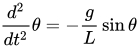
This simulation uses this formula directly, updating the velocity from the acceleration and the position from the velocity; inaccuracy results from the finite timestep.
The event flow works like this:
The clock object created by the simulation steps the simulation on the specified in the interval.
The simulation writes its output to angle, which is a Lamport slot which can notify of updates.
The whenever set up by makeDisplayComponent listens for updates and triggers redrawing as long as interest has been expressed, which is done whenever the component actually redraws, which happens only if the component's window is still on screen.
When the window is closed, additionally, the simulation itself is stopped and the application allowed to exit.
(This logic is more general than necessary; it is designed to be suitable for a larger application as well.)
#!/usr/bin/env rune
pragma.syntax("0.9")

def pi := (-1.0).acos()
def makeEPainter := <unsafe:com.zooko.tray.makeEPainter>
def makeLamportSlot := <import:org.erights.e.elib.slot.makeLamportSlot>
def whenever := <import:org.erights.e.elib.slot.whenever>
def colors := <import:java.awt.makeColor>

# --------------------------------------------------------------
# --- Definitions

def makePendulumSim(length_m :float64,
                    gravity_mps2 :float64,
                    initialAngle_rad :float64,
                    timestep_ms :int) {
  var velocity := 0
  def &angle := makeLamportSlot(initialAngle_rad)
  def k := -gravity_mps2/length_m
  def timestep_s := timestep_ms / 1000
  def clock := timer.every(timestep_ms, fn _ {
    def acceleration := k * angle.sin()
    velocity += acceleration * timestep_s
    angle    += velocity     * timestep_s
  })
  return [clock, &angle]
}

def makeDisplayComponent(&angle) {
  def c
  def updater := whenever([&angle], fn { c.repaint() })

  bind c := makeEPainter(def paintCallback {
    to paintComponent(g) {
      try {
        def originX := c.getWidth() // 2
        def originY := c.getHeight() // 2
        def pendRadius := (originX.min(originY) * 0.95).round()
        def ballRadius := (originX.min(originY) * 0.04).round()
        def ballX := (originX + angle.sin() * pendRadius).round()
        def ballY := (originY + angle.cos() * pendRadius).round()

        g.setColor(colors.getWhite())
        g.fillRect(0, 0, c.getWidth(), c.getHeight())
        g.setColor(colors.getBlack())

        g.fillOval(originX - 2, originY - 2, 4, 4)
        g.drawLine(originX, originY, ballX, ballY)
        g.fillOval(ballX - ballRadius, ballY - ballRadius, ballRadius * 2, ballRadius * 2)

        updater[] # provoke interest provided that we did get drawn (window not closed)
      } catch p {
        stderr.println(`In paint callback: $p${p.eStack()}`)
      }
    }
  })

  c.setPreferredSize(<awt:makeDimension>(300, 300))
  return c
}

# --------------------------------------------------------------
# --- Application setup

def [clock, &angle] := makePendulumSim(1, 9.80665, pi*99/100, 10)

# Initialize AWT, move to AWT event thread
when (currentVat.morphInto("awt")) -> {

  # Create the window
  def frame := <unsafe:javax.swing.makeJFrame>("Pendulum")
  frame.setContentPane(def display := makeDisplayComponent(&angle))
  frame.addWindowListener(def mainWindowListener {
    to windowClosing(_) {
      clock.stop()
      interp.continueAtTop()
    }
    match _ {}
  })
  frame.setLocation(50, 50)
  frame.pack()

  # Start and become visible
  frame.show()
  clock.start()
}

interp.blockAtTop()
EasyLang
ang = 45
on animate
  clear
  move 50 50
  circle 1
  x = 50 + 40 * sin ang
  y = 50 + 40 * cos ang
  line x y
  circle 6
  vel += sin ang / 5
  ang += vel
.
Elm
import Color exposing (..)
import Collage exposing (..)
import Element exposing (..)
import Html exposing (..)
import Time exposing (..)
import Html.App exposing (program)

dt = 0.01
scale = 100

type alias Model =
  { angle : Float
  , angVel : Float
  , length : Float
  , gravity : Float
  }

type Msg
    = Tick Time

init : (Model,Cmd Msg)
init =
  ( { angle = 3 * pi / 4
    , angVel = 0.0
    , length = 2
    , gravity = -9.81
    }
  , Cmd.none)

update : Msg -> Model -> (Model, Cmd Msg)
update _ model =
  let
    angAcc = -1.0 * (model.gravity / model.length) * sin (model.angle)
    angVel' = model.angVel + angAcc * dt
    angle' = model.angle + angVel' * dt
  in
    ( { model
        | angle = angle'
        , angVel = angVel'
      }
    , Cmd.none )

view : Model -> Html Msg
view model =
  let
    endPoint = ( 0, scale * model.length )
    pendulum =
      group
        [ segment ( 0, 0 ) endPoint
            |> traced { defaultLine | width = 2, color = red }
        , circle 8
            |> filled blue
        , ngon 3 10
            |> filled green
            |> rotate (pi/2)
            |> move endPoint
        ]
  in
    toHtml <|
      collage 700 500
        [ pendulum |> rotate model.angle ]

subscriptions : Model -> Sub Msg
subscriptions _ =
    Time.every (dt * second) Tick

main =
  program
      { init = init
      , view = view
      , update = update
      , subscriptions = subscriptions
      }
Link to live demo: http://dc25.github.io/animatedPendulumElm
ERRE
PROGRAM PENDULUM

!
! for rosettacode.org
!

!$KEY

!$INCLUDE="PC.LIB"

PROCEDURE PENDULUM(A,L)
      PIVOTX=320
      PIVOTY=0
      BOBX=PIVOTX+L*500*SIN(a)
      BOBY=PIVOTY+L*500*COS(a)
      LINE(PIVOTX,PIVOTY,BOBX,BOBY,6,FALSE)
      CIRCLE(BOBX+24*SIN(A),BOBY+24*COS(A),27,11)
      PAUSE(0.01)
      LINE(PIVOTX,PIVOTY,BOBX,BOBY,0,FALSE)
      CIRCLE(BOBX+24*SIN(A),BOBY+24*COS(A),27,0)
END PROCEDURE

BEGIN
      SCREEN(9)
      THETA=40*p/180     ! initial displacement
      G=9.81             ! acceleration due to gravity
      L=0.5              ! length of pendulum in metres
      LINE(0,0,639,0,5,FALSE)
      LOOP
        PENDULUM(THETA,L)
        ACCEL=-G*SIN(THETA)/L/100
        SPEED=SPEED+ACCEL/100
        THETA=THETA+SPEED
      END LOOP
END PROGRAM
PC version: Ctrl+Break to stop.
Euler Math Toolbox
Euler Math Toolbox can determine the exact period of a physical pendulum. The result is then used to animate the pendulum. The following code is ready to be pasted back into Euler notebooks.
>g=gearth$; l=1m;
>function f(x,y) := [y[2],-g*sin(y[1])/l]
>function h(a) := ode("f",linspace(0,a,100),[0,2])[1,-1]
>period=solve("h",2)
 2.06071780729
>t=linspace(0,period,30); s=ode("f",t,[0,2])[1];
>function anim (t,s) ...
$  setplot(-1,1,-1,1);
$  markerstyle("o#");
$  repeat
$  for i=1 to cols(t)-1;
$    clg;
$    hold on;
$    plot([0,sin(s[i])],[1,1-cos(s[i])]);
$    mark([0,sin(s[i])],[1,1-cos(s[i])]);
$    hold off;
$    wait(t[i+1]-t[i]);
$  end;
$  until testkey();
$  end
$endfunction
>anim(t,s);
>
Euphoria
DOS32 version
include graphics.e
include misc.e

constant dt = 1E-3
constant g = 50

sequence vc
sequence suspension
atom len

procedure draw_pendulum(atom color, atom len, atom alfa)
    sequence point
    point = (len*{sin(alfa),cos(alfa)} + suspension)
    draw_line(color, {suspension, point})
    ellipse(color,0,point-{10,10},point+{10,10})
end procedure

function wait()
    atom t0
    t0 = time()
    while time() = t0 do
        if get_key() != -1 then
            return 1
        end if
    end while
    return 0
end function

procedure animation()
    atom alfa, omega, epsilon

    if graphics_mode(18) then
    end if

    vc = video_config()
    suspension = {vc[VC_XPIXELS]/2,vc[VC_YPIXELS]/2}
    len = vc[VC_YPIXELS]/2-20

    alfa = PI/2
    omega = 0

    while 1 do
        draw_pendulum(BRIGHT_WHITE,len,alfa)
        if wait() then
            exit
        end if
        draw_pendulum(BLACK,len,alfa)
        epsilon = -len*sin(alfa)*g
        omega += dt*epsilon
        alfa += dt*omega
    end while

    if graphics_mode(-1) then
    end if
end procedure

animation()
F#
A nice application of F#'s support for units of measure.
open System
open System.Drawing
open System.Windows.Forms

// define units of measurement
[<Measure>] type m;  // metres
[<Measure>] type s;  // seconds

// a pendulum is represented as a record of physical quantities
type Pendulum =
 { length   : float<m>
   gravity  : float<m/s^2>
   velocity : float<m/s>
   angle    : float
 }

// calculate the next state of a pendulum
let next pendulum deltaT : Pendulum =
  let k = -pendulum.gravity / pendulum.length
  let acceleration = k * Math.Sin pendulum.angle * 1.0<m>
  let newVelocity = pendulum.velocity + acceleration * deltaT
  let newAngle = pendulum.angle + newVelocity * deltaT / 1.0<m>
  { pendulum with velocity = newVelocity; angle = newAngle }

// paint a pendulum (using hard-coded screen coordinates)
let paint pendulum (gr: System.Drawing.Graphics) =
  let homeX = 160
  let homeY = 50
  let length = 140.0
  // draw plate
  gr.DrawLine( new Pen(Brushes.Gray, width=2.0f), 0, homeY, 320, homeY )
  // draw pivot
  gr.FillEllipse( Brushes.Gray,           homeX-5, homeY-5, 10, 10 )
  gr.DrawEllipse( new Pen(Brushes.Black), homeX-5, homeY-5, 10, 10 )
  // draw the pendulum itself
  let x = homeX + int( length * Math.Sin pendulum.angle )
  let y = homeY + int( length * Math.Cos pendulum.angle )
  // draw rod
  gr.DrawLine( new Pen(Brushes.Black, width=3.0f), homeX, homeY, x, y )
  // draw bob
  gr.FillEllipse( Brushes.Yellow,         x-15, y-15, 30, 30 )
  gr.DrawEllipse( new Pen(Brushes.Black), x-15, y-15, 30, 30 )

// defines an operator "-?" that calculates the time from t2 to t1
// where t2 is optional
let (-?) (t1: DateTime) (t2: DateTime option) : float<s> =
  match t2 with
  | None   -> 0.0<s> // only one timepoint given -> difference is 0
  | Some t -> (t1 - t).TotalSeconds * 1.0<s>

// our main window is double-buffered form that reacts to paint events
type PendulumForm() as self =
  inherit Form(Width=325, Height=240, Text="Pendulum")
  let mutable pendulum = { length   = 1.0<m>;
                           gravity  = 9.81<m/s^2>
                           velocity = 0.0<m/s>
                           angle    = Math.PI / 2.0
                         }
  let mutable lastPaintedAt = None
  let updateFreq = 0.01<s>

  do self.DoubleBuffered <- true
     self.Paint.Add( fun args ->
       let now = DateTime.Now
       let deltaT = now -? lastPaintedAt |> min 0.01<s>
       lastPaintedAt <- Some now

       pendulum <- next pendulum deltaT

       let gr = args.Graphics
       gr.Clear( Color.LightGray )
       paint pendulum gr

       // initiate a new paint event after a while (non-blocking)
       async { do! Async.Sleep( int( 1000.0 * updateFreq / 1.0<s> ) )
               self.Invalidate()
            }
       |> Async.Start
     )

[<STAThread>]
Application.Run( new PendulumForm( Visible=true ) )
Factor
Approximation of the pendulum for small swings : theta = theta0 * cos(omega0 * t)
USING: accessors alarms arrays calendar colors.constants kernel
locals math math.constants math.functions math.rectangles
math.vectors opengl sequences system ui ui.gadgets ui.render ;
IN: pendulum

CONSTANT: g 9.81
CONSTANT: l 20
CONSTANT: theta0 0.5

: current-time ( -- time ) nano-count -9 10^ * ;

: T0 ( -- T0 ) 2 pi l g / sqrt * * ;
: omega0 ( -- omega0 ) 2 pi * T0 / ;
: theta ( -- theta ) current-time omega0 * cos theta0 * ;

: relative-xy ( theta l -- xy )
    swap [ sin * ] [ cos * ] 2bi 2array ;
: theta-to-xy ( origin theta l -- xy ) relative-xy v+ ;

TUPLE: pendulum-gadget < gadget alarm ;

: O ( gadget -- origin ) rect-bounds [ drop ] [ first 2 / ] bi* 0 2array ;
: window-l ( gadget -- l ) rect-bounds [ drop ] [ second ] bi* ;
: gadget-xy ( gadget -- xy ) [ O ] [ drop theta ] [ window-l ] tri theta-to-xy ;

M: pendulum-gadget draw-gadget*
    COLOR: black gl-color
    [ O ] [ gadget-xy ] bi gl-line ;

M:: pendulum-gadget graft* ( gadget -- )
    [ gadget relayout-1 ]
    20 milliseconds every gadget (>>alarm) ;
M: pendulum-gadget ungraft* alarm>> cancel-alarm ;

: <pendulum-gadget> ( -- gadget )
    pendulum-gadget new
    { 500 500 } >>pref-dim ;
: pendulum-main ( -- )
    [ <pendulum-gadget> "pendulum" open-window ] with-ui ;
MAIN: pendulum-main
FBSL
#INCLUDE <Include\Windows.inc>

FBSLSETTEXT(ME, "Pendulum")
FBSL.SETTIMER(ME, 1000, 10)
RESIZE(ME, 0, 0, 300, 200)
CENTER(ME)
SHOW(ME)

BEGIN EVENTS
	SELECT CASE CBMSG
		CASE WM_TIMER
			' Request redraw
			InvalidateRect(ME, NULL, FALSE)
			RETURN 0
		CASE WM_PAINT
			Swing()
		CASE WM_CLOSE
			FBSL.KILLTIMER(ME, 1000)
	END SELECT
END EVENTS

SUB Swing()
	TYPE RECT: %rcLeft, %rcTop, %rcRight, %rcBottom: END TYPE
	STATIC rc AS RECT, !!acceleration, !!velocity, !!angle = M_PI_2, %pendulum = 100

	GetClientRect(ME, @rc)

	' Recalculate
	DIM headX = rc.rcRight / 2, headY = rc.rcBottom / 4
	DIM tailX = headX + SIN(angle) * pendulum
	DIM tailY = headY + COS(angle) * pendulum

	acceleration = -9.81 / pendulum * SIN(angle)
	INCR(velocity, acceleration * 0.1)(angle, velocity * 0.1)

	' Create backbuffer
	CreateCompatibleDC(GetDC(ME))
	SelectObject(CreateCompatibleDC, CreateCompatibleBitmap(GetDC, rc.rcRight, rc.rcBottom))

	' Draw to backbuffer
	FILLSTYLE(FILL_SOLID): FILLCOLOR(RGB(200, 200, 0))
	LINE(CreateCompatibleDC, 0, 0, rc.rcRight, rc.rcBottom, GetSysColor(COLOR_BTNHILIGHT), TRUE, TRUE)
	LINE(CreateCompatibleDC, 0, headY, rc.rcRight, headY, GetSysColor(COLOR_3DSHADOW))
	DRAWWIDTH(3)
	LINE(CreateCompatibleDC, headX, headY, tailX, tailY, RGB(200, 0, 0))
	DRAWWIDTH(1)
	CIRCLE(CreateCompatibleDC, headX, headY, 2, GetSysColor, 0, 360, 1, TRUE)
	CIRCLE(CreateCompatibleDC, tailX, tailY, 10, GetSysColor, 0, 360, 1, FALSE)

	' Blit to window
	BitBlt(GetDC, 0, 0, rc.rcRight, rc.rcBottom, CreateCompatibleDC, 0, 0, SRCCOPY)
	ReleaseDC(ME, GetDC)

	' Delete backbuffer
	DeleteObject(SelectObject(CreateCompatibleDC, SelectObject))
	DeleteDC(CreateCompatibleDC)
END SUB
Screenshot:


Fortran
Uses system commands (gfortran) to clear the screen. An initial starting angle is allowed between 90 (to the right) and -90 degrees (to the left). It checks for incorrect inputs.
!Implemented by Anant Dixit (October, 2014)
program animated_pendulum
implicit none
double precision, parameter :: pi = 4.0D0*atan(1.0D0), l = 1.0D-1, dt = 1.0D-2, g = 9.8D0
integer :: io
double precision :: s_ang, c_ang, p_ang, n_ang

write(*,*) 'Enter starting angle (in degrees):'
do
  read(*,*,iostat=io) s_ang
  if(io.ne.0 .or. s_ang.lt.-90.0D0 .or. s_ang.gt.90.0D0) then
    write(*,*) 'Please enter an angle between 90 and -90 degrees:'
  else
    exit
  end if
end do
call execute_command_line('cls')

c_ang = s_ang*pi/180.0D0
p_ang = c_ang

call display(c_ang)
do
  call next_time_step(c_ang,p_ang,g,l,dt,n_ang)
  if(abs(c_ang-p_ang).ge.0.05D0) then
    call execute_command_line('cls')
    call display(c_ang)
  end if
end do
end program

subroutine next_time_step(c_ang,p_ang,g,l,dt,n_ang)
double precision :: c_ang, p_ang, g, l, dt, n_ang
n_ang = (-g*sin(c_ang)/l)*2.0D0*dt**2 + 2.0D0*c_ang - p_ang
p_ang = c_ang
c_ang = n_ang
end subroutine

subroutine display(c_ang)
double precision :: c_ang
character (len=*), parameter :: cfmt = '(A1)'
double precision :: rx, ry
integer :: x, y, i, j
rx = 45.0D0*sin(c_ang)
ry = 22.5D0*cos(c_ang)
x = int(rx)+51
y = int(ry)+2
do i = 1,32
  do j = 1,100
    if(i.eq.y .and. j.eq.x) then
      write(*,cfmt,advance='no') 'O'
    else if(i.eq.y .and. (j.eq.(x-1).or.j.eq.(x+1))) then
      write(*,cfmt,advance='no') 'G'
    else if(j.eq.x .and. (i.eq.(y-1).or.i.eq.(y+1))) then
      write(*,cfmt,advance='no') 'G'
    else if(i.eq.y .and. (j.eq.(x-2).or.j.eq.(x+2))) then
      write(*,cfmt,advance='no') '#'
    else if(j.eq.x .and. (i.eq.(y-2).or.i.eq.(y+2))) then
      write(*,cfmt,advance='no') 'G'
    else if((i.eq.(y+1).and.j.eq.(x+1)) .or. (i.eq.(y-1).and.j.eq.(x-1))) then
      write(*,cfmt,advance='no') '#'
    else if((i.eq.(y+1).and.j.eq.(x-1)) .or. (i.eq.(y-1).and.j.eq.(x+1))) then
      write(*,cfmt,advance='no') '#'
    else if(j.eq.50) then
      write(*,cfmt,advance='no') '|'
    else if(i.eq.2) then
      write(*,cfmt,advance='no') '-'
    else
      write(*,cfmt,advance='no') ' '
    end if
  end do
  write(*,*)
end do
end subroutine
A small preview (truncated to a few steps of the pendulum changing direction). Initial angle provided = 80 degrees.
|
-------------------------------------------------|--------------------------------------------------
|
|
|
|
|
|
|
|
|
|
|
|
|
|
|
|
|
| G
| #G#
| #GOG#
| #G#
| G
|
|
|
|
|
|
|
|
|
-------------------------------------------------|--------------------------------------------------
|
|
|
|
|
|
|
|
|
|
|
|
|
|
|
|
| G
| #G#
| #GOG#
| #G#
| G
|
|
|
|
|
|
|
|
|
|
-------------------------------------------------|--------------------------------------------------
|
|
|
|
|
|
|
|
|
|
|
|
|
|
| G
| #G#
| #GOG#
| #G#
| G
|
|
|
|
|
|
|
|
|
|
|
|
-------------------------------------------------|--------------------------------------------------
|
|
|
|
|
|
|
|
|
|
|
| G
| #G#
| #GOG#
| #G#
| G
|
|
|
|
|
|
|
|
|
|
|
|
|
|
|
-------------------------------------------------|--------------------------------------------------
|
|
|
|
|
|
|
|
|
| G
| #G#
| #GOG#
| #G#
| G
|
|
|
|
|
|
|
|
|
|
|
|
|
|
|
|
|
-------------------------------------------------|--------------------------------------------------
|
|
|
|
|
|
|
| G
| #G#
| #GOG#
| #G#
| G
|
|
|
|
|
|
|
|
|
|
|
|
|
|
|
|
|
|
|
-------------------------------------------------|--------------------------------------------------
|
|
|
|
|
| G
| #G#
| #GOG#
| #G#
| G
|
|
|
|
|
|
|
|
|
|
|
|
|
|
|
|
|
|
|
|
|
-------------------------------------------------|--------------------------------------------------
|
|
|
| G
| #G#
| #GOG#
| #G#
| G
|
|
|
|
|
|
|
|
|
|
|
|
|
|
|
|
|
|
|
|
|
|
Groovy
Straight translation of Java solution groovified by removing explicit definitions and converting casts to Groovy as style where needed.
import java.awt.*;
import javax.swing.*;

class Pendulum extends JPanel implements Runnable {

    private angle = Math.PI / 2;
    private length;

    Pendulum(length) {
        this.length = length;
        setDoubleBuffered(true);
    }

    @Override
    void paint(Graphics g) {
        g.setColor(Color.WHITE);
        g.fillRect(0, 0, getWidth(), getHeight());
        g.setColor(Color.BLACK);
        int anchorX = getWidth() / 2, anchorY = getHeight() / 4;
        def ballX = anchorX + (Math.sin(angle) * length) as int;
        def ballY = anchorY + (Math.cos(angle) * length) as int;
        g.drawLine(anchorX, anchorY, ballX, ballY);
        g.fillOval(anchorX - 3, anchorY - 4, 7, 7);
        g.fillOval(ballX - 7, ballY - 7, 14, 14);
    }

    void run() {
        def angleAccel, angleVelocity = 0, dt = 0.1;
        while (true) {
            angleAccel = -9.81 / length * Math.sin(angle);
            angleVelocity += angleAccel * dt;
            angle += angleVelocity * dt;
            repaint();
            try { Thread.sleep(15); } catch (InterruptedException ex) {}
        }
    }

    @Override
    Dimension getPreferredSize() {
        return new Dimension(2 * length + 50, (length / 2 * 3) as int);
    }

    static void main(String[] args) {
        def f = new JFrame("Pendulum");
        def p = new Pendulum(200);
        f.add(p);
        f.setDefaultCloseOperation(JFrame.EXIT_ON_CLOSE);
        f.pack();
        f.setVisible(true);
        new Thread(p).start();
    }
}
FutureBasic
void local fn BuildWindow
  window 1, @"Animated Pendulum in FutureBasic", ( 0, 0, 640, 400 )
  WindowSetBackgroundColor( 1, fn ColorBlack )
  WindowSetMinSize( 1, fn CGSizeMake( 640, 400 ) )
  WindowSetMaxSize( 1, fn CGSizeMake( 640, 400 ) )
end fn

local fn AnimatedPendulum
  block double   theta, gravity, length, accel, speed, weight, tempo, px, py, bx, by
  block ColorRef color = fn ColorWithRGB( 0.164, 0.793, 0.075, 1.0 )
  theta   = pi/2.0 // Denominator of 2.0 = 180-degree swing, < 2.0 narrows inscribed arc, > 2.0 widens it.
  gravity = 9.90   // Adjusts effect of gravity on swing. Smaller values slow arc swing.
  length  = 0.95   // Tweak for length of pendulum arm
  speed   = 0      // Zero this or you get a propellor!
  px      = 320    // Pivot horizontal center x point (half window width)
  py      = 30     // Pivot y center y point from top
  weight  = 42     // Diameter of pendulum weight
  tempo   = 75     // Smaller value increases pendulum tempo, larger value slows it.

  timerbegin, 0.02, YES
    bx = px + length * 300 * sin(theta) // Pendulum bottom x point
    by = py - length * 300 * cos(theta) // Pendulum bottom y point
    cls
    pen 6.0, color
    line px, py to bx, by
    oval fill bx -weight/2, by -weight/2, weight, weight, color // Traveling weight
    pen 4.0
    oval fill 313, 20, 16, 16, fn ColorGray // Top center point
    accel  = gravity * sin(theta) / length / tempo
    speed += accel / tempo
    theta += speed
  timerEnd
end fn

void local fn DoDialog( ev as long, tag as long, wnd as long )
  select ( ev )
    case _windowWillClose : end
  end select
end fn

on dialog fn DoDialog

fn BuildWindow
fn AnimatedPendulum

HandleEvents
Go
Using
from Github
package main

import (
	"github.com/google/gxui"
	"github.com/google/gxui/drivers/gl"
	"github.com/google/gxui/math"
	"github.com/google/gxui/themes/dark"
	omath "math"
	"time"
)

//Two pendulums animated
//Top: Mathematical pendulum with small-angle approxmiation (not appropiate with PHI_ZERO=pi/2)
//Bottom: Simulated with differential equation phi'' = g/l * sin(phi)

const (
	ANIMATION_WIDTH  int     = 480
	ANIMATION_HEIGHT int     = 320
	BALL_RADIUS      float32 = 25.0
	METER_PER_PIXEL  float64 = 1.0 / 20.0
	PHI_ZERO         float64 = omath.Pi * 0.5
)

var (
	l    float64 = float64(ANIMATION_HEIGHT) * 0.5
	freq float64 = omath.Sqrt(9.81 / (l * METER_PER_PIXEL))
)

type Pendulum interface {
	GetPhi() float64
}

type mathematicalPendulum struct {
	start time.Time
}

func (p *mathematicalPendulum) GetPhi() float64 {
	if (p.start == time.Time{}) {
		p.start = time.Now()
	}
	t := float64(time.Since(p.start).Nanoseconds()) / omath.Pow10(9)
	return PHI_ZERO * omath.Cos(t*freq)
}

type numericalPendulum struct {
	currentPhi float64
	angAcc     float64
	angVel     float64
	lastTime   time.Time
}

func (p *numericalPendulum) GetPhi() float64 {
	dt := 0.0
	if (p.lastTime != time.Time{}) {
		dt = float64(time.Since(p.lastTime).Nanoseconds()) / omath.Pow10(9)
	}
	p.lastTime = time.Now()

	p.angAcc = -9.81 / (float64(l) * METER_PER_PIXEL) * omath.Sin(p.currentPhi)
	p.angVel += p.angAcc * dt
	p.currentPhi += p.angVel * dt

	return p.currentPhi
}

func draw(p Pendulum, canvas gxui.Canvas, x, y int) {
	attachment := math.Point{X: ANIMATION_WIDTH/2 + x, Y: y}

	phi := p.GetPhi()
	ball := math.Point{X: x + ANIMATION_WIDTH/2 + math.Round(float32(l*omath.Sin(phi))), Y: y + math.Round(float32(l*omath.Cos(phi)))}

	line := gxui.Polygon{gxui.PolygonVertex{attachment, 0}, gxui.PolygonVertex{ball, 0}}

	canvas.DrawLines(line, gxui.DefaultPen)

	m := math.Point{int(BALL_RADIUS), int(BALL_RADIUS)}
	rect := math.Rect{ball.Sub(m), ball.Add(m)}
	canvas.DrawRoundedRect(rect, BALL_RADIUS, BALL_RADIUS, BALL_RADIUS, BALL_RADIUS, gxui.TransparentPen, gxui.CreateBrush(gxui.Yellow))
}

func appMain(driver gxui.Driver) {
	theme := dark.CreateTheme(driver)

	window := theme.CreateWindow(ANIMATION_WIDTH, 2*ANIMATION_HEIGHT, "Pendulum")
	window.SetBackgroundBrush(gxui.CreateBrush(gxui.Gray50))

	image := theme.CreateImage()

	ticker := time.NewTicker(time.Millisecond * 15)
	pendulum := &mathematicalPendulum{}
	pendulum2 := &numericalPendulum{PHI_ZERO, 0.0, 0.0, time.Time{}}

	go func() {
		for _ = range ticker.C {
			canvas := driver.CreateCanvas(math.Size{ANIMATION_WIDTH, 2 * ANIMATION_HEIGHT})
			canvas.Clear(gxui.White)

			draw(pendulum, canvas, 0, 0)
			draw(pendulum2, canvas, 0, ANIMATION_HEIGHT)

			canvas.Complete()
			driver.Call(func() {
				image.SetCanvas(canvas)
			})
		}
	}()

	window.AddChild(image)

	window.OnClose(ticker.Stop)
	window.OnClose(driver.Terminate)
}

func main() {
	gl.StartDriver(appMain)
}
Haskell
import Graphics.HGL.Draw.Monad (Graphic, )
import Graphics.HGL.Draw.Picture
import Graphics.HGL.Utils
import Graphics.HGL.Window
import Graphics.HGL.Run

import Control.Exception (bracket, )
import Control.Arrow

toInt = fromIntegral.round

pendulum = runGraphics $
  bracket
    (openWindowEx "Pendulum animation task" Nothing (600,400) DoubleBuffered (Just 30))
    closeWindow
    (\w -> mapM_ ((\ g -> setGraphic w g >> getWindowTick w).
                    (\ (x, y) -> overGraphic (line (300, 0) (x, y))
                                    (ellipse (x - 12, y + 12) (x + 12, y - 12)) )) pts)
 where
    dt = 1/30
    t = - pi/4
    l = 1
    g = 9.812
    nextAVT (a,v,t) = (a', v', t + v' * dt) where
        a' = - (g / l) * sin t
        v' = v + a' * dt
    pts = map (\(_,t,_) -> (toInt.(300+).(300*).cos &&& toInt. (300*).sin) (pi/2+0.6*t) )
        $ iterate nextAVT (- (g / l) * sin t, t, 0)
Usage with ghci:
*Main> pendulum
Alternative solution
import Graphics.Gloss

-- Initial conditions
g_  = (-9.8)        :: Float    --Gravity acceleration
v_0 = 0             :: Float    --Initial tangential speed
a_0 = 0 / 180 * pi  :: Float    --Initial angle
dt  = 0.01          :: Float    --Time step
t_f = 15            :: Float    --Final time for data logging
l_  = 200           :: Float    --Rod length

-- Define a type to represent the pendulum:
type Pendulum = (Float, Float, Float) -- (rod length, tangential speed, angle)

-- Pendulum's initial state
initialstate :: Pendulum
initialstate = (l_, v_0, a_0)

-- Step funtion: update pendulum to new position
movePendulum :: Float -> Pendulum -> Pendulum
movePendulum dt (l,v,a) = ( l , v_2 , a + v_2 / l * dt*10 )
    where   v_2 = v + g_ * (cos a) * dt

-- Convert from Pendulum to [Picture] for display
renderPendulum :: Pendulum -> [Picture]
renderPendulum (l,v,a) = map (uncurry Translate newOrigin)
                            [ Line    [ ( 0 , 0 ) , ( l * (cos a), l * (sin a) ) ]
                            , polygon [ ( 0 , 0 ) , ( -5 , 8.66 ) , ( 5 , 8.66 ) ]
                            , Translate ( l * (cos a)) (l * (sin a)) (circleSolid (0.04*l_))
                            , Translate (-1.1*l) (-1.3*l) (Scale 0.1 0.1 (Text currSpeed))
                            , Translate (-1.1*l) (-1.3*l + 20) (Scale 0.1 0.1 (Text currAngle))
                            ]
    where   currSpeed = "Speed (pixels/s) = " ++ (show v)
            currAngle = "Angle (deg) = " ++ (show ( 90 + a / pi * 180 ) )

-- New origin to beter display the animation
newOrigin = (0, l_ / 2)

-- Calcule a proper window size (for angles between 0 and -pi)
windowSize :: (Int, Int)
windowSize = ( 300 + 2 * round (snd newOrigin)
             , 200 + 2 * round (snd newOrigin) )

-- Run simulation
main :: IO ()
main = do   --plotOnGNU
            simulate window background fps initialstate render update
                where   window      = InWindow "Animate a pendulum" windowSize (40, 40)
                        background  = white
                        fps         = round (1/dt)
                        render xs   = pictures $ renderPendulum xs
                        update _    = movePendulum
HicEst
DIFFEQ and the callback procedure pendulum numerically integrate the pendulum equation. The display window can be resized during the run, but for window width not equal to 2*height the pendulum rod becomes a rubber band instead:
REAL :: msec=10, Lrod=1, dBob=0.03, g=9.81, Theta(2), dTheta(2)
BobMargins = ALIAS(ls, rs, ts, bs) ! box margins to draw the bob


Theta = (1, 0)        ! initial angle and velocity
start_t = TIME()

DO i = 1, 1E100       ! "forever"
   end_t = TIME()     ! to integrate in real-time sections:
   DIFFEQ(Callback="pendulum", T=end_t, Y=Theta, DY=dTheta, T0=start_t)
   xBob = (SIN(Theta(1)) + 1) / 2
   yBob = COS(Theta(1)) - dBob

   ! create or clear window and draw pendulum bob at (xBob, yBob):
   WINDOW(WIN=wh, LeftSpace=0, RightSpace=0, TopSpace=0, BottomSpace=0, Up=999)
   BobMargins = (xBob-dBob, 1-xBob-dBob, yBob-dBob, 1-yBob-dBob)
   WINDOW(WIN=wh, LeftSpace=ls, RightSpace=rs, TopSpace=ts, BottomSpace=bs)
   WRITE(WIN=wh, DeCoRation='EL=4, BC=4') ! flooded red ellipse as bob

   ! draw the rod hanging from the center of the window:
   WINDOW(WIN=wh, LeftSpace=0.5, TopSpace=0, RightSpace=rs+dBob)
   WRITE(WIN=wh, DeCoRation='LI=0 0; 1 1, FC=4.02') ! red pendulum rod

   SYSTEM(WAIT=msec)
   start_t = end_t
ENDDO

END

SUBROUTINE pendulum                 ! Theta" = - (g/Lrod) * SIN(Theta)
  dTheta(1) = Theta(2)              ! Theta' = Theta(2)  substitution
  dTheta(2) = -g/Lrod*SIN(Theta(1)) ! Theta" = Theta(2)' = -g/Lrod*SIN(Theta(1))
END
Icon and Unicon
The following code uses features exclusive to Unicon, specifically the object-oriented gui library.
import gui
$include "guih.icn"

# some constants to define the display and pendulum
$define HEIGHT 400
$define WIDTH 500
$define STRING_LENGTH 200
$define HOME_X 250
$define HOME_Y 21
$define SIZE 30
$define START_ANGLE 80

class WindowApp : Dialog ()

  # draw the pendulum on given context_window, at position (x,y)
  method draw_pendulum (x, y)
    # reference to current screen area to draw on
    cw := Clone(self.cwin)

    # clear screen
    WAttrib (cw, "bg=grey")
    EraseRectangle (cw, 0, 0, WIDTH, HEIGHT)

    # draw the display
    WAttrib (cw, "fg=dark gray")
    DrawLine (cw, 10, 20, WIDTH-20, 20)
    WAttrib (cw, "fg=black")
    DrawLine (cw, HOME_X, HOME_Y, x, y)
    FillCircle (cw, x, y, SIZE+2)
    WAttrib (cw, "fg=yellow")
    FillCircle (cw, x, y, SIZE)

    # free reference to screen area
    Uncouple (cw)
  end

  # find the average of given two arguments
  method avg (a, b)
    return (a + b) / 2
  end

  # this method gets called by the ticker
  # it computes the next position of the pendulum and
  # requests a redraw
  method tick ()
    static x, y
    static theta := START_ANGLE
    static d_theta := 0
    # update x,y of pendulum
    scaling := 3000.0 / (STRING_LENGTH * STRING_LENGTH)
    # -- first estimate
    first_dd_theta := -(sin (dtor (theta)) * scaling)
    mid_d_theta := d_theta + first_dd_theta
    mid_theta := theta + avg (d_theta, mid_d_theta)
    # -- second estimate
    mid_dd_theta := - (sin (dtor (mid_theta)) * scaling)
    mid_d_theta_2 := d_theta + avg (first_dd_theta, mid_dd_theta)
    mid_theta_2 := theta + avg (d_theta, mid_d_theta_2)
    # -- again first
    mid_dd_theta_2 := -(sin (dtor (mid_theta_2)) * scaling)
    last_d_theta := mid_d_theta_2 + mid_dd_theta_2
    last_theta := mid_theta_2 + avg (mid_d_theta_2, last_d_theta)
    # -- again second
    last_dd_theta := - (sin (dtor (last_theta)) * scaling)
    last_d_theta_2 := mid_d_theta_2 + avg (mid_dd_theta_2, last_dd_theta)
    last_theta_2 := mid_theta_2 + avg (mid_d_theta_2, last_d_theta_2)
    # -- update stored angles
    d_theta := last_d_theta_2
    theta := last_theta_2
    # -- update x, y
    pendulum_angle := dtor (theta)
    x := HOME_X + STRING_LENGTH * sin (pendulum_angle)
    y := HOME_Y + STRING_LENGTH * cos (pendulum_angle)

    # draw pendulum
    draw_pendulum (x, y)
  end

  # set up the window
  method component_setup ()
    # some cosmetic settings for the window
    attrib("size="||WIDTH||","||HEIGHT, "bg=light gray", "label=Pendulum")
    # make sure we respond to window close event
    connect (self, "dispose", CLOSE_BUTTON_EVENT)
    # start the ticker, to update the display periodically
    self.set_ticker (20)
  end
end

procedure main ()
  w := WindowApp ()
  w.show_modal ()
end
J
Works for J6
require 'gl2 trig'
coinsert 'jgl2'

DT   =: %30      NB. seconds
ANGLE=: 0.45p1   NB. radians
L    =: 1        NB. metres
G    =: 9.80665  NB. ms_2
VEL  =: 0        NB. ms_1

PEND=: noun define
pc pend;pn "Pendulum";
xywh 0 0 320 200;cc isi isigraph rightmove bottommove;
pas 0 0;pcenter;
rem form end;
)

pend_run      =: verb def ' wd PEND,'';pshow;timer '',":DT * 1000 '
pend_close    =: verb def ' wd ''timer 0; pclose'' '
pend_isi_paint=: verb def ' drawPendulum ANGLE '

sys_timer_z_=: verb define
  recalcAngle ''
  wd 'psel pend; setinvalid isi'
)

recalcAngle=: verb define
  accel=. - (G % L) * sin ANGLE
  VEL  =: VEL + accel * DT
  ANGLE=: ANGLE + VEL * DT
)

drawPendulum=: verb define
  width=. {. glqwh''
  ps=. (-: width) , 40
  pe=. ps + 280 <.@* (cos , sin) 0.5p1 + y    NB. adjust orientation
  glbrush glrgb 91 91 91
  gllines ps , pe
  glellipse (,~ ps - -:) 40 15
  glellipse (,~ pe - -:) 20 20
  glrect 0 0 ,width, 40
)

pend_run''                                    NB. run animation
Updated for changes in J8
require 'gl2 trig'
coinsert 'jgl2'

DT   =: %30      NB. seconds
ANGLE=: 0.45p1   NB. radians
L    =: 1        NB. metres
G    =: 9.80665  NB. ms_2
VEL  =: 0        NB. ms_1

PEND=: noun define
pc pend;pn "Pendulum";
minwh 320 200; cc isi isigraph flush;
)

pend_run=: verb define
  wd PEND,'pshow'
  wd 'timer ',":DT * 1000
)

pend_close=: verb define
  wd 'timer 0; pclose'
)

sys_timer_z_=: verb define
  recalcAngle_base_ ''
  wd 'psel pend; set isi invalid'
)

pend_isi_paint=: verb define
  drawPendulum ANGLE
)

recalcAngle=: verb define
  accel=. - (G % L) * sin ANGLE
  VEL  =: VEL + accel * DT
  ANGLE=: ANGLE + VEL * DT
)

drawPendulum=: verb define
  width=. {. glqwh''
  ps=. (-: width) , 20
  pe=. ps + 150 <.@* (cos , sin) 0.5p1 + y    NB. adjust orientation
  glclear''
  glbrush glrgb 91 91 91                      NB. gray
  gllines ps , pe
  glellipse (,~ ps - -:) 40 15
  glrect 0 0, width, 20
  glbrush glrgb 255 255 0                     NB. yellow
  glellipse (,~ pe - -:) 15 15                NB. orb
)

pend_run''

Java
import java.awt.*;
import javax.swing.*;

public class Pendulum extends JPanel implements Runnable {

    private double angle = Math.PI / 2;
    private int length;

    public Pendulum(int length) {
        this.length = length;
        setDoubleBuffered(true);
    }

    @Override
    public void paint(Graphics g) {
        g.setColor(Color.WHITE);
        g.fillRect(0, 0, getWidth(), getHeight());
        g.setColor(Color.BLACK);
        int anchorX = getWidth() / 2, anchorY = getHeight() / 4;
        int ballX = anchorX + (int) (Math.sin(angle) * length);
        int ballY = anchorY + (int) (Math.cos(angle) * length);
        g.drawLine(anchorX, anchorY, ballX, ballY);
        g.fillOval(anchorX - 3, anchorY - 4, 7, 7);
        g.fillOval(ballX - 7, ballY - 7, 14, 14);
    }

    public void run() {
        double angleAccel, angleVelocity = 0, dt = 0.1;
        while (true) {
            angleAccel = -9.81 / length * Math.sin(angle);
            angleVelocity += angleAccel * dt;
            angle += angleVelocity * dt;
            repaint();
            try { Thread.sleep(15); } catch (InterruptedException ex) {}
        }
    }

    @Override
    public Dimension getPreferredSize() {
        return new Dimension(2 * length + 50, length / 2 * 3);
    }

    public static void main(String[] args) {
        JFrame f = new JFrame("Pendulum");
        Pendulum p = new Pendulum(200);
        f.add(p);
        f.setDefaultCloseOperation(JFrame.EXIT_ON_CLOSE);
        f.pack();
        f.setVisible(true);
        new Thread(p).start();
    }
}
JavaScript
With <canvas>
(plus gratuitous motion blur)
<html><head>
<title>Pendulum</title>
</head><body style="background: gray;">
<canvas id="canvas" width="600" height="600">
<p>Sorry, your browser does not support the <canvas> used to display the pendulum animation.</p>
</canvas>
<script>
function PendulumSim(length_m, gravity_mps2, initialAngle_rad, timestep_ms, callback) {
var velocity = 0;
var angle = initialAngle_rad;
var k = -gravity_mps2/length_m;
var timestep_s = timestep_ms / 1000;
return setInterval(function () {
var acceleration = k * Math.sin(angle);
velocity += acceleration * timestep_s;
angle += velocity * timestep_s;
callback(angle);
}, timestep_ms);
}
var canvas = document.getElementById('canvas');
var context = canvas.getContext('2d');
var prev=0;
var sim = PendulumSim(1, 9.80665, Math.PI*99/100, 10, function (angle) {
var rPend = Math.min(canvas.width, canvas.height) * 0.47;
var rBall = Math.min(canvas.width, canvas.height) * 0.02;
var rBar = Math.min(canvas.width, canvas.height) * 0.005;
var ballX = Math.sin(angle) * rPend;
var ballY = Math.cos(angle) * rPend;
context.fillStyle = "rgba(255,255,255,0.51)";
context.globalCompositeOperation = "destination-out";
context.fillRect(0, 0, canvas.width, canvas.height);
context.fillStyle = "yellow";
context.strokeStyle = "rgba(0,0,0,"+Math.max(0,1-Math.abs(prev-angle)*10)+")";
context.globalCompositeOperation = "source-over";
context.save();
context.translate(canvas.width/2, canvas.height/2);
context.rotate(angle);
context.beginPath();
context.rect(-rBar, -rBar, rBar*2, rPend+rBar*2);
context.fill();
context.stroke();
context.beginPath();
context.arc(0, rPend, rBall, 0, Math.PI*2, false);
context.fill();
context.stroke();
context.restore();
prev=angle;
});
</script>
</body></html>
Within SVG
If we use SVG we don't even have to make a HTML document. We can put the script inside SVG.
To do things a bit differently, we'll use a stereographic projection of the circle, in order to get algebraic Euler-Lagrange equations which we'll integrate with the Runge-Kutta method.
Also we'll use a dimensionless formulation of the problem (taking unit value for the mass, the length and so on).
<svg height="100%" width="100%" viewBox="-2 0 4 4" xmlns="http://www.w3.org/2000/svg">
  <line id="string" x1="0" y1="0" x2="1" y2="0" stroke="grey" stroke-width="0.05" />
  <circle id="ball" cx="0" cy="0" r="0.1" fill="black" />
  <script>
    /*jshint esnext: true */

    function rk4(dt, x, f) {
      "use strict";
      let from = Array.from,
          a = from(f(from(x,  $    => $         )), $ => $*dt),
          b = from(f(from(x, ($,i) => $ + a[i]/2)), $ => $*dt),
          c = from(f(from(x, ($,i) => $ + b[i]/2)), $ => $*dt),
          d = from(f(from(x, ($,i) => $ + c[i]  )), $ => $*dt);
      return from(x, (_,i) => (a[i] + 2*b[i] + 2*c[i] + d[i])/6);
    }

    function setPendulumPos($) {
      const string = document.getElementById("string"),
            ball = document.getElementById("ball");
      let $2 = $*$,
          x = 2*$/(1+$2),
          y = (1-$2)/(1+$2);
      string.setAttribute("x2", x);
      string.setAttribute("y2", y);
      ball.setAttribute("cx", x);
      ball.setAttribute("cy", y);
    }

    var q = [1, 0];
    var previousTimestamp;
    (function animate(timestamp) {
      if ( previousTimestamp !== undefined) {
        let dq = rk4((timestamp - previousTimestamp)/1000, q, $ => [$[1], 2*$[1]*$[1]*$[0]/(1+$[0]*$[0]) - $[0]]);
        q = [q[0] + dq[0], q[1] + dq[1]];
        setPendulumPos(q[0]);
      }
      previousTimestamp = timestamp;
      window.requestAnimationFrame(animate);
    })()
  </script>
</svg>
Julia
Differential equation based solution using the Luxor graphics library.
using Luxor
using Colors
using BoundaryValueDiffEq

# constants for differential equations and movie
const g = 9.81
const L = 1.0                         # pendulum length in meters
const bobd = 0.10                     # pendulum bob diameter in meters
const framerate = 50.0                # intended frame rate/sec
const t0 = 0.0                        # start time (s)
const tf = 2.3                        # end simulation time (s)
const dtframe = 1.0/framerate         # time increment per frame
const tspan = LinRange(t0, tf, Int(floor(tf*framerate)))  # array of time points in animation

const bgcolor = "black"               # gif background
const leaderhue = (0.80, 0.70, 0.20)  # gif swing arm hue light gold
const hslcolors = [HSL(col) for col in (distinguishable_colors(
                   Int(floor(tf*framerate)+3),[RGB(1,1,1)])[2:end])]
const giffilename = "pendulum.gif"    # output file

# differential equations
simplependulum(du, u, p, t) = (θ=u[1]; dθ=u[2]; du[1]=dθ; du[2]=-(g/L)*sin(θ))
bc2(residual, u, p, t) = (residual[1] = u[end÷2][1] + pi/2; residual[2] = u[end][1] - pi/2)
bvp2 = BVProblem(simplependulum, bc2, [pi/2,pi/2], (tspan[1],tspan[end]))
sol2 = solve(bvp2, MIRK4(), dt=dtframe) # use the MIRK4 solver for TwoPointBVProblem

# movie making background
backdrop(scene, framenumber) = background(bgcolor)

function frame(scene, framenumber)
    u1, u2 = sol2.u[framenumber]
    y, x = L*cos(u1), L*sin(u1)
    sethue(leaderhue)
    poly([Point(-4.0, 0.0), Point(4.0, 0.0),
          Point(160.0x,160.0y)], :fill)
    sethue(Colors.HSV(framenumber*4.0, 1, 1))
    circle(Point(160.0x,160.0y), 160bobd, :fill)
    text(string("frame $framenumber of $(scene.framerange.stop)"),
        Point(0.0, -190.0),
        halign=:center)
end

muv = Movie(400, 400, "Pendulum Demo", 1:length(tspan))
animate(muv, [Scene(muv, backdrop),
              Scene(muv, frame, easingfunction=easeinoutcubic)],
              creategif=true, pathname=giffilename)
- Output:

Kotlin
Conversion of Java snippet.
import java.awt.*
import java.util.concurrent.*
import javax.swing.*

class Pendulum(private val length: Int) : JPanel(), Runnable {
    init {
        val f = JFrame("Pendulum")
        f.add(this)
        f.defaultCloseOperation = JFrame.EXIT_ON_CLOSE
        f.pack()
        f.isVisible = true
        isDoubleBuffered = true
    }

    override fun paint(g: Graphics) {
        with(g) {
            color = Color.WHITE
            fillRect(0, 0, width, height)
            color = Color.BLACK
            val anchor = Element(width / 2, height / 4)
            val ball = Element((anchor.x + Math.sin(angle) * length).toInt(), (anchor.y + Math.cos(angle) * length).toInt())
            drawLine(anchor.x, anchor.y, ball.x, ball.y)
            fillOval(anchor.x - 3, anchor.y - 4, 7, 7)
            fillOval(ball.x - 7, ball.y - 7, 14, 14)
        }
    }

    override fun run() {
        angleVelocity += -9.81 / length * Math.sin(angle) * dt
        angle += angleVelocity * dt
        repaint()
    }

    override fun getPreferredSize() = Dimension(2 * length + 50, length / 2 * 3)

    private data class Element(val x: Int, val y: Int)

    private val dt = 0.1
    private var angle = Math.PI / 2
    private var angleVelocity = 0.0
}

fun main(a: Array<String>) {
    val executor = Executors.newSingleThreadScheduledExecutor()
    executor.scheduleAtFixedRate(Pendulum(200), 0, 15, TimeUnit.MILLISECONDS)
}
Liberty BASIC
nomainwin
    WindowWidth = 400
    WindowHeight = 300

    open "Pendulum" for graphics_nsb_nf as #main
    #main "down;fill white; flush"
    #main "color black"
    #main "trapclose [quit.main]"

    Angle = asn(1)
    DeltaT = 0.1
    PendLength = 150
    FixX = int(WindowWidth / 2)
    FixY = 40

    timer 30, [swing]

    wait

[swing]

    #main "cls"
    #main "discard"

    PlumbobX = FixX + int(sin(Angle) * PendLength)
    PlumbobY = FixY + int(cos(Angle) * PendLength)
    AngAccel = -9.81 / PendLength * sin(Angle)
    AngVelocity = AngVelocity + AngAccel * DeltaT
    Angle = Angle + AngVelocity * DeltaT

    #main "backcolor black"
    #main "place ";FixX;" ";FixY
    #main "circlefilled 3"
    #main "line ";FixX;" ";FixY;" ";PlumbobX;" ";PlumbobY
    #main "backcolor red"
    #main "circlefilled 10"

    wait

[quit.main]
    close #main
    end
Lingo
global RODLEN, GRAVITY, DT
global velocity, acceleration, angle, posX, posY

on startMovie

    -- window properties
    _movie.stage.title = "Pendulum"
    _movie.stage.titlebarOptions.visible = TRUE
    _movie.stage.rect = rect(0, 0, 400, 400)
    _movie.centerStage = TRUE
    _movie.puppetTempo(30)

    RODLEN = 180
    GRAVITY = -9.8
    DT = 0.03

    velocity = 0.0
    acceleration = 0.0
    angle = PI/3
    posX = 200 - sin(angle) * RODLEN
    posY = 100 + cos(angle) * RODLEN
    paint()

    -- show the window
    _movie.stage.visible = TRUE
end

on enterFrame
    acceleration = GRAVITY * sin(angle)
    velocity = velocity + acceleration * DT
    angle = angle + velocity * DT
    posX = 200 - sin(angle) * rodLen
    posY = 100 + cos(angle) * rodLen
    paint()
end

on paint
    img = _movie.stage.image
    img.fill(img.rect, rgb(255,255,255))
    img.fill(point(200-5, 100-5), point(200+5, 100+5), [#shapeType:#oval,#color:rgb(0,0,0)])
    img.draw(point(200, 100), point(posX, posY), [#color:rgb(0,0,0)])
    img.fill(point(posX-20, posY-20), point(posX+20, posY+20), [#shapeType:#oval,#lineSize:1,#bgColor:rgb(0,0,0),#color:rgb(255,255,0)])
end
Logo
make "angle 45
make "L 1
make "bob 10

to draw.pendulum
  clearscreen
  seth :angle+180		; down on screen is 180
  forward :L*100-:bob
  penup
  forward :bob
  pendown
  arc 360 :bob
end

make "G   9.80665
make "dt  1/30
make "acc 0
make "vel 0

to step.pendulum
  make "acc  -:G / :L * sin :angle
  make "vel   :vel   + :acc * :dt
  make "angle :angle + :vel * :dt
  wait :dt*60
  draw.pendulum
end

hideturtle
until [key?] [step.pendulum]
Lua
Needs LÖVE 2D Engine
function degToRad( d )
    return d * 0.01745329251
end

function love.load()
    g = love.graphics
    rodLen, gravity, velocity, acceleration = 260, 3, 0, 0
    halfWid, damp = g.getWidth() / 2, .989
    posX, posY, angle = halfWid
    TWO_PI, angle = math.pi * 2, degToRad( 90 )
end

function love.update( dt )
    acceleration = -gravity / rodLen * math.sin( angle )
    angle = angle + velocity; if angle > TWO_PI then angle = 0 end
    velocity = velocity + acceleration
    velocity = velocity * damp
    posX = halfWid + math.sin( angle ) * rodLen
    posY = math.cos( angle ) * rodLen
end

function love.draw()
    g.setColor( 250, 0, 250 )
    g.circle( "fill", halfWid, 0, 8 )
    g.line( halfWid, 4, posX, posY )
    g.setColor( 250, 100, 20 )
    g.circle( "fill", posX, posY, 20 )
end
M2000 Interpreter
Module Pendulum {
      back()
      degree=180/pi
      THETA=Pi/2
      SPEED=0
      G=9.81
      L=0.5
      Profiler
      lasttimecount=0
      cc=40  ' 40 ms every draw
      accold=0
      Every cc {
            ACCEL=G*SIN(THETA*degree)/L/50
            SPEED+=ACCEL/cc
            THETA+=SPEED
            Pendulum(THETA)
            if KeyPress(32) Then Exit
      }

      Sub back()
            If not IsWine then Smooth On
            Cls 7,0
            Pen 0
            Move 0, scale.y/4
            Draw scale.x,0
            Step -scale.x/2
            circle fill #AAAAAA, scale.x/50
            Hold  ' hold this as background
      End Sub

      Sub Pendulum(x)
            x+=pi/2
            Release  ' place stored background to screen
            Width scale.x/2000 {
                  Draw Angle x, scale.y/2.5
                  Width 1 {
                        Circle Fill 14, scale.x/25
                  }
                  Step Angle x, -scale.y/2.5
            }
            Print @(1,1), lasttimecount
            if sgn(accold)<>sgn(ACCEL) then lasttimecount=timecount: Profiler
            accold=ACCEL
            Refresh 1000
      End Sub
}
Pendulum
Mathematica / Wolfram Language
tmax = 10;
g = 9.8;
l = 1;
pendulum = Module[
   {g, l},
   ParametricNDSolve[
    {
     y''[t] + g/l Sin[y[t]] == 0,
     y[0] == 0, y'[0] == 1
     },
    {y},
    {t, 0, tmax},
    {g, l}
    ]
   ];
Animate[
 Graphics[
  Rotate[
   {Line[{{0, 0}, {0, -1}}], Disk[{0, -1}, .1]},
   Evaluate[y[g, l] /. pendulum][t],
   {0, 0}
   ],
  PlotRange -> {{-l, l}, {-l - .5, 0}}
  ],
 {t, 0, tmax},
 AnimationRate -> 1
 ]
MATLAB
pendulum.m
%This is a numerical simulation of a pendulum with a massless pivot arm.

%% User Defined Parameters
%Define external parameters
g = -9.8;
deltaTime = 1/50; %Decreasing this will increase simulation accuracy
endTime = 16;

%Define pendulum
rodPivotPoint = [2 2]; %rectangular coordinates
rodLength = 1;
mass = 1; %of the bob
radius = .2; %of the bob
theta = 45; %degrees, defines initial position of the bob
velocity = [0 0]; %cylindrical coordinates; first entry is radial velocity,
                  %second entry is angular velocity

%% Simulation
assert(radius < rodLength,'Pendulum bob radius must be less than the length of the rod.');

position = rodPivotPoint - (rodLength*[-sind(theta) cosd(theta)]); %in rectangular coordinates

%Generate graphics, render pendulum
figure;
axesHandle = gca;
xlim(axesHandle, [(rodPivotPoint(1) - rodLength - radius) (rodPivotPoint(1) + rodLength + radius)] );
ylim(axesHandle, [(rodPivotPoint(2) - rodLength - radius) (rodPivotPoint(2) + rodLength + radius)] );

rectHandle = rectangle('Position',[(position - radius/2) radius radius],...
    'Curvature',[1,1],'FaceColor','g'); %Pendulum bob
hold on
plot(rodPivotPoint(1),rodPivotPoint(2),'^'); %pendulum pivot
lineHandle = line([rodPivotPoint(1) position(1)],...
    [rodPivotPoint(2) position(2)]); %pendulum rod
hold off

%Run simulation, all calculations are performed in cylindrical coordinates
for time = (deltaTime:deltaTime:endTime)

    drawnow; %Forces MATLAB to render the pendulum

    %Find total force
    gravitationalForceCylindrical = [mass*g*cosd(theta) mass*g*sind(theta)];

    %This code is just incase you want to add more forces,e.g friction
    totalForce = gravitationalForceCylindrical;

    %If the rod isn't massless or is a spring, etc., modify this line
    %accordingly
    rodForce = [-totalForce(1) 0]; %cylindrical coordinates

    totalForce = totalForce + rodForce;

    acceleration = totalForce / mass; %F = ma
    velocity = velocity + acceleration * deltaTime;
    rodLength = rodLength + velocity(1) * deltaTime;
    theta = theta + velocity(2) * deltaTime; % Attention!! Mistake here.
    % Velocity needs to be divided by pendulum length and scaled to degrees:
    % theta = theta + velocity(2) * deltaTime/rodLength/pi*180;

    position = rodPivotPoint - (rodLength*[-sind(theta) cosd(theta)]);

    %Update figure with new position info
    set(rectHandle,'Position',[(position - radius/2) radius radius]);
    set(lineHandle,'XData',[rodPivotPoint(1) position(1)],'YData',...
        [rodPivotPoint(2) position(2)]);

end
Nim
OpenGL version
Conversion from C with some modifications: changing some variable names, adding a display function to make the program work with "freeGlut", choosing another initial angle, etc.
# Pendulum simulation.

import math
import times

import opengl
import opengl/glut

var
  # Simulation variables.
  lg: float         # Pendulum length.
  g: float          # Gravity (should be positive).
  currTime: Time    # Current time.
  theta0: float     # Initial angle.
  theta: float      # Current angle.
  omega: float      # Angular velocity = derivative of theta.
  accel: float      # Angular acceleration = derivative of omega.
  e: float          # Total energy.

#---------------------------------------------------------------------------------------------------

proc initSimulation(length, gravitation, start: float) =
  ## Initialize the simulation.

  lg = length
  g = gravitation
  currTime = getTime()
  theta0 = start                    # Initial angle for which omega = 0.
  theta = start
  omega = 0
  accel = -g / lg * sin(theta0)
  e = g * lg * (1 - cos(theta0))    # Total energy = potential energy when starting.

#---------------------------------------------------------------------------------------------------

proc elapsed(): float =
  ## Return the elapsed time since previous call, expressed in seconds.

  let nextTime = getTime()
  result = (nextTime - currTime).inMicroseconds.float / 1e6
  currTime = nextTime

#---------------------------------------------------------------------------------------------------

proc resize(w, h: GLsizei) =
  ## Resize the window.

  glViewport(0, 0, w, h)
  glMatrixMode(GL_PROJECTION)
  glLoadIdentity()

  glMatrixMode(GL_MODELVIEW)
  glLoadIdentity()
  glOrtho(0, GLdouble(w), GLdouble(h), 0, -1, 1)

#---------------------------------------------------------------------------------------------------

proc render() {.cdecl.} =
  ## Render the window.

  # Compute the position of the mass.
  var x = 320 + 300 * sin(theta)
  var y = 300 * cos(theta)

  resize(640, 320)
  glClear(GL_COLOR_BUFFER_BIT)

  # Draw the line from pivot to mass.
  glBegin(GL_LINES)
  glVertex2d(320, 0)
  glVertex2d(x, y)
  glEnd()
  glFlush()

  # Update theta and omega.
  let dt = elapsed()
  theta += (omega + dt * accel / 2) * dt
  omega += accel * dt

  # If, due to computation errors, potential energy is greater than total energy,
  # reset theta to ±theta0 and omega to 0.
  if lg * g * (1 - cos(theta)) >= e:
    theta = sgn(theta).toFloat * theta0
    omega = 0

  accel = -g / lg * sin(theta)

#---------------------------------------------------------------------------------------------------

proc initGfx(argc: ptr cint; argv: pointer) =
  ## Initialize OpenGL rendering.

  glutInit(argc, argv)
  glutInitDisplayMode(GLUT_RGB)
  glutInitWindowSize(640, 320)
  glutIdleFunc(render)
  discard glutCreateWindow("Pendulum")
  glutDisplayFunc(render)
  loadExtensions()

#———————————————————————————————————————————————————————————————————————————————————————————————————

initSimulation(length = 5, gravitation = 9.81, start = PI / 3)

var argc: cint = 0
initGfx(addr(argc), nil)
glutMainLoop()
Gtk3 version
This version uses the same equations but replace OpenGL by Gtk3 with the “gintro” bindings.
# Pendulum simulation.

import math
import times

import gintro/[gobject, gdk, gtk, gio, cairo]
import gintro/glib except Pi

type

  # Description of the simulation.
  Simulation = ref object
    area: DrawingArea       # Drawing area.
    length: float           # Pendulum length.
    g: float                # Gravity (should be positive).
    time: Time              # Current time.
    theta0: float           # initial angle.
    theta: float            # Current angle.
    omega: float            # Angular velocity = derivative of theta.
    accel: float            # Angular acceleration = derivative of omega.
    e: float                # Total energy.

#---------------------------------------------------------------------------------------------------

proc newSimulation(area: DrawingArea; length, g, theta0: float): Simulation {.noInit.} =
  ## Allocate and initialize the simulation object.

  new(result)
  result.area = area
  result.length = length
  result.g = g
  result.time = getTime()
  result.theta0 = theta0
  result.theta = theta0
  result.omega = 0
  result.accel = -g / length * sin(theta0)
  result.e = g * length * (1 - cos(theta0))    # Total energy = potential energy when starting.

#---------------------------------------------------------------------------------------------------

template toFloat(dt: Duration): float = dt.inNanoseconds.float / 1e9

#---------------------------------------------------------------------------------------------------

const Origin = (x: 320.0, y: 100.0)   # Pivot coordinates.
const Scale = 300                     # Coordinates scaling constant.

proc draw(sim: Simulation; context: cairo.Context) =
  ## Draw the pendulum.

  # Compute coordinates in drawing area.
  let x = Origin.x + sin(sim.theta) * Scale
  let y = Origin.y + cos(sim.theta) * Scale

  # Clear the region.
  context.moveTo(0, 0)
  context.setSource(0.0, 0.0, 0.0)
  context.paint()

  # Draw pendulum.
  context.moveTo(Origin.x, Origin.y)
  context.setSource(0.3, 1.0, 0.3)
  context.lineTo(x, y)
  context.stroke()

  # Draw pivot.
  context.setSource(0.3, 0.3, 1.0)
  context.arc(Origin.x, Origin.y, 8, 0, 2 * Pi)
  context.fill()

  # Draw mass.
  context.setSource(1.0, 0.3, 0.3)
  context.arc(x, y, 8, 0, 2 * Pi)
  context.fill()

#---------------------------------------------------------------------------------------------------

proc update(sim: Simulation): gboolean =
  ## Update the simulation state.

  # compute time interval.
  let nextTime = getTime()
  let dt = (nextTime - sim.time).toFloat
  sim.time = nextTime

  # Update theta and omega.
  sim.theta += (sim.omega + dt * sim.accel / 2) * dt
  sim.omega += sim.accel * dt

  # If, due to computation errors, potential energy is greater than total energy,
  # reset theta to ±theta0 and omega to 0.
  if sim.length * sim.g * (1 - cos(sim.theta)) >= sim.e:
    sim.theta = sgn(sim.theta).toFloat * sim.theta0
    sim.omega = 0

  # Compute acceleration.
  sim.accel = -sim.g / sim.length * sin(sim.theta)

  result = gboolean(1)

  sim.draw(sim.area.window.cairoCreate())

#---------------------------------------------------------------------------------------------------

proc activate(app: Application) =
  ## Activate the application.

  let window = app.newApplicationWindow()
  window.setSizeRequest(640, 480)
  window.setTitle("Pendulum simulation")

  let area = newDrawingArea()
  window.add(area)

  let sim = newSimulation(area, length = 5, g = 9.81, theta0 = PI / 3)

  timeoutAdd(10, update, sim)

  window.showAll()

#———————————————————————————————————————————————————————————————————————————————————————————————————

let app = newApplication(Application, "Rosetta.pendulum")
discard app.connect("activate", activate)
discard app.run()
ooRexx
ooRexx does not have a portable GUI, but this version is similar to the Ada version and just prints out the coordinates of the end of the pendulum.
pendulum = .pendulum~new(10, 30)

before = .datetime~new
do 100         -- somewhat arbitrary loop count
  call syssleep .2
  now = .datetime~new
  pendulum~update(now - before)
  before = now
  say " X:" pendulum~x " Y:" pendulum~y
end

::class pendulum
::method init
  expose length theta x y velocity
  use arg length, theta
  x = rxcalcsin(theta) * length
  y = rxcalccos(theta) * length
  velocity = 0

::attribute x GET
::attribute y GET

::constant g -9.81   -- acceleration due to gravity

::method update
  expose length theta x y velocity
  use arg duration
  acceleration = self~g / length * rxcalcsin(theta)
  durationSeconds = duration~microseconds / 1000000
  x = rxcalcsin(theta, length)
  y = rxcalccos(theta, length)
  velocity = velocity + acceleration * durationSeconds
  theta = theta + velocity * durationSeconds

::requires rxmath library
Oz
Inspired by the E and Ruby versions.
declare
  [QTk] = {Link ['x-oz://system/wp/QTk.ozf']}

  Pi = 3.14159265

  class PendulumModel
     feat
	K
     attr
	angle
	velocity

     meth init(length:L       <= 1.0    %% meters
	       gravity:G      <= 9.81   %% m/s²
	       initialAngle:A <= Pi/2.) %% radians
	self.K = ~G / L
	angle := A
	velocity := 0.0
     end

     meth nextAngle(deltaT:DeltaTMS %% milliseconds
		    ?Angle)         %% radians
        DeltaT = {Int.toFloat DeltaTMS} / 1000.0 %% seconds
        Acceleration = self.K * {Sin @angle}
     in
        velocity := @velocity + Acceleration * DeltaT
        angle := @angle + @velocity * DeltaT
        Angle = @angle
     end
  end

  %% Animates a pendulum on a given canvas.
  class PendulumAnimation from Time.repeat
     feat
        Pend
        Rod
        Bob
        home:pos(x:160 y:50)
        length:140.0
	delay

     meth init(Pendulum Canvas delay:Delay <= 25) %% milliseconds
	self.Pend = Pendulum
	self.delay = Delay
	%% plate and pivot
        {Canvas create(line 0 self.home.y 320 self.home.y width:2 fill:grey50)}
        {Canvas create(oval 155 self.home.y-5 165 self.home.y+5 fill:grey50 outline:black)}
	%% the pendulum itself
	self.Rod = {Canvas create(line 1 1 1 1 width:3 fill:black handle:$)}
        self.Bob = {Canvas create(oval 1 1 2 2 fill:yellow outline:black handle:$)}
        %%
        {self setRepAll(action:Animate delay:Delay)}
     end

     meth Animate
	Theta = {self.Pend nextAngle(deltaT:self.delay $)}
	%% calculate x and y from angle
	X = self.home.x + {Float.toInt self.length * {Sin Theta}}
	Y = self.home.y + {Float.toInt self.length * {Cos Theta}}
     in
	%% update canvas
	try
	   {self.Rod setCoords(self.home.x self.home.y X Y)}
	   {self.Bob setCoords(X-15 Y-15 X+15 Y+15)}
	catch system(tk(alreadyClosed ...) ...) then skip end
     end
  end

  Pendulum = {New PendulumModel init}

  Canvas
  GUI = td(title:"Pendulum"
           canvas(width:320 height:210 handle:?Canvas)
           action:proc {$} {Animation stop} {Window close} end
          )
  Window = {QTk.build GUI}

  Animation = {New PendulumAnimation init(Pendulum Canvas)}
in
  {Window show}
  {Animation go}
Perl
This does not have the window resizing handling that Tcl does.
use strict;
use warnings;
use Tk;
use Math::Trig qw/:pi/;

my $root =  new MainWindow( -title => 'Pendulum Animation' );
my $canvas = $root->Canvas(-width => 320, -height => 200);
my $after_id;

for ($canvas) {
	$_->createLine(   0,  25, 320,  25, -tags => [qw/plate/], -width => 2, -fill => 'grey50' );
	$_->createOval( 155,  20, 165,  30, -tags => [qw/pivot outline/], -fill => 'grey50' );
	$_->createLine(   1,   1,    1,  1, -tags => [qw/rod width/], -width => 3, -fill => 'black' );
	$_->createOval(   1,   1,    2,  2, -tags => [qw/bob outline/], -fill => 'yellow' );
}

$canvas->raise('pivot');
$canvas->pack(-fill => 'both', -expand => 1);
my ($Theta, $dTheta, $length, $homeX, $homeY) =
	(45, 0, 150, 160, 25);

sub show_pendulum {
  my $angle = $Theta * pi() / 180;
  my $x = $homeX + $length * sin($angle);
  my $y = $homeY + $length * cos($angle);
  $canvas->coords('rod', $homeX, $homeY, $x, $y);
  $canvas->coords('bob', $x-15, $y-15, $x+15, $y+15);
}


sub recompute_angle {
  my $scaling = 3000.0 / ($length ** 2);
  # first estimate
  my $firstDDTheta = -sin($Theta * pi / 180) * $scaling;
  my $midDTheta = $dTheta + $firstDDTheta;
  my $midTheta = $Theta + ($dTheta + $midDTheta)/2;
  # second estimate
  my $midDDTheta = -sin($midTheta * pi/ 180) * $scaling;
  $midDTheta = $dTheta + ($firstDDTheta + $midDDTheta)/2;
  $midTheta = $Theta + ($dTheta + $midDTheta)/2;
  # again, first
  $midDDTheta = -sin($midTheta * pi/ 180) * $scaling;
  my $lastDTheta = $midDTheta + $midDDTheta;
  my $lastTheta = $midTheta + ($midDTheta + $lastDTheta)/2;
  # again, second
  my $lastDDTheta = -sin($lastTheta * pi/180) * $scaling;
  $lastDTheta = $midDTheta + ($midDDTheta + $lastDDTheta)/2;
  $lastTheta = $midTheta + ($midDTheta + $lastDTheta)/2;
  # Now put the values back in our globals
  $dTheta  = $lastDTheta;
  $Theta = $lastTheta;
}


sub animate {
  recompute_angle;
  show_pendulum;
  $after_id = $root->after(15 => sub {animate() });
}

show_pendulum;
$after_id = $root->after(500 => sub {animate});

$canvas->bind('<Destroy>' => sub {$after_id->cancel});
MainLoop;
Phix
You can run this online here.
--
-- demo\rosetta\animate_pendulum.exw
-- =================================
--
-- Author Pete Lomax, March 2017
--
-- Port of animate_pendulum.exw from arwen to pGUI, which is now
--  preserved as a comment below (in the distro version only).
--
-- With help from lesterb, updates now in timer_cb not redraw_cb,
-- variables better named, and velocity problem sorted, July 2018.
--
constant full = false   -- set true for full swing to near-vertical.
                        -- false performs swing to horizontal only.
                        -- (adjusts the starting angle, pivot point,
                        --  and canvas size, only.)

include pGUI.e

Ihandle dlg, canvas, timer
cdCanvas cdcanvas

constant g = 50

atom angle = iff(full?PI-0.01:PI/2),  -- (near_vertical | horiz)
     velocity = 0
integer w = 0, h = 0, len = 0

function redraw_cb(Ihandle /*ih*/, integer /*posx*/, /*posy*/)
    {w, h} = IupGetIntInt(canvas, "DRAWSIZE")
    cdCanvasActivate(cdcanvas)
    cdCanvasClear(cdcanvas)
    -- new suspension point:
    integer sX = floor(w/2)
    integer sY = floor(h/iff(full?2:16))  -- (mid | top)
    -- repaint:
    integer eX = floor(len*sin(angle)+sX)
    integer eY = floor(len*cos(angle)+sY)
    cdCanvasSetForeground(cdcanvas, CD_CYAN)
    cdCanvasLine(cdcanvas, sX, h-sY, eX, h-eY)
    cdCanvasSetForeground(cdcanvas, CD_DARK_GREEN)
    cdCanvasSector(cdcanvas, sX, h-sY, 5, 5, 0, 360)
    cdCanvasSetForeground(cdcanvas, CD_BLUE)
    cdCanvasSector(cdcanvas, eX, h-eY, 35, 35, 0, 360)
    cdCanvasFlush(cdcanvas)
    return IUP_DEFAULT
end function

function timer_cb(Ihandle /*ih*/)
    if w!=0 then
        integer newlen = floor(w/2)-30
        if newlen!=len then
            len = newlen
            atom tmp = 2*g*len*(cos(angle))
            velocity = iff(tmp<0?0:sqrt(tmp)*sign(velocity))
        end if
        atom dt = 0.2/w
        atom acceleration = -len*sin(angle)*g
        velocity += dt*acceleration
        angle += dt*velocity
        IupUpdate(canvas)
    end if
    return IUP_IGNORE
end function

function map_cb(Ihandle ih)
    atom res = IupGetDouble(NULL, "SCREENDPI")/25.4
    IupGLMakeCurrent(canvas)
    if platform()=JS then
        cdcanvas = cdCreateCanvas(CD_IUP, canvas)
    else
        cdcanvas = cdCreateCanvas(CD_GL, "10x10 %g", {res})
    end if
    cdCanvasSetBackground(cdcanvas, CD_PARCHMENT)
    return IUP_DEFAULT
end function

function canvas_resize_cb(Ihandle /*canvas*/)
    integer {canvas_width, canvas_height} = IupGetIntInt(canvas, "DRAWSIZE")
    atom res = IupGetDouble(NULL, "SCREENDPI")/25.4
    cdCanvasSetAttribute(cdcanvas, "SIZE", "%dx%d %g", {canvas_width, canvas_height, res})
    return IUP_DEFAULT
end function

procedure main()
    IupOpen()

    canvas = IupGLCanvas()
    IupSetAttribute(canvas, "RASTERSIZE", iff(full?"640x640":"640x340")) -- (fit 360|180)
    IupSetCallback(canvas, "MAP_CB", Icallback("map_cb"))
    IupSetCallback(canvas, "ACTION", Icallback("redraw_cb"))
    IupSetCallback(canvas, "RESIZE_CB", Icallback("canvas_resize_cb"))

    timer = IupTimer(Icallback("timer_cb"), 20)

    dlg = IupDialog(canvas)
    IupSetAttribute(dlg, "TITLE", "Animated Pendulum")

    IupShow(dlg)
    IupSetAttribute(canvas, "RASTERSIZE", NULL)
    if platform()!=JS then
        IupMainLoop()
        IupClose()
    end if
end procedure

main()
PicoLisp
A minimalist solution. The pendulum consists of the center point '+', and the swinging xterm cursor.
(load "@lib/math.l")

(de pendulum (X Y Len)
   (let (Angle pi/2  V 0)
      (call 'clear)
      (call 'tput "cup" Y X)
      (prin '+)
      (call 'tput "cup" 1 (+ X Len))
      (until (key 25)                        # 25 ms
         (let A (*/ (sin Angle) -9.81 1.0)
            (inc 'V (*/ A 40))               # DT = 25 ms = 1/40 sec
            (inc 'Angle (*/ V 40)) )
         (call 'tput "cup"
            (+ Y (*/ Len (cos Angle) 2.2))   # Compensate for aspect ratio
            (+ X (*/ Len (sin Angle) 1.0)) ) ) ) )
Test (hit any key to stop):
(pendulum 40 1 36)Portugol
programa {
    inclua biblioteca Matematica --> math // math library
    inclua biblioteca Util --> u // util library
    inclua biblioteca Graficos --> g // graphics library
    inclua biblioteca Teclado --> t // keyboard library

    real accel, bx, by
    real theta	= math.PI * 0.5
    real g	= 9.81
    real l	= 1.0
    real speed	= 0.0
    real px	= 320.0
    real py	= 10.0
    inteiro w	= 10 // circle width and height (radius)

    // main entry
    funcao inicio() {

    g.iniciar_modo_grafico(verdadeiro)
        g.definir_dimensoes_janela(640, 400)

        // while ESC key not pressed
        enquanto (nao t.tecla_pressionada(t.TECLA_ESC)) {
            bx = px + l * 300.0 * math.seno(theta)
            by = py - l * 300.0 * math.cosseno(theta)

            g.definir_cor(g.COR_PRETO)
            g.limpar()

            g.definir_cor(g.COR_BRANCO)
            g.desenhar_linha(px, py, bx, by)
            g.desenhar_elipse(bx - w, by - w, w * 2, w * 2, verdadeiro)

            accel = g * math.seno(theta) / l / 100.0
            speed = speed + accel / 100.0
            theta = theta + speed

            g.desenhar_texto(0, 370, "Pendulum")
            g.desenhar_texto(0, 385, "Press ESC to quit")

            g.renderizar()
            u.aguarde(10)
        }
    }
}
Prolog
SWI-Prolog has a graphic interface XPCE.
:- use_module(library(pce)).

pendulum :-
	new(D, window('Pendulum')),
	send(D, size, size(560, 300)),
	new(Line, line(80, 50, 480, 50)),
	send(D, display, Line),
	new(Circle, circle(20)),
	send(Circle, fill_pattern,  colour(@default, 0, 0, 0)),
	new(Boule, circle(60)),
	send(Boule, fill_pattern,  colour(@default, 0, 0, 0)),
	send(D, display, Circle, point(270,40)),
	send(Circle, handle, handle(h/2, w/2, in)),
	send(Boule, handle, handle(h/2, w/2, out)),
	send(Circle, connect, Boule, link(in, out, line(0,0,0,0,none))),
	new(Anim, animation(D, 0.0, Boule, 200.0)),
	send(D, done_message, and(message(Anim, free),
				  message(Boule, free),
				  message(Circle, free),
				  message(@receiver,destroy))),
	send(Anim?mytimer, start),
	send(D, open).


:- pce_begin_class(animation(window, angle, boule, len_pendulum), object).
variable(window, object,  both, "Display window").
variable(boule,  object, both,  "bowl of the pendulum").
variable(len_pendulum,    object, both,  "len of the pendulum").
variable(angle,  object, both,  "angle with the horizontal").
variable(delta,    object, both,  "increment of the angle").
variable(mytimer, timer, both, "timer of the animation").

initialise(P, W:object, A:object, B : object, L:object) :->
        "Creation of the object"::
        send(P, window, W),
        send(P, angle, A),
        send(P, boule, B),
        send(P, len_pendulum, L),
        send(P, delta, 0.01),
	send(P, mytimer, new(_, timer(0.01,message(P, anim_message)))).

% method called when the object is destroyed
% first the timer is stopped
% then all the resources are freed
unlink(P) :->
	send(P?mytimer, stop),
	send(P, send_super, unlink).


% message processed by the timer
anim_message(P) :->
	get(P, angle, A),
	get(P, len_pendulum, L),
	calc(A, L, X, Y),
	get(P, window, W),
	get(P, boule, B),
	send(W, display, B, point(X,Y)),
	% computation of the next position
	get(P, delta, D),
	next_Angle(A, D, NA, ND),
	send(P, angle, NA),
	send(P, delta, ND).

:- pce_end_class.

% computation of the position of the bowl.
calc(Ang, Len, X, Y) :-
	X is Len * cos(Ang)+ 250,
	Y is Len * sin(Ang) + 20.


% computation of the next angle
% if we reach 0 or pi, delta change.
next_Angle(A, D, NA, ND) :-
	NA is D + A,
	(((D > 0,   abs(pi-NA) < 0.01); (D < 0, abs(NA) < 0.01))->
	  ND = - D;
	  ND = D).
PureBasic
If the code was part of a larger application it could be improved by specifying constants for the locations of image elements.
Procedure handleError(x, msg.s)
  If Not x
    MessageRequester("Error", msg)
    End
  EndIf
EndProcedure

#ScreenW = 320
#ScreenH = 210
handleError(OpenWindow(0, 0, 0, #ScreenW, #ScreenH, "Animated Pendulum", #PB_Window_SystemMenu), "Can't open window.")
handleError(InitSprite(), "Can't setup sprite display.")
handleError(OpenWindowedScreen(WindowID(0), 0, 0, #ScreenW, #ScreenH, 0, 0, 0), "Can't open screen.")

Enumeration ;sprites
  #bob_spr
  #ceiling_spr
  #pivot_spr
EndEnumeration

TransparentSpriteColor(#PB_Default, RGB(255, 0, 255))
CreateSprite(#bob_spr, 32, 32)
StartDrawing(SpriteOutput(#bob_spr))
  Box(0, 0, 32, 32, RGB(255, 0, 255))
  Circle(16, 16, 15, RGB(253, 252, 3))
  DrawingMode(#PB_2DDrawing_Outlined)
  Circle(16, 16, 15, RGB(0, 0, 0))
StopDrawing()

CreateSprite(#pivot_spr, 10, 10)
StartDrawing(SpriteOutput(#pivot_spr))
  Box(0, 0, 10, 10, RGB(255, 0, 255))
  Circle(5, 5, 4, RGB(125, 125, 125))
  DrawingMode(#PB_2DDrawing_Outlined)
  Circle(5, 5, 4, RGB(0,0 , 0))
StopDrawing()

CreateSprite(#ceiling_spr,#ScreenW,2)
StartDrawing(SpriteOutput(#ceiling_spr))
  Box(0,0,SpriteWidth(#ceiling_spr), SpriteHeight(#ceiling_spr), RGB(126, 126, 126))
StopDrawing()

Structure pendulum
  length.d   ; meters
  constant.d ; -g/l
  gravity.d  ; m/s²
  angle.d    ; radians
  velocity.d ; m/s
EndStructure

Procedure initPendulum(*pendulum.pendulum, length.d = 1.0, gravity.d = 9.81, initialAngle.d = #PI / 2)
  With *pendulum
    \length = length
    \gravity = gravity
    \angle = initialAngle
    \constant = -gravity / length
    \velocity = 0.0
  EndWith
EndProcedure


Procedure updatePendulum(*pendulum.pendulum, deltaTime.d)
  deltaTime = deltaTime / 1000.0 ;ms
  Protected acceleration.d = *pendulum\constant * Sin(*pendulum\angle)
  *pendulum\velocity + acceleration * deltaTime
  *pendulum\angle + *pendulum\velocity * deltaTime
EndProcedure

Procedure drawBackground()
  ClearScreen(RGB(190,190,190))
  ;draw ceiling
  DisplaySprite(#ceiling_spr, 0, 47)
  ;draw pivot
  DisplayTransparentSprite(#pivot_spr, 154,43) ;origin in upper-left
EndProcedure

Procedure drawPendulum(*pendulum.pendulum)
  ;draw rod
  Protected x = *pendulum\length * 140 * Sin(*pendulum\angle) ;scale = 1 m/140 pixels
  Protected y = *pendulum\length * 140 * Cos(*pendulum\angle)
  StartDrawing(ScreenOutput())
    LineXY(154 + 5,43 + 5, 154 + 5 + x, 43 + 5 + y) ;draw from pivot-center to bob-center, adjusting for origins
  StopDrawing()

  ;draw bob
  DisplayTransparentSprite(#bob_spr, 154 + 5 - 16 + x, 43 + 5 - 16 + y) ;adj for origin in upper-left
EndProcedure

Define pendulum.pendulum, event
initPendulum(pendulum)
drawPendulum(pendulum)

AddWindowTimer(0, 1, 50)
Repeat
  event = WindowEvent()
  Select event
    Case #pb_event_timer
      drawBackground()
      Select EventTimer()
        Case 1
          updatePendulum(pendulum, 50)
          drawPendulum(pendulum)
      EndSelect
      FlipBuffers()
    Case #PB_Event_CloseWindow
      Break
  EndSelect
ForEver
Python
import pygame, sys
from pygame.locals import *
from math import sin, cos, radians

pygame.init()

WINDOWSIZE = 250
TIMETICK = 100
BOBSIZE = 15

window = pygame.display.set_mode((WINDOWSIZE, WINDOWSIZE))
pygame.display.set_caption("Pendulum")

screen = pygame.display.get_surface()
screen.fill((255,255,255))

PIVOT = (WINDOWSIZE/2, WINDOWSIZE/10)
SWINGLENGTH = PIVOT[1]*4

class BobMass(pygame.sprite.Sprite):
    def __init__(self):
        pygame.sprite.Sprite.__init__(self)
        self.theta = 45
        self.dtheta = 0
        self.rect = pygame.Rect(PIVOT[0]-SWINGLENGTH*cos(radians(self.theta)),
                                PIVOT[1]+SWINGLENGTH*sin(radians(self.theta)),
                                1,1)
        self.draw()

    def recomputeAngle(self):
        scaling = 3000.0/(SWINGLENGTH**2)

        firstDDtheta = -sin(radians(self.theta))*scaling
        midDtheta = self.dtheta + firstDDtheta
        midtheta = self.theta + (self.dtheta + midDtheta)/2.0

        midDDtheta = -sin(radians(midtheta))*scaling
        midDtheta = self.dtheta + (firstDDtheta + midDDtheta)/2
        midtheta = self.theta + (self.dtheta + midDtheta)/2

        midDDtheta = -sin(radians(midtheta)) * scaling
        lastDtheta = midDtheta + midDDtheta
        lasttheta = midtheta + (midDtheta + lastDtheta)/2.0

        lastDDtheta = -sin(radians(lasttheta)) * scaling
        lastDtheta = midDtheta + (midDDtheta + lastDDtheta)/2.0
        lasttheta = midtheta + (midDtheta + lastDtheta)/2.0

        self.dtheta = lastDtheta
        self.theta = lasttheta
        self.rect = pygame.Rect(PIVOT[0]-
                                SWINGLENGTH*sin(radians(self.theta)),
                                PIVOT[1]+
                                SWINGLENGTH*cos(radians(self.theta)),1,1)


    def draw(self):
        pygame.draw.circle(screen, (0,0,0), PIVOT, 5, 0)
        pygame.draw.circle(screen, (0,0,0), self.rect.center, BOBSIZE, 0)
        pygame.draw.aaline(screen, (0,0,0), PIVOT, self.rect.center)
        pygame.draw.line(screen, (0,0,0), (0, PIVOT[1]), (WINDOWSIZE, PIVOT[1]))

    def update(self):
        self.recomputeAngle()
        screen.fill((255,255,255))
        self.draw()

bob = BobMass()

TICK = USEREVENT + 2
pygame.time.set_timer(TICK, TIMETICK)

def input(events):
    for event in events:
        if event.type == QUIT:
            sys.exit(0)
        elif event.type == TICK:
            bob.update()

while True:
    input(pygame.event.get())
    pygame.display.flip()
Python: using tkinter
''' Python 3.6.5 code using Tkinter graphical user interface.'''

from tkinter import *
import math

class Animation:
    def __init__(self, gw):
        self.window = gw
        self.xoff, self.yoff = 300, 100
        self.angle = 0
        self.sina = math.sin(self.angle)
        self.cosa = math.cos(self.angle)
        self.rodhyp = 170
        self.bobr = 30
        self.bobhyp = self.rodhyp + self.bobr
        self.rodx0, self.rody0 = self.xoff, self.yoff
        self.ra = self.rodx0
        self.rb = self.rody0
        self.rc = self.xoff + self.rodhyp*self.sina
        self.rd = self.yoff + self.rodhyp*self.cosa
        self.ba = self.xoff - self.bobr + self.bobhyp*self.sina
        self.bb = self.yoff - self.bobr + self.bobhyp*self.cosa
        self.bc = self.xoff + self.bobr + self.bobhyp*self.sina
        self.bd = self.yoff + self.bobr + self.bobhyp*self.cosa
        self.da = math.pi / 360

        # create / fill canvas:
        self.cnv = Canvas(gw, bg='lemon chiffon')
        self.cnv.pack(fill=BOTH, expand=True)

        self.cnv.create_line(0, 100, 600, 100,
                             fill='dodger blue',
                             width=3)
        radius = 8
        self.cnv.create_oval(300-radius, 100-radius,
                             300+radius, 100+radius,
                             fill='navy')

        self.bob = self.cnv.create_oval(self.ba,
                                        self.bb,
                                        self.bc,
                                        self.bd,
                                        fill='red',
                                        width=2)

        self.rod = self.cnv.create_line(self.ra,
                                        self.rb,
                                        self.rc,
                                        self.rd,
                                        fill='dodger blue',
                                        width=6)

        self.animate()

    def animate(self):
        if abs(self.angle) > math.pi / 2:
            self.da = - self.da
        self.angle += self.da
        self.sina = math.sin(self.angle)
        self.cosa = math.cos(self.angle)
        self.ra = self.rodx0
        self.rb = self.rody0
        self.rc = self.xoff + self.rodhyp*self.sina
        self.rd = self.yoff + self.rodhyp*self.cosa
        self.ba = self.xoff - self.bobr + self.bobhyp*self.sina
        self.bb = self.yoff - self.bobr + self.bobhyp*self.cosa
        self.bc = self.xoff + self.bobr + self.bobhyp*self.sina
        self.bd = self.yoff + self.bobr + self.bobhyp*self.cosa

        self.cnv.coords(self.rod,
                        self.ra,
                        self.rb,
                        self.rc,
                        self.rd)
        self.cnv.coords(self.bob,
                        self.ba,
                        self.bb,
                        self.bc,
                        self.bd)
        self.window.update()
        self.cnv.after(5, self.animate)

root = Tk()
root.title('Pendulum')
root.geometry('600x400+100+50')
root.resizable(False, False)
a = Animation(root)
root.mainloop()
QB64
'declare and initialize variables
CONST PI = 3.141592

DIM SHARED Bob_X, Bob_Y, Pivot_X, Pivot_Y, Rod_Length, Rod_Angle, Bob_Angular_Acceleration, Bob_Angular_Velocity, Delta_Time, Drawing_Scale, G AS DOUBLE
DIM SHARED exit_flag AS INTEGER

'set gravity to Earth's by default (in m/s squared)
G = -9.80665

'set the pivot at the screen center near the top. Positions are in meters not pixels, and they translate to 320 and 60 pixels
Pivot_X = 1.6
Pivot_Y = 0.3

'set the rod length, 0.994 meters by default (gives 1 second period in Earth gravity)
Rod_Length = 0.994
'set the initial rod angle to 6 degrees and convert to radians. 6 degrees seems small but it is near to what clocks use so it
'makes the pendulum look like a clock's. More amplitude works perfectly but looks silly.
Rod_Angle = 6 * (PI / 180)
'set delta time, seconds. 5 miliseconds is precise enough.
Delta_Time = 0.05

'because the positions are calculated in meters, the pendulum as drawn would be way too small (1 meter = 1 pixel),
'so a scale factor is introduced (1 meter = 200 pixels by default)
Drawing_Scale = 200

'initialize the screen to 640 x 480, 16 colors
SCREEN 12

'main loop
DO
    'math to figure out what the pendulum is doing based on the initial conditions.

    'first calculate the position of the bob's center based on the rod angle by using the sine and cosine functions for x and y coordinates
    Bob_X = (Pivot_X + SIN(Rod_Angle) * Rod_Length)
    Bob_Y = (Pivot_Y + COS(Rod_Angle) * Rod_Length)
    'then based on the rod's last angle, length, and gravitational acceleration, calculate the angular acceleration
    Bob_Angular_Acceleration = G / Rod_Length * SIN(Rod_Angle)
    'integrate the angular acceleration over time to obtain angular velocity
    Bob_Angular_Velocity = Bob_Angular_Velocity + (Bob_Angular_Acceleration * Delta_Time)
    'integrate the angular velocity over time to obtain a new angle for the rod
    Rod_Angle = Rod_Angle + (Bob_Angular_Velocity * Delta_Time)

    'draw the user interface and pendulum position

    'clear the screen before drawing the next frame of the animation
    CLS

    'print information
    PRINT "   Gravity: " + STR$(ABS(G)) + " m/sý, Rod Length: " + STR$(Rod_Length); " m"
    LOCATE 25, 1
    PRINT "+/- keys control rod length, numbers 1-5 select gravity, (1 Earth, 2 the Moon, 3 Mars, 4 more 5 less), Q to exit"

    'draw the pivot
    CIRCLE (Pivot_X * Drawing_Scale, Pivot_Y * Drawing_Scale), 5, 8
    PAINT STEP(0, 0), 8, 8

    'draw the bob
    CIRCLE (Bob_X * Drawing_Scale, Bob_Y * Drawing_Scale), 20, 14
    PAINT STEP(0, 0), 14, 14

    'draw the rod
    LINE (Pivot_X * Drawing_Scale, Pivot_Y * Drawing_Scale)-(Bob_X * Drawing_Scale, Bob_Y * Drawing_Scale), 14

    'process input
    SELECT CASE UCASE$(INKEY$)
        CASE "+"
            'lengthen rod
            Rod_Length = Rod_Length + 0.01
        CASE "-"
            'shorten rod
            Rod_Length = Rod_Length - 0.01
        CASE "1"
            'Earth G
            G = -9.80665
        CASE "2"
            'Moon G
            G = -1.62
        CASE "3"
            'Mars G
            G = -3.721
        CASE "4"
            'More G
            G = G + 0.1
        CASE "5"
            'Less G
            G = G - 0.1
        CASE "Q"
            'exit on any other key
            exit_flag = 1
    END SELECT

    'wait before drawing the next frame
    _DELAY Delta_Time

    'loop the animation until the user presses any key
LOOP UNTIL exit_flag = 1
R
library(DescTools)

pendulum<-function(length=5,radius=1,circle.color="white",bg.color="white"){
  tseq = c(seq(0,pi,by=.1),seq(pi,0,by=-.1))
  slow=.27;fast=.07
  sseq = c(seq(slow,fast,length.out = length(tseq)/4),seq(fast,slow,length.out = length(tseq)/4),seq(slow,fast,length.out = length(tseq)/4),seq(fast,slow,length.out = length(tseq)/4))
  plot(0,0,xlim=c((-length-radius)*1.2,(length+radius)*1.2),ylim=c((-length-radius)*1.2,0),xaxt="n",yaxt="n",xlab="",ylab="")
  cat("Press Esc to end animation")

  while(T){
    for(i in 1:length(tseq)){
      rect(par("usr")[1],par("usr")[3],par("usr")[2],par("usr")[4],col = bg.color)
      abline(h=0,col="grey")
      points(0,0)
      DrawCircle((radius+length)*cos(tseq[i]),(radius+length)*-sin(tseq[i]),r.out=radius,col=circle.color)
      lines(c(0,length*cos(tseq[i])),c(0,length*-sin(tseq[i])))
      Sys.sleep(sseq[i])
    }
  }

}

pendulum(5,1,"gold","lightblue")
Racket
#lang racket

(require 2htdp/image 2htdp/universe)

(define (pendulum)
  (define (accel θ) (- (sin θ)))
  (define θ (/ pi 2.5))
  (define θ′ 0)
  (define θ′′ (accel (/ pi 2.5)))
  (define (x θ) (+ 200 (* 150 (sin θ))))
  (define (y θ) (* 150 (cos θ)))
  (λ (n)
    (define p-image (underlay/xy (add-line (empty-scene 400 200) 200 0 (x θ) (y θ) "black")
                                 (- (x θ) 5) (- (y θ) 5) (circle 5 "solid" "blue")))
    (set! θ (+ θ (* θ′ 0.04)))
    (set! θ′ (+ θ′ (* (accel θ) 0.04)))
    p-image))

(animate (pendulum))
Raku
(formerly Perl 6)
Handles window resizing, modifies pendulum length and period as window height changes. May need to tweek $ppi scaling to get good looking animation.
use SDL2::Raw;
use Cairo;

my $width = 1000;
my $height = 400;

SDL_Init(VIDEO);

my $window = SDL_CreateWindow(
    'Pendulum - Raku',
    SDL_WINDOWPOS_CENTERED_MASK,
    SDL_WINDOWPOS_CENTERED_MASK,
    $width, $height, RESIZABLE
);

my $render = SDL_CreateRenderer($window, -1, ACCELERATED +| PRESENTVSYNC);

my $bob = Cairo::Image.create( Cairo::FORMAT_ARGB32, 32, 32 );
given Cairo::Context.new($bob) {
     my Cairo::Pattern::Gradient::Radial $sphere .=
        create(13.3, 12.8, 3.2, 12.8, 12.8, 32);
     $sphere.add_color_stop_rgba(0, 1, 1, .698, 1);
     $sphere.add_color_stop_rgba(1, .623, .669, .144, 1);
     .pattern($sphere);
     .arc(16, 16, 15, 0, 2 * pi);
     .fill;
     $sphere.destroy;
}

my $bob_texture = SDL_CreateTexture(
    $render, %PIXELFORMAT<ARGB8888>,
    STATIC, 32, 32
);

SDL_UpdateTexture(
    $bob_texture,
    SDL_Rect.new(:x(0), :y(0), :w(32), :h(32)),
    $bob.data, $bob.stride // 32
);

SDL_SetTextureBlendMode($bob_texture, 1);

SDL_SetRenderDrawBlendMode($render, 1);

my $event = SDL_Event.new;

my $now = now;   # time
my $Θ   = -π/3;  # start angle
my $ppi = 500;   # scale
my $g   = -9.81; # accelaration of gravity
my $ax  = $width/2; # anchor x
my $ay  = 25;       # anchor y
my $len = $height - 75; # 'rope' length
my $vel; # velocity
my $dt;  # delta time

main: loop {
    while SDL_PollEvent($event) {
        my $casted_event = SDL_CastEvent($event);
        given $casted_event {
            when *.type == QUIT    { last main }
            when *.type == WINDOWEVENT {
                if .event == 5 {
                    $width  = .data1;
                    $height = .data2;
                    $ax = $width/2;
                    $len = $height - 75;
                }
            }
        }
    }

    $dt = now - $now;
    $now = now;
    $vel += $g / $len * sin($Θ) * $ppi * $dt;
    $Θ   += $vel * $dt;
    my $bx = $ax + sin($Θ) * $len;
    my $by = $ay + cos($Θ) * $len;

    SDL_SetRenderDrawColor($render, 255, 255, 255, 255);
    SDL_RenderDrawLine($render, |($ax, $ay, $bx, $by)».round);
    SDL_RenderCopy( $render, $bob_texture, Nil,
      SDL_Rect.new($bx - 16, $by - 16, 32, 32)
    );
    SDL_RenderPresent($render);
    SDL_SetRenderDrawColor($render, 0, 0, 0, 0);
    SDL_RenderClear($render);
}

SDL_Quit();
REXX
REXX doesn't have a portable graphics user interface (GUI), but
this version is similar to the Ada version and just
displays the coordinates of the end of the pendulum.
/*REXX program displays the   (x, y)  coördinates  (at the end of a swinging pendulum). */
parse arg cycles Plength theta .                 /*obtain optional argument from the CL.*/
if  cycles=='' |  cycles==","  then  cycles=  60 /*Not specified?  Then use the default.*/
if pLength=='' | pLength==","  then pLength=  10 /* "      "         "   "   "     "    */
if   theta=='' |   theta==","  then   theta=  30 /* "      "         "   "   "     "    */
theta= theta / 180 * pi()                        /* 'cause that's the way  Ada  did it. */
was= time('R')                                   /*obtain the current elapsed time (was)*/
g= -9.81                                         /*gravitation constant  (for earth).   */
speed= 0                                         /*velocity of the pendulum, now resting*/
         do cycles;            call delay 1/20   /*swing the pendulum a number of times.*/
         now= time('E')                          /*obtain the current time (in seconds).*/
         duration= now - was                     /*calculate duration since last cycle. */
         acceleration= g / pLength * sin(theta)  /*compute the pendulum acceleration.   */
         x= sin(theta) * pLength                 /*calculate  X  coördinate of pendulum.*/
         y= cos(theta) * pLength                 /*    "      Y       "           "     */
         speed= speed + acceleration * duration  /*calculate "   speed      "     "     */
         theta= theta + speed        * duration  /*    "     "   angle      "     "     */
         was= now                                /*save the elapsed time as it was then.*/
         say right('X: ',20)   fmt(x)      right("Y: ", 10)        fmt(y)
         end   /*cycles*/
exit 0                                           /*stick a fork in it,  we're all done. */
/*──────────────────────────────────────────────────────────────────────────────────────*/
fmt:  procedure; parse arg z;  return left('', z>=0)format(z, , digits() - 1)   /*align#*/
pi:   pi= 3.1415926535897932384626433832795028841971693993751058209749445923078; return pi
r2r:  return arg(1)  //  (pi() * 2)              /*normalize radians ──► a unit circle. */
/*──────────────────────────────────────────────────────────────────────────────────────*/
cos:  procedure; parse arg x; x=r2r(x); numeric fuzz min(6,digits()-3);  z=1;  _=1;  x=x*x
      p=z; do k=2  by 2; _=-_*x/(k*(k-1)); z=z+_;  if z=p  then leave; p=z; end;  return z
/*──────────────────────────────────────────────────────────────────────────────────────*/
sin:  procedure; parse arg x; x=r2r(x); _=x; numeric fuzz min(5, max(1,digits()-3)); q=x*x
      z=x;   do k=2  by 2  until p=z;  p= z;  _= -_*q/(k*k+k);   z= z+_;   end;   return z
Programming note: the SIN and COS functions above are abridged versions.
- output when using the default inputs:
(Shown at three-quarter size.)
                 X:   5.00000001        Y:   8.66025263
                 X:   4.99061349        Y:   8.66566514
                 X:   4.97243576        Y:   8.67610852
                 X:   4.93067038        Y:   8.69991317
                 X:   4.89012042        Y:   8.72276910
                 X:   4.82031857        Y:   8.76153587
                 X:   4.75801424        Y:   8.79552638
                 X:   4.68636431        Y:   8.83391049
                 X:   4.57361919        Y:   8.89280584
                 X:   4.48234416        Y:   8.93916001
                 X:   4.37986973        Y:   8.98981271
                 X:   4.22616556        Y:   9.06308553
                 X:   4.10234645        Y:   9.11979981
                 X:   3.92362587        Y:   9.19810621
                 X:   3.77927439        Y:   9.25835208
                 X:   3.62636710        Y:   9.31930574
                 X:   3.41031145        Y:   9.40051989
                 X:   3.23831928        Y:   9.46114623
                 X:   3.05856966        Y:   9.52077477
                 X:   2.80449093        Y:   9.59869639
                 X:   2.60777314        Y:   9.65399458
                 X:   2.33706050        Y:   9.72307536
                 X:   2.12566754        Y:   9.77146685
                 X:   1.90875333        Y:   9.81614357
                 X:   1.61409349        Y:   9.86887572
                 X:   1.38628040        Y:   9.90344528
                 X:   1.15474731        Y:   9.93310425
                 X:   0.83894984        Y:   9.96474604
                 X:   0.60607739        Y:   9.98161664
                 X:   0.28427382        Y:   9.99595857
                 X:   0.04337158        Y:   9.99990600
                 X:  -0.19764981        Y:   9.99804656
                 X:  -0.51465016        Y:   9.98674803
                 X:  -0.75351685        Y:   9.97157018
                 X:  -0.99032702        Y:   9.95084184
                 X:  -1.29813435        Y:   9.91538447
                 X:  -1.52787755        Y:   9.88259045
                 X:  -1.82867021        Y:   9.83137708
                 X:  -2.04809904        Y:   9.78801877
                 X:  -2.26218023        Y:   9.74076694
                 X:  -2.53465430        Y:   9.67344838
                 X:  -2.73460510        Y:   9.61883856
                 X:  -2.92771580        Y:   9.56182417
                 X:  -3.17015942        Y:   9.48420212
                 X:  -3.34611403        Y:   9.42356201
                 X:  -3.51412189        Y:   9.36220839
                 X:  -3.72485659        Y:   9.28037935
                 X:  -3.87040178        Y:   9.22062834
                 X:  -4.01043937        Y:   9.16058801
                 X:  -4.18250467        Y:   9.08331710
                 X:  -4.30172468        Y:   9.02746685
                 X:  -4.44332328        Y:   8.95861981
                 X:  -4.54135551        Y:   8.90932543
                 X:  -4.63012036        Y:   8.86351916
                 X:  -4.73113128        Y:   8.81001598
                 X:  -4.79830022        Y:   8.77361372
                 X:  -4.85610202        Y:   8.74175352
                 X:  -4.91679319        Y:   8.70776227
                 X:  -4.95266247        Y:   8.68741106
                 X:  -4.98366742        Y:   8.66966173
Ring
# Project : Animate a pendulum

load "guilib.ring"
load "stdlib.ring"

CounterMan = 1
paint = null
pi = 22/7
theta = pi/180*40
g = 9.81
l = 0.50
speed = 0

new qapp
        {
        win1 = new qwidget() {
                  setwindowtitle("Animate a pendulum")
                  setgeometry(100,100,800,600)
                  label1 = new qlabel(win1) {
                              setgeometry(10,10,800,600)
                              settext("")
                  }
                  new qpushbutton(win1) {
                          setgeometry(150,500,100,30)
                          settext("draw")
                          setclickevent("draw()")
                  }
                  TimerMan = new qtimer(win1)
                  {
                                    setinterval(1000)
                                    settimeoutevent("draw()")
                                    start()
                  }
                  show()
        }
        exec()
        }

func draw
        p1 = new qpicture()
               color = new qcolor() {
               setrgb(0,0,255,255)
        }
        pen = new qpen() {
                 setcolor(color)
                 setwidth(1)
        }
        paint = new qpainter() {
                  begin(p1)
                  setpen(pen)
        ptime()
        endpaint()
        }
        label1 { setpicture(p1) show() }
        return

 func ptime()
         TimerMan.start()
         pPlaySleep()
         sleep(0.1)
         CounterMan++
         if CounterMan = 20
            TimerMan.stop()
         ok

func pPlaySleep()
       pendulum(theta, l)
       pendulum(theta, l)
       accel = - g * sin(theta) / l / 100
       speed = speed + accel / 100
       theta = theta + speed

func pendulum(a, l)
       pivotx = 640
       pivoty = 800
       bobx = pivotx + l * 1000 * sin(a)
       boby = pivoty - l * 1000 * cos(a)
       paint.drawline(pivotx, pivoty, bobx, boby)
       paint.drawellipse(bobx + 24 * sin(a), boby - 24 * cos(a), 24, 24)
Output video: Animate a pendulum
RLaB
The plane pendulum motion is an interesting and easy problem in which the facilities of RLaB for numerical computation and simulation are easily accessible. The parameters of the problem are , the length of the arm, and the magnitude of the gravity.
We start with the mathematical transliteration of the problem. We solve it in plane (2-D) in terms of describing the angle between the -axis and the arm of the pendulum, where the downwards direction is taken as positive. The Newton equation of motion, which is a second-order non-linear ordinary differential equation (ODE) reads

In our example, we will solve the problem as, so called, initial value problem (IVP). That is, we will specify that at the time t=0 the pendulum was at rest , extended at an angle radians (equivalent to 30 degrees).


RLaB has the facilities to solve ODE IVP which are accessible through odeiv solver. This solver requires that the ODE be written as the first order differential equation,

Here, we introduced a vector , for which the original ODE reads
![{\displaystyle u = [\theta, \dot\theta] = [u_1, u_2]}](https://wikimedia.org/api/rest_v1/media/math/render/svg/c775bcc5d8b2d1f0403a15e04d9426763cd3221c)
- .


The RLaB script that solves the problem is
//
// example: solve ODE for pendulum
//

// we first define the first derivative function for the solver
dudt = function(t, u, p)
{
  // t-> time
  // u->[theta, dtheta/dt ]
  // p-> g/L, parameter
  rval = zeros(2,1);
  rval[1] =  u[2];
  rval[2] = -p[1] * sin(u[1]);
  return rval;
};

// now we solve the problem
// physical parameters
L  = 5;  // (m), the length of the arm of the pendulum
p  = mks.g / L;  // RLaB has a built-in list 'mks' which contains large number of physical constants and conversion factors
T0 = 2*const.pi*sqrt(L/mks.g); // approximate period of the pendulum

// initial conditions
theta0 = 30;  // degrees, initial angle of deflection of pendulum
u0 = [theta0*const.pi/180, 0];  // RLaB has a built-in list 'const' of mathematical constants.

// times at which we want solution
t = [0:4:1/64] * T0;  // solve for 4 approximate periods with at time points spaced at T0/64

// prepare ODEIV solver
optsode = <<>>;
optsode.eabs   = 1e-6;      // relative error for step size
optsode.erel   = 1e-6;      // absolute error for step size
optsode.delta_t = 1e-6;     // maximum dt that code is allowed
optsode.stdout = stderr();  // open the text console and in it print the results of each step of calculation
optsode.imethod = 5;        // use method No. 5 from the odeiv toolkit, Runge-Kutta 8th order Prince-Dormand method
//optsode.phase_space = 0;    // the solver returns [t, u1(t), u2(t)] which is default behavior
optsode.phase_space = 1;    // the solver returns [t, u1(t), u2(t), d(u1)/dt(t), d(u2)/dt]

// solver do my bidding
y = odeiv(dudt, p, t, u0, optsode);

// Make an animation. We choose to use 'pgplot' rather then 'gnuplot' interface because the former is
// faster and thus less cache-demanding, while the latter can be very cache-demanding (it may slow your
// linux system quite down if one sends lots of plots for gnuplot to plot).
plwins (1); // we will use one pgplot-window

plwin(1);  // plot to pgplot-window No. 1; necessary if using more than one pgplot window
plimits (-L,L, -1.25*L, 0.25*L);
xlabel ("x-coordinate");
ylabel ("z-coordinate");
plegend ("Arm");
for (i in 1:y.nr)
{
  // plot a line between the pivot point at (0,0) and the current position of the pendulum
  arm_line = [0,0; L*sin(y[i;2]), -L*cos(y[i;2])]; // this is because theta is between the arm and the z-coordinate
  plot  (arm_line);
  sleep (0.1); // sleep 0.1 seconds between plots
}
Ruby
This does not have the window resizing handling that Tcl does -- I did not spend enough time in the docs to figure out how to get the new window size out of the configuration event. Of interest when running this pendulum side-by-side with the Tcl one: the Tcl pendulum swings noticibly faster.
require 'tk'

$root = TkRoot.new("title" => "Pendulum Animation")
$canvas = TkCanvas.new($root) do
  width 320
  height 200
  create TkcLine, 0,25,320,25,   'tags' => 'plate', 'width' => 2, 'fill' => 'grey50'
  create TkcOval, 155,20,165,30, 'tags' => 'pivot', 'outline' => "", 'fill' => 'grey50'
  create TkcLine, 1,1,1,1, 'tags' => 'rod', 'width' => 3, 'fill' => 'black'
  create TkcOval, 1,1,2,2, 'tags' => 'bob', 'outline' => 'black', 'fill' => 'yellow'
end
$canvas.raise('pivot')
$canvas.pack('fill' => 'both', 'expand' => true)

$Theta = 45.0
$dTheta = 0.0
$length = 150
$homeX = 160
$homeY = 25

def show_pendulum
  angle = $Theta * Math::PI / 180
  x = $homeX + $length * Math.sin(angle)
  y = $homeY + $length * Math.cos(angle)
  $canvas.coords('rod', $homeX, $homeY, x, y)
  $canvas.coords('bob', x-15, y-15, x+15, y+15)
end

def recompute_angle
  scaling = 3000.0 / ($length ** 2)
  # first estimate
  firstDDTheta = -Math.sin($Theta * Math::PI / 180) * scaling
  midDTheta = $dTheta + firstDDTheta
  midTheta = $Theta + ($dTheta + midDTheta)/2
  # second estimate
  midDDTheta = -Math.sin(midTheta * Math::PI / 180) * scaling
  midDTheta = $dTheta + (firstDDTheta + midDDTheta)/2
  midTheta = $Theta + ($dTheta + midDTheta)/2
  # again, first
  midDDTheta = -Math.sin(midTheta * Math::PI / 180) * scaling
  lastDTheta = midDTheta + midDDTheta
  lastTheta = midTheta + (midDTheta + lastDTheta)/2
  # again, second
  lastDDTheta = -Math.sin(lastTheta * Math::PI/180) * scaling
  lastDTheta = midDTheta + (midDDTheta + lastDDTheta)/2
  lastTheta = midTheta + (midDTheta + lastDTheta)/2
  # Now put the values back in our globals
  $dTheta  = lastDTheta
  $Theta = lastTheta
end

def animate
  recompute_angle
  show_pendulum
  $after_id = $root.after(15) {animate}
end

show_pendulum
$after_id = $root.after(500) {animate}

$canvas.bind('<Destroy>') {$root.after_cancel($after_id)}

Tk.mainloop
Shoes.app(:width => 320, :height => 200) do
  @centerX = 160
  @centerY = 25
  @length = 150
  @diameter = 15

  @Theta = 45.0
  @dTheta = 0.0

  stroke gray
  strokewidth 3
  line 0,25,320,25
  oval 155,20,10

  stroke black
  @rod = line(@centerX, @centerY, @centerX, @centerY + @length)
  @bob = oval(@centerX - @diameter, @centerY + @length - @diameter, 2*@diameter)

  animate(24) do |i|
    recompute_angle
    show_pendulum
  end

  def show_pendulum
    angle = (90 + @Theta) * Math::PI / 180
    x = @centerX + (Math.cos(angle) * @length).to_i
    y = @centerY + (Math.sin(angle) * @length).to_i

    @rod.remove
    strokewidth 3
    @rod = line(@centerX, @centerY, x, y)
    @bob.move(x-@diameter, y-@diameter)
  end

  def recompute_angle
    scaling = 3000.0 / (@length **2)
    # first estimate
    firstDDTheta = -Math.sin(@Theta * Math::PI / 180) * scaling
    midDTheta = @dTheta + firstDDTheta
    midTheta = @Theta + (@dTheta + midDTheta)/2
    # second estimate
    midDDTheta = -Math.sin(midTheta * Math::PI / 180) * scaling
    midDTheta = @dTheta + (firstDDTheta + midDDTheta)/2
    midTheta = @Theta + (@dTheta + midDTheta)/2
    # again, first
    midDDTheta = -Math.sin(midTheta * Math::PI / 180) * scaling
    lastDTheta = midDTheta + midDDTheta
    lastTheta = midTheta + (midDTheta + lastDTheta)/2
    # again, second
    lastDDTheta = -Math.sin(lastTheta * Math::PI/180) * scaling
    lastDTheta = midDTheta + (midDDTheta + lastDDTheta)/2
    lastTheta = midTheta + (midDTheta + lastDTheta)/2
    # Now put the values back in our globals
    @dTheta  = lastDTheta
    @Theta = lastTheta
  end
end
#!/bin/ruby

begin; require 'rubygems'; rescue; end

require 'gosu'
include Gosu

# Screen size
W = 640
H = 480

# Full-screen mode
FS = false

# Screen update rate (Hz)
FPS = 60

class Pendulum

  attr_accessor :theta, :friction

  def initialize( win, x, y, length, radius, bob = true, friction = false)
    @win = win
    @centerX = x
    @centerY = y
    @length = length
    @radius = radius
    @bob = bob
    @friction = friction

    @theta = 60.0
    @omega = 0.0
    @scale = 2.0 / FPS
  end

  def draw
    @win.translate(@centerX, @centerY) {
      @win.rotate(@theta) {
        @win.draw_quad(-1, 0, 0x3F_FF_FF_FF, 1, 0, 0x3F_FF_FF_00, 1, @length, 0x3F_FF_FF_00, -1, @length, 0x3F_FF_FF_FF )
        if @bob
          @win.translate(0, @length) {
            @win.draw_quad(0, -@radius, Color::RED, @radius, 0, Color::BLUE, 0, @radius, Color::WHITE, -@radius, 0, Color::BLUE )
          }
        end
      }
    }
  end

  def update
    # Thanks to Hugo Elias for the formula (and explanation thereof)
    @theta += @omega
    @omega = @omega - (Math.sin(@theta * Math::PI / 180) / (@length * @scale))
    @theta *= 0.999 if @friction
  end

end # Pendulum class

class GfxWindow < Window

  def initialize
    # Initialize the base class
    super W, H, FS, 1.0 / FPS * 1000
    # self.caption = "You're getting sleeeeepy..."
    self.caption = "Ruby/Gosu Pendulum Simulator (Space toggles friction)"

    @n = 1  # Try changing this number!
    @pendulums = []
    (1..@n).each do |i|
      @pendulums.push Pendulum.new( self, W / 2, H / 10, H * 0.75 * (i / @n.to_f), H / 60 )
    end

  end

  def draw
    @pendulums.each { |pen| pen.draw }
  end

  def update
    @pendulums.each { |pen| pen.update }
  end

  def button_up(id)
    if id == KbSpace
      @pendulums.each { |pen|
        pen.friction = !pen.friction
        pen.theta = (pen.theta <=> 0) * 45.0 unless pen.friction
      }
    else
      close
    end
  end

  def needs_cursor?()
    true
  end

end # GfxWindow class

begin
  GfxWindow.new.show
rescue Exception => e
  puts e.message, e.backtrace
  gets
end
Rust
This is a translation of the C# code, albeit with a more explicit declaration of constants.
When moving the mouse over the viewport, the framerate accelerates somehow - any edits to keep the framerate constant is welcome!
// using version 0.107.0 of piston_window
use piston_window::{clear, ellipse, line_from_to, PistonWindow, WindowSettings};

const PI: f64 = std::f64::consts::PI;
const WIDTH: u32 = 640;
const HEIGHT: u32 = 480;

const ANCHOR_X: f64 = WIDTH as f64 / 2. - 12.;
const ANCHOR_Y: f64 = HEIGHT as f64 / 4.;
const ANCHOR_ELLIPSE: [f64; 4] = [ANCHOR_X - 3., ANCHOR_Y - 3., 6., 6.];

const ROPE_ORIGIN: [f64; 2] = [ANCHOR_X, ANCHOR_Y];
const ROPE_LENGTH: f64 = 200.;
const ROPE_THICKNESS: f64 = 1.;

const DELTA: f64 = 0.05;
const STANDARD_GRAVITY_VALUE: f64 = -9.81;

// RGBA Colors
const BLACK: [f32; 4] = [0., 0., 0., 1.];
const RED: [f32; 4] = [1., 0., 0., 1.];
const GOLD: [f32; 4] = [216. / 255., 204. / 255., 36. / 255., 1.0];
fn main() {
    let mut window: PistonWindow = WindowSettings::new("Pendulum", [WIDTH, HEIGHT])
        .exit_on_esc(true)
        .build()
        .unwrap();

    let mut angle = PI / 2.;
    let mut angular_vel = 0.;

    while let Some(event) = window.next() {
        let (angle_sin, angle_cos) = angle.sin_cos();
        let ball_x = ANCHOR_X + angle_sin * ROPE_LENGTH;
        let ball_y = ANCHOR_Y + angle_cos * ROPE_LENGTH;

        let angle_accel = STANDARD_GRAVITY_VALUE / ROPE_LENGTH * angle_sin;
        angular_vel += angle_accel * DELTA;
        angle += angular_vel * DELTA;
        let rope_end = [ball_x, ball_y];
        let ball_ellipse = [ball_x - 7., ball_y - 7., 14., 14.];

        window.draw_2d(&event, |context, graphics, _device| {
            clear([1.0; 4], graphics);
            line_from_to(
                BLACK,
                ROPE_THICKNESS,
                ROPE_ORIGIN,
                rope_end,
                context.transform,
                graphics,
            );
            ellipse(RED, ANCHOR_ELLIPSE, context.transform, graphics);
            ellipse(GOLD, ball_ellipse, context.transform, graphics);
        });
    }
}
Scala
import java.awt.Color
import java.util.concurrent.{Executors, TimeUnit}

import scala.swing.{Graphics2D, MainFrame, Panel, SimpleSwingApplication}
import scala.swing.Swing.pair2Dimension

object Pendulum extends SimpleSwingApplication {
  val length = 100

  lazy val ui = new Panel {
    import scala.math.{cos, Pi, sin}

    background = Color.white
    preferredSize = (2 * length + 50, length / 2 * 3)
    peer.setDoubleBuffered(true)

    var angle: Double = Pi / 2

    override def paintComponent(g: Graphics2D): Unit = {
      super.paintComponent(g)

      val (anchorX, anchorY) = (size.width / 2, size.height / 4)
      val (ballX, ballY) =
        (anchorX + (sin(angle) * length).toInt, anchorY + (cos(angle) * length).toInt)
      g.setColor(Color.lightGray)
      g.drawLine(anchorX - 2 * length, anchorY, anchorX + 2 * length, anchorY)
      g.setColor(Color.black)
      g.drawLine(anchorX, anchorY, ballX, ballY)
      g.fillOval(anchorX - 3, anchorY - 4, 7, 7)
      g.drawOval(ballX - 7, ballY - 7, 14, 14)
      g.setColor(Color.yellow)
      g.fillOval(ballX - 7, ballY - 7, 14, 14)
    }

    val animate: Runnable = new Runnable {
      var angleVelocity = 0.0
      var dt = 0.1

      override def run(): Unit = {
        angleVelocity += -9.81 / length * Math.sin(angle) * dt
        angle += angleVelocity * dt
        repaint()
      }
    }
  }

  override def top = new MainFrame {
    title = "Rosetta Code >>> Task: Animate a pendulum | Language: Scala"
    contents = ui
    centerOnScreen()
    Executors.
      newSingleThreadScheduledExecutor().
      scheduleAtFixedRate(ui.animate, 0, 15, TimeUnit.MILLISECONDS)
  }
}
Scheme
This is a direct translation of the Ruby/Tk example into Scheme + PS/Tk.
#!r6rs

;;; R6RS implementation of Pendulum Animation

(import (rnrs)
        (lib pstk main) ; change this for your pstk installation
        )

(define PI 3.14159)
(define *conv-radians* (/ PI 180))
(define *theta* 45.0)
(define *d-theta* 0.0)
(define *length* 150)
(define *home-x* 160)
(define *home-y* 25)

;;; estimates new angle of pendulum
(define (recompute-angle)
  (define (avg a b) (/ (+ a b) 2))
  (let* ((scaling (/ 3000.0 (* *length* *length*)))
         ; first estimate
         (first-dd-theta (- (* (sin (* *theta* *conv-radians*)) scaling)))
         (mid-d-theta (+ *d-theta* first-dd-theta))
         (mid-theta (+ *theta* (avg *d-theta* mid-d-theta)))
         ; second estimate
         (mid-dd-theta (- (* (sin (* mid-theta *conv-radians*)) scaling)))
         (mid-d-theta-2 (+ *d-theta* (avg first-dd-theta mid-dd-theta)))
         (mid-theta-2 (+ *theta* (avg *d-theta* mid-d-theta-2)))
         ; again first
         (mid-dd-theta-2 (- (* (sin (* mid-theta-2 *conv-radians*)) scaling)))
         (last-d-theta (+ mid-d-theta-2 mid-dd-theta-2))
         (last-theta (+ mid-theta-2 (avg mid-d-theta-2 last-d-theta)))
         ; again second
         (last-dd-theta (- (* (sin (* last-theta *conv-radians*)) scaling)))
         (last-d-theta-2 (+ mid-d-theta-2 (avg mid-dd-theta-2 last-dd-theta)))
         (last-theta-2 (+ mid-theta-2 (avg mid-d-theta-2 last-d-theta-2))))
    ; put values back in globals
    (set! *d-theta* last-d-theta-2)
    (set! *theta* last-theta-2)))

;;; The main event loop and graphics context
(let ((tk (tk-start)))
  (tk/wm 'title tk "Pendulum Animation")
  (let ((canvas (tk 'create-widget 'canvas)))

    ;;; redraw the pendulum on canvas
    ;;; - uses angle and length to compute new (x,y) position of bob
    (define (show-pendulum canvas)
      (let* ((pendulum-angle (* *conv-radians* *theta*))
             (x (+ *home-x* (* *length* (sin pendulum-angle))))
             (y (+ *home-y* (* *length* (cos pendulum-angle)))))
        (canvas 'coords 'rod *home-x* *home-y* x y)
        (canvas 'coords 'bob (- x 15) (- y 15) (+ x 15) (+ y 15))))

    ;;; move the pendulum and repeat after 20ms
    (define (animate)
      (recompute-angle)
      (show-pendulum canvas)
      (tk/after 20 animate))

    ;; layout the canvas
    (tk/grid canvas 'column: 0 'row: 0)
    (canvas 'create 'line 0 25 320 25 'tags: 'plate 'width: 2 'fill: 'grey50)
    (canvas 'create 'oval 155 20 165 30 'tags: 'pivot 'outline: "" 'fill: 'grey50)
    (canvas 'create 'line 1 1 1 1 'tags: 'rod 'width: 3 'fill: 'black)
    (canvas 'create 'oval 1 1 2 2 'tags: 'bob 'outline: 'black 'fill: 'yellow)

    ;; get everything started
    (show-pendulum canvas)
    (tk/after 500 animate)
    (tk-event-loop tk)))
Another version using gauche scheme:
#!/usr/bin/env gosh
#| -*- mode: scheme; coding: utf-8; -*- |#
(use gl)
(use gl.glut)
(use gl.simple.viewer)
(use math.const)
(define (deg->rad degree) (* (/ degree 180) pi))
(define (rad->deg radians) (* (/ radians pi) 180))
(define (main args)
  (glut-init args)
  (let* ((φ (deg->rad 179)) (l 0.5) (bob 0.02) (q (make <glu-quadric>))
	 (draw-pendulum (lambda()
  			  (gl-push-matrix*
			   (gl-scale 4 4 4)
			   (gl-translate 0 l 0)
			   (gl-rotate (rad->deg φ) 0 0 1)
			   (gl-begin GL_LINES)
			   (gl-vertex 0 0)
			   (gl-vertex 0 (- l))
			   (gl-end)
			   (gl-translate 0 (- l) 0)
			   (glu-sphere q bob 10 10))))
	 (g 9.81)
	 (φ̇ 0)
	 (euler-step (lambda(h)
		       (inc! φ̇ (* (- (* (/ g l) (sin φ))) h))
		       (inc! φ (* φ̇ h)))))
    (simple-viewer-display
     (lambda ()
       ;; I hope sync to VBLANK aka VSYNC works and the display has ~60Hz
       (euler-step 1/60)
       (draw-pendulum)
       (glut-post-redisplay))))
  (simple-viewer-window 'pendulum)
  (glut-full-screen)
  (simple-viewer-run :rescue-errors #f))
Scilab
The animation is displayed on a graphic window, and won't stop until it shows all positions calculated unless the user abort the execution on Scilab console.
//Input variables (Assumptions: massless pivot, no energy loss)
bob_mass=10;
g=-9.81;
L=2;
theta0=-%pi/6;
v0=0;
t0=0;

//No. of steps
steps=300;

//Setting deltaT or duration (comment either of the lines below)
//deltaT=0.1; t_max=t0+deltaT*steps;
t_max=5; deltaT=(t_max-t0)/steps;

if t_max<=t0 then
    error("Check duration (t0 and t_f), number of steps and deltaT.");
end

//Initial position
not_a_pendulum=%F;
t=zeros(1,steps); t(1)=t0;                      //time
theta=zeros(1,steps); theta(1)=theta0;          //angle
F=zeros(1,steps); F(1)=bob_mass*g*sin(theta0);  //force
A=zeros(1,steps); A(1)=F(1)/bob_mass;           //acceleration
V=zeros(1,steps); V(1)=v0;                      //linear speed
W=zeros(1,steps); W(1)=v0/L;                    //angular speed

for i=2:steps
    t(i)=t(i-1)+deltaT;
    V(i)=A(i-1)*deltaT+V(i-1);
    W(i)=V(i)/L;
    theta(i)=theta(i-1)+W(i)*deltaT;
    F(i)=bob_mass*g*sin(theta(i));
    A(i)=F(i)/bob_mass;
    if (abs(theta(i))>=%pi | (abs(theta(i))==0 & V(i)==0)) & ~not_a_pendulum  then
        disp("Initial conditions do not describe a pendulum.");
        not_a_pendulum = %T;
    end
end
clear i

//Ploting the pendulum
bob_r=0.08*L;
bob_shape=bob_r*exp(%i.*linspace(0,360,20)/180*%pi);

bob_pos=zeros(20,steps);
rod_pos=zeros(1,steps);
for i=1:steps
    rod_pos(i)=L*exp(%i*(-%pi/2+theta(i)));
    bob_pos(:,i)=bob_shape'+rod_pos(i);
end
clear i

scf(0); clf(); xname("Simple gravity pendulum");
plot2d(real([0 rod_pos(1)]),imag([0 rod_pos(1)]));
axes=gca();
axes.isoview="on";
axes.children(1).children.mark_style=3;
axes.children(1).children.mark_size=1;
axes.children(1).children.thickness=3;

plot2d(real(bob_pos(:,1)),imag(bob_pos(:,1)));
axes=gca();
axes.children(1).children.fill_mode="on";
axes.children(1).children.foreground=2;
axes.children(1).children.background=2;

if max(imag(bob_pos))>0 then
    axes.data_bounds=[-L-bob_r,-L-1.01*bob_r;L+bob_r,max(imag(bob_pos))];
else
    axes.data_bounds=[-L-bob_r,-L-1.01*bob_r;L+bob_r,bob_r];
end


//Animating the plot
disp("Duration: "+string(max(t)+deltaT-t0)+"s.");
sleep(850);
for i=2:steps
    axes.children(1).children.data=[real(bob_pos(:,i)), imag(bob_pos(:,i))];
    axes.children(2).children.data=[0, 0; real(rod_pos(i)), imag(rod_pos(i))];
    sleep(deltaT*1000)
end
clear i
SequenceL
Using the Easel Engine for SequenceL
import <Utilities/Sequence.sl>;
import <Utilities/Conversion.sl>;
import <Utilities/Math.sl>;

//region Types

Point ::= (x: int(0), y: int(0));
Color ::= (red: int(0), green: int(0), blue: int(0));
Image ::= (kind: char(1), iColor: Color(0), vert1: Point(0), vert2: Point(0), vert3: Point(0), center: Point(0),
           radius: int(0), height: int(0), width: int(0), message: char(1), source: char(1));
Click ::= (clicked: bool(0), clPoint: Point(0));
Input ::= (iClick: Click(0), keys: char(1));

//endregion


//region Helpers======================================================================
//region Constructor-Functions-------------------------------------------------
point(a(0), b(0)) := (x: a, y: b);
color(r(0), g(0), b(0)) := (red: r, green: g, blue: b);
segment(e1(0), e2(0), c(0)) := (kind: "segment", vert1: e1, vert2: e2, iColor: c);
disc(ce(0), rad(0), c(0)) := (kind: "disc", center: ce, radius: rad, iColor: c);
//endregion----------------------------------------------------------------------

//region Colors----------------------------------------------------------------
dBlack := color(0, 0, 0);
dYellow := color(255, 255, 0);
//endregion----------------------------------------------------------------------
//endregion=============================================================================


//=================Easel=Functions=============================================

State ::= (angle: float(0), angleVelocity: float(0), angleAccel: float(0));

initialState := (angle: pi/2, angleVelocity: 0.0, angleAccel: 0.0);

dt := 0.3;
length := 450;

anchor := point(500, 750);

newState(I(0), S(0)) :=
    let
        newAngle := S.angle + newAngleVelocity * dt;
        newAngleVelocity := S.angleVelocity + newAngleAccel * dt;
        newAngleAccel := -9.81 / length * sin(S.angle);
    in
    (angle: newAngle, angleVelocity: newAngleVelocity, angleAccel: newAngleAccel);

sounds(I(0), S(0)) := ["ding"] when I.iClick.clicked else [];

images(S(0)) :=
    let
        pendulum := pendulumLocation(S.angle);
    in
        [segment(anchor, pendulum, dBlack),
         disc(pendulum, 30, dYellow),
         disc(anchor, 5, dBlack)];

pendulumLocation(angle) :=
    let
        x := anchor.x + round(sin(angle) * length);
        y := anchor.y - round(cos(angle) * length);
    in
        point(x, y);

//=============End=Easel=Functions=============================================- Output:
Sidef
require('Tk')

var root = %s<MainWindow>.new('-title' => 'Pendulum Animation')
var canvas = root.Canvas('-width' => 320, '-height' => 200)

canvas.createLine(  0,  25, 320,  25, '-tags' => <plate>,     '-width' => 2, '-fill' => :grey50)
canvas.createOval(155,  20, 165,  30, '-tags' => <pivot outline>,            '-fill' => :grey50)
canvas.createLine(  1,   1,    1,  1, '-tags' => <rod width>, '-width' => 3, '-fill' => :black)
canvas.createOval(  1,   1,    2,  2, '-tags' => <bob outline>,              '-fill' => :yellow)

canvas.raise(:pivot)
canvas.pack('-fill' => :both, '-expand' => 1)
var(θ = 45, Δθ = 0, length = 150, homeX = 160, homeY = 25)

func show_pendulum() {
    var angle = θ.deg2rad
    var x = (homeX + length*sin(angle))
    var y = (homeY + length*cos(angle))
    canvas.coords(:rod, homeX,  homeY,  x,      y)
    canvas.coords(:bob, x - 15, y - 15, x + 15, y + 15)
}

func recompute_angle() {
    var scaling = 3000/(length**2)

    # first estimate
    var firstΔΔθ = (-sin(θ.deg2rad) * scaling)
    var midΔθ    = (Δθ + firstΔΔθ)
    var midθ     = ((Δθ + midΔθ)/2 + θ)

    # second estimate
    var midΔΔθ = (-sin(midθ.deg2rad) * scaling)
    midΔθ      = ((firstΔΔθ + midΔΔθ)/2 + Δθ)
    midθ       = ((Δθ + midΔθ)/2 + θ)

    # again, first
    midΔΔθ     = (-sin(midθ.deg2rad) * scaling)
    var lastΔθ = (midΔθ + midΔΔθ)
    var lastθ  = ((midΔθ + lastΔθ)/2 + midθ)

    # again, second
    var lastΔΔθ = (-sin(lastθ.deg2rad) * scaling)
    lastΔθ      = ((midΔΔθ + lastΔΔθ)/2 + midΔθ)
    lastθ       = ((midΔθ + lastΔθ)/2 + midθ)

    # Now put the values back in our globals
    Δθ = lastΔθ
    θ  = lastθ
}

func animate(Ref id) {
    recompute_angle()
    show_pendulum()
    *id = root.after(15 => { animate(id) })
}

show_pendulum()
var after_id = root.after(500 => { animate(\after_id) })

canvas.bind('<Destroy>' => { after_id.cancel })
%S<Tk>.MainLoop()
smart BASIC
'Pendulum
'By Dutchman
' --- constants
g=9.81 ' accelleration of gravity
l=1 ' length of pendulum
GET SCREEN SIZE sw,sh
pivotx=sw/2
pivoty=150
' --- initialise graphics
GRAPHICS
DRAW COLOR 1,0,0
FILL COLOR 0,0,1
DRAW SIZE 2
' --- initialise pendulum
theta=1 ' initial displacement in radians
speed=0
' --- loop
DO
  bobx=pivotx+100*l*SIN(theta)
  boby=pivoty-100*l*COS(theta)
  GOSUB Plot
  PAUSE 0.01
  accel=g*SIN(theta)/l/100
  speed=speed+accel
  theta=theta+speed
UNTIL 0
END
' --- subroutine
Plot:
REFRESH OFF
GRAPHICS CLEAR 1,1,0.5
DRAW LINE pivotx,pivoty TO bobx,boby
FILL CIRCLE bobx,boby SIZE 10
REFRESH ON
RETURN
We hope that the webmaster will soon have image uploads enabled again so that we can show a screen shot.
Tcl
package require Tcl 8.5
package require Tk

# Make the graphical entities
pack [canvas .c -width 320 -height 200] -fill both -expand 1
.c create line 0 25 320 25 -width 2 -fill grey50 -tags plate
.c create line 1 1 1 1 -tags rod -width 3 -fill black
.c create oval 1 1 2 2 -tags bob -fill yellow -outline black
.c create oval 155 20 165 30 -fill grey50 -outline {} -tags pivot

# Set some vars
set points {}
set Theta   45.0
set dTheta   0.0
set pi       3.1415926535897933
set length 150
set homeX  160

# How to respond to a changing in size of the window
proc resized {width} {
    global homeX
    .c coords plate 0 25 $width 25
    set homeX [expr {$width / 2}]
    .c coords pivot [expr {$homeX-5}] 20 [expr {$homeX+5}] 30
    showPendulum
}

# How to actually arrange the pendulum, mapping the model to the display
proc showPendulum {} {
    global Theta dTheta pi length homeX
    set angle [expr {$Theta * $pi/180}]
    set x [expr {$homeX + $length*sin($angle)}]
    set y [expr {25 + $length*cos($angle)}]
    .c coords rod $homeX 25 $x $y
    .c coords bob [expr {$x-15}] [expr {$y-15}] [expr {$x+15}] [expr {$y+15}]
}

# The dynamic part of the display
proc recomputeAngle {} {
    global Theta dTheta pi length
    set scaling [expr {3000.0/$length**2}]

    # first estimate
    set firstDDTheta [expr {-sin($Theta * $pi/180)*$scaling}]
    set midDTheta [expr {$dTheta + $firstDDTheta}]
    set midTheta [expr {$Theta + ($dTheta + $midDTheta)/2}]
    # second estimate
    set midDDTheta [expr {-sin($midTheta * $pi/180)*$scaling}]
    set midDTheta [expr {$dTheta + ($firstDDTheta + $midDDTheta)/2}]
    set midTheta [expr {$Theta + ($dTheta + $midDTheta)/2}]
    # Now we do a double-estimate approach for getting the final value
    # first estimate
    set midDDTheta [expr {-sin($midTheta * $pi/180)*$scaling}]
    set lastDTheta [expr {$midDTheta + $midDDTheta}]
    set lastTheta [expr {$midTheta + ($midDTheta + $lastDTheta)/2}]
    # second estimate
    set lastDDTheta [expr {-sin($lastTheta * $pi/180)*$scaling}]
    set lastDTheta [expr {$midDTheta + ($midDDTheta + $lastDDTheta)/2}]
    set lastTheta [expr {$midTheta + ($midDTheta + $lastDTheta)/2}]
    # Now put the values back in our globals
    set dTheta $lastDTheta
    set Theta $lastTheta
}

# Run the animation by updating the physical model then the display
proc animate {} {
    global animation

    recomputeAngle
    showPendulum

    # Reschedule
    set animation [after 15 animate]
}
set animation [after 500 animate]; # Extra initial delay is visually pleasing

# Callback to handle resizing of the canvas
bind .c <Configure> {resized %w}
# Callback to stop the animation cleanly when the GUI goes away
bind .c <Destroy> {after cancel $animation}
VBScript
Well, VbScript does'nt have a graphics mode so this is a wobbly textmode pandulum. It should be called from cscript.
option explicit

 const dt = 0.15
 const length=23
 dim ans0:ans0=chr(27)&"["
 dim Veloc,Accel,angle,olr,olc,r,c
const r0=1
const c0=40
 cls
 angle=0.7
 while 1
    wscript.sleep(50)
    Accel = -.9 * sin(Angle)
    Veloc = Veloc + Accel * dt
    Angle = Angle + Veloc * dt

    r = r0 + int(cos(Angle) * Length)
    c = c0+ int(2*sin(Angle) * Length)
    cls
    draw_line r,c,r0,c0
    toxy r,c,"O"

    olr=r :olc=c
wend

sub cls()  wscript.StdOut.Write ans0 &"2J"&ans0 &"?25l":end sub
sub toxy(r,c,s)  wscript.StdOut.Write ans0 & r & ";" & c & "f"  & s :end sub

Sub draw_line(r1,c1, r2,c2)  'Bresenham's line drawing
  Dim x,y,xf,yf,dx,dy,sx,sy,err,err2
  x =r1    : y =c1
  xf=r2    : yf=c2
  dx=Abs(xf-x) : dy=Abs(yf-y)
  If x<xf Then sx=+1: Else sx=-1
  If y<yf Then sy=+1: Else sy=-1
  err=dx-dy
  Do
    toxy x,y,"."
    If x=xf And y=yf Then Exit Do
    err2=err+err
    If err2>-dy Then err=err-dy: x=x+sx
    If err2< dx Then err=err+dx: y=y+sy
  Loop
End Sub 'draw_line
Wren
import "graphics" for Canvas, Color
import "dome" for Window
import "math" for Math
import "./dynamic" for Tuple

var Element = Tuple.create("Element", ["x", "y"])
var Dt = 0.1
var Angle = Num.pi / 2
var AngleVelocity = 0

class Pendulum {
    construct new(length) {
        Window.title = "Pendulum"
        _w = 2 * length + 50
        _h = length / 2 * 3
        Window.resize(_w, _h)
        Canvas.resize(_w, _h)
        _length = length
        _anchor = Element.new((_w/2).floor, (_h/4).floor)
        _fore = Color.black
    }

    init() {
        drawPendulum()
    }

    drawPendulum() {
        Canvas.cls(Color.white)
        var ball = Element.new((_anchor.x + Math.sin(Angle) * _length).truncate,
                               (_anchor.y + Math.cos(Angle) * _length).truncate)
        Canvas.line(_anchor.x, _anchor.y, ball.x, ball.y, _fore, 2)
        Canvas.circlefill(_anchor.x - 3, _anchor.y - 4, 7, Color.lightgray)
        Canvas.circle(_anchor.x - 3, _anchor.y - 4, 7, _fore)
        Canvas.circlefill(ball.x - 7, ball.y - 7, 14, Color.yellow)
        Canvas.circle(ball.x - 7, ball.y - 7, 14, _fore)
    }

    update() {
        AngleVelocity = AngleVelocity - 9.81 / _length * Math.sin(Angle) * Dt
        Angle = Angle + AngleVelocity * Dt
    }

    draw(alpha) {
        drawPendulum()
    }
}

var Game = Pendulum.new(200)
XPL0
include c:\cxpl\codes;          \intrinsic 'code' declarations

proc    Ball(X0, Y0, R, C);     \Draw a filled circle
int     X0, Y0, R, C;           \center coordinates, radius, color
int     X, Y;
for Y:= -R to R do
    for X:= -R to R do
        if X*X + Y*Y <= R*R then Point(X+X0, Y+Y0, C);


def     L  = 2.0,               \pendulum arm length (meters)
        G  = 9.81,              \acceleration due to gravity (meters/second^2)
        Pi = 3.14,
        DT = 1.0/72.0;          \delta time = screen refresh rate (seconds)
def     X0=640/2, Y0=480/2;     \anchor point = center coordinate
real    S, V, A, T;             \arc length, velocity, acceleration, theta angle
int     X, Y;                   \ball coordinates

[SetVid($101);                  \set 640x480x8 graphic display mode
T:= Pi*0.75;  V:= 0.0;          \starting angle and velocity
S:= T*L;
repeat  A:= -G*Sin(T);
        V:= V + A*DT;
        S:= S + V*DT;
        T:= S/L;
        X:= X0 + fix(L*100.0*Sin(T));   \100 scales to fit screen
        Y:= Y0 + fix(L*100.0*Cos(T));
        Move(X0, Y0); Line(X, Y, 7);    \draw pendulum
        Ball(X, Y, 10, $E\yellow\);
        while port($3DA) & $08 do [];   \wait for vertical retrace to go away
        repeat until port($3DA) & $08;  \wait for vertical retrace signal
        Move(X0, Y0); Line(X, Y, 0);    \erase pendulum
        Ball(X, Y, 10, 0\black\);
until   KeyHit;                         \keystroke terminates program
SetVid(3);                              \restore normal text screen
]
Yabasic
clear screen
open window 400, 300
window origin "cc"

rodLen = 160
gravity = 2
damp = .989
TWO_PI = pi * 2
angle = 90 * 0.01745329251 // convert degree to radian

repeat
    acceleration = -gravity / rodLen * sin(angle)
    angle = angle + velocity : if angle > TWO_PI angle = 0
    velocity = velocity + acceleration
    velocity = velocity * damp
    posX = sin(angle) * rodLen
    posY = cos(angle) * rodLen - 70
    clear window
    text -50, -100, "Press 'q' to quit"
    color 250, 0, 250
    fill circle 0, -70, 4
    line 0, -70, posX, posY
    color 250, 100, 20
    fill circle posX, posY, 10
until(lower$(inkey$(0.02)) = "q")

exit
Zig
const math = @import("std").math;
const c = @cImport({
    @cInclude("raylib.h");
});
pub fn main() void {
    c.SetConfigFlags(c.FLAG_VSYNC_HINT);
    c.InitWindow(640, 320, "Pendulum");
    defer c.CloseWindow();

    // Simulation constants.
    const g = 9.81; // Gravity (should be positive).
    const length = 5.0; // Pendulum length.
    const theta0 = math.pi / 3.0; // Initial angle for which omega = 0.

    const e = g * length * (1 - @cos(theta0)); // Total energy = potential energy when starting.

    // Simulation variables.
    var theta: f32 = theta0; // Current angle.
    var omega: f32 = 0; // Angular velocity = derivative of theta.
    var accel: f32 = -g / length * @sin(theta0); // Angular acceleration = derivative of omega.

    c.SetTargetFPS(60);

    while (!c.WindowShouldClose()) // Detect window close button or ESC key
    {
        const half_width = @as(f32, @floatFromInt(c.GetScreenWidth())) / 2;
        const pivot = c.Vector2{ .x = half_width, .y = 0 };

        // Compute the position of the mass.
        const mass = c.Vector2{
            .x = 300 * @sin(theta) + pivot.x,
            .y = 300 * @cos(theta),
        };

        {
            c.BeginDrawing();
            defer c.EndDrawing();

            c.ClearBackground(c.RAYWHITE);

            c.DrawLineV(pivot, mass, c.GRAY);
            c.DrawCircleV(mass, 20, c.GRAY);
        }

        // Update theta and omega.
        const dt = c.GetFrameTime();
        theta += (omega + dt * accel / 2) * dt;
        omega += accel * dt;

        // If, due to computation errors, potential energy is greater than total energy,
        // reset theta to ±theta0 and omega to 0.
        if (length * g * (1 - @cos(theta)) >= e) {
            theta = math.sign(theta) * theta0;
            omega = 0;
        }
        accel = -g / length * @sin(theta);
    }
}
ZX Spectrum Basic
In a real Spectrum it is too slow. Use the BasinC emulator/editor at maximum speed for realistic animation.
10 OVER 1: CLS
20 LET theta=1
30 LET g=9.81
40 LET l=0.5
50 LET speed=0
100 LET pivotx=120
110 LET pivoty=140
120 LET bobx=pivotx+l*100*SIN (theta)
130 LET boby=pivoty+l*100*COS (theta)
140 GO SUB 1000: PAUSE 1: GO SUB 1000
190 LET accel=g*SIN (theta)/l/100
200 LET speed=speed+accel/100
210 LET theta=theta+speed
220 GO TO 100
1000 PLOT pivotx,pivoty: DRAW bobx-pivotx,boby-pivoty
1010 CIRCLE bobx,boby,3
1020 RETURN- Animation
- Programming Tasks
- Temporal media
- Ada
- Amazing Hopper
- AutoHotkey
- GDIP
- BASIC
- Applesoft BASIC
- BBC BASIC
- Commodore BASIC
- FreeBASIC
- IS-BASIC
- C
- GLUT
- C sharp
- Windows Forms
- GDI (System.Drawing)
- C++
- WxWidgets
- Clojure
- Swing
- AWT
- Common Lisp
- Lispbuilder-SDL
- Delphi
- Vcl.Forms
- Vcl.Graphics
- Vcl.ExtCtrls
- E
- EasyLang
- Elm
- ERRE
- Euler Math Toolbox
- Euphoria
- F Sharp
- Factor
- FBSL
- Fortran
- Groovy
- FutureBasic
- Go
- GXUI
- Haskell
- HGL
- Gloss
- HicEst
- Unicon
- J
- Java
- JavaScript
- Julia
- Kotlin
- Liberty BASIC
- Lingo
- Logo
- Lua
- M2000 Interpreter
- Mathematica
- Wolfram Language
- MATLAB
- Nim
- OpenGL
- Nim bindings for OpenGL
- Gintro
- OoRexx
- Oz
- Perl
- Perl/Tk
- Phix
- Phix/pGUI
- Phix/online
- PicoLisp
- Portugol
- Prolog
- PureBasic
- Python
- Pygame
- QB64
- R
- Racket
- Raku
- REXX
- Ring
- RLaB
- Ruby
- Ruby/Tk
- Shoes
- Ruby/Gosu
- Rust
- Piston window
- Scala
- Scheme
- Scheme/PsTk
- Scilab
- SequenceL
- EaselSL
- Sidef
- Smart BASIC
- Tcl
- Tk
- VBScript
- Wren
- DOME
- Wren-dynamic
- XPL0
- Yabasic
- Zig
- Raylib
- ZX Spectrum Basic
- LFE/Omit
- Maxima/Omit
- PARI/GP/Omit
- PHP/Omit
- SQL PL/Omit